
[Javascript] Getter and Setter Abstractions
JavaScript provides primitive types and means of processing those. However, those are not enough. Real data must somehow come into the program and data must somehow leave the program, for it to become useful to us. In this talk, we will see how two abstractions are essential for data flow and to build up other abstractions, such as Iterator, Iterable, Observable, Scheduling, and others. Talk
Getter as abstractions:
const ten = ;

// Abstractions

// Laziness

const getTen = () => {

  console.log("hi"); // hook for side effects

  // Implementation flexibility

  return  + ;

  // return 2 * 5;

  // return 10

}
Benefits:
- First of all: 'getTen' if you don't call the function, the calcuation inside the fucntion never run.
- You can do any side effects inside function.
- Implmentation flexibility, you can do different ways to aecieve the same effects.
Think about this code:
function add(getX, getY) {

   const x = getX();

   const y = getY();

   return x + y;

}
'getX' and 'getY' are abstract. What we are doing now is adding two abstract number in concrete world. What if we add in abstract world?
function add(getX, getY) {

   return () => { // put code into a get getter function

     const x = getX();

     const y = getY();

     return x + y;

   }

}
Now the function are complete lazy, lazyniess is a good thing, when you have some lzay you use getter can make things concrete.
function add(getX, getY) {

   return () => {

     const x = getX();

     const y = getY();

     return x + y;

   }

}

const getTen = () => ;

const getY = Math.random;

const getSum = add(getTen, getY); // so far no calcuation happens
Lazy initialization and lazy iteration:
let i = ;

const array = [,,,];

function getArrayItem() {

  // lazy iteration

  return array[i++];

}

console.log(getArrayItem());

console.log(getArrayItem());

console.log(getArrayItem());

console.log(getArrayItem());
console.log(getArrayItem()); // undefined
This is a concrete example, we call the fucntion mutiplue time and loop though the array.
And we also see that after call result as 'undefined', if we want to loop the array again from zero idnex, we have to do:
let i = ;

const array = [,,,];

function getArrayItem() {

  // lazy iteration

  return array[i++];

}

console.log(getArrayItem());

console.log(getArrayItem());

console.log(getArrayItem());

console.log(getArrayItem());

i = ;

console.log(getArrayItem());

console.log(getArrayItem());

console.log(getArrayItem());

console.log(getArrayItem());
We call
i = ;
Of course this is not good at all, we leak the information.
The way to improve it is by using getter & lazyniess:
function getGetArrayItem() {

  // lazy initialization

  let i = ;

  const array = [,,,];

  return function() {

    // lazy iteration

    return array[i++];

  }

}

let getArrayItem = getGetArrayItem();

console.log(getArrayItem());

console.log(getArrayItem());

console.log(getArrayItem());

console.log(getArrayItem());

getArrayItem = getGetArrayItem();

console.log(getArrayItem());

console.log(getArrayItem());

console.log(getArrayItem());

console.log(getArrayItem());
getter-getter: Abstract List:
Think about the following example:
function range(left, right) {

  return () => {

    // lazy initialization

    let x = left;

    return () => {

      // lazy iteration

      if (x > right) {

        return undefined;

      }

      return x++;

    }

  }

}

const getGet = range( , );

const get = getGet();

console.log(get()); //

console.log(get());

console.log(get());

console.log(get());

console.log(get());  //

console.log(get());  // undefined

console.log(get());

console.log(get());
It prints out the range of nuber, which we defined, we can notice after the right limit of the number, it just print out undefined.
One way to solve the undefined problem is using for loop:
function range(left, right) {

  return () => {

    // lazy initialization

    let x = left;

    return () => {

      // lazy iteration

      if (x > right) {

        return undefined;

      }

      return x++;

    }

  }

}

const getGet = range( , );

for(let get = getGet(), x = get(); x !== undefined; x = get()) {

  console.log(x) // 10 ... 14

}
The good thing about this code is that no matter how large the range it is, the menory size is always 1. Every time you call the fucntion, it pull one value from the abstract getter function every time. It makes CPU and memory efficient.
Completion markers:
function range(left, right) {

  return () => {

    // lazy initialization

    let x = left;

    return () => {

      // lazy iteration

      if (x > right) {

        return {done: true};

      }

      return {done: false, value: x++};

    }

  }

}

const getGet = range(, );

for(let get = getGet(), res = get(); !res.done; res = get()) {

  console.log(res.value) // 10 ... 14

}
We added {done: true | false} as a complete marker.
Convert to Symbol.iterator:
function range(left, right) {

  return {

    [Symbol.iterator]: () => {

    // lazy initialization

    let x = left;

    return {

      next: () => {

        // lazy iteration

        if (x > right) {

          return {done: true};

        }

        return {done: false, value: x++};

      }

    }

   }

  }

}
Javascript notice that when you are using [Symbol.iterator] and have 'next' inside, then it provides you a nice syntax to loop over the iterator and get the value of out it.
for(let x of range(, )) {

  console.log(x) // 10 ... 14

}
We might have done this:
function range(left, right) {

  return {

    [Symbol.iterator]: () => {

    // lazy initialization

    let x = left;

    return {

      next: () => {

        // lazy iteration

        if (x > right) {

          return {done: true};

        }

        return {done: false, value: x++};

      }

    }

  }

  }

}

for(let x of range(,)) {

  if(x %  === ) {

    console.log(x)

  }

}
We using 'if' inside 'for' loop, well it is nothing wrong, but we can do better. Because range() is abstract function, we don't need to pull all the value done to the concrete world to do the filtering, we can also do the filtering in abstract function.
const filter = pred => iterations => {

  let z = [];

  for (let x of iterations) {

    if(pred(x)) z.push(x);

  }

  return z;

};

function range(left, right) {

  return {

    [Symbol.iterator]: () => {

    // lazy initialization

    let x = left;

    return {

      next: () => {

        // lazy iteration

        if (x > right) {

          return {done: true};

        }

        return {done: false, value: x++};

      }

    }

  }

  }

}

for(let x of filter(x => x %  === )(range(,))) {

  console.log(x)

}
Setter-setter abstraction:
You can think of "setter-setter" is callback:
const setSetTen = (setTen) => {

  setTen()

}

setSetTen(console.log) //
The benifits of doing setter-setter is
- Async
- Inversion of control
const setSetTen = (setTen) => {

  setTimeout(() => {

    //Async

    setTen()

  }, )

}

setSetTen(console.log) //
Setter-setter to Observable:
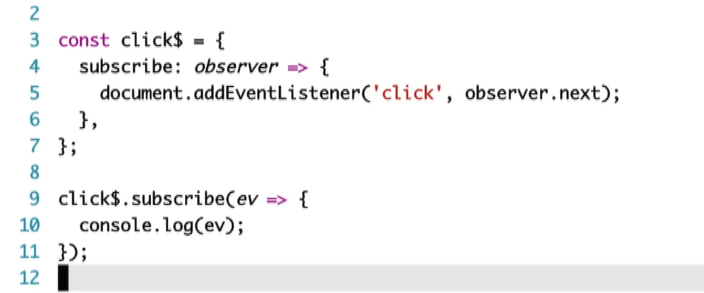
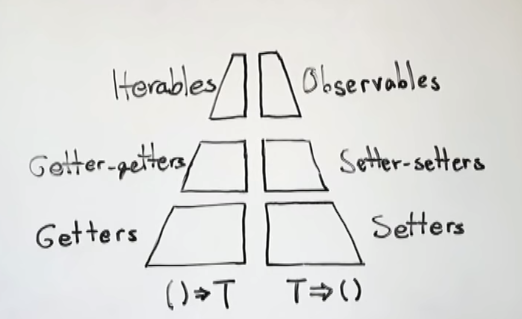
[Javascript] Getter and Setter Abstractions的更多相关文章
- JavaScript getter and setter All In One
JavaScript getter and setter All In One getter & setter JavaScript Object Accessors JavaScript A ...
- JavaScript getter和setter
对象的属性是由属性名name,值key,和其他特性(可读写性 writable,可枚举性enumerable,可配置性configurable)组成的.从ES5开发,提供了getter和setter ...
- javascript的getter和setter(转)
显然这是一个无关IE(高级IE除外)的话题,尽管如此,有兴趣的同学还是一起来认识一下ECMAScript5标准中getter和setter的实现.在一个对象中,操作其中的属性或方法,通常运用最多的就是 ...
- JavaScript中闭包实现的私有属性的getter()和setter()方法
注意: 以下的输出都在浏览器的控制台中 <!DOCTYPE html> <html> <head> <meta charset="utf-8&quo ...
- javascript中的function命名空間與模擬getter、setter
function的命名空間 在javascript中,function也可以擁有自己的命名空間例如以下這段程式碼: 12345678 function () { return 'I am A';} A ...
- javascript权威指南笔记--javascript语言核心(五)--getter和setter属性
getter和setter属性: var p = { x:1.0, y:1.0, get r(){ return Math.sqrt(this.x*this.x + this.y * this.y); ...
- javascript中的getter和setter
在ECMAScript 5中,属性值可以用一个或两个方法代替,这两个方法就是getter和setter var man = { name : 'lidg', weibo : '@lidg', get ...
- 基于 getter 和 setter 撸一个简易的MVVM
Angular 和 Vue 在对Angular的学习中,了解到AngularJS 的两个主要缺点: 对于每一次界面时间,Ajax 或者 timeout,都会进行一个脏检查,而每一次脏检查又会在内部循环 ...
- js中的访问器属性中的getter和setter函数实现数据双向绑定
嗯,之前在读js红宝书的时候,在对象那一章有介绍属性类型.第一种数据类型指的是数据属性,第二种是访问器属性.在初识vue的时候,其双向数据绑定也是基于访问器属性中的getter和setter函数原理来 ...
随机推荐
- android service--delphixe 10.3
开发中的陷阱: 1. 别放什么 *.wav文件,这个 服务窗口不能随便放东西,不然铁定出现意想不到的结果,比如 无法运行,因为没 ui界面,随意都不知是啥问题. 2. 不能加载 datamodule ...
- 生成器模式(Builder)C++实现
意图:将一个复杂对象的创建与它的表示分离,使得同样的构建过程可以创建不同的表示. 适用性:1.当创建复杂对象的算法应该独立于该对象的组成部分以及它们的装配方式时. 2.当构建过程必须允许被构建的对象有 ...
- android 国际化 横屏(land) 竖屏(port)margin外边距和padding内边距
android 国际化 横屏(land) 竖屏(port) 边距又分为内边距和外边距,即margin和padding.
- hibernate_07_单表操作_增删改操作
首先,创建类对象 package com.imooc.hibernate; public class Address { private String postcode; //邮编 private S ...
- Linux scp 后台运行传输文件
Linux scp 设置nohup后台运行 1.正常执行scp命令 2.输入ctrl + z 暂停任务 3.bg将其放入后台 4.disown -h 将这个作业忽略HUP信号 5.测试会话中断,任务继 ...
- spring中的prop、set、list、map
props.set.list.map这些事spring配置文件中很常见的标签,下面说下各自的适用场合. props:用于键值对,建和值都为string类型. <property name=&qu ...
- 深圳面试一周记录——.NET(B/S)开发
个人简单信息:2011年毕业,最高学历大专,最近一份工作在广州:有做架构设计经验,有一年的带团队(10人左右)经验:互联网和行业软件公司都待过. 为免不必要的争论,本文说地址的就不说公司行业,说公司行 ...
- servlet_获取初始化参数
在web.xml的<servlet>标签中增添 <init-param> <param-name>XXX</param-name> <param- ...
- lvs直接路由模式DR模式
1)实验所有关闭防火墙systemtcl stop firewalldsystemctl disable firewalldsetenforce 0iptables -F2)配置负载调度器配置虚拟IP ...
- 记录:通过SSH远程连接Ubuntu
一.安装openssh服务器 $ sudo apt-get install openssh-server 二.启动ssh服务 安装完成后,启动服务: $ sudo /etc/init.d/ssh st ...