
使用Perl处理Excel之DMA映射
使用Perl处理Excel之DMA映射
功能
通道处理,将各个通道的外设映射到通道上
外设ack信号处理
脚本执行情况
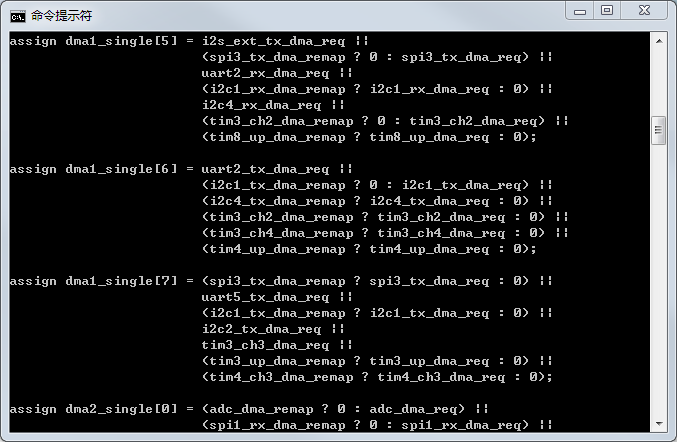

顶层Perl脚本(dma_parse.pl)
将上述两个功能脚本整合,便于调用
#!/usr/bin/perl -w

use strict;

my $Has_Help = "";

my $workfile = "";

my $worklist = "";

my $excelfile;

my $ipnamelist;

if( $#ARGV < 0 ) {

  &print_usage;

  exit;

}

my $filename ="";

&parse_argv;

if( $Has_Help =~ /TRUE/ )  #显示帮助说明

    {

      &print_usage;

      exit;

    }

if($workfile =~ /TRUE/)

{

   chomp($excelfile);

   #格式化输出通道输出部分

   system"perl dmaremap_parse.pl   $excelfile";

   system"perl dmaack_parse.pl   $excelfile";

}

else

    {

      &print_usage;

      exit;

    }

#################################################

# Sub-routine: print_usage()   帮助说明

#################################################

sub print_usage {

  print "\nUsage: perl dma_parse.pl -f <excel_file> \\\n";

  print "                        [-h] \n\n";

  print "For example:\n";

  print "    perl dma_parse.pl -f dma_map.xls\n";

  print "    perl dma_parse.pl -h \n";

  print "\n";

}

#################################################

# Sub-routine : parse_argv()   参数读入

#################################################

sub parse_argv {

  my $all_arg = "-h|-f";

  for(my $i=0; $i<=$#ARGV; $i++) {

    if( $ARGV[$i] =~ /-f/ ) {

      $i++;

      if(!defined $ARGV[$i])

      {

         $Has_Help = "TRUE";

      }

      $workfile = "TRUE";

      $excelfile = $ARGV[$i];

    }

    elsif( $ARGV[$i] =~ /-h/ ) {

      $Has_Help = "TRUE";

    }

    else { ### other options

      $Has_Help = "TRUE";

    }

  }

}
通道映射脚本(dmaremap_parse.pl)
#!/usr/bin/perl -w

#################################################

# 使用方法

# perl dma_parse.pl dma_map.xls

#################################################

use strict;

use Spreadsheet::ParseExcel;

use Spreadsheet::ParseExcel::FmtUnicode;

my $parser   = Spreadsheet::ParseExcel->new();

my $formatter = Spreadsheet::ParseExcel::FmtUnicode->new(Unicode_Map=>"CP936");

my $workbook = $parser->parse($ARGV[0], $formatter);

#my $workbook = $parser->parse($ARGV[0]);

if ( !defined $workbook ) {

    die $parser->error(), ".\n";

}

for my $worksheet ( $workbook->worksheets() ) {

    my ( $row_min, $row_max ) = $worksheet->row_range();

    my ( $col_min, $col_max ) = $worksheet->col_range();

#################################################

# get DMA1/2坐标

#################################################

    my %dma;

    for my $row ( $row_min .. $row_max ) {

        for my $col ( $col_min .. $col_max ) {

            my $cell = $worksheet->get_cell( $row, $col );

            next unless $cell;

	    $_ = $cell->value();

	    if(/DMA\d/){

		#print "Row, Col    = ($row, $col)\n\n";

		my $rowtmpfmt=(sprintf "%03d", $row);

		my $coltmpfmt=(sprintf "%03d", $col);

		$dma{$cell->value()} = $rowtmpfmt.$coltmpfmt;

		#print "$_\n\n";

	    }

        }

    }

    #显示DMA坐标

    #foreach my $position (sort keys %dma) {

    #  print "$position = $dma{$position}\n";

    #}

    print "\n\n";

#################################################

# 分别处理DMA1/DMA2(遍历)各个通道

#################################################

    foreach my $dma_name (sort keys %dma){

	#print "$dma_name\n\n";

        my $row = substr($dma{$dma_name},0,3); 	#使用substr得到前三位字符串

        my $col = substr($dma{$dma_name},3,3); 	#使用substr得到后三位字符串

        my $loop_row = $row + 2;

        my $loop_col = $col + 1;

	#print "Row, Col    = ($loop_row, $loop_col)\n";

        #################################################

        # 取得各个通道映射信息

        #################################################

	my $channel_num = 0;

        for my $col ( $loop_col .. $loop_col+7 ) {

	    my @channel;

	    #print "channel_num = $channel_num\n";  #通道channel1/2/3

            for my $row ( $loop_row .. $loop_row+31 ) {

                my $cell = $worksheet->get_cell( $row, $col );

                next unless $cell;

		if(($cell->value() eq ""))

       	        {

       	           next;

       	        }

                $_ = $cell->value();

		#print "$_\n";

		push(@channel,$cell->value());    #得到通道中的外设,存入数组

            }

            #################################################

            # 格式化处理通道数组元素

            #################################################

	    my @fmtouts;

	    foreach my $peripheral (@channel){    #格式化出通道数组

	        my @channel_tmp = split(/\s+/,$peripheral);

		#print "channel_tmp = @channel_tmp\n";

		push @fmtouts,@channel_tmp;

	    }

	    #print "\n\nchannel = @channel\n\n";

	    #print "fmtouts = @fmtouts\n\n\n";

            #################################################

            # 输出通道内的映射信息

            #################################################

	    my $periphs_num = @fmtouts;

	    #print "periphs_num = $periphs_num\n";

	    my $perph_tmpnum = 0;

	    my $remap = 0;

	    my $perph_remap;

	    foreach my $peripherals (@fmtouts){

	        $_ = $peripherals;

		#print "$_\n";

		$remap = 0;                    #清除重映射标记

		if(/\(1\)/){                #判断是否有重映射

		    #print "$` \t $& \t $' \n";

		    $peripherals = $`;

		    $remap = 1;

		    $perph_remap = $peripherals."_dma_remap";

		}

		if(/\(2\)/){                #判断是否有重映射

		    #print "$` \t $& \t $' \n";

		    $peripherals = $`;

		    $remap = 2;

		    $perph_remap = $peripherals."_dma_remap";

		}

                #my $output = $peripherals;

		#$output =~ /(\d)/;

		my $eq_left  = $dma_name."_single"."\[$channel_num\]";

		my $eq_right = $peripherals."_dma_req";

		if($periphs_num == 1){

		    if($remap == 2){

	                print "assign \L$eq_left = \(\L$perph_remap \? \L$eq_right : 0\);\n";

		    }

		    elsif($remap == 1){

	                print "assign \L$eq_left = \(\L$perph_remap \? 0 : \L$eq_right\);\n";

		    }

		    else{

	                print "assign \L$eq_left = \L$eq_right;";

		    }

	        }

	        if($perph_tmpnum == 0){

		    if($remap == 2){

	                print "assign \L$eq_left = \(\L$perph_remap \? \L$eq_right : 0\) ||\n";

		    }

		    elsif($remap == 1){

	                print "assign \L$eq_left = \(\L$perph_remap \? 0 : \L$eq_right\) ||\n";

		    }

		    else{

	                print "assign \L$eq_left = \L$eq_right ||\n";

		    }

	        }

	        elsif($perph_tmpnum < $periphs_num-1){

		    if($remap == 2){

	                print "                        \(\L$perph_remap \? \L$eq_right : 0\) ||\n";

		    }

		    elsif($remap == 1){

	                print "                        \(\L$perph_remap \? 0 : \L$eq_right\) ||\n";

		    }

		    else{

	                print "                        \L$eq_right ||\n";

		    }

	        }

	        else{

		    if($remap == 2){

	                print "                        \(\L$perph_remap \? \L$eq_right : 0\);\n";

		    }

		    elsif($remap = 1){

	                print "                        \(\L$perph_remap \? 0 : \L$eq_right\);\n";

		    }

		    else{

	                print "                        \L$eq_right;\n";

		    }

	        }

		#print"remp = $remap\n";

	        $perph_tmpnum++;               #通道中外设映射个数

	    }

	    $channel_num = $channel_num + 1;   #表示通道号channel1/channel2/...

	    print"\n";

        }

    }

}
外设ack信号处理脚本(dmaack_parse.pl)
#!/usr/bin/perl -w

#################################################

# 使用方法

# perl dma_parse.pl dma_map.xls

#################################################

use strict;

use Spreadsheet::ParseExcel;

use Spreadsheet::ParseExcel::FmtUnicode;

my $parser   = Spreadsheet::ParseExcel->new();

my $formatter = Spreadsheet::ParseExcel::FmtUnicode->new(Unicode_Map=>"CP936");

my $workbook = $parser->parse($ARGV[0], $formatter);

#my $workbook = $parser->parse($ARGV[0]);

if ( !defined $workbook ) {

    die $parser->error(), ".\n";

}

for my $worksheet ( $workbook->worksheets() ) {

    my ( $row_min, $row_max ) = $worksheet->row_range();

    my ( $col_min, $col_max ) = $worksheet->col_range();

#################################################

# get DMA1/2坐标

#################################################

    my %dma;

    for my $row ( $row_min .. $row_max ) {

        for my $col ( $col_min .. $col_max ) {

            my $cell = $worksheet->get_cell( $row, $col );

            next unless $cell;

	    $_ = $cell->value();

	    if(/DMA\d/){

		#print "Row, Col    = ($row, $col)\n\n";

		my $rowtmpfmt=(sprintf "%03d", $row);

		my $coltmpfmt=(sprintf "%03d", $col);

		$dma{$cell->value()} = $rowtmpfmt.$coltmpfmt;

		#print "$_\n\n";

	    }

        }

    }

    #显示DMA坐标

    #foreach my $position (sort keys %dma) {

    #  print "$position = $dma{$position}\n";

    #}

    print "\n\n";

#################################################

# 分别处理DMA1/DMA2(遍历)各个外设

#################################################

    foreach my $dma_name (sort keys %dma){

	#print "$dma_name\n\n";

        my $dma_row = substr($dma{$dma_name},0,3); 	#使用substr得到前三位字符串

        my $dma_col = substr($dma{$dma_name},3,3); 	#使用substr得到后三位字符串

        my $loop_row = $dma_row + 2;

        my $loop_col = $dma_col + 1;

	#print "Row, Col    = ($loop_row, $loop_col)\n";

        #################################################

        # 取得各个外设映射信息

        #################################################

        for my $row ( $loop_row .. $loop_row+31 ) {

	    my @peripherals;

	    my $periph_cell = $worksheet->get_cell( $row, $loop_col-1);  #外设行列确定

	    my $peripherals_name = $periph_cell->value;

	    #print "peripherals_name = $peripherals_name\n";              #外设名字

            for my $col ( $loop_col .. $loop_col+7 ) {

                my $cell = $worksheet->get_cell( $row, $col );

                next unless $cell;

		if(($cell->value() eq ""))

       	        {

       	           next;

       	        }

                $_ = $cell->value();

		if(/\w+/)

       	        {

		   #print "dma_col = $dma_col\n";

		   my $channel_num = $col - $dma_col - 1;          #计算通道信息

	           my $coltmpfmt=(sprintf "%03d", $channel_num);   #通道信息

		   #print "coltmpfmt = $coltmpfmt\n";

		   my $peripherals_tmp = $coltmpfmt.$cell->value();

		   push(@peripherals,$peripherals_tmp);            #得到外设映射的信息,存入数组,同时将通道信息也存入其中

		   #print "$_\n";

       	        }

            }

	    my $peripherals_num = @peripherals;          #确定映射信息是否为空(==0)

	    if($peripherals_num == 0){

       	        next;                                    #如果为空将不在进行数据分析,进行下一次循环

	    }

	    #print "peripherals = @peripherals\n";

            #################################################

            # 格式化处理外设映射数组元素

            #################################################

	    my @fmtouts;

	    foreach my $peripheral (@peripherals){             #格式化出通道数组

		my $channel_num = substr($peripheral,0,3);     #分离通道信息

		#print "channel_num = $channel_num\n";

		substr($peripheral,0,3) = "";

	        my @peripherals_tmp = split(/\s+/,$peripheral);

		#print "peripherals_tmp = @peripherals_tmp\n";

		my $element_num = @peripherals_tmp;

		my $count = 0;

		while($count < $element_num){                  #附加通道信息

	           $peripherals_tmp[$count] = $channel_num.$peripherals_tmp[$count];

		   #print "peripherals_tmp\[$count\] = $peripherals_tmp[$count]\n";

		   $count++;

		}

		push @fmtouts,@peripherals_tmp;

	    }

	    #print "\n\nfmtouts = @fmtouts\n";

            #################################################

            # 正则处理:格式化输出

	    # 分析数据:数组1用于查找含(1),数组2用于查找含(2)的外设映射通道信息

            #################################################

	    my $remap_num = @fmtouts;

	    #print "remap_num = $remap_num\n";

            #################################################

            # 处理无映射情况

            #################################################

	    foreach my $fmtout (@fmtouts){

		$_ = $fmtout;

		#print "$_\n";

		if(/\(\d\)/){

		   next;              #去除包含重映射的外设

		}

	 	my $channel_num = substr($fmtout,2,1);     #分离通道信息

		substr($fmtout,0,3) = "";

		my $dma_ack = $dma_name."_ack"."\[".$channel_num."\]";

		my $peripherals_ack = $fmtout."_dma_ack";

		print "assign \L$peripherals_ack = \L$dma_ack;\n";

	    }

            #################################################

            # 处理存在映射的情况

            #################################################

	    my @fmtouts_tmp = @fmtouts;

	    foreach my $fmtout (@fmtouts){

		$_ = $fmtout;

		#print "$_\n";

		if(/\(2\)/){

		   my $channel_2 = substr($fmtout,2,1);        #映射通道2信息

		   my $fmtout = $`;                            #自动,捕获之前的信息

		   substr($fmtout,0,3) = "";                   #去除通道信息,重新赋值

		   my $dma_ack2 = $dma_name."_ack"."\[".$channel_2."\]";

	           foreach my $fmtout_tmp (@fmtouts_tmp){

		       $_ = $fmtout_tmp;

		       if(/$fmtout/){

			  $_ = $fmtout_tmp;

			  if(/\(2\)/){

                             next;

			  }

	 	          my $channel_1 = substr($fmtout_tmp,2,1);     #映射通道2信息

		          substr($fmtout_tmp,0,3) = "";

		          my $dma_ack1 = $dma_name."_ack"."\[".$channel_1."\]";

		          my $peripherals_ack = $fmtout."_dma_ack";

			  my $peripherals_remap = $fmtout."_dma_remap";

		          print "assign \L$peripherals_ack = \L$peripherals_remap ? \L$dma_ack2 : \L$dma_ack1;\n";

		       }

	           }

		}

	    }

	    print "\n";

        }

    }

}
使用方法
dma_parse.pl 顶层文件

|

|--dmaremap_parse.pl

|

|--dmaack_parse.pl

#################################################

# 使用方法

# perl dma_parse.pl dma_map.xls

#################################################

#################################################

# 子文件使用方法

# perl dmaremap_parse.pl dma_map.xls

# perl dmaack_parse.pl dma_map.xls

#################################################
使用Perl处理Excel之DMA映射的更多相关文章
- 使用Perl提取Excel中的IO_MUX
使用Perl提取Excel中的IO_MUX 关键问题 提取数据 格式化输出 循环嵌套 数据结构构建 坐标映射,逆向提取关键字 描述 在IC集成中,我们使用Excel表格规划设计的IC引脚功能映射需要转 ...
- perl 读取Excel写入txt 乱码
用perl读出excel的内容(中文),然后输出在txt中乱码,但是打印在控制台正常. 解决办法: use Encode qw/from_to/; from_to($value, 'gb2312', ...
- Perl读写Excel简单操作
Perl读写Excel简单操作 使用模块 Spreadsheet::ParseExcel Spreadsheet::WriteExcel 读Excel #!/usr/bin/perl -w use s ...
- 使用perl读取Excel
使用perl读取Excel 环境 windows 7 ActiveState Perl Win32::OLE[perl package] 基本功能 循环处理多个sheet 读取Excel单元,提取in ...
- Linux动态DMA映射
1. 几种地址类型 虚拟地址 Linux内核使用的地址是虚拟地址,数据类型为void *.例如,kmalloc()和vmalloc()函数返回值就是虚拟地址. 物理地址 处理器真实地址总线上的地址,数 ...
- 如何用Perl对Excel的数据进行提取并分析
巡检类工作经常会出具日报,最近在原有日报的基础上又新增了一个表的数据量统计日报,主要是针对数据库中使用较频繁,数据量又较大的31张表.该日报有两个sheet组成,第一个sheet是数据填写,第二个sh ...
- perl读取excel
因为工作当中遇到要处理大数据的excel的玩意,最多的有几十万行.用perl的方式试试,看看效果如何. ppm install OLE::Storage_Lite #如果不安装这个,后面两个安装不了 ...
- Perl读取Excel中的数据
#!usr/bin/perl -W use strict; use Spreadsheet::ParseExcel;#PERL的Spreadsheet::ParseExcel模块支持Excel的读操作 ...
- 《Linux Device Drivers》第十五章 内存映射和DMA——note
简单介绍 很多类型的驱动程序编程都须要了解一些虚拟内存子系统怎样工作的知识 当遇到更为复杂.性能要求更为苛刻的子系统时,本章所讨论的内容迟早都要用到 本章的内容分成三个部分 讲述mmap系统调用的实现 ...
随机推荐
- ZOJ 3587 Marlon's String 扩展KMP
链接:http://acm.zju.edu.cn/onlinejudge/showProblem.do?problemCode=3587 题意:给出两个字符串S和T.S,T<=100000.拿出 ...
- hdoj-1289-A Bug's Life【种类并查集】
A Bug's Life Time Limit: 15000/5000 MS (Java/Others) Memory Limit: 32768/32768 K (Java/Others) Total ...
- iOS_31_cocos2d_微信飞机
终于效果图: 纹理素材 watermark/2/text/aHR0cDovL2Jsb2cuY3Nkbi5uZXQvcHJlX2VtaW5lbnQ=/font/5a6L5L2T/fontsize/400 ...
- ONVIF客户端搜索设备获取rtsp地址开发笔记(精华篇)
原文 http://blog.csdn.net/gubenpeiyuan/article/details/25618177 概要: 目前ONVIF协议家族设备已占据数字监控行业半壁江山以上,亲, ...
- 手动挂接NFS
环境: 单板:s3c2440 内核:Linux-2.6.22.6 U-boot1.16 初始根文件系统Yaffs2 前提条件 1. 开发板上要烧写好文件系统 2. 能正常开机进入Linux系统 3. ...
- http压测工具wrk
安装 wrk支持大多数类UNIX系统,不支持windows.需要操作系统支持LuaJIT和OpenSSL,不过不用担心,大多数类Unix系统都支持.安装wrk非常简单,只要从github上下载wrk源 ...
- React 和 Vue 对比
React 和 Vue 有许多相似之处,它们都有: * 使用 Virtual DOM * 提供了响应式 (Reactive) 和组件化 (Composable) 的视图组件. * 将注意力集中保持 ...
- HDU——T 2824 The Euler function
http://acm.hdu.edu.cn/showproblem.php?pid=2824 Time Limit: 2000/1000 MS (Java/Others) Memory Limi ...
- unity3d 改动gui label颜色,定义颜色需除以256
GUIStyle titleStyle2 = new GUIStyle(); titleStyle2.fontSize = 20; titleStyle2.normal.textColor = new ...
- 2. ZooKeeper的ZAB协议。
转自:https://blog.csdn.net/en_joker/article/details/78662880 ZooKeeper并没有完全采用Paxos算法,而是使用了一种称为ZooKeepe ...