
k8s Gitlab CI/CD 之自动编译Docker镜像并推送到指定的Registry
环境介绍:
| 说明 | 节点 | ip | 系统 |
| Gitlab Server | git.ds.com | 10.0.1.179 | CentOS 7.5.1804 |
| Gitlab Runner | 10.0.1.178 | CentOS 7.5.1804 | |
| Docker Registry Harbor | harbor.ds.com | 10.0.1.183 | CentOS 7.5.1804 |
关于 gitlab server和Harbor的安装这里就表述了。
一、gitlab runner的安装 (gitlab 10版本的)
1、根据具体的系统环境下载对应的二进制执行文件
|
1
2
3
4
5
6
7
8
|
# Linux x86-64sudo wget -O /usr/local/bin/gitlab-runner https://gitlab-runner-downloads.s3.amazonaws.com/latest/binaries/gitlab-runner-linux-amd64# Linux x86sudo wget -O /usr/local/bin/gitlab-runner https://gitlab-runner-downloads.s3.amazonaws.com/latest/binaries/gitlab-runner-linux-386# Linux armsudo wget -O /usr/local/bin/gitlab-runner https://gitlab-runner-downloads.s3.amazonaws.com/latest/binaries/gitlab-runner-linux-arm |
通过下面的地址你可以找到左右版本的二进制文件
https://docs.gitlab.com/runner/install/bleeding-edge.html#download-any-other-tagged-release
2、给刚下载的二进制执行文件添加执行权限
|
1
|
sudo chmod +x /usr/local/bin/gitlab-runner |
3、安装docker
|
1
|
curl -sSL https://get.docker.com/ | sh |
4、创建一个gitlab ci用户
|
1
|
useradd --comment 'GitLab Runner' --create-home gitlab-runner --shell /bin/bash |
5、将gitlab ci用户添加到docker运行用户的组里面
|
1
|
usermod -aG root gitlab-runner |
由于我的docker是用root用户运行的所以我这边将gitlab-runner用户加到root的组里面了。

6、开始运行GitLab-Runner
|
1
2
|
gitlab-runner install --user=gitlab-runner --working-directory=/home/gitlab-runnergitlab-runner start |
二、注册Runners
1、打开gitlab页面找到runners的注册令牌
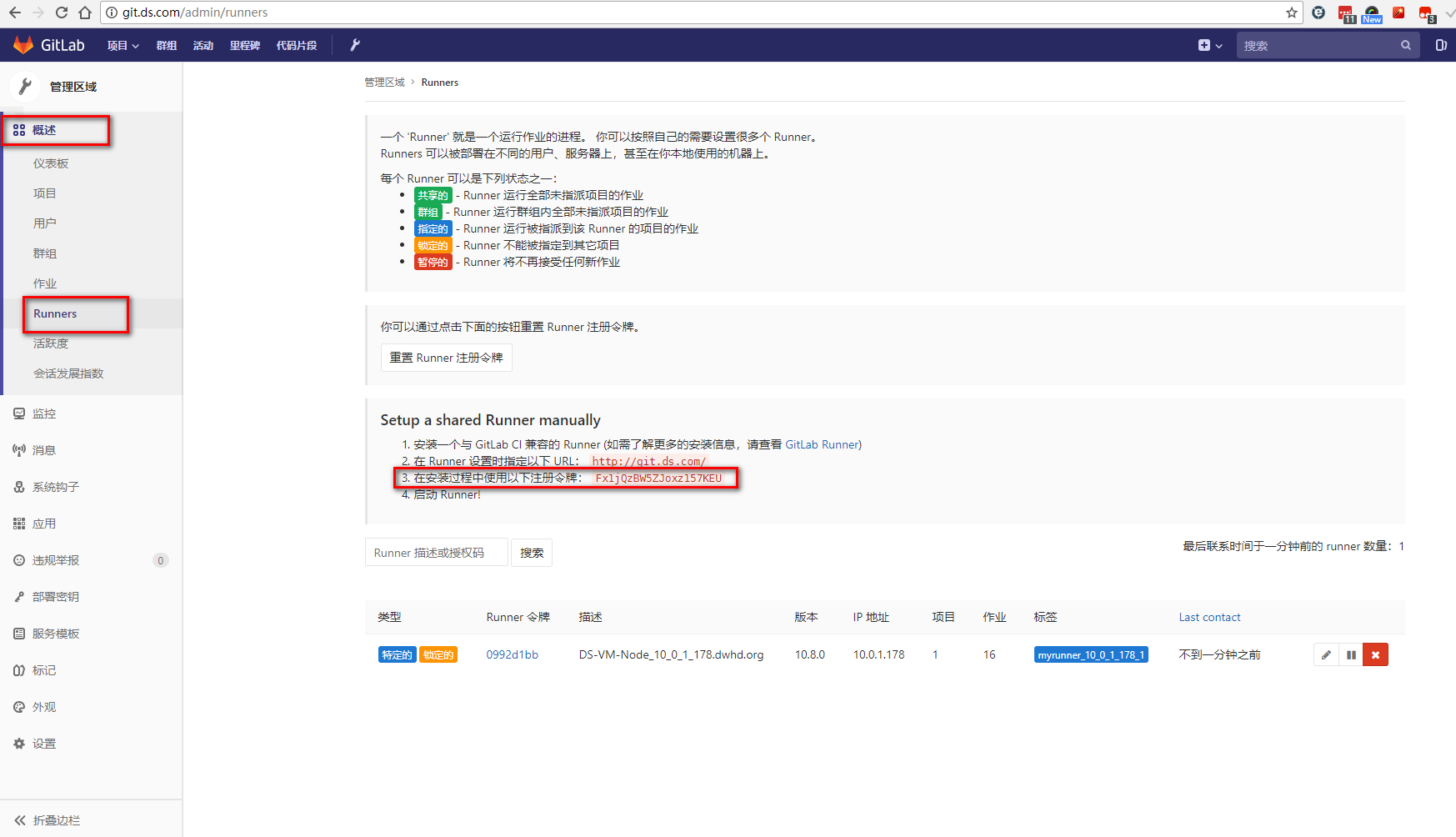
2、去gitlab runner的节点上做注册动作
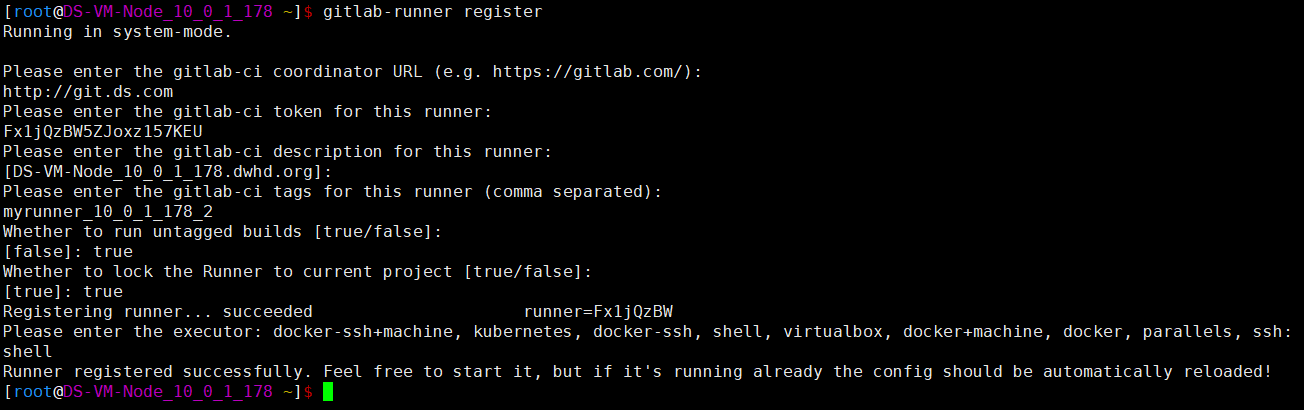
|
1
|
gitlab-runner register |
|
01
02
03
04
05
06
07
08
09
10
11
12
13
14
15
16
17
18
19
20
|
[root@DS-VM-Node_10_0_1_178 ~]$ gitlab-runner registerRunning in system-mode.Please enter the gitlab-ci coordinator URL (e.g. https://gitlab.com/):http://git.ds.comPlease enter the gitlab-ci token for this runner:Fx1jQzBW5ZJoxz157KEUPlease enter the gitlab-ci description for this runner:[DS-VM-Node_10_0_1_178.dwhd.org]:Please enter the gitlab-ci tags for this runner (comma separated):myrunner_10_0_1_178_2Whether to run untagged builds [true/false]:[false]: trueWhether to lock the Runner to current project [true/false]:[true]: trueRegistering runner... succeeded runner=Fx1jQzBWPlease enter the executor: docker-ssh+machine, kubernetes, docker-ssh, shell, virtualbox, docker+machine, docker, parallels, ssh:shellRunner registered successfully. Feel free to start it, but if it's running already the config should be automatically reloaded![root@DS-VM-Node_10_0_1_178 ~]$ |
3、重启一下runner使之生效
|
1
|
gitlab-runner restart |
4、去gitlab上检查
能发现到一个刚注册的runner

5、将这个runner指定到指定项目上去

三、测试
新建了一个gitlab项目。
k8s Gitlab CI/CD 之自动编译Docker镜像并推送到指定的Registry的更多相关文章
- 利用 Maven 创建 Docker 镜像并且推送到私有注册中心
利用 Maven 命令生成项目框架 mvn archetype:generate -DgroupId=com.mycompany.app -DartifactId=my-app -Darchetype ...
- 03.pipeline实现项目自动编译docker镜像自动打包
https://jenkins.io/zh/doc/book/pipeline/ 官方教程,可以中文.Jenkinsfile就是把pipeline内容保存到文件,然后提交到svn等版本控制库中.安装b ...
- 使用Jenkins自带功能(不用shell)构建Docker镜像并推送到远程仓库
意义: 一开始实现这个目的是在Jenkins中使用的shell脚本,也就是如下的这个: bash # 进入到生成jar包的根目录 cd ${WORKSPACE}/${module_filename} ...
- 【OF框架】在Visual Studio中发布Docker镜像,推送镜像到Azure容器注册表
准备 拥有Azure账号,已经创建 Azure容器注册表,获得注册表地址.账号.密码 本地已经在Visual Studio登录Azure账号. 本地已经拥有Docker环境 注意:首次发布Docker ...
- Docker 镜像的推送(六)
目录 一.为镜像命名 二.推送到官方 Docker Hub 1.首先得在 Docker Hub 上注册一个账号. 2.在 Docker Host 上登录 3.修改镜像命名 4.镜像上传 5.登录查看上 ...
- 使用maven插件dockerfile-maven-plugin生成Docker镜像并推送到镜像仓库
1.引入maven插件 <build> <plugins> <plugin> <groupId>com.spotify</groupId> ...
- 实践分享!GitLab CI/CD 快速入门
用过 GitLab 的同学肯定也对 GitLab CI/CD 不陌生,GitLab CI/CD 是一个内置在 GitLab 中的工具,它可以帮助我们在每次代码推送时运行一系列脚本来构建.测试和验证代码 ...
- GitLab CI/CD的官译【原】
CI / CD方法简介 软件开发的持续集成基于自动执行脚本,以最大限度地减少在开发应用程序时引入错误的可能性.从新代码的开发到部署,它们需要较少的人为干预甚至根本不需要干预. 它涉及在每次小迭代中不断 ...
- .Net Core自动化部署系列(三):使用GitLab CI/CD 自动部署Api到Docker
之前写过使用Jenkins实现自动化部署,最近正好没事研究了下GitLab的自动化部署,顺便记录一下. 使用GitLab部署我们需要准备两件事,第一个起码你得有个GitLab,自己搭建或者使用官方的都 ...
随机推荐
- php加密方法有哪些
1. MD5加密 string md5 ( string $str [, bool $raw_output = false ] ) 参数 str -- 原始字符串. raw_output -- 如果可 ...
- 【Oracle】append
我们在生产环境中经常遇到需要往表中插入大量数据的情况,怎么样才能让插入数据的速度变快呢?Oracle中的append简直就是神器!!没图说个**,直接上图: 是不是看晕了?哈哈,莫慌,请看下面总结: ...
- 【PostgreSQL-9.6.3】函数(3)--日期和时间函数
在PostgreSQL中,DATE.TIME.TIMESTAMP是三种不同的数据类型.DATE表示日期类型,格式为YYYY-MM-DD或YYYYMMDD:TIME表示时间类型,格式为hh:mi:ss: ...
- JAVA;使用java.awt.Image的不稳定性
在使用awt的image时候,不是能时时获取到图像的宽和高, GetWidth()函数偶尔得到的值为-1,暂时没有找到解决方法. 代码: public class picture extends JF ...
- SLAM:ORB-SLAM 位姿优化描述
只知道算法描述和代码,而不知道原理是比较扯的事情,还是把原理转载一下. 原文链接: http://www.cnblogs.com/luyb/p/5447497.html ORB-SLAM作为单目SLA ...
- ANN:DNN结构演进History—LSTM网络
为了保持文章系列的连贯性,参考这个文章: DNN结构演进History-LSTM_NN 对于LSTM的使用:谷歌语音转录背后的神经网络 摘要: LSTM使用一个控制门控制参数是否进行梯度计算,以此避免 ...
- 论 fmap、fmap fmap、与 fmap fmap fmap
https://blog.csdn.net/sinat_25226993/article/details/44415803
- MAMP PRO mysql无法启动
mac上可能勾选了软件自动更新,然后MAMP PRO 升级了. 升级了之后,mysql启动就出问题了,看报错日志: InnoDB: The error means the system cannot ...
- SP1825 FTOUR2 - Free tour II 点分治+启发式合并+未调完
题意翻译 给定一棵n个点的树,树上有m个黑点,求出一条路径,使得这条路径经过的黑点数小于等于k,且路径长度最大 Code: #include <bits/stdc++.h> using n ...
- [转]理解和配置 Linux 下的 OOM Killer
最近有位 VPS 客户抱怨 MySQL 无缘无故挂掉,还有位客户抱怨 VPS 经常死机,登陆到终端看了一下,都是常见的 Out of memory 问题.这通常是因为某时刻应用程序大量请求内存导致系统 ...