
为了记忆和方便翻阅 vue构建后的结构目录说明
一、
├── build // 项目构建(webpack)相关代码 记忆:(够贱) 9个
│ ├── build.js // 生产环境构建代码
│ ├── check-versions.js // 检查node&npm等版本
│ ├── dev-client.js // 热加载相关
│ ├── dev-server.js // 构建本地服务器
│ ├── utils.js // 构建配置公用工具
│ ├── vue-loader.conf.js // vue加载器
│ ├── webpack.base.conf.js // webpack基础环境配置
│ ├── webpack.dev.conf.js // webpack开发环境配置
│ └── webpack.prod.conf.js // webpack生产环境配置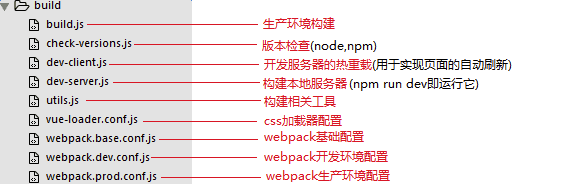
二、
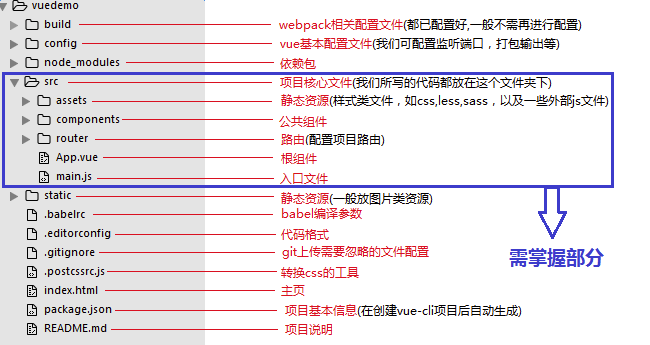
├── config// 项目开发环境配置相关代码 记忆: (环配) 3个
│ ├── dev.env.js // 开发环境变量(看词明意)
│ ├── index.js //项目一些配置变量
│ └── prod.env.js // 生产环境变量

三、
├──node_modules// 项目依赖的模块 记忆: (依赖) *个
四、
├── src// 源码目录 5
│ ├── assets// 资源目录
│ │ └── logo.png
2
│ ├── components// vue公共组件
│ │ └── Hello.vue
│ ├──router// 前端路由
│ │ └── index.js// 路由配置文件
│ ├── App.vue// 页面入口文件(根组件)
│ └── main.js// 程序入口文件(入口js文件)
五、
└── static// 静态文件,比如一些图片,json数据等
│ ├── .gitkeep
剩余、
├── .babelrc// ES6语法编译配置
├── .editorconfig// 定义代码格式
├── .gitignore// git上传需要忽略的文件格式
├── index.html// 入口页面
├── package.json// 项目基本信息
├── README.md// 项目说明
build/          // 项目构建(webpack)相关代码

    build.js       // 生产环境构建代码

    check-versions.js // 检查node&npm等版本

    utils.js          // 构建配置公用工具

    vue-loader.conf.js // vue加载器

    webpack.base.conf.js // webpack基础环境配置

    webpack.dev.conf.js //  webpack开发环境配置

    webpack.prod.conf.js // webpack生产环境配置

config/         // 项目开发环境配置相关代码

    dev.env.js  // 开发环境变量(看词明意)

    index.js //项目一些配置变量

    prod.env.js // 生产环境变量

    test.env.js                  // 测试环境变量

dist/      //npm run build打包后生成的文件夹

node_modules/

    ...     // 项目依赖的模块

src/            // 源码目录

    assets/         // 资源目录

        logo.png

    components/         // vue公共组件

        Head.vue

        Footer.vue

    pages (或views)/    //视图

        login/

            Index.vue

        list/

            Foods.vue

    router/             // 前端路由

        index.js// 路由配置文件

    store/                          // vuex的状态管理

    App.vue// 页面入口文件(根组件)

    main.js// 程序入口文件(入口js文件)

static // 静态文件,比如一些图片,json数据等

    .gitkeep    //这个里面的gitkeep是这个目录为空,也可以把这个目录提交的git仓库里面,因为通常一个空目录是不能提交git仓库里面的

.babelrc// ES6语法编译配置

.editorconfig// 定义代码格式

.gitignore// git上传需要忽略的文件格式

index.html// 入口页面

package.json// 项目基本信息

README.md// 项目说明
build.js
require('./check-versions')()       // 检查 Node 和 npm 版本

process.env.NODE_ENV = 'production'

const ora = require('ora')          // 一个很好看的 loading 插件

const rm = require('rimraf')

const path = require('path')

const chalk = require('chalk')

const webpack = require('webpack')

const config = require('../config')     // 加载 config.js

const webpackConfig = require('./webpack.prod.conf')        // 加载 webpack.prod.conf

const spinner = ora('building for production...')

spinner.start()     // 开始 loading 动画

rm(path.join(config.build.assetsRoot, config.build.assetsSubDirectory), err => {

  if (err) throw err

  //  开始 webpack 的编译

  webpack(webpackConfig, (err, stats) => {

    // 编译成功的回调函数

    spinner.stop()

    if (err) throw err

    process.stdout.write(stats.toString({

      colors: true,

      modules: false,

      children: false, // If you are using ts-loader, setting this to true will make TypeScript errors show up during build.

      chunks: false,

      chunkModules: false

    }) + '\n\n')

    if (stats.hasErrors()) {

      console.log(chalk.red('  Build failed with errors.\n'))

      process.exit()

    }

    console.log(chalk.cyan('  Build complete.\n'))

    console.log(chalk.yellow(

      '  Tip: built files are meant to be served over an HTTP server.\n' +

      '  Opening index.html over file:// won\'t work.\n'

    ))

  })

})
webpack.dev.conf.js
const utils = require('./utils')        // 使用一些小工具

const webpack = require('webpack')      // 使用 webpack

const config = require('../config')     // 使用 config/index.js

const merge = require('webpack-merge')  // 使用 webpack 配置合并插件

const path = require('path')

const baseWebpackConfig = require('./webpack.base.conf')    // 加载 webpack.base.conf

const CopyWebpackPlugin = require('copy-webpack-plugin')

const HtmlWebpackPlugin = require('html-webpack-plugin')    // 使用 html-webpack-plugin 插件,这个插件可以帮我们自动生成 html 并且注入到 .html 文件中

const FriendlyErrorsPlugin = require('friendly-errors-webpack-plugin')

const portfinder = require('portfinder')

const HOST = process.env.HOST

const PORT = process.env.PORT && Number(process.env.PORT)

// 将我们 webpack.dev.conf.js 的配置和 webpack.base.conf.js 的配置合并

const devWebpackConfig = merge(baseWebpackConfig, {

  module: {

    // 使用 styleLoaders

    rules: utils.styleLoaders({ sourceMap: config.dev.cssSourceMap, usePostCSS: true })

  },

  // cheap-module-eval-source-map is faster for development

  devtool: config.dev.devtool,

  // these devServer options should be customized in /config/index.js

  devServer: {

    clientLogLevel: 'warning',

    historyApiFallback: {

      rewrites: [

        { from: /.*/, to: path.posix.join(config.dev.assetsPublicPath, 'index.html') },

      ],

    },

    hot: true,

    contentBase: false, // since we use CopyWebpackPlugin.

    compress: true,

    host: HOST || config.dev.host,

    port: PORT || config.dev.port,

    open: config.dev.autoOpenBrowser,

    overlay: config.dev.errorOverlay

      ? { warnings: false, errors: true }

      : false,

    publicPath: config.dev.assetsPublicPath,

    proxy: config.dev.proxyTable,

    quiet: true, // necessary for FriendlyErrorsPlugin

    watchOptions: {

      poll: config.dev.poll,

    }

  },

  plugins: [

    // definePlugin 接收字符串插入到代码当中, 所以你需要的话可以写上 JS 的字符串

    new webpack.DefinePlugin({

      'process.env': require('../config/dev.env')

    }),

    // HotModule 插件在页面进行变更的时候只会重回对应的页面模块,不会重绘整个 html 文件

    new webpack.HotModuleReplacementPlugin(),

    new webpack.NamedModulesPlugin(), // HMR shows correct file names in console on update.

    // 使用了 NoErrorsPlugin 后页面中的报错不会阻塞,但是会在编译结束后报错

    new webpack.NoEmitOnErrorsPlugin(),

    // https://github.com/ampedandwired/html-webpack-plugin

    // 将 index.html 作为入口,注入 html 代码后生成 index.html文件

    new HtmlWebpackPlugin({

      filename: 'index.html',

      template: 'index.html',

      inject: true

    }),

    // copy custom static assets

    new CopyWebpackPlugin([

      {

        from: path.resolve(__dirname, '../static'),

        to: config.dev.assetsSubDirectory,

        ignore: ['.*']

      }

    ])

  ]

})

module.exports = new Promise((resolve, reject) => {

  portfinder.basePort = process.env.PORT || config.dev.port

  portfinder.getPort((err, port) => {

    if (err) {

      reject(err)

    } else {

      // publish the new Port, necessary for e2e tests

      process.env.PORT = port

      // add port to devServer config

      devWebpackConfig.devServer.port = port

      // Add FriendlyErrorsPlugin

      devWebpackConfig.plugins.push(new FriendlyErrorsPlugin({

        compilationSuccessInfo: {

          messages: [`Your application is running here: http://${devWebpackConfig.devServer.host}:${port}`],

        },

        onErrors: config.dev.notifyOnErrors

        ? utils.createNotifierCallback()

        : undefined

      }))

      resolve(devWebpackConfig)

    }

  })

})
webpack.base.conf.js
const path = require('path')        // 使用 NodeJS 自带的文件路径插件

const utils = require('./utils')        // 引入一些小工具

var webpack = require('webpack')

const config = require('../config')

const vueLoaderConfig = require('./vue-loader.conf')

// 获取绝对路径

function resolve (dir) {

  return path.join(__dirname, '..', dir)

}

module.exports = {

  context: path.resolve(__dirname, '../'),

  entry: {

    // 编译文件入口

    app: './src/main.js'

  },

  // webpack输出路径和命名规则

  output: {

    // 编译输出的根路径

    path: config.build.assetsRoot,

    // 编译输出的文件名

    filename: '[name].js',

    // 正式发布环境下编译输出的发布路径

    publicPath: process.env.NODE_ENV === 'production'

      ? config.build.assetsPublicPath

      : config.dev.assetsPublicPath

  },

  resolve: {

    // 自动补全的扩展名

    extensions: ['.js', '.vue', '.json'],

    // 别名,方便引用模块,例如有了别名之后,

    // import Vue from 'vue/dist/vue.esm.js'可以写成 import Vue from 'vue'

    alias: {

      'vue$': 'vue/dist/vue.esm.js',

      '@': resolve('src'),

    }

  },

  // 不同类型模块的处理规则

  module: {

    rules: [

      ...

      // 需要处理的文件及使用的 loader

      {

        test: /\.scss$/,

        loaders: ["style", "css", "sass"]

      }

    ]

  },

  plugins: [

      new webpack.ProvidePlugin({

          $: "jquery",

          jQuery: "jquery"

      })

  ],

  node: {

    // prevent webpack from injecting useless setImmediate polyfill because Vue

    // source contains it (although only uses it if it's native).

    setImmediate: false,

    // prevent webpack from injecting mocks to Node native modules

    // that does not make sense for the client

    dgram: 'empty',

    fs: 'empty',

    net: 'empty',

    tls: 'empty',

    child_process: 'empty'

  }

}
config/index.js
// Template version: 1.3.1

// see http://vuejs-templates.github.io/webpack for documentation.

const path = require('path')

module.exports = {

    // 开发过程中使用的配置

  dev: {

    // Paths        // 编译输出的二级目录

    assetsSubDirectory: 'static',

    // 编译发布上线路径的根目录,可配置为资源服务器域名或 CDN 域名

    assetsPublicPath: '/',

    // 需要 proxyTable 代理的接口(可跨域)

    proxyTable: {},

    // Various Dev Server settings

    host: 'localhost', // can be overwritten by process.env.HOST

    port: , // can be overwritten by process.env.PORT, if port is in use, a free one will be determined

    autoOpenBrowser: false,     // 是否自动打开浏览器

    errorOverlay: true,

    notifyOnErrors: true,

    poll: false, // https://webpack.js.org/configuration/dev-server/#devserver-watchoptions-

    /**

     * Source Maps

     */

    // https://webpack.js.org/configuration/devtool/#development

    devtool: 'cheap-module-eval-source-map',   //可改变为devtool: '#eval-source-map',方便调试

    // If you have problems debugging vue-files in devtools,

    // set this to false - it *may* help

    // https://vue-loader.vuejs.org/en/options.html#cachebusting

    cacheBusting: true,

    cssSourceMap: true

  },

    // 构建产品时使用的配置

  build: {

    // Template for index.html      // html入口文件

    index: path.resolve(__dirname, '../dist/index.html'),

    // Paths    // 编译输出的静态资源根路径

    assetsRoot: path.resolve(__dirname, '../dist'),

    // 编译输出的二级目录

    assetsSubDirectory: 'static',

    // 编译发布上线路径的根目录,可配置为资源服务器域名或 CDN 域名

    assetsPublicPath: './',

    /**

     * Source Maps

     */

    // 是否开启 cssSourceMap

    productionSourceMap: true,

    // https://webpack.js.org/configuration/devtool/#production

    devtool: '#source-map',

    // Gzip off by default as many popular static hosts such as

    // Surge or Netlify already gzip all static assets for you.

    // Before setting to `true`, make sure to:

    // npm install --save-dev compression-webpack-plugin

    // 是否开启 gzip

    productionGzip: false,

    // 需要使用 gzip 压缩的文件扩展名

    productionGzipExtensions: ['js', 'css'],

    // Run the build command with an extra argument to

    // View the bundle analyzer report after build finishes:

    // `npm run build --report`

    // Set to `true` or `false` to always turn it on or off

    bundleAnalyzerReport: process.env.npm_config_report

  }

}
.babelrc
{

  "presets": [

    ["env", {

      "modules": false,

      "targets": {

        "browsers": ["> 1%", "last 2 versions", "not ie <= 8"]

      }

    }],

    "stage-2"

  ],

  "plugins": ["transform-vue-jsx", "transform-runtime"]

}
.editorconfig
root = true

[*]    // 对所有文件应用下面的规则

charset = utf-                    // 编码规则用utf-8

indent_style = space               // 缩进用空格

indent_size =                     // 缩进数量为2个空格

end_of_line = lf                   // 换行符格式

insert_final_newline = true        // 是否在文件的最后插入一个空行

trim_trailing_whitespace = true    // 是否删除行尾的空格
可参考:https://www.jianshu.com/p/7006a663fb9f
为了记忆和方便翻阅 vue构建后的结构目录说明的更多相关文章
- vue 构建项目vue-cli
1.首先得有node和npm的环境,node的下载:http://nodejs.org/download/.安装node之后,npm也自动生成了,显示版本号就意味着安装成功 2.接下来就是安装vue- ...
- vue 构建项目遇到的请求本地json问题
在本地测试的json没有问题,但是打包后,发现json 的路径不对了,变成了绝对路径 解决方法: 建立的json文件需要放置 根目录/static下.如项目名/static/data.json,这边 ...
- vue 构建项目遇到的问题
1.我在打包完成后,打开index.html文件发现地址并没有携带路由. config下的 index.js 中的build命令的配置有一个属性叫assetsPublicPath,它的值为‘/’.意思 ...
- Flask & Vue 构建前后端分离的应用
Flask & Vue 构建前后端分离的应用 最近在使用 Flask 制作基于 HTML5 的桌面应用,前面写过<用 Python 构建 web 应用>,借助于完善的 Flask ...
- vue 构建前端项目并关联github
这几天尝试用node开发一个网站,后端的接口已经初步开发完成,现在开始构建前端的项目,记录下过程,在学习下吧. 用vue-cli 构建项目,myproject.(构架过程略过) 每次在本地构建项目后和 ...
- Vue项目搭建流程 以及 目录结构构建
Vue项目搭建流程 以及 目录结构构建 一个小的Vue项目, 基于微信浏览器的移动端, 做了这么多的练习项目, 这一次准备记录下构建的过程, 以方便以后的调高效率 环境准备 操作系统 我的 windo ...
- Vue.js源码解析-从scripts脚本看vue构建
目录 1. scripts 脚本构建 1.1 dev 开发环境构建过程 1.1.1 配置文件代码 1.1.2 如何进行代码调试? 1.2 build 生产环境构建过程 1.2.1 scripts/bu ...
- jmeter+ant+jenkins+mac 构建后自动发送邮件
1.安装Email Extension Plugin插件 2.进入系统管理-系统设置,按如下进行设置: ------------------------------------------------ ...
- jenkins构建后操作添加“Publish to Subversion repository”与Eclipse更新提交SVN文件冲突
jenkins配置环境信息: 1.安装“SVN Publisher plugin”插件: 2.在系统管理-系统设置中“Global SVN Publisher Settings” 填写信息:
随机推荐
- springboot整合ribbitMQ
参考:https://blog.csdn.net/a13627210064/article/details/82348059 参考:https://blog.csdn.net/u010288264/a ...
- shrio Subject的认证
注意:shiro的认证只是获取用户名和密码,具体的匹配由shiro来完成
- 怎样在Windows本地搭建redis服务器
1.下载最新redis https://github.com/MicrosoftArchive/redis/releases 2.解压如果是mis 版本直接下一步下一步即可 3.接下来我们 ...
- UI5-文档-4.17-Fragment Callbacks
现在我们已经集成了对话框,是时候添加一些用户交互了.用户肯定希望在某个时候再次关闭对话框,因此我们添加一个按钮来关闭对话框并分配一个事件处理程序. Preview The dialog now has ...
- tomcat的catalina.out日志文件过大
今天发现一个服务器的/opt目录数据过大,最后发现是tomcat中的catalina.out日志过大引起的 用du命令查看opt下一层的数据文件大小 [root@ccssapportalp opt]# ...
- TCP/IP知识总结(TCP/IP协议族读书笔记四)
参考:http://blog.chinaunix.net/uid-26275986-id-4109679.html 继续!TCP的流量控制和拥塞控制. TCP相对UDP可靠的地方在于它的拥塞控制.流量 ...
- [转] #ifndef#define#endif的用法(整理) 原作者:icwk
文件中的#ifndef 头件的中的#ifndef,这是一个很关键的东西.比如你有两个C文件,这两个C文件都include了同一个头文件.而编译时,这两个C文件要一同编译成一个可运行文件,于是问题来了, ...
- 设计模式学习笔记(1)Iterator
Iterator 模式 public interface Iterator { public boolean hasNext(); public Object next(); } public int ...
- (4)shiro多个realm
shiro支持多个realm,当设置多个realm的时候,shiro的认证和授权的步骤是怎样的呢. 多个realm认证原理: 发现需要在执行认证的时候,需要策略来处理多个realm存在的情况.默认实现 ...
- Javascript系列:总体理解
js是一个脚本客户端(浏览器)语言.和sql html类似.多练习. 没有排错的经验,弱类型语言,浏览器解释执行,出错也不会报错 预备 <!DOCTYPE html PUBLIC "- ...