
vue自定义日历组件的实现
实现一个日期组件,如图:
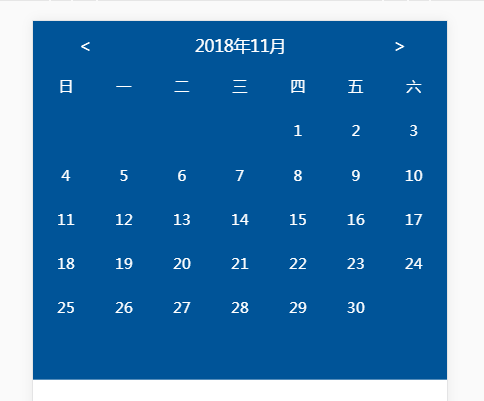
components.js代码如下:
Vue.component('sc-calendar',{

    template:'<div class="scCalendar">' +

    '<div class="calendar_header">' +

        '<div class="prev" @click="prevMonth"> < </div>' +

        '<span class="text_year">{{currentYear}}年</span>' +

        '<span class="text_month">{{currentMonth}}月</span>' +

        '<div class="next" @click="nextMonth"> > </div>' +

    '</div>' +

    '<div class="calendar_content">' +

        '<ul class="week">' +

            '<li v-for="item in weeks">{{item}}</li>' +

        '</ul>' +

        '<ul class="day">' +

            '<li v-for="item in dayList"  :class="{marginRight0:item.marginRight0}">{{item.text}}</li>' +

        '</ul>' +

    '</div>' +

    '</div>',

    data:function(){

        return {

            weeks: ['日', '一', '二', '三', '四', '五', '六'],

            dayList:[],

            currentYear:'',

            currentMonth: ''

        }

    },

    created:function(){

        var date=new Date;

        this.currentYear = date.getFullYear();

        this.currentMonth = date.getMonth()+1;

        this.calDay(this.currentYear, this.currentMonth);

    },

    methods:{

        //计算指定月份的天数

        calDay:function(year,month){

            var oDate = new Date();

            //setFullYear(year,month,day) 方法用于设置年份,返回调整过的日期的毫秒表示。

            oDate.setFullYear(year, month-1,1);

            oDate.setDate(1);//设置一个月中的第一天

            var oNow = oDate.getDay();//当前月的第一天是星期几

            var dayNum = 0; //指定月份的天数

            if(month==1 || month==3 || month==5 || month==7 || month==8 || month==10 || month==12){

                dayNum = 31;

            }else if(month==4 || month==6 || month==9 || month==11){

                dayNum = 30;

            }else if(month==2&&this.isLeaYear(year)){

                dayNum = 29;

            }else{

                dayNum = 28;

            }

            var SumDayLiNum = 0;//总共的格子数

            var lastNum = (dayNum-(7-oNow))%7; //最后剩余的数

            lastNum = lastNum == 0?0:7;

            SumDayLiNum = 7 + parseInt((dayNum-(7-oNow))/7)*7+lastNum;

            this.showDayList(dayNum,SumDayLiNum,oNow);

        },

        //判断是否是闰年

        isLeaYear:function(year){

            if(year%4==0&&year%100!=0){

                return true;

            }else{

                if(year%400==0){

                    return true;

                }else{

                    return false;

                }

            }

        },

        //显示当前日历内容

        showDayList:function(dayNum,SumDayLiNum,oNow){

            this.dayList = [];

            var rows = parseInt(SumDayLiNum/7);

            var cols = 7;

            for(var i=0;i<rows;i++){

                for(var j=0;j<cols ;j++){

                    if(j == cols-1){

                        this.dayList.push({

                            text:'',

                            marginRight0:true

                        })

                    }else{

                        this.dayList.push({

                            text:'',

                            marginRight0:false

                        })

                    }

                }

            }

            for(var z=1;z<=dayNum;z++){

                this.dayList[oNow].text = z;

                oNow++;

            }

        },

        prevMonth:function(){

            if( this.currentMonth == 1){

                this.currentYear = this.currentYear - 1;

                this.currentMonth = 12;

            }else{

                this.currentMonth = this.currentMonth - 1;

            }

            this.calDay(this.currentYear, this.currentMonth);

        },

        nextMonth:function(){

            if( this.currentMonth == 12){

                this.currentYear = this.currentYear + 1;

                this.currentMonth = 1;

            }else{

                this.currentMonth = this.currentMonth + 1;

            }

            this.calDay(this.currentYear, this.currentMonth);

        }

    }

});
ccal.css代码:
html {

  font-family: '微软雅黑';

}

body,

div,

span,

img,

ul,

li,

p {

  margin: 0;

  padding: 0;

}

ul,

li {

  list-style: none;

}

.commonprev {

  width: 0.46666667rem;

  height: 0.93333333rem;

  color: #ffffff;

  position: absolute;

  display: inline-block;

}

.commonyear {

  width: 5.46666667rem;

  height: 1.6rem;

  font-size: 1rem;

  color: #ffffff;

  position: absolute;

}

.scCalendar {

  width: 25rem;

  height: 21.66666667rem;

  background:  #005498;

  background-size: 100%;

}

.scCalendar .calendar_header {

  height: 2.93333333rem;

  width: 100%;

  position: relative;

  line-height: 2.93333333rem;

}

.scCalendar .calendar_header .prev {

  width: 0.46666667rem;

  height: 0.93333333rem;

  color: #ffffff;

  position: absolute;

  display: inline-block;

  left: 2.76666667rem;

}

.scCalendar .calendar_header .next {

  width: 0.46666667rem;

  height: 0.93333333rem;

  color: #ffffff;

  position: absolute;

  display: inline-block;

  right: 2.76666667rem;

}

.scCalendar .calendar_header .text_year {

  width: 5.46666667rem;

  height: 1.6rem;

  font-size: 1rem;

  color: #ffffff;

  position: absolute;

  left: 9.76666667rem;

}

.scCalendar .calendar_header .text_month {

  width: 5.46666667rem;

  height: 1.6rem;

  font-size: 1rem;

  color: #ffffff;

  position: absolute;

  left: 13.1rem;

}

.scCalendar .calendar_content {

  padding: 0 1rem;

}

.scCalendar .calendar_content li {

  width: 2rem;

  height: 2rem;

  line-height: 2rem;

  margin-right: 1.5rem;

  text-align: center;

  margin-bottom: 0.66666667rem;

  float: left;

  color: white;

  font-size: 0.93333333rem;

}

.scCalendar .calendar_content .week li:nth-of-type(7) {

  margin-right: 0;

}

.scCalendar .calendar_content .day .marginRight0 {

  margin-right: 0;

}
index.html代码:
<!DOCTYPE html>

<html lang="en">

<head>

    <meta charset="UTF-8">

    <title>Title</title>

    <link rel="stylesheet" href="./ccal.css">

    <script>

        var pixRatio = 1/window.devicePixelRatio; //像素比

        var html = document.documentElement;

        document.write('<meta name="viewport" content="width=device-width,user-scalable=no,initial-scale='+ pixRatio +',minimum-scale='+ pixRatio +',maximum-scale='+ pixRatio +'">');

        html.style.fontSize = html.clientWidth/25 + 'px';

    </script>

    <script src="https://cdn.jsdelivr.net/npm/vue@2.5.17/dist/vue.js"></script>

    <script src="./components.js"></script>

</head>

<body>

<div id="app">

    <div class="calendar">

        <sc-calendar></sc-calendar>

    </div>

</div>

</body>

<script>

    var vm = new Vue({

        el:'#app'

    })

</script>

</html>
vue自定义日历组件的实现的更多相关文章
- Vue自定义日历组件
今天给大家介绍Vue的日历组件,可自定义样式.日历类型及支持扩展,可自定义事件回调.Props数据传输. 线上demo效果 示例 Template: <Calendar :sundayStart ...
- vue 自定义日历组件
<template> <div class=""> <div class="calendarTraffic" name=" ...
- 使用ant design vue的日历组件,实现一个简单交易日与非交易日的切换
使用ant design vue的日历组件,实现一个简单交易日与非交易日的切换 需求: 日历区分交易日.非交易日 可以切换面板查看整年交易日信息 可以在手动调整交易日.非交易日 演示实例 序--使用软 ...
- vue自定义全局组件(自定义插件)
有时候我们在做开发的时候,就想自己写一个插件然后就可以使用自己的插件,那种成就感很强.博主最近研究element-ui和axios的时候,发现他们是自定义组件,但是唯一有一点不同的是,在用elemen ...
- 一个vue的日历组件
说明: 1.基于element-ui开发的vue日历组件. 地址 更新: 1.增加value-format指定返回值的格式2.增加头部插槽自定义头部 <ele-calendar > < ...
- vue初学实践之路——vue简单日历组件(1)
---恢复内容开始--- 最近做的项目有一个需求,需要有一个日历组件供预定功能使用,之前的代码过于繁琐复杂,所以我采用vue重写了这个组件. npm.vue等等安装. 只是一个简单的日历组件,所以并不 ...
- vue 自定义报警组件
1.自定义报警组件 Alarm.vue <!-- 报警 组件 --> <template> <div class="alarm"> <!- ...
- vue自定义select组件
1.目的 看了很多element-ui的源码,决定自己实现一个简单的select组件,遇到的几个难点,便记录下来. 2.难点一 element-ui中的select组件通过v-model可以绑定数据, ...
- vue 自定义分页组件
vue2.5自定义分页组件,可设置每页显示条数,带跳转框直接跳转到相应页面 Pagination.vue 效果如下图: all: small(只显示数字和上一页和下一页): html <temp ...
随机推荐
- Redis偶发连接失败案例分析
[作者] 张延俊:携程技术保障中心资深DBA,对数据库架构和疑难问题分析排查有浓厚的兴趣. 寿向晨:携程技术保障中心高级DBA,主要负责携程Redis及DB的运维工作,在自动化运维,流程化及监控排障等 ...
- 【BZOJ3217】ALOEXT 分块
题目传送门:http://www.lydsy.com/JudgeOnline/problem.php?id=3217 分块过掉辣!!!!!!$O(n^{1.5}+q\times \sqrt{n})$的 ...
- Web开发常用在线工具
http://tool.oschina.net/ 爬去网页工具: http://www.keydatas.com/product
- Spring Security构建Rest服务-0900-rememberMe记住我
Spring security记住我基本原理: 登录的时候,请求发送给过滤器UsernamePasswordAuthenticationFilter,当该过滤器认证成功后,会调用RememberMeS ...
- 用COS实现文件上传
cos是O'Rrilly公司开发的一款用于HTTP上传文件的OpenSource组件 需要cos.jar,下载地址:http://www.servlets.com/cos/ cos上传文件很简单,比f ...
- Android 开发工具类 22_PullPersonService
PULL 解析 XML import java.io.InputStream; import java.io.OutputStream; import java.util.ArrayList; imp ...
- 计算机硬件的五大单元 & CPU的种类 & 计算机的运行流程
不多说,直接上干货! 计算机硬件的五大单元 关于计算机的组成部分,其实你可以观察你的桌面计算机分析一下,依外观来说这家伙主要分为三部分: 输入单元:包括键盘.鼠标.卡片阅读机.扫描仪.手写板.触摸屏幕 ...
- 基于TrueLicense实现产品License验证功能
受朋友所托,需要给产品加上License验证功能,进行试用期授权,在试用期过后,产品不再可用. 通过研究调查,可以利用Truelicense开源框架实现,下面分享一下如何利用Truelicense实现 ...
- Go 压测
1. 单测 + 压测 压测 go test -bench=. -benchmem 单元测试 go test -v . 2. pprof + 火焰图(查看cpu占用,内存占用) 嵌入代码 import ...
- juqery dragsort使用遇到的问题
1.destroy时,没给容器加id,不能执行成功--->修改源码如下: if (options == "destroy") { $(this).trigger(" ...