
python包安装-centos7/windows
1、修改pip源
临时使用:
可以在使用pip的时候在后面加上-i参数,指定pip源
eg: pip install scrapy -i https://pypi.tuna.tsinghua.edu.cn/simple
常用的源有:
新版ubuntu要求使用https源,要注意。
# 清华源

index-url = https://pypi.tuna.tsinghua.edu.cn/simple

trusted-host = pypi.tuna.tsinghua.edu.cn

# 阿里云源

index-url = http://mirrors.aliyun.com/pypi/simple/

trusted-host = mirrors.aliyun.com

## 以下设置trusted-host也类似

# 中国科技大学

https://pypi.mirrors.ustc.edu.cn/simple/

# 华中理工大学:

http://pypi.hustunique.com/

# 山东理工大学:

http://pypi.sdutlinux.org/

# 豆瓣:

http://pypi.douban.com/simple/
永久修改:
linux:
修改 ~/.pip/pip.conf (没有就创建一个), 内容如下(以清华源为例):
[global]

index-url =  https://pypi.tuna.tsinghua.edu.cn/simple

[install]

trusted-host= pypi.tuna.tsinghua.edu.cn
windows:
(1)在windows文件管理器中,输入 %APPDATA%
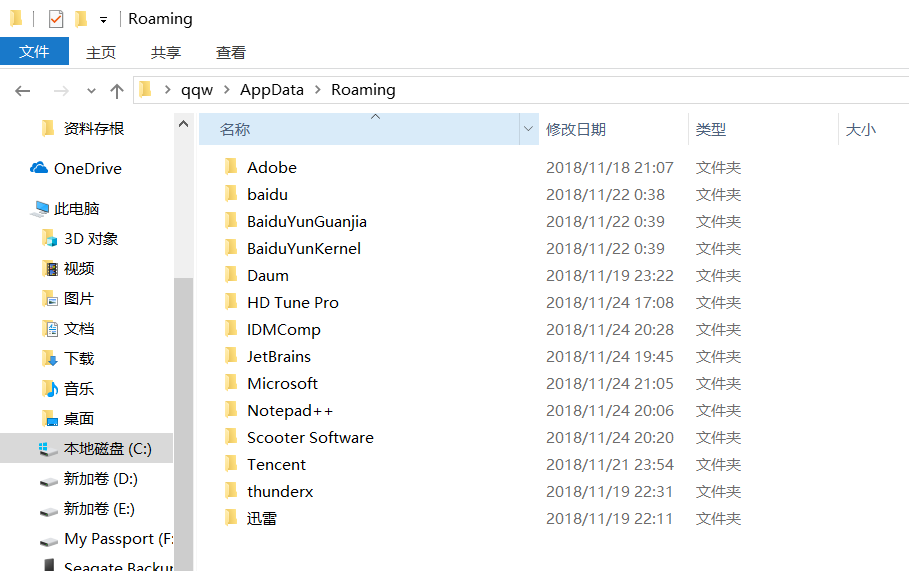
(2)在该目录下新建pip文件夹,然后到pip文件夹里面去新建个pip.ini文件
(3)在新建的pip.ini文件中输入以下内容(以阿里云源为例):
阿里云的源:
[global]

index-url = http://mirrors.aliyun.com/pypi/simple/

trusted-host = mirrors.aliyun.com
离线下载网站:https://pypi.python.org/pypi(centos,windows),https://www.lfd.uci.edu/~gohlke/pythonlibs(windows)
six:pip install six
离线版:six-1.11.0-py2.py3-none-any.whl(centos版),six-1.11.0-py2.py3-none-any.whl(windows版),后面类似
pytz:pip install pytz
离线版:pytz-2017.3-py2.py3-none-any.whl,pytz-2017.3-py2.py3-none-any.whl
pillow:pip install pillow(自动安装olefile, pillow)
离线版:Pillow-4.3.0-cp27-cp27mu-manylinux1_x86_64.whl,Pillow-4.3.0-cp27-cp27m-win_amd64.whl
numpy:pip install numpy
离线版:numpy-1.13.3-cp27-cp27mu-manylinux1_x86_64.whl,numpy-1.13.3-cp27-none-win_amd64.whl
decorator:pip install decorator
离线版:decorator-4.1.2-py2.py3-none-any.whl,decorator-4.1.2-py2.py3-none-any.whl
pyparsing:pip install pyparsing
离线版:pyparsing-2.2.0-py2.py3-none-any.whl,pyparsing-2.2.0-py2.py3-none-any.whl
scikit-learn:pip install scikit-learn
离线版:scikit_learn-0.19.1-cp27-cp27mu-manylinux1_x86_64.whl,scikit_learn-0.19.1-cp27-cp27m-win_amd64.whl
backports.functools-lru-cache:pip install backports.functools-lru-cache
离线版:backports.functools_lru_cache-1.4-py2.py3-none-any.whl,backports.functools_lru_cache-1.4-py2.py3-none-any.whl
cycler:pip install cycler(自动安装six,cycler)
离线版:cycler-0.10.0-py2.py3-none-any.whl,cycler-0.10.0-py2.py3-none-any.whl
python-dateutil:pip install python_dateutil(自动安装six,python_dateutil)
离线版:python_dateutil-2.6.1-py2.py3-none-any.whl,python_dateutil-2.6.1-py2.py3-none-any.whl
scipy:pip install scipy(自动安装numpy, scipy)
离线版:scipy-1.0.0-cp27-cp27mu-manylinux1_x86_64.whl,scipy-1.0.0-cp27-none-win_amd64.whl
PyWavelets:pip install PyWavelets(自动安装numpy,PyWavelets)
离线版:PyWavelets-0.5.2-cp27-cp27mu-manylinux1_x86_64.whl,PyWavelets-0.5.2-cp27-none-win_amd64.whl
pandas:pip install pandas(自动安装six, python-dateutil, numpy, pytz, pandas)
离线版:pandas-0.21.0-cp27-cp27mu-manylinux1_x86_64.whl,pandas-0.21.0-cp27-cp27m-win_amd64.whl
matplotlib:pip install matplotlib(自动安装pyparsing, backports.functools-lru-cache, six, python-dateutil, subprocess32, pytz, cycler, numpy, matplotlib)
离线版:matplotlib-2.1.0-cp27-cp27mu-manylinux1_x86_64.whl,matplotlib-2.1.0-cp27-cp27m-win_amd64.whl
skimage:pip install scikit-image(自动安装numpy, PyWavelets, scipy, decorator, networkx, six, pyparsing, backports.functools-lru-cache, python-dateutil, subprocess32, pytz, cycler, matplotlib, olefile, pillow, scikit-image)
离线版:scikit_image-0.13.1-cp27-cp27mu-manylinux1_x86_64.whl,scikit-image-0.13.1.tar.gz
可能遇见的问题
1、(安装skimage时)skimage\external\tifffile\tifffile.c(75) : fatal error C1083: Cannot open include file: 'stdint.h': No such file or directory
原因: stdint.h是c99标准的头文件,vc不支持,所以出现错误“No such file or directory”。
解决方法:
①去我的资源中下载msinttypes-r26.zip,地址为:http://download.csdn.net/detail/atfuies/9887776解压后得到3个文件:inttypes.h,stdint.h,changelog.txt
②找到VC的include目录,一般默认的VC for Python 的include位置为:
C:\Users\Administrator\AppData\Local\Programs\Common\Microsoft\Visual C++ for Python\9.0\VC\include
有的用户名不是Administrator,将Administrator替换为你自己的用户名。
③将inttypes.h和stdint.h两个文件放到VC for Python 的include文件中。
2、(pip install scikit-image时)error: Microsoft Visual C++ 9.0 is required. Get it from http://aka.ms/vcpython27
原因:python通过pip或者源码来安装某些模块时,这些模块包含有c/c++源码,安装过程会调用本地的编译器编译这些代码。
由于Python默认调用VS2008编译器编译相关C代码,因此出现这种错误的原因可能有如下几个方面:
(1)没有安装VS2008
(2)安装了32位VS2008,使用64位python
解决方法:vs2008已经过时,直接指定更高版本的vs。先确保已安装vs(如vs2013,vs2015等)。
指定方法:打开 “python安装目录/Lib/distutils/msvc9compiler.py”文件,找到find_vcvarsall函数,在该函数开头添加version =VS版本号(最好用pycharm编辑,文本编辑器容易出现空格,tab等造成的格式对齐问题),例如使用VS2013,则version = 12.0。
python包安装-centos7/windows的更多相关文章
- python包安装
python包安装: 一种是有网操作:pip install 包名:例子[pip install setuptools] 无网络服务器上操作: 先把包下载:传上去再安装[] 1.一种是 *.wh ...
- Java Service Wrapper将jar包安装成Windows服务
刚接触java,第一次使用Java开发windows服务,也是刚不久看了SSM框架 简直也是一头雾水,不过只要用心理解,其实很简单,下面有详细的步骤,包学包会 在windows上运行jar包,需要在工 ...
- vs中python包安装教程
vs安装python很简单,只需要在vs安装包中选择python就可以了,这里使用的python3.7: 如果有了解,都知道安装python包的指令:"pip install xxx&quo ...
- Python包安装及使用指南
这里长期更新一些Python第三方包的安装教程,以及使用教程... Pygame 安装教程: Windows: 首先,查看已安装的Python版本:访问https://www.lfd.uci.edu/ ...
- python包安装和使用机制
python语言的魅力之一就是大量的外置数据包,能够帮助使用者节省很多时间,提高效率.模块下载和引用是最常见的操作,现在解析内部的原理和背后发生的故事,做到心里有数. 导航: 基本定义 模块使用 模块 ...
- Python解释器安装问题-windows
问题一-更新问题(update your machine) 解决方案 1 搜索 windows update 2 检查更新 3 安装更新重启 问题二-0x80072efd错误 问题原因: 安装包需要在 ...
- Python包安装过程
以下是paramiko-1.7.7.1的安装过程,可以看到整个过程分为步,第一步是build,就是拷贝源文件到build文件夹里, F:\VMFiles\tmpFiles\paramiko-1.7.7 ...
- 用pip命令把python包安装到指定目录
sudo pip install transforms3d --target=/usr/local/lib/python2.7/site-packages pip install transforms ...
- python 包 安装 加速 pip anaconda
使用 -i 参数指定源,豆瓣的很快: pip install web.py -i http://pypi.douban.com/simple anaconda: ~/.condarc channels ...
随机推荐
- [NOI2011]阿狸的打字机——AC自动机之fail树的利用
Description 阿狸喜欢收藏各种稀奇古怪的东西,最近他淘到一台老式的打字机.打字机上只有28个按键,分别印有26个小写英文字母和'B'.'P'两个字母. 经阿狸研究发现,这个打字机是这样工作的 ...
- 实验四:终极改造之使用EF
回顾一下我们前面经过改造后的程序代码: (1)Listing.aspx:负责将Product对象集合(产品集合)按要求显示出来 (2)Repository.cs:负责读将数据库中读到的数据转换成Pro ...
- Redis+Sentinel 实现redis集群高可用
1.sentinel作用及实现原理: https://my.oschina.net/u/172871/blog/596976?p={{currentPage-1}}
- Hadoop生态圈-phoenix(HBase)的索引配置
Hadoop生态圈-phoenix(HBase)的索引配置 作者:尹正杰 版权声明:原创作品,谢绝转载!否则将追究法律责任. 创建索引是为了优化查询,我们可以在phoenix上配置索引方式. 一.修改 ...
- C语言中的指针和内存泄漏几种情况
引言 原文地址:http://www.cnblogs.com/archimedes/p/c-point-memory-leak.html,转载请注明源地址. 对于任何使用C语言的人,如果问他们C语言的 ...
- Vue入坑教程(一)——搭建vue-cli脚手架
1. Vue简介 详细内容可以参考官网Vue.js 1)兼容性 Vue 不支持 IE8 及以下版本,因为 Vue 使用了 IE8 无法模拟的 ECMAScript 5 特性.但它支持所有兼容 ECMA ...
- Java入门系列(三)面向对象三大特性之封装、继承、多态
面向对象综述 封装 封装的意义,在于明确标识出允许外部使用的所有成员函数和数据项,或者叫接口. 有了封装,就可以明确区分内外,使得类实现者可以修改封装内的东西而不影响外部调用者:而外部调用者也可以知道 ...
- Druid.io通过NiFi摄取流数据
NiFi是一个易于使用,功能强大且可靠的系统来处理和分发数据. 本文讲述如何用NiFi将Http的Json数据传到Druid.国外的一篇文章讲到如何用NiFi将推文传到Druid,https://co ...
- 20155235 2016-2017-2 《Java程序设计》第六周学习总结
20155235 2016-2017-2 <Java程序设计>第六周学习总结 教材学习内容总结 第十章 InputStream与OutputStreaam 串流设计的概念 串流继承架构 川 ...
- 面试:----Nginx的一理解
1.静态HTTP服务器 首先,Nginx是一个HTTP服务器,可以将服务器上的静态文件(如HTML.图片)通过HTTP协议展现给客户端. 配置: 2.反向代理服务器 什么是反向代理? 客户端本来可以直 ...