
hbase 自定义过滤器
1、首先生成自定义过滤器,生成jar包,然后拷贝到服务器hbase目录的lib下。
1.1 自定义过滤器CustomFilter
import com.google.protobuf.InvalidProtocolBufferException;

import org.apache.hadoop.hbase.Cell;

import org.apache.hadoop.hbase.CellUtil;

import org.apache.hadoop.hbase.exceptions.DeserializationException;

import org.apache.hadoop.hbase.filter.Filter;

import org.apache.hadoop.hbase.filter.FilterBase;

import org.apache.hadoop.hbase.util.ByteStringer;

import java.io.IOException;

/**

 * @Author: xu.dm

 * @Date: 2019/4/14 12:16

 * @Description: 自定义过滤器,选择列值匹配的行数据

 */

public class CustomFilter extends FilterBase {

    private byte[] value = null;

    private boolean filterRow = true;

    public CustomFilter() {

        super();

    }

    public CustomFilter(byte[] value) {

        this.value = value;

    }

    @Override

    public void reset() throws IOException {

        this.filterRow = true;

    }

    @Override

    public boolean filterRow() throws IOException {

        return this.filterRow;

    }

    //匹配的数据不过滤

    @Override

    public ReturnCode filterCell(Cell c) throws IOException {

        if(CellUtil.matchingValue(c,value))

            filterRow = false;

        return ReturnCode.INCLUDE;

    }

    /**

     * protobuf生成MyFilterProtos

     */

    @Override

    public byte[] toByteArray() throws IOException {

        MyFilterProtos.CustomFilter.Builder builder = MyFilterProtos.CustomFilter.newBuilder();

        if(value!=null)

            builder.setValue(ByteStringer.wrap(value));

        return builder.build().toByteArray();

    }

    public static Filter parseFrom(final byte[] pbBytes)

            throws DeserializationException {

        MyFilterProtos.CustomFilter proto;

        try {

            proto = MyFilterProtos.CustomFilter.parseFrom(pbBytes);

        } catch (InvalidProtocolBufferException e) {

            throw new DeserializationException(e);

        }

        return new CustomFilter(proto.getValue().toByteArray());

    }

}
1.2 MyFilterProtos是通过protobuf生成的,这里需要注意hbase使用的是protobuf2.5.0版本,不要使用高于2.5.0版本的protobuf,不然hbase会报找不到类的错误。
proto文件
syntax = "proto2";

option java_package = "";

option java_outer_classname = "MyFilterProtos";

option java_generic_services = true;

option java_generate_equals_and_hash = true;

option optimize_for = SPEED;

message CustomFilter {

  required bytes value = 1;

}
1.3 编辑成jar包,发布到hbase的lib目录,hbase需要重启
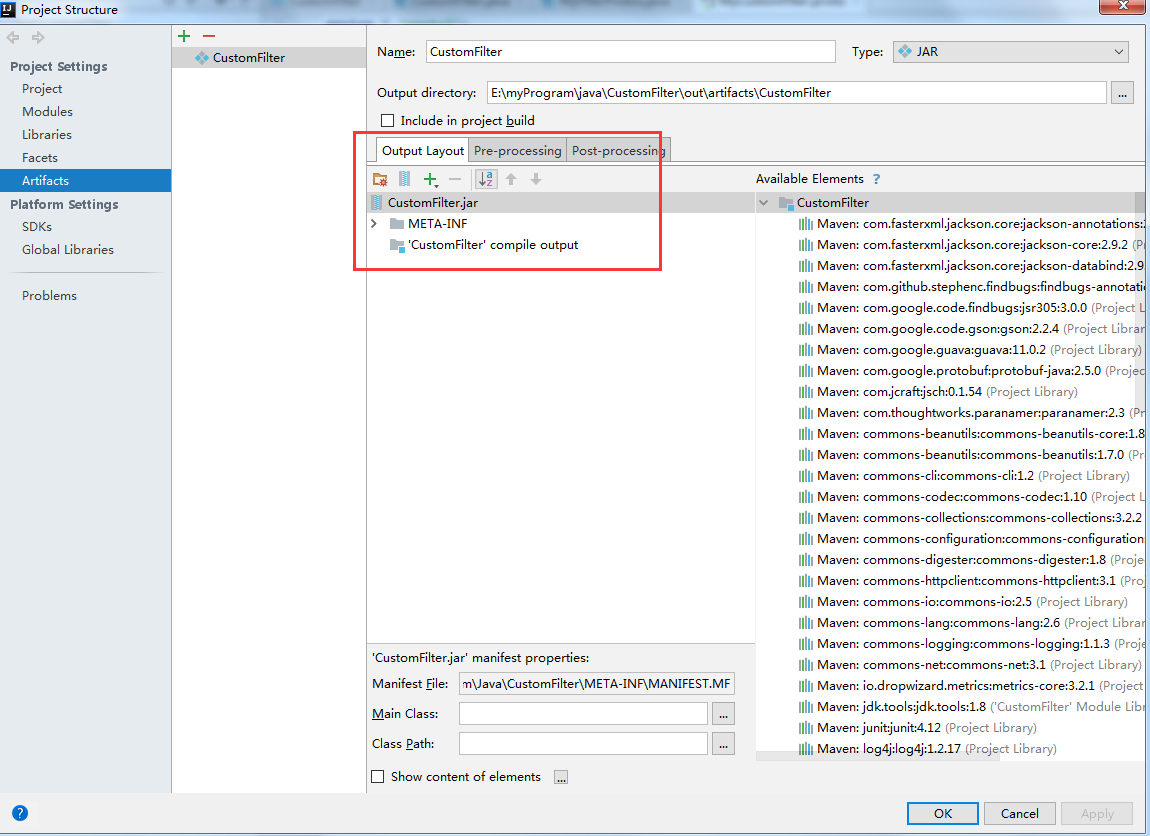
[root@bigdata-senior01 lib]# ls $HBASE_HOME/lib/Custom*.*

/opt/hbase-2.0.4/lib/CustomFilter.jar
2、使用自定义过滤
2.1 程序中引入刚才发布的jar包

2.2 使用自定义过滤器过滤数据
   //使用自定义过滤器,只显示匹配列值的行

    private static void customFilterData() throws IOException{

        Table table = helper.getConnection().getTable(TableName.valueOf("testtable"));

        List<Filter> filters = new ArrayList<Filter>();

        Filter filter1 = new CustomFilter(Bytes.toBytes("user30"));

        filters.add(filter1);

        Filter filter2 = new CustomFilter(Bytes.toBytes("user20"));

        filters.add(filter2);

        Filter filter3 = new CustomFilter(Bytes.toBytes("user90"));

        filters.add(filter3);

        FilterList filterList = new FilterList(

                FilterList.Operator.MUST_PASS_ONE, filters);

        Scan scan = new Scan();

        scan.setFilter(filterList);

        ResultScanner scanner = table.getScanner(scan);

        for(Result result:scanner){

            helper.dumpResult(result);

        }

        scanner.close();

        table.close();

    }

}
输出结果:
Cell: rowKey20/ex:addr/1555078771906/Put/vlen=8/seqid=0, Value: street20

Cell: rowKey20/info:username/1555078771906/Put/vlen=6/seqid=0, Value: user20

Cell: rowKey20/memo:detail/1555078771906/Put/vlen=8/seqid=0, Value: remark20

Cell: rowKey30/ex:addr/1555078771906/Put/vlen=8/seqid=0, Value: street30

Cell: rowKey30/info:username/1555078771906/Put/vlen=6/seqid=0, Value: user30

Cell: rowKey30/memo:detail/1555078771906/Put/vlen=8/seqid=0, Value: remark30

Cell: rowKey90/ex:addr/1555078771906/Put/vlen=8/seqid=0, Value: street90

Cell: rowKey90/info:username/1555078771906/Put/vlen=6/seqid=0, Value: user90

Cell: rowKey90/memo:detail/1555078771906/Put/vlen=8/seqid=0, Value: remark90
hbase 自定义过滤器的更多相关文章
- HBase - Filter - 过滤器的介绍以及使用
1 过滤器HBase 的基本 API,包括增.删.改.查等.增.删都是相对简单的操作,与传统的 RDBMS 相比,这里的查询操作略显苍白,只能根据特性的行键进行查询(Get)或者根据行键的范围来查询( ...
- 实现MVC自定义过滤器,自定义Area过滤器,自定义Controller,Action甚至是ViewData过滤器
MVC开发中几种以AOP方式实现的Filters是非常好用的,默认情况下,我们通过App_Start中的FilterConfig来实现的过滤器注册是全局的,也就是整个应用程序都会使用的,针对单独的Fi ...
- lucene自定义过滤器
先介绍下查询与过滤的区别和联系,其实查询(各种Query)和过滤(各种Filter)之间非常相似,可以这样说只要用Query能完成的事,用过滤也都可以完成,它们之间可以相互转换,最大的区别就是使用过滤 ...
- asp.net MVC之 自定义过滤器(Filter) - shuaixf
一.系统过滤器使用说明 1.OutputCache过滤器 OutputCache过滤器用于缓存你查询结果,这样可以提高用户体验,也可以减少查询次数.它有以下属性: Duration :缓存的时间, 以 ...
- angular之自定义过滤器的使用
自定义过滤器需要使用filter函数,格式如下: filter("filterName',function(){ return function(target,args){ .... } } ...
- 第六节:Vue过滤器的用法和自定义过滤器
1.过滤器的用法,用 '|' 分割表达式和过滤器. 例如:{{ msg | filter}} {{msg | filter(a)}} a就标识filter的一个参数. 用两个过滤器:{{ ...
- .net中自定义过滤器对Response内容进行处理
原文:http://www.cnblogs.com/zgqys1980/archive/2008/09/02/1281895.html 代码DEMO:http://files.cnblogs.com/ ...
- asp.net MVC之 自定义过滤器(Filter)
一.系统过滤器使用说明 1.OutputCache过滤器 OutputCache过滤器用于缓存你查询结果,这样可以提高用户体验,也可以减少查询次数.它有以下属性: Duration:缓存的时间,以秒为 ...
- Vue自定义过滤器
gitHub地址: https://github.com/lily1010/vue_learn/tree/master/lesson05 一 自定义过滤器(注册在Vue全局) 注意事项: (1)全局方 ...
随机推荐
- css布局笔记(二)Flex
flex Flex是"Flexible Box"的缩写,意为"弹性布局",用来为盒状模型提供最大的灵活性. 任何一个容器都可指定为Flex布局. .box{di ...
- 关于python中的tkinter模块
python2.7和python3.6中的tkinter是两个包,不会自动升级,假如在fedora28做开发的话, 错误:用import Tkinter /import tkinter /import ...
- 微信小程序video视频组件
支持mp4和m3u8的视频格式,其中mp4的需要是h264的视频编码 .1.如果您使用video组件是mp4的但不能播放,大部分是由于编码的问题,当然排除文件不存在等这些客观的因素条件.2.如果使用m ...
- Hands on Machine Learning with Sklearn and TensorFlow学习笔记——机器学习概览
一.什么是机器学习? 计算机程序利用经验E(训练数据)学习任务T(要做什么,即目标),性能是P(性能指标),如果针对任务T的性能P随着经验E不断增长,成为机器学习.[这是汤姆米切尔在1997年定义] ...
- python3.6环境中django2.0与xadmin0.6结合的后台管理
1.xadmin简介 django的admin管理后台页面很简洁,对个人来说做后台管理非常简单:xadmin的比较admin优化界面,看着也舒服. xadmin界面效果如下: 2.xadmin安装 从 ...
- Spring Data REST PATCH请求远程代码执行漏洞(CVE-2017-8046) 本地复现方法
#1背景 Spring Data REST是Spring Data项目的一部分,可以轻松地在Spring Data存储库之上构建超媒体驱动的REST Web服务. 恶意的PATCH请求使用精心构造 ...
- Python交互数据库(Mysql | Mongodb | Redis)
数据库 Mysql Mysql MySQL是一个关系型数据库管理系统,由瑞典MySQL AB公司开发,后来被Sun公司收购,Sun公司后来又被Oracle公司收购,目前属于Oracle旗下产品 MyS ...
- to_char
to_date(to_char(to_date(#{conds.currentTime,jdbcType=VARCHAR},'YYYY-MM-DD hh24:mi:ss'),'hh24:mi:ss') ...
- 第二阶段Sprint冲刺会议5
进展:能够保存到手机或内存卡上,没有实现自己选路径,指定路径为内存卡并能够播放已录制好的视频.
- Task 5.1 电梯调度程序需求调研报告
1.任务概述: 1.1任务背景:试想一下,石家庄铁道大学基础教学楼的电梯配置如下:大厦有18层, 4部电梯,很多乘客使用这些电梯的日常(旅客重量:平均70公斤最大120公斤,最小45公斤).其他常量数 ...