
spring读取数据库的配置信息(url、username、password)时的<bean>PropertyPlaceholderConfigurer的用法
用法1:
<?xml version="1.0" encoding="UTF-8"?>
<beans
xmlns="http://www.springframework.org/schema/beans"
xmlns:xsi="http://www.w3.org/2001/XMLSchema-instance"
xmlns:p="http://www.springframework.org/schema/p"
xsi:schemaLocation="http://www.springframework.org/schema/beans http://www.springframework.org/schema/beans/spring-beans-2.5.xsd">
<!-- 使用spring提供的PropertyPlaceholderConfigurer读取数据库配置信息.properties -->
- 这里的classpath可以认为是项目中的src-
- 属性名是 locations,使用子标签<list></list>可以指定多个数据库的配置文件,这里指定了一个
<bean id="propertyConfigurer" class="org.springframework.beans.factory.config.PropertyPlaceholderConfigurer">
<property name="locations">
<list>
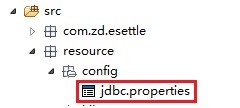
<value>classpath:resource/config/jdbc.properties</value>
</list>
</property>
</bean>
此时的数据库配置文件项目路径是这样的
读取数据库的配置文件还可以使用下面的方式
<?xml version="1.0" encoding="UTF-8"?>
<beans xmlns="http://www.springframework.org/schema/beans" xmlns:xsi="http://www.w3.org/2001/XMLSchema-instance"xsi:schemaLocation="http://www.springframework.org/schema/beans http://www.springframework.org/schema/beans/spring-beans-2.0.xsd">
<bean id="propertyConfigurer" class="org.springframework.beans.factory.config.PropertyPlaceholderConfigurer">
<property name="locations">
<list>
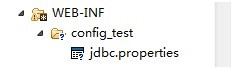
<value>/WEB-INF/config_test/jdbc.properties</value>
</list>
</property>
</bean>
此时jdbc.properties文件的位置如下图所示
.properties配置文件还可以有多个,这里在<list></list>标签中指定了2个数据的配置文件
<?xml version="1.0" encoding="UTF-8"?>
<beans xmlns="http://www.springframework.org/schema/beans" xmlns:xsi="http://www.w3.org/2001/XMLSchema-instance"xsi:schemaLocation="http://www.springframework.org/schema/beans http://www.springframework.org/schema/beans/spring-beans-2.0.xsd">
<bean id="propertyConfigurer" class="org.springframework.beans.factory.config.PropertyPlaceholderConfigurer">
<property name="locations">
<list>
<value>classpath:jdbc.properties</value>
<value>/WEB-INF/config_test/jdbc.properties</value>
</list>
</property>
</bean>
classpath:jdbc.properties对应的文件位置是:
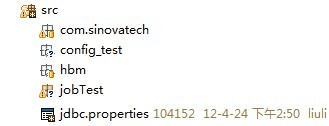
文件内容是:配置的是sqlserver的连接信息
sqlserver.username=sa
sqlserver.password=sqlserver
sqlserver.url=jdbc\:jtds\:sqlserver\://localhost\:1433/J2EE
sqlserver.driver=net.sourceforge.jtds.jdbc.Driver
/WEB-INF/config_test/jdbc.properties对应的文件位置是
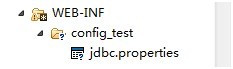
文件内容是:配置的是oracle的连接信息
jdbc.driverClassName=oracle.jdbc.driver.OracleDriver
jdbc.url=jdbc:oracle:thin:@127.0.0.1:1521:orcl
jdbc.username=jxbms
jdbc.password=jxbms
用法2:这种方法比较简洁:
<context:property-placeholder location="classpath:db.properties"/>//这句配置通常放在applicationContext.xml的配置文件中
用法3:利用applicationContext.xml配置文件中配置的bean,然后自己去写PropertyPlaceholderConfigurer这个类,当然你得先继承spring自身的这个PropertyPlaceholderConfigurer,这种方法适合数据库配置有好多种方式,在PropertyPlaceholderConfigurer这个类中去选择读取哪一种配置信息的数据配置信息,这个方式实现的原理就是,在spring容器中配置bean之后,spring会初始化这些bean,所以你的java选择数据库配置信息的实现代码,要在构造器中实现,现举例:
spring的配置信息:
<bean id="propertyConfigurer"
class="cn.com.ksplatform.core.expand.spring.PropertyPlaceholderConfigurer"></bean><!-- 这个PropertyPlaceholderConfigurer类重写了-->
PropertyPlaceholderConfigurer.java如下:
public class PropertyPlaceholderConfigurer extends

		org.springframework.beans.factory.config.PropertyPlaceholderConfigurer {

	/**

	 * 初始化任务 1.完成系统配置的动态载入,读取数据库的配置信息是在构造函数中完成的

	 */

	public PropertyPlaceholderConfigurer() {

		InstallInfo info = new InstallInfo();

		if (PlatformContext.SYSTEMSTATU.equals(SystemStatu.INSTALLED)) {

			Log.info("加载系统安装信息。");

			try {

				Log.info("读取内部配置文件。");

				info = SystemUtil.getSysConfigModel();

				if(info == null){

					Log.info("无法读取内部文件。。 读取容器配置");

					info = SystemUtil

							.getSysConfigModel(PlatformContext.CONTEXT_PATH);

				}

			} catch (FileNotFoundException e) {

				e.printStackTrace();

			} catch (IOException e) {

				e.printStackTrace();

			} catch (ClassNotFoundException e) {

				e.printStackTrace();

			}

		} else {

			Log.info("未检测到系统按照信息。  加载系统文件数据库");

			//启动本地数据库

			DbUtil.runLocalDb(9002);

			info.setDataBaseType(DBType.HSQLDB.getValue());

			info.setDataBaseHost("127.0.0.1");

			info.setDataBaseName("ksPlatform");

			info.setDataBaseUserName("sa");

			info.setDataBasePassWord("");

			info.setDataBasePort(9002);

			DbHelp.setUrl(info);

			PlatformContext.SYSTEMSTATU = SystemStatu.INSTALLED;

		}

		Properties p = new Properties();

		p.setProperty("dataBaseUrl", info.getDataBaseUrl());

		p.setProperty("dataBaseUserName", info.getDataBaseUserName());

		p.setProperty("dataBasePassWord", info.getDataBasePassWord());

		p.setProperty("hibernateProperties",info.hibernateProperties);

		super.setProperties(p);

	}

}
这样数据库的配置信息被读取之后,在创建datasource的时候就可以使用了
下面连接oracle 使用apache的dbcp 数据源
<bean id="dataSource"
class="org.apache.commons.dbcp.BasicDataSource"
destroy-method="close">
<property name="driverClassName">
<value>${jdbc.driverClassName}</value>
</property>
<property name="url">
<value>${jdbc.url}</value>
</property>
<property name="username">
<value>${jdbc.username}</value>
</property>
<property name="password">
<value>${jdbc.password}</value>
</property>
<property name="maxActive">
<value>100</value>
</property>
<property name="maxIdle">
<value>3</value>
</property>
<property name="maxWait">
<value>-1</value>
</property>
<property name="defaultAutoCommit">
<value>false</value>
</property>
</bean>
下面连接sqlserver数据库使用的是c3p0数据源
<bean id="dataSource_oracle" class="com.mchange.v2.c3p0.ComboPooledDataSource"
destroy-method="close" >
<property name="driverClass" value="${jdbc.driverClassName}" />
<property name="jdbcUrl" value="${jdbc.url}" />
<property name="user" value="${jdbc.username}" />
<property name="password" value="${jdbc.password}" />
</bean>
使用dbcp数据源令人郁闷的事,使用dbcp和spring提供的JdbcTemplate操作数据库是 查询是可以的
但是执行update、delete、insert into 操作时,数据库中的数据没有变化
从网上查询了很多的资料,都无果。最后偶然看到网上有人说,dbcp数据源的事务不会自动提交,
当改成c3p0数据源后好了
随后认为这下终于可以松口气了,谁知道天不遂人愿。当更换一张表进行测试,数据库中的数据还是没有变化,难道c3p0数据源也不好使,
当再次经过代码的折磨之后,
最终发现改动测试java文件,不在一个项目中,把其他的项目关闭就好了
当文档写到这里时,突然发现oracle使用的dbcp数据源有这一项配置
<property name="defaultAutoCommit">
<value>false</value>
</property>
原来dbcp数据源事务的自动提交功能被关闭了
马上把事务自动提交改成true 进行测试,一切ok
spring读取数据库的配置信息(url、username、password)时的<bean>PropertyPlaceholderConfigurer的用法的更多相关文章
- Eclipse中利用JSP把mysql-connector-java-8.0.13.jar放到WebContent\WEB-INF\lib中连接MySQL数据库时Connection conn = DriverManager.getConnection(url,username,password)报错的解决办法
开发环境: 1.系统:windows 7/8/10均可 2.jdk:1.8.0_144 3.服务器:apache-tomcat-9.0.8 4.IDE:eclipse+jsp 0.网页代码如下: &l ...
- [Xcode 实际操作]九、实用进阶-(8)实现App的Setting设置:添加和读取程序的配置信息
目录:[Swift]Xcode实际操作 本文将演示如何实现添加和读取程序的配置信息. 在项目文件夹[DemoApp]上点击鼠标右键->[New File]创建一个设置束文件 ->[Sett ...
- Spring主从数据库的配置和动态数据源切换原理
原文:https://www.liaoxuefeng.com/article/00151054582348974482c20f7d8431ead5bc32b30354705000 在大型应用程序中,配 ...
- Spring引用数据库文件配置数据源
例子:引用 druid.properties 在Spring配置文件(applicationContext.xml)引入外部配置文件,需要指定特定的 key才能被正确识别并使用 在原本的 url.us ...
- php随笔2-php+ajax 实现输入读取数据库显示匹配信息
dropbox_index.php <!DOCTYPE html PUBLIC "-//W3C//DTD XHTML 1.0 Transitional//EN" " ...
- 从Config文件中读取节点的配置信息
下面是web.config中与本内容有关的细节 <appSettings> <add key="servername" value="www" ...
- 教你如何利用分布式的思想处理集群的参数配置信息——spring的configurer妙用
引言 最近LZ的技术博文数量直线下降,实在是非常抱歉,之前LZ曾信誓旦旦的说一定要把<深入理解计算机系统>写完,现在看来,LZ似乎是在打自己脸了.尽管LZ内心一直没放弃,但从现状来看,需要 ...
- 第九篇:Spring的applicationContext.xml配置总结
在前面的一篇日志中,记录了web.xml配置启动的顺序,web启动到监听器ContextLoaderListener时,开始加载spring的配置文件applicationContext.xml(通常 ...
- JDBC通过配置文件(properites)读取数据库配置信息
扫盲: Classloader 类加载器,用来加载 Java 类到 Java 虚拟机中.与普通程序不同的是.Java程序(class文件)并不是本地的可执行程序.当运行Java程序时,首先运行JVM( ...
随机推荐
- js中定时器之一
<!DOCTYPE html><html lang="en"><head> <meta charset="UTF-8" ...
- 正则表达式在JS中的使用
<script type="text/javascript"> /** *正则表达式在js中的第一种使用方式: * RegExp 通过构造器去使用正则表达式 需要对反斜 ...
- 跨域请求设置withCredentials
最近在做运动城项目,这一个项目下面有多个子项目,如主数据项目,pos项目等.主数据项目的域名为www.topmall.com,POS项目的域名为pos.topmall.com.即两个项目的主域名相同, ...
- spring学习笔记(二)
Spring的Bean管理:(注解方式) Spring的AOP:XML方式 Spring的AOP:注解方式 1.Spring的Bean管理的中常用的注解: * @Controller :WEB层 ...
- IDEA artifacts Web Application:Exploded Web Application:Archive
首先,artifacts是maven中的一个概念,表示项目/modules如何打包,比如jar,war,war exploded,ear等打包形式,一个项目或者说module有了artifacts 就 ...
- Swagger+ springfox +Spring mvc
简介 Swagger 是一个规范和完整的框架,用于生成.描述.调用和可视化 RESTful 风格的 Web 服务.总体目标是使客户端和文件系统作为服务器以同样的速度来更新.文件的方法,参数和模型紧密集 ...
- DFT
离散傅里叶变换(Discrete Fourier Transform,缩写为DFT),是傅里叶变换在时域和频域上都呈离散的形式, 将信号的时域采样变换为其DTFT的频域采样.在形式上,变换两端(时域和 ...
- springmvc在处理请求过程中出现异常信息交由异常处理器进行处理,自定义异常处理器可以实现一个系统的异常处理逻辑。为了区别不同的异常通常根据异常类型自定义异常类,这里我们创建一个自定义系统异常,如果controller、service、dao抛出此类异常说明是系统预期处理的异常信息。
springmvc在处理请求过程中出现异常信息交由异常处理器进行处理,自定义异常处理器可以实现一个系统的异常处理逻辑. 1.1 异常处理思路 系统中异常包括两类:预期异常和运行时异常RuntimeEx ...
- python字典练习
#!/bin/python3.4 # coding=utf-8 class lexicon(object): def __init__(self): print "define a clas ...
- 在原型设计上,UI和UX设计师有哪三个区别?
原型设计在日常的软件开发过程中是必不可少的,不管是UI还是UX设计师,很多工作都会涉及到原型设计.那么这两类设计师在设计原型的时候表现出了哪些的不同点呢?今天就让我们来讨论一下,先说说我发现的3个不同 ...