
ASP.NEt MVC5--创建下拉列表
Adding Search by Genre
If you added the HttpPost version of the Index method, delete it now.
Next, you'll add a feature to let users search for movies by genre. Replace the Index method with the following code:
现在我们来改写Index方法,
   public ActionResult Index(string movieGenre,string searchString)

         {

             var GenreLst = new List<string>();

             var GenreQry = from d in db.Movies

                            orderby d.Genre

                            select d.Genre;

             GenreLst.AddRange(GenreQry.Distinct());

             //SelectList生成列表

             ViewBag.movieGenre = new SelectList(GenreLst);

             //Linq查询

             var movies = from m in db.Movies select m;

             if (!string.IsNullOrEmpty(searchString))

             {

                 movies = movies.Where(s => s.Title.Contains(searchString));

             }

             if (string.IsNullOrEmpty(movieGenre))

             {

                 movies = movies.Where(x => x.Genre == movieGenre);

             }

             return View(movies);

         }
  var GenreQry = from d in db.Movies

                            orderby d.Genre

                            select d.Genre;
当执行完这句代码之后,SQL(GenreQry)为:
 SELECT

 [Extent1].[Genre] AS [Genre]

 FROM [dbo].[Movies] AS [Extent1]

 ORDER BY [Extent1].[Genre] ASC
var movies = from m in db.Movies select m;
执行完这句代码之后,SQL(Movies)为:
 SELECT

 [Extent1].[ID] AS [ID],

 [Extent1].[Title] AS [Title],

 [Extent1].[ReleaseDate] AS [ReleaseDate],

 [Extent1].[Genre] AS [Genre],

 [Extent1].[Price] AS [Price]

 FROM [dbo].[Movies] AS [Extent1]
现在先让我们,在Index视图页面中,添加一个实现下拉框的代码吧:
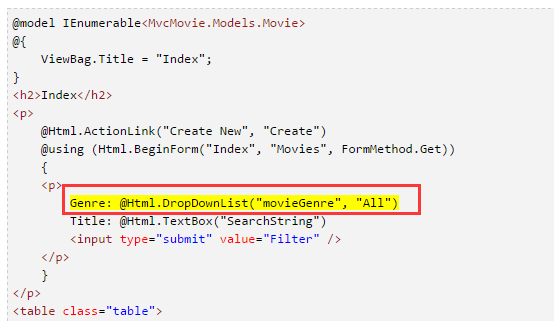
In the following code:
@Html.DropDownList("movieGenre", "All")
The parameter "movieGenre" provides the key for the DropDownList helper to find a IEnumerable<SelectListItem > in the ViewBag. The ViewBag was populated in the action method:
这句话的意思是:moviegenre参数,为DropDownList方法,提供了主键,去找到在控制器中定义的Viewbag.movieGenre
The parameter "All" provides the item in the list to be preselected. Had we used the following code:
这句话的意思是:All参数,提供了默认选择项
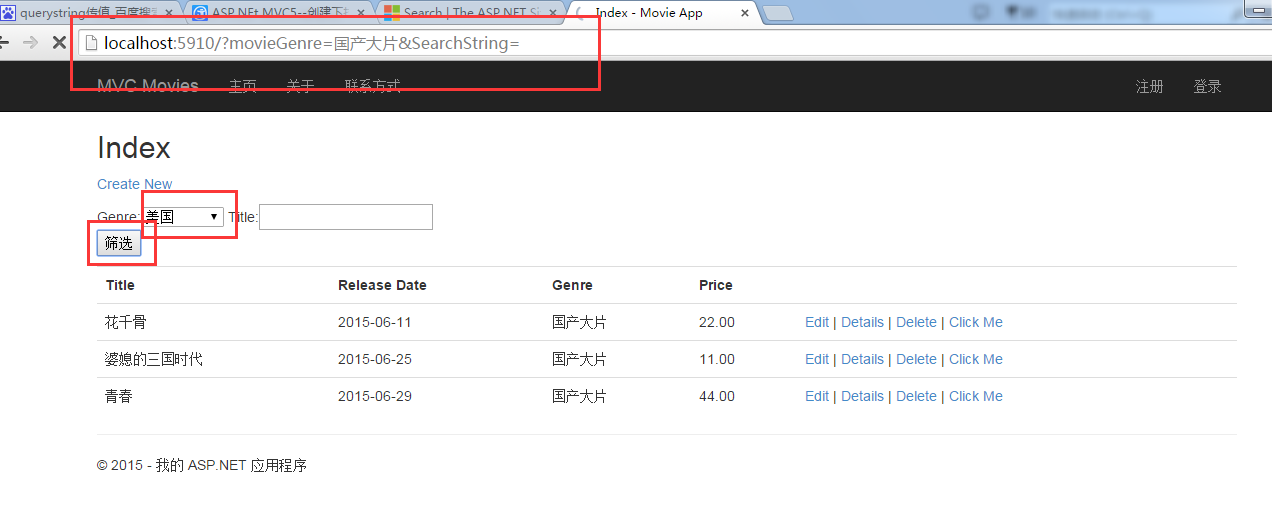
 效果图:
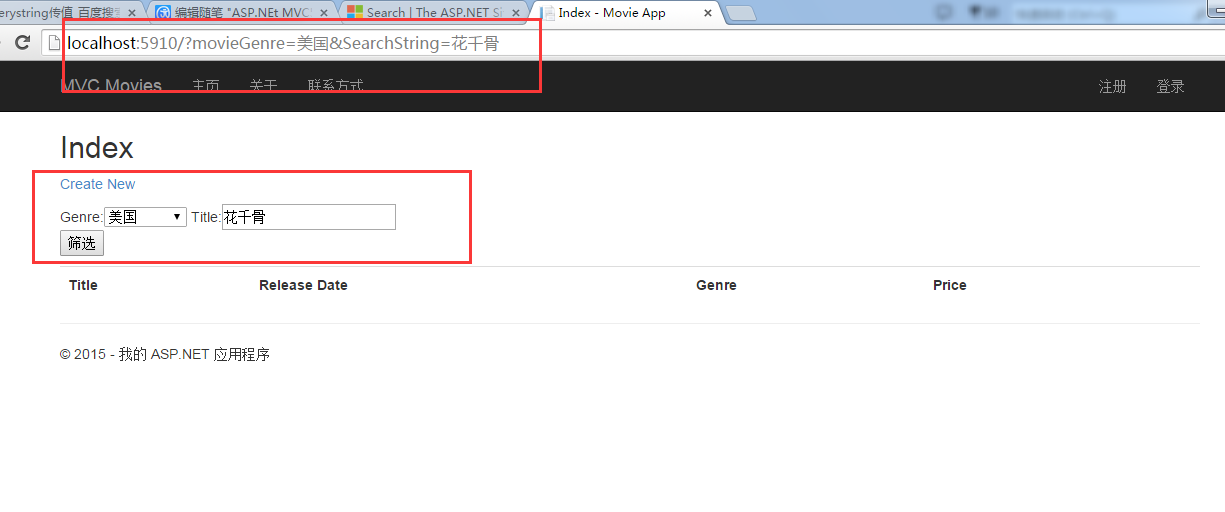
效果图:
 In this section you created a search action method and view that let users search by movie title and genre. In the next section, you'll look at how to add a property to the
 Movie model and how to add an initializer that will automatically create a test database.
通过下拉列表,来搜索:
 通过下拉列表和title输入框搜索:
ASP.NEt MVC5--创建下拉列表的更多相关文章
- 五、 创建连接串连接本地数据库(ASP.NET MVC5 系列)
1. 创建连接串连接本地SQLServer数据库 上节讲到MovieDBContext类,这个类的作用是连接数据库并将Movie对象迁移到数据库记录中.不过你会问一个问题:如何知道这个对象将连接哪个数 ...
- 一步一步创建ASP.NET MVC5程序[Repository+Autofac+Automapper+SqlSugar](一)
前言 大家好,我是Rector 从今天开始,Rector将为大家推出一个关于创建ASP.NET MVC5程序[Repository+Autofac+Automapper+SqlSugar]的文章系列, ...
- 一步一步创建ASP.NET MVC5程序[Repository+Autofac+Automapper+SqlSugar](五)
前言 Hi,大家好,我是Rector 时间飞逝,一个星期又过去了,今天还是星期五,Rector在图享网继续跟大家分享系列文本:一步一步创建ASP.NET MVC5程序[Repository+Autof ...
- 一步一步创建ASP.NET MVC5程序[Repository+Autofac+Automapper+SqlSugar](四)
前言 上一篇<一步一步创建ASP.NET MVC5程序[Repository+Autofac+Automapper+SqlSugar](三)>,我们完成了: * 引用SqlSugar * ...
- 一步一步创建ASP.NET MVC5程序[Repository+Autofac+Automapper+SqlSugar](三)
前言 上一篇<一步一步创建ASP.NET MVC5程序[Repository+Autofac+Automapper+SqlSugar](二)>我们通过如下操作: 创建实体及工具类 创建Re ...
- 一步一步创建ASP.NET MVC5程序[Repository+Autofac+Automapper+SqlSugar](二)
前言: 在本系列第一篇<一步一步创建ASP.NET MVC5程序[Repository+Autofac+Automapper+SqlSugar](一)>中,我为大家介绍了搭建空白解决方案以 ...
- 一步一步创建ASP.NET MVC5程序[Repository+Autofac+Automapper+SqlSugar](六)
前言 大家好,我是Rector 又是星期五,很兴奋,很高兴,很high...啦啦啦... Rector在图享网又和大家见面啦!!!上一篇<一步一步创建ASP.NET MVC5程序[Reposit ...
- 一步一步创建ASP.NET MVC5程序[Repository+Autofac+Automapper+SqlSugar](七)
前言 大家好,我依旧是你们的老朋友Rector,很高兴又在周五的时候准时和大家见面. Rector的系列文章[一步一步创建ASP.NET MVC5程序[Repository+Autofac+Autom ...
- 一步一步创建ASP.NET MVC5程序[Repository+Autofac+Automapper+SqlSugar](八)
前言 Hi, 大家好,还是星期五,还是Rector,又在图享网准时和大家见面了. 今天给大家带来系列教程<一步一步创建ASP.NET MVC5程序[Repository+Autofac+Auto ...
- 一步一步创建ASP.NET MVC5程序[Repository+Autofac+Automapper+SqlSugar](九)
前言 童鞋们,大家好 我是专注.NET开发者社区建设的实践者Rector. 首先,为自己间隔了两个星期五再更新本系列文章找个不充分的理由:Rector最近工作,家庭的各种事务所致,希望大家谅解. 本文 ...
随机推荐
- 谢谢博客-园,让我不再有开源AYUI的想法
第一次 第二次 教程不会在博客园上写了,具体的看我官网博客吧,谢谢大家了 ================= 我是个有素质的程序员 艹艹艹艹艹艹艹艹艹艹艹艹艹艹艹艹艹艹艹艹艹艹艹艹艹艹艹艹艹艹艹艹艹艹 ...
- Codeforces Round #382 (Div. 2) A. Ostap and Grasshopper bfs
A. Ostap and Grasshopper 题面 On the way to Rio de Janeiro Ostap kills time playing with a grasshopper ...
- AWVS漏洞测试-03节-添加扫描项目
http://localhost:9660 我们要扫描这个页面 点击左上角的New Scan,在Scan Single哪里输入要扫描的网站地址,可以是本地地址 然后选择下一步 Next 这里我们可以配 ...
- 题目1533:最长上升子序列 (nlogn | 树状数组)
题目1533:最长上升子序列 http://ac.jobdu.com/problem.php?pid=1533 时间限制:1 秒 内存限制:128 兆 特殊判题:否 提交:857 解决:178 题目描 ...
- Porter/Duff,图片加遮罩setColorFilter
同步发表于http://avenwu.net/2015/02/03/porterduff Fork on github https://github.com/avenwu/support 经常会遇到给 ...
- 封装一个UILabel圆形边框显示进度
封装了一个UILabel并让它显示圆形的边框,UILabel上面显示百份比,而边框则用Animation绘制到整个圆占指定百分比的点. 这只是我个人想的继承一个UILabel实现的,用到两个CASha ...
- 1.C#中通过委托Action消除重复代码
阅读目录 一:重复的代码 二:使用委托消除重复代码 一:重复的代码 我们在写一些方法的时候,会在里面可能出现异常的地方使用try catch语句,这样每个方法都会有try catch语 ...
- Android开发(51) 摄像头自动对焦。在OpenCV图像识别中连续拍照时自动对焦和拍照。
概述 对焦,这里所说的“焦”是指“焦距”.在拍照时,一定是需要调焦的.一般会在目标位置最清晰的时候会停止对焦.最近在处理OpenCV进行图像识别时,需要连续的调焦(对焦),并在对焦完成后进行拍照,获取 ...
- CSS - DIV标签width根据内容自适应
设置样式: 父标签{ width: auto; display: inline-block; } 子标签 { // 内容自动填充父节点宽度: } JSFiddle Demo: http://jsfid ...
- Android Studio配置和使用OpenCV3.x,不需要OpencvManager
转载声明,本文转自CSDN:http://blog.csdn.net/qq_22033759/article/details/51156121 ps:本来在贴吧上有人问,想自己写的,但时间有限,当初自 ...