
iOS沙盒简单介绍
先简单介绍一下什么是沙盒:你可以简单理解成为一个目录,这个目录的改动不会对操作系统造成任何损失。(这里也有一点点介绍)
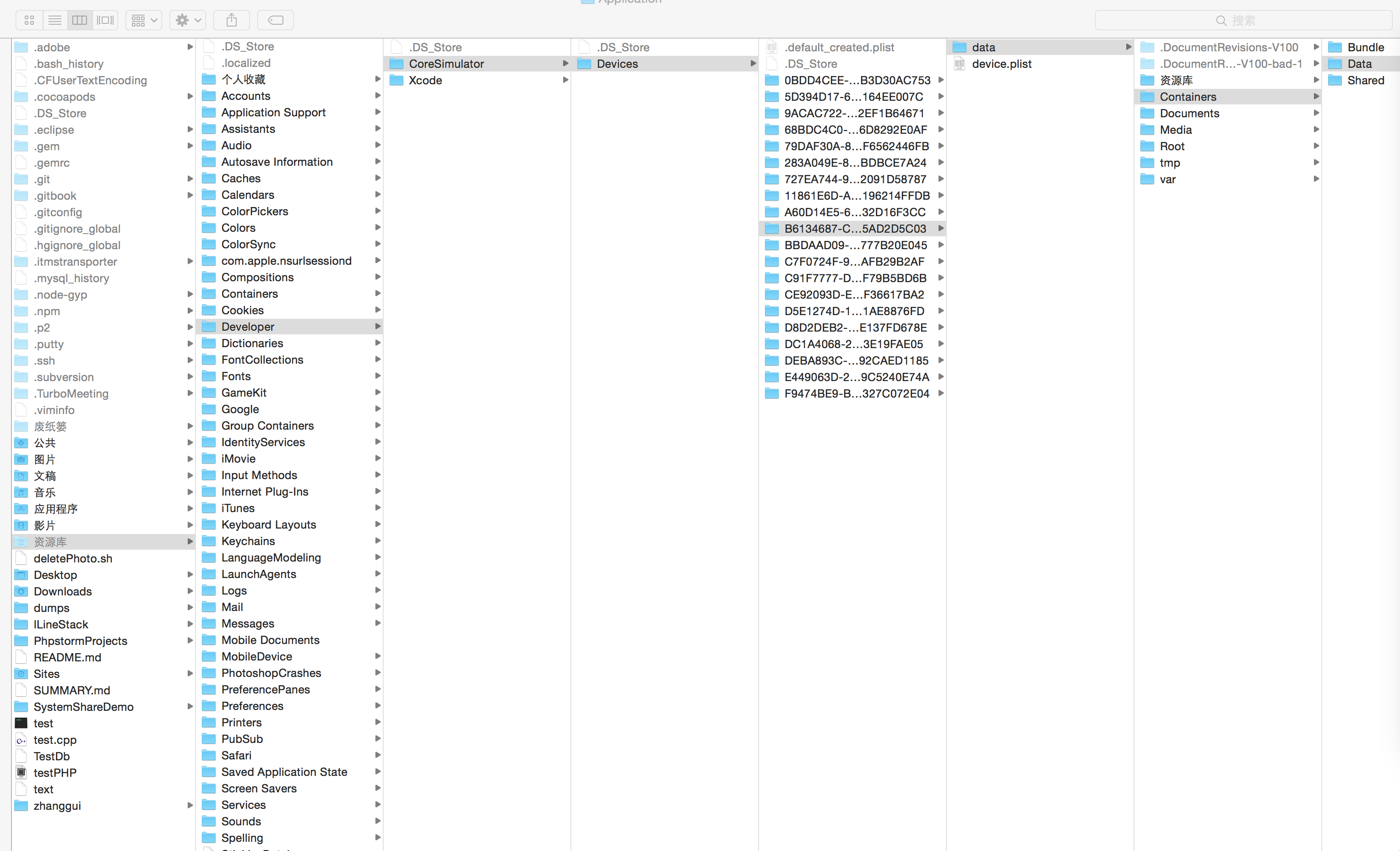
看看苹果的沙盒目录:
再附一张苹果官方的图
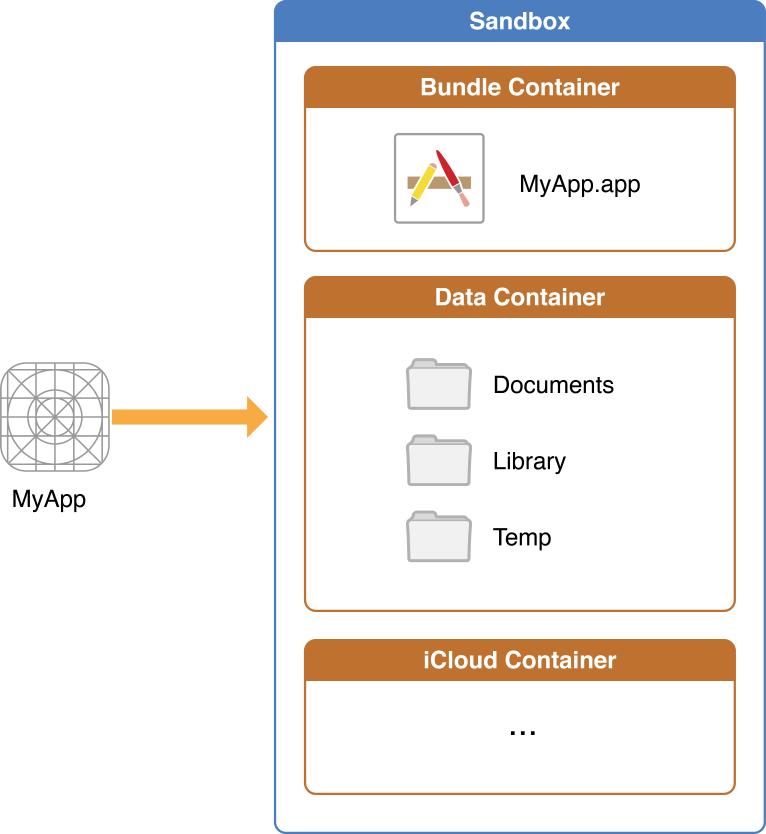
一个iOS app操作都是在自己的沙盒中进行的。
首先:
Deveices,里面是各种的模拟器设备。
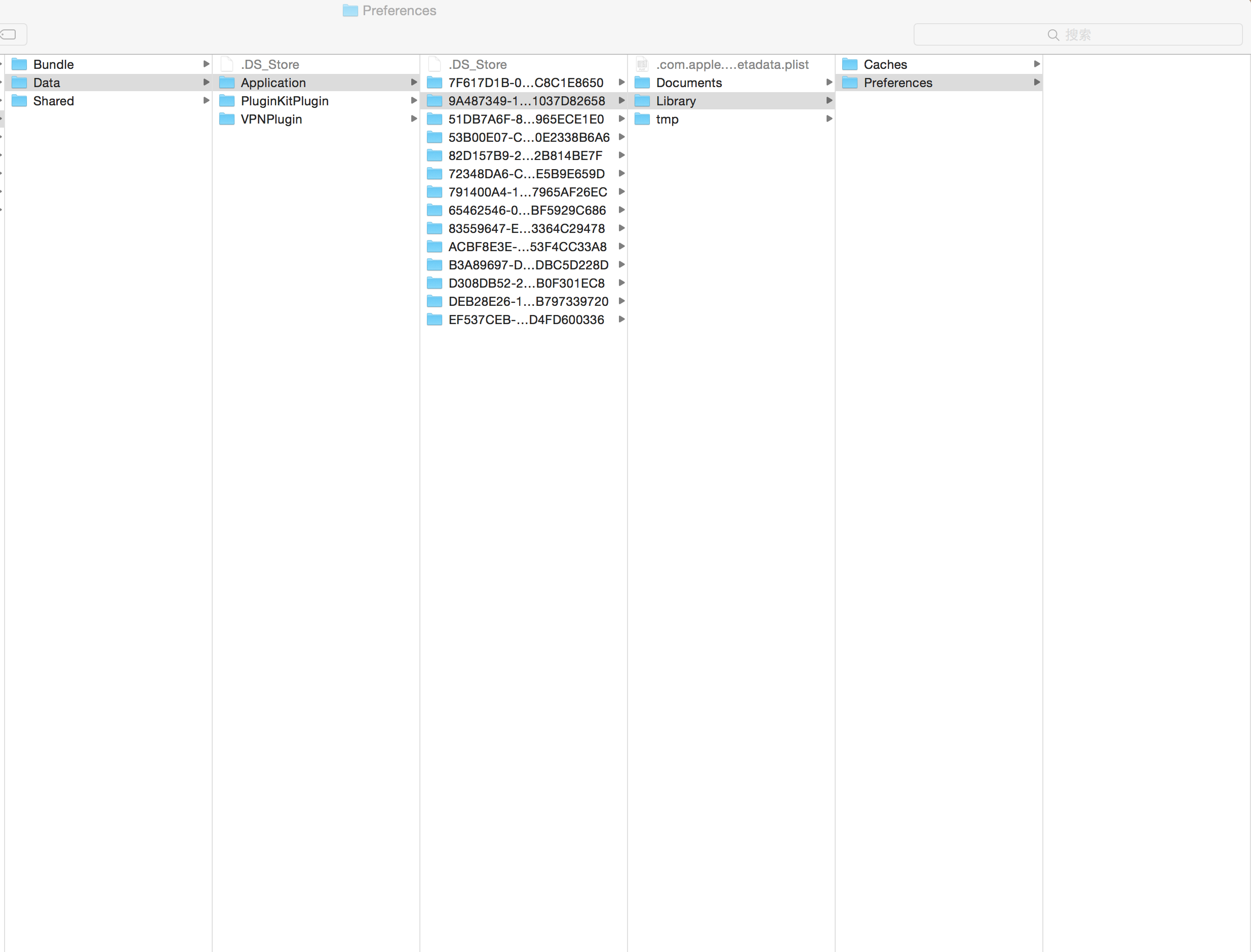
然后随便找一个模拟器设备。里面的data是里面的数据。然后Container里面Data中有一个Application就是该设备的安装软件。
我们可以看到里面有好多个(就算我们Reset Content and Settings,也会有。因为里面有设备自带的软件,例如通讯录,地图等。)。
随便打开一个就可以看到里面某个程序包括三个目录:
Documents
Library:又包括Caches和Preferences
temp
其中的
Documents只有用户生成的文件、其他的数据以及程序程序不能创建的文件,这里的数据通过iCloud自动备份。我们录制的音频和拍照的图片都可以放到这里。
Library:可以重新下载或者重新生成的数据应该保存在Library的caches目录中。这里用于盛放缓存。
tmp:是临时使用的数据。iCloud不会自动备份这些文件,这些数据使用完后要随时删除,避免占用用户设备空间。
- (NSString *)documentDirectory {

    NSArray *paths = NSSearchPathForDirectoriesInDomains(NSDocumentDirectory, NSUserDomainMask, YES);

    return [paths objectAtIndex:];

}
通过上面这个方法可以得到:
/Users/zhanggui/Library/Developer/CoreSimulator/Devices/B6134687-CC10-40DE-BD9D-A2E5AD2D5C03/data/Containers/Data/Application/--481D-B8CB-B25EB4B787E2/Documents
也就是Documents的路径.
还可以得到通过下面的方法:
NSString *s = NSHomeDirectory();
得到如下结果:
/Users/zhanggui/Library/Developer/CoreSimulator/Devices/B6134687-CC10-40DE-BD9D-A2E5AD2D5C03/data/Containers/Data/Application/08A6D627--48B4-8AF8-A1ED361DC9D6
故名思议,我们通过NSHomeDirectory得到了该安装软件的目录。(里面就包括Documents/Library/temp)
苹果官方介绍的是返回用户的或者应用程序的家目录,依赖于平台。
再来看一下如何取得Caches目录路径的方法:
NSString *s = [NSSearchPathForDirectoriesInDomains(NSCachesDirectory, NSUserDomainMask, YES) objectAtIndex:];
返回结果:
/Users/zhanggui/Library/Developer/CoreSimulator/Devices/B6134687-CC10-40DE-BD9D-A2E5AD2D5C03/data/Containers/Data/Application/DB647E93-5F05-4B7B-A8E9-F6F01DD2586B/Library/Caches
最后看一下如何获取tmp目录:
NSString *s = NSTemporaryDirectory();
返回结果:
/Users/zhanggui/Library/Developer/CoreSimulator/Devices/B6134687-CC10-40DE-BD9D-A2E5AD2D5C03/data/Containers/Data/Application/C7CA833E-8D20-480B-AB91-234A8F17336D/tmp/
--------------------------------------------------------------------大概就这么多吧--------------------------------------------------------------------
NO ,NO ,NO看看苹果官方的说明吧:
|
AppName |
This is the app’s bundle. This directory contains the app and all of its resources. You cannot write to this directory. To prevent tampering, the bundle directory is signed at installation time. Writing to this directory changes the signature and prevents your app from launching. You can, however, gain read-only access to any resources stored in the apps bundle. For more information, see theResource Programming Guide The contents of this directory are not backed up by iTunes. However, iTunes does perform an initial sync of any apps purchased from the App Store. |
|
|
Use this directory to store user-generated content. The contents of this directory can be made available to the user through file sharing; therefore, his directory should only contain files that you may wish to expose to the user. The contents of this directory are backed up by iTunes. |
|
|
Use this directory to access files that your app was asked to open by outside entities. Specifically, the Mail program places email attachments associated with your app in this directory. Document interaction controllers may also place files in it. Your app can read and delete files in this directory but cannot create new files or write to existing files. If the user tries to edit a file in this directory, your app must silently move it out of the directory before making any changes. The contents of this directory are backed up by iTunes. |
|
|
This is the top-level directory for any files that are not user data files. You typically put files in one of several standard subdirectories. iOS apps commonly use the Use the The contents of the For additional information about the Library directory and its commonly used subdirectories, see The Library Directory Stores App-Specific Files. |
|
|
Use this directory to write temporary files that do not need to persist between launches of your app. Your app should remove files from this directory when they are no longer needed; however, the system may purge this directory when your app is not running. The contents of this directory are not backed up by iTunes. |
英语好的大神可以看一下。不好的飘过,,,,
(2017年6月16日上午10:15更新)
近日有位开发者咨询了一个问题:将NSUserDefaults的plist删除之后再次打开app不会自动生成plist的问题。经过测试,苹果的NSUserDefaults存储数据是在Library--->Perference里面存储的,并且名字为:com.xxxx.xxxx.plist.该文件可以(开发过程中)直接被删除(通过iExplorer)。但是删除之后再次打开app是不会自动生成的,除非你重启了手机(并打开app)或者重新安装了app。这个应该是苹果的机制。而且重新生成的plist是不会包含你原来在里面存储的数据。
从AppStore上下载的程序我用工具无法查看到它的沙盒,所以也无从下手删除了。
iOS沙盒简单介绍的更多相关文章
- iOS 阶段学习第25天笔记(iOS沙盒机制介绍)
iOS学习(OC语言)知识点整理 一.iOS沙盒机制介绍 1)概念: 每个ios应用都有自己的应用沙盒,应用沙盒就是文件系统目录,与其他应用放入文件 系统隔离,ios系统不允许访问 其他应用的应用沙盒 ...
- iOS沙盒机制介绍,Block 的介绍
一.iOS沙盒机制介绍 (转载) 1)概念:每个ios应用都有自己的应用沙盒,应用沙盒就是文件系统目录,与其他应用放入文件 系统隔离,ios系统不允许访问 其他应用的应用沙盒,但在ios8中已经开放访 ...
- IOS 学习之 iOS沙盒(sandbox) 介绍 沙盒机制 文件操作(一)
1.iOS沙盒机制 iOS应用程序只能在为该改程序创建的文件系统中读取文件,不可以去其它地方访问,此区域被成为沙盒,所以所有的非代码文件都要保存在此,例如图像,图标,声音,映像,属性列表,文本文件等. ...
- iOS沙盒文件目录介绍
1.APP沙盒目录结构简介 首先奉上苹果官方文档: https://developer.apple.com/library/archive/documentation/FileManagement/C ...
- iOS沙盒机制介绍
一.沙盒机制 沙盒的概念:沙盒是每一个iOS应用程序都会自动创建的一个文件系统目录(文件夹),而且沙盒还具有独立.封闭.安全的特点. 沙盒机制 iOS中的沙盒不仅仅是一个文件目录,TA其实更是一种安全 ...
- iOS 沙盒目录结构介绍
iOS系统中,每个应用都有自己的沙盒,且应用只能访问其对应的沙盒目录下面的文件.当然,在用户授权的情况下,应用也可以访问其他目录下面的文件.比如,用户授权情况下,应用可以访问相册.通讯录.在开发中,经 ...
- iOS 沙盒(sandbox)机制和文件操作
本文参看了 http://www.uml.org.cn/mobiledev/201209211.asp#1 这篇文章中的介绍,尊重原著. 1.IOS沙盒机制 IOS应用程序只能在本应用程序中创建的文件 ...
- IOS学习之IOS沙盒(sandbox)机制和文件操作
IOS学习之IOS沙盒(sandbox)机制和文件操作(一) 1.IOS沙盒机制 IOS应用程序只能在为该改程序创建的文件系统中读取文件,不可以去其它地方访问,此区域被成为沙盒,所以所有的非代码文件都 ...
- IOS沙盒(sandbox)机制和文件操作
IOS学习之IOS沙盒(sandbox)机制和文件操作 作者:totogo2010 ,发布于2012-9-21,来源:CSDN 目录: IOS学习之IOS沙盒(sandbox)机制和文件操作( ...
随机推荐
- 【目录】C#操作Excel组件Spire.XLS系列文章目录
本博客所有文章分类的总目录链接:http://www.cnblogs.com/asxinyu/p/4288836.html 1.C#操作Excel组件Spire.XLS文章目录 1.[原创].NET读 ...
- Oracle 11g 安全加固
1.安全加固的检查方向 2.安全加固检查safeCheck.sh 3.安全加固执行safeExec.sh 1.安全加固的检查方向 1.1.sysdba用户远程登录限制(查看Oracle登录认证方式) ...
- HTML5 新特性总结
1.使用autocomplete 自动完成必须给input 加上name. 2.SVG图形代码 复制https://developer.mozilla.org/zh-CN/docs/Web/SVG/E ...
- java高级---->Java动态代理的原理
Java动态代理机制的出现,使得 Java 开发人员不用手工编写代理类,只要简单地指定一组接口及委托类对象,便能动态地获得代理类.代理类会负责将所有的方法调用分派到委托对象上反射执行,在分派执行的过程 ...
- TCP/IP协议(一)
TCP/IP是Transmission Control Protocol/Internet Protocol的简写,中译名为传输控制协议/因特网互联协议,又名网络通讯协议,是Internet最基本的协 ...
- HTML解析类 ,让你不使用正则也能轻松获取HTML相关元素 -C# .NET
功能: 1.轻松获取指元素HTML元素. 2.可以根据属性标签进行筛选 3.返回的都是Llist强类型无需转换 用过XElement的都知道 用来解析XML非常的方便,但是对于HTML的格式多样化实在 ...
- iOS性能优化之内存管理:Analyze、Leaks、Allocations的使用和案例代码
最近接了个小任务,和公司的iOS小伙伴们分享下instruments的具体使用,于是有了这篇博客...性能优化是一个很大的话题,这里讨论的主要是内存泄露部分. 一. 一些相关概念 很多人应该比较了解这 ...
- 透过WebGL 3D看动画Easing函数本质
50年前的这个月诞生了BASIC这门计算机语言,回想起自己喜欢上图形界面这行,还得归功于当年在win98下用QBASIC照葫芦画瓢敲了一段绘制奥运五环的代码,当带色彩的奥运五环呈现在自己面前时我已知道 ...
- 程序代码记Log
private static object s_lock = new object(); public static void TraceLog(string message, string logF ...
- SQL年月日方面的查询信息
这是计算一个月第一天的SQL 脚本: SELECT DATEADD(mm, DATEDIFF(mm,0,getdate()), 0) --当月的第一天 SELECT DATEADD(mm, DAT ...