
PullToRefresh 下拉刷新的样式修改
资源文件结构图,
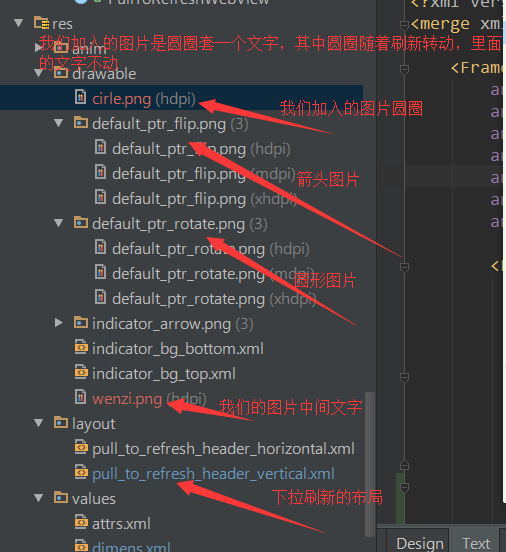
先看看下拉刷新头的布局,
<?xml version="1.0" encoding="utf-8"?>

<merge xmlns:android="http://schemas.android.com/apk/res/android" >

//我们在此处改变framelayout的padding值,可以控制图片跟文字的距离

    <FrameLayout

        android:id="@+id/fl_inner"

        android:layout_width="fill_parent"

        android:layout_height="wrap_content"

        android:paddingBottom="@dimen/header_footer_top_bottom_padding"

        android:paddingLeft="@dimen/header_footer_left_right_padding"

        android:paddingRight="@dimen/header_footer_left_right_padding"

        android:paddingTop="@dimen/header_footer_top_bottom_padding" >

        <FrameLayout

            android:layout_width="wrap_content"

            android:layout_height="wrap_content"

            android:layout_gravity="left|center_vertical" >

//使用这个imageview的id查询该控件使用的地方,可以发现 转动的图片就是设置在这个控件上。

            <ImageView

                android:id="@+id/pull_to_refresh_image"

                android:layout_width="wrap_content"

                android:layout_height="wrap_content"

                android:layout_gravity="center" />

            <ImageView   //这个是我们加的,放置固定的文字。由于是帧布局所以会跟上面的转动图标重叠显示,达到我们的效果。

                android:layout_width="wrap_content"

                android:layout_height="wrap_content"

                android:layout_gravity="center"

                android:src="@drawable/wenzi"

                />

//这个是android系统的圆型进度条,也会重叠到上面,默认是gone,可能就是为了迎合某些人需要使用系统原生进度条。具体用途没深究,望指正

            <ProgressBar

                android:id="@+id/pull_to_refresh_progress"

                style="?android:attr/progressBarStyleSmall"

                android:layout_width="wrap_content"

                android:layout_height="wrap_content"

                android:layout_gravity="center"

                android:indeterminate="true"

                android:visibility="gone"

                />

        </FrameLayout>

//以下为垂直显示两行文字信息,第一行是加粗的,应该是正在刷新的提示,第二个是默认gone,可用于显示时间等扩展信息

        <LinearLayout

            android:layout_width="wrap_content"

            android:layout_height="wrap_content"

            android:layout_gravity="center"

            android:gravity="center_horizontal"

            android:orientation="vertical" >

            <TextView

                android:id="@+id/pull_to_refresh_text"

                android:layout_width="wrap_content"

                android:layout_height="wrap_content"

                android:singleLine="true"

                android:textAppearance="?android:attr/textAppearance"

                android:textStyle="bold" />

            <TextView

                android:id="@+id/pull_to_refresh_sub_text"

                android:layout_width="wrap_content"

                android:layout_height="wrap_content"

                android:singleLine="true"

                android:textAppearance="?android:attr/textAppearanceSmall"

                android:visibility="gone" />

        </LinearLayout>

    </FrameLayout>

</merge>
来看看在怎么设置转动的图片,转动的图片为了扩展方法,原本就提供了可以在外面设置的属性,方式如下:
在我们自己项目中需要用到pulltofresh的布局里加入命名空间
xmlns:ptr="http://schemas.android.com/apk/res-auto"
然后再控件布局中直接添加:
ptr:ptrDrawable="@drawable/cirle"   //circle就是我们自己的图片
完整代码如下:
<LinearLayout

    xmlns:android="http://schemas.android.com/apk/res/android"

    xmlns:ptr="http://schemas.android.com/apk/res-auto"   //加入命名空间

    android:layout_width="match_parent"

    android:layout_height="match_parent"

    android:background="@color/bg_color"

    android:orientation="vertical">

    <com.handmark.pulltorefresh.library.PullToRefreshScrollView

        android:id="@+id/pull_refresh_scrollview"

        android:layout_width="match_parent"

        android:layout_height="match_parent"

        ptr:ptrDrawable="@drawable/cirle"   //设置我们需要转动的图片

        >

            <LinearLayout

                android:layout_width="match_parent"

                android:layout_height="wrap_content"

                android:orientation="vertical">
           //此处省略很多行。。。。
           </LinearLayout>

    </com.handmark.pulltorefresh.library.PullToRefreshScrollView>

</LinearLayout>
下来说说显示上次刷新的时间,上面有提到过下拉刷新布局中有一个textview是默认gone状态,一直没用,猜测可以用于显示上次刷新的时间等信息
在此介绍如何把时间显示在这个textview中,关于该textview的显示与隐藏系统已经判断,有值则显示,无值则隐藏。
查相关逻辑的方式,选中该textview的id 查询此id在那些地方用过,android studio使用 ctrl+alt+F7查看
//首先会跳转到LoadingLayout这个类中,里面主要判断它的隐藏和显示

关键代码:

private void setSubHeaderText(CharSequence label) {

        if (null != mSubHeaderText) {

            if (TextUtils.isEmpty(label)) {

                mSubHeaderText.setVisibility(View.GONE);

            } else {

                mSubHeaderText.setText(label);

可以看到使用了setSubHeaderText()方法,该方法中给textveiw设置了文字label,然后查询这个方法在那些地方使用,首先找到该类中的以下方法

@Override

    public void setLastUpdatedLabel(CharSequence label) {

        setSubHeaderText(label);

    }

接着查询setLastUpdatedLabel()会在LoadingLayoutProxy类中找到该方法,
我们只要在代码中能获取到这个类,就可以给这个textview设置文字显示,接着我们可以在PullToRefreshBase类中找到以下代码:
@Override
public final ILoadingLayout getLoadingLayoutProxy() {
   return getLoadingLayoutProxy(true, true);
}
而我们代码中使用的pulltorefresh正是此类的子类,所以我们的代码中可以用以下方式:
private void setListener() {
    final ILoadingLayout loadingLayoutProxy = mPullRefreshScrollView.getLoadingLayoutProxy(true, true);//获取对象
    mPullRefreshScrollView.setOnRefreshListener(new PullToRefreshBase.OnRefreshListener<ScrollView>() {

        @Override
        public void onRefresh(PullToRefreshBase<ScrollView> refreshView) {
            if(preTime==null){
                loadingLayoutProxy.setLastUpdatedLabel("");
            }else{
                loadingLayoutProxy.setLastUpdatedLabel(preTime);  //设置时间
            }
           long time =System.currentTimeMillis();
            SimpleDateFormat format=new SimpleDateFormat("yyyy-MM-dd HH:mm:ss");
            Date d1=new Date(time);
             preTime=format.format(d1);
            new GetDataTask().execute();
        }

    });
PullToRefresh 下拉刷新的样式修改的更多相关文章
- Android-设置PullToRefresh下拉刷新样式
以下是开源控件PullToRefresh的自定义样式属性: <?xml version="1.0" encoding="utf-8"?> <r ...
- .Net 转战 Android 4.4 日常笔记(10)--PullToRefresh下拉刷新使用
下拉刷新很多地方都用到了,新浪微博,微信,百度新闻 这里我们使用一个开源的库叫:PullToRefresh 开源地址:https://github.com/chenyoca/pull-to-refre ...
- PullToRefresh下拉刷新 加载更多 详解 +示例
常用设置 项目地址:https://github.com/chrisbanes/Android-PullToRefresh a. 设置刷新模式 如果Mode设置成Mode.PULL_FROM_STAR ...
- pullToRefresh下拉刷新上拉加载
PullToRefresh 是一个第三方的工程. 之前的自定义下拉刷新控件貌似不太好用,于是网上找了这个. 参考:http://www.cnblogs.com/summers/p/4343964.ht ...
- Android PullToRefresh下拉刷新控件的简单使用
PullToRefresh这个开源库早就听说了,不过一直没用过.作为一个经典的的开源库,我觉得还是有必要认识一下. 打开github上的网址:https://github.com/chrisbanes ...
- Android PullToRefresh 下拉刷新,上拉很多其它,支持ScrollView,ListView,可方便拓展GridView,WebView等
在写着东西之前.从网上找到非常多这方面的源代码,可是基本没有找到惬意的.包含在GitHub上的比較有名的Android-PullToRefresh-master.思来想去还是自己写吧.当然当中借鉴了一 ...
- Android精品课程—PullToRefresh 下拉刷新
http://edu.csdn.net/course/detail/1716 TableLayout http://edu.csdn.net/course/detail/2262 Android开发之 ...
- PullToRefresh下拉刷新
https://github.com/chrisbanes/Android-PullToRefresh
- Android中实现下拉刷新
需求:项目中的消息列表界面要求实现类似sina微博的下拉刷新: 思路:一般的消息列表为ListView类型,将list加载到adapter中,再将adapter加载到 ListView中,从而实现消息 ...
随机推荐
- cocos2dx 3.x(加载cocostudio进度条)
// // MyLoagingScene.hpp // My // // Created by work on 16/10/13. // // #ifndef MyLoagingScene_hpp # ...
- ali面试点滴
1.喜欢问原理 最好问2句 回答8句 把相关的知识也加上 最好说一下优势与区别 2.sql优化 分库 分表 ssl https 3.jvm.高并发(事务.原子操作).设计模式(一定要烂熟于心) 4.访 ...
- java 笔记(1)-—— JVM基础,内存数据,内存释放,垃圾回收,即时编译技术JIT,高精度类型
1.java中5个存放数据的地方: (1).寄存器(Registers):位于CPU内部,是速度最快的存储区,但是数量和容量有限.在java中不能直接操作寄存器. (2).栈(Stack):栈位于通用 ...
- 续【C# 以管理员方式启动Winform,进而使用管理员控制Windows Service】
前提:在我们的域环境下,给分配了管理员级别两个账号(user0,user1). 需求:只允许一个账户运行进程"WindowsFormsApplication1": 1,)当已经运行 ...
- GTA项目 二, JSON接口开放跨域访问
public class CORSAttribute : ActionFilterAttribute { public string Domains { get; set; } public CORS ...
- 分布式领域CAP理论
分布式领域CAP理论,Consistency(一致性), 数据一致更新,所有数据变动都是同步的Availability(可用性), 好的响应性能Partition tolerance(分区容错性) 可 ...
- Leetcode: Number of Islands II && Summary of Union Find
A 2d grid map of m rows and n columns is initially filled with water. We may perform an addLand oper ...
- 【Origin】jquery.barddialog.js
/// <reference path="jquery-2.1.1.min.js" /> /** * @license jquery.bardDialog 1.0.0 ...
- ligerui_ligerTree_001_第一个“树”效果
折叠.展开.有复选框.没有复选框: 源码地址:http://download.csdn.net/detail/poiuy1991719/8571255 效果图: <%@ page languag ...
- haskell笔记1
haskell platform下载:https://www.haskell.org/platform/ 进入haskell控制台,终端输入 $ ghci 编译文件 :l file.hs 数组操作 & ...