
eclipse的ssh框架详解
1、创建项目
2、导包
1.1:导入Struts2可能用到的包:
先从网站下载
再这里找出 ,打开它把WEB-INF/lib/下的所有包导入项目
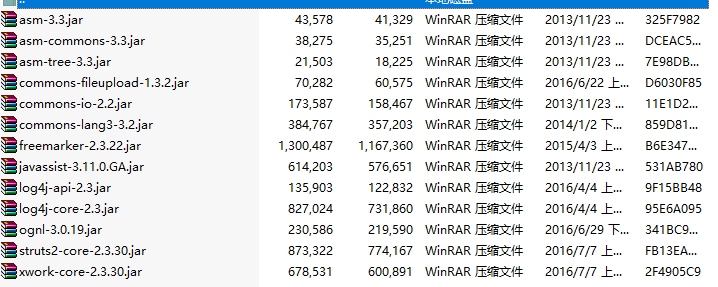
1.2:导入spring可能用到的包:
先从网站下载
再打开把
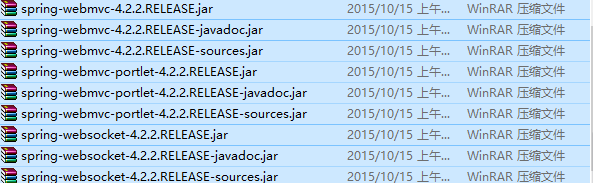 和所有以"javadoc.jar"、"sources.jar"结尾的jar包如
 都不用管,其余的都导入项目中
要想Struts2与spring整合,还得导入 这两个jar包
这两个jar包可以自己在百度搜索找到或者从的 中WEB-INF/lib/下找
1.3:导入hibernate可能用到的包:
先从网站下载
把required目录下的包都导入项目中

还有一个数据库池的包,如果是c3p0,那么可以在的\lib\optional\c3p0找,
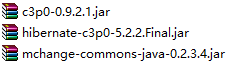
如果是dbcp,那么你可以上网下载或在Struts2的包下也有(自己找)

最后别忘了导入你对应你数据库的包哟
2、写web.xml配置文件加入Struts2(过滤器)和spring(监听器)
这份要看你的版本(一般是从空白项目中把头部信息拷贝过来的)
<web-app xmlns:xsi="http://www.w3.org/2001/XMLSchema-instance"
xmlns="http://xmlns.jcp.org/xml/ns/javaee"
xsi:schemaLocation="http://xmlns.jcp.org/xml/ns/javaee http://xmlns.jcp.org/xml/ns/javaee/web-app_3_1.xsd"
id="WebApp_ID" version="3.1">
<!-- struts过滤器的开始 -->
<filter>
<filter-name>struts2</filter-name>
<filter-class>org.apache.struts2.dispatcher.ng.filter.StrutsPrepareAndExecuteFilter</filter-class>
</filter>
<filter-mapping>
<filter-name>struts2</filter-name>
<url-pattern>/*</url-pattern>
</filter-mapping>
<!-- spring的监听器配置开始 -->
<context-param>
<param-name>contextConfigLocation</param-name>
<param-value>classpath:applicationContext.xml</param-value>
</context-param>
<listener>
<listener-class>org.springframework.web.context.ContextLoaderListener</listener-class>
</listener>
3、写struts.xml配置文件
头部信息
<!DOCTYPE struts PUBLIC
"-//Apache Software Foundation//DTD Struts Configuration 2.3//EN"
"http://struts.apache.org/dtds/struts-2.3.dtd">
有些老版本若想spring的配置文件和Struts2的配置文件整合要加上一句
<constant name="struts.objectFactory" value="spring" />
然后写action类一般都要继承 ActionSupport 如下:


接着写action的配置信息
4、写appliCation.xml配置文件
写从找一份appliCation.xml模板文件,也就是写下面这堆东西
<beans xmlns="http://www.springframework.org/schema/beans"
xmlns:xsi="http://www.w3.org/2001/XMLSchema-instance"
xmlns:p="http://www.springframework.org/schema/p"
xmlns:aop="http://www.springframework.org/schema/aop"
xmlns:context="http://www.springframework.org/schema/context"
xmlns:jee="http://www.springframework.org/schema/jee"
xmlns:tx="http://www.springframework.org/schema/tx"
xsi:schemaLocation="
http://www.springframework.org/schema/aop http://www.springframework.org/schema/aop/spring-aop-4.2.xsd
http://www.springframework.org/schema/beans http://www.springframework.org/schema/beans/spring-beans-4.2.xsd
http://www.springframework.org/schema/context http://www.springframework.org/schema/context/spring-context-4.2.xsd
http://www.springframework.org/schema/jee http://www.springframework.org/schema/jee/spring-jee-4.2.xsd
http://www.springframework.org/schema/tx http://www.springframework.org/schema/tx/spring-tx-4.2.xsd">
接着写你的<bean>如下

接着写数据库池dbcp或者c3p0与sessionFactory(一般都用c3p0而不用dbcp)
要看源码的朋友可以去看以下的类文件路径
sessionFactory的类文件路径spring-orm-4.2.2.RELEASE.jar/org.springframework.orm.hibernate5.LocalSessionFactoryBean.class
c3p0的类文件路径hibernate-release-5.2.2.Final\lib\optional\c3p0\c3p0-0.9.2.1.jarcom.mchange.v2.c3p0.ComboPooledDataSource.class
dbcp的类文件路径F:\二学期的\ssh\s2sh的库\dbcp\commons-dbcp-1.4.jar\org.apache.commons.dbcp.BasicDataSource.class
接着下面是一份关于数据库信息的配置文件:(之所以要这样写是为了以后方面维护的时候误删了重要的东西,所有要区分开)
注意:要想能读取这份配置文件,那么必须在applicationContext.xml里面加一句话



下面这是c3p0的配置文件

下面这是dbcp的配置文件(一般不用它,所有就不多说了)

下面这是sessionFactory的配置文件
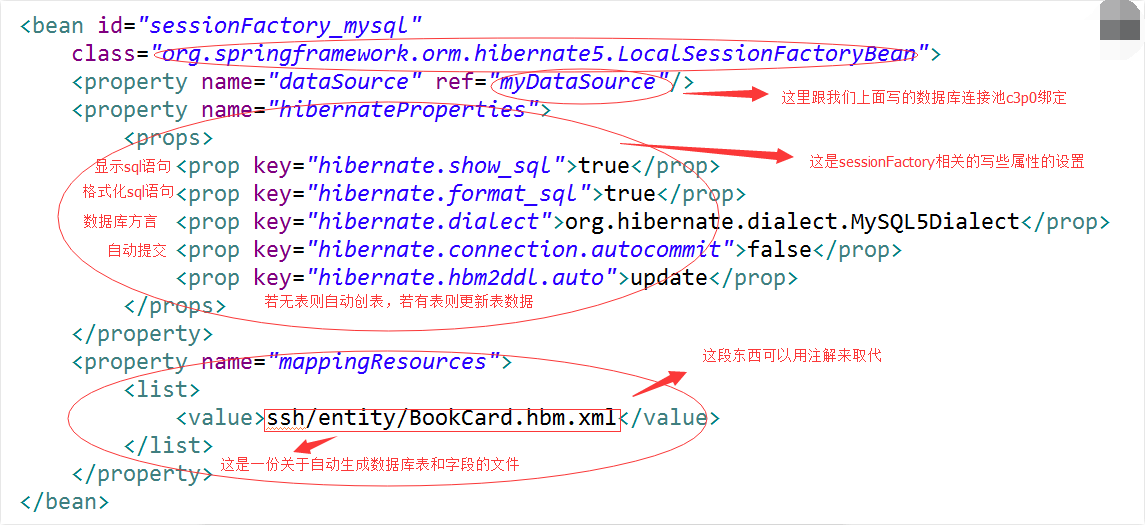
下面也给大家看看这份配置文件吧
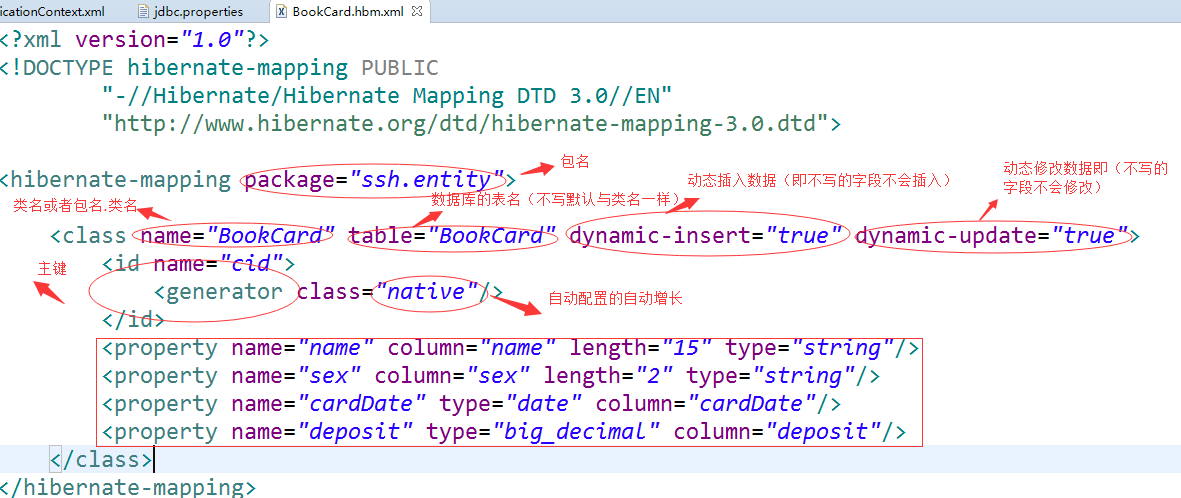
sessionFactory都做完之后,我们就那些要用到它的类注入了:比如说daoImpl包下的类,serviceImpl包下的类等等都有可以用到它
当然还可以加个事务管理器(要加相关的一些jar包)
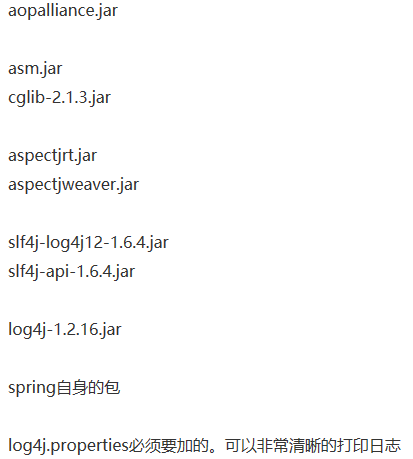
首先实例化一个事务管理器

然后建立一个通知
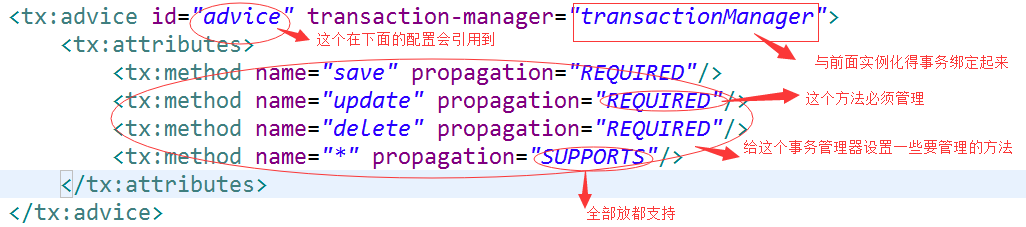
最后给它配一个切面表达式

做完这些,一个ssh框架就基本完成了,不过为了规范,还要把对应的包建好,有助于你写代码。如:
 这是最基本的包(小项目可以用这样分)
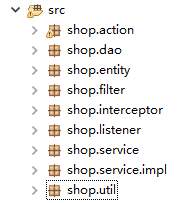 大点项目一般就分得更细了,有助于我们阅读
eclipse的ssh框架详解的更多相关文章
- eclipse Indigo搭建SSH框架详解
SSH框架是最常用的框架之一,在搭建SSH框架的时候总有人遇到这样,那样的问题.下面我介绍一下SSH框架搭建的全过程. 第一步:准备工作. 下载好eclipse,Struts2,Spring,Hi ...
- [JavaEE] SSH框架笔记_eclipse搭建SSH框架详解
SSH框架是最常用的框架之一,在搭建SSH框架的时候总有人遇到这样,那样的问题.下面我介绍一下SSH框架搭建的全过程. 第一步:准备工作. 下载好eclipse,Struts2,Spring,Hibe ...
- java SSH框架详解(面试和学习都是最好的收藏资料)
Java—SSH(MVC)1. 谈谈你mvc的理解MVC是Model—View—Controler的简称.即模型—视图—控制器.MVC是一种设计模式,它强制性的把应用程序的输入.处理和输出分开.MVC ...
- SSH框架详解
1.什么是ssh? SSH对应 struts spring hibernate struts 采用MVC模式,主要是作用于用户交互 spring 采用IOC和AOP~作用比较抽象,是用于项目的松耦合 ...
- jQuery Validate验证框架详解
转自:http://www.cnblogs.com/linjiqin/p/3431835.html jQuery校验官网地址:http://bassistance.de/jquery-plugins/ ...
- mina框架详解
转:http://blog.csdn.net/w13770269691/article/details/8614584 mina框架详解 分类: web2013-02-26 17:13 12651人 ...
- lombok+slf4j+logback SLF4J和Logback日志框架详解
maven 包依赖 <dependency> <groupId>org.projectlombok</groupId> <artifactId>lomb ...
- [Cocoa]深入浅出 Cocoa 之 Core Data(1)- 框架详解
Core data 是 Cocoa 中处理数据,绑定数据的关键特性,其重要性不言而喻,但也比较复杂.Core Data 相关的类比较多,初学者往往不太容易弄懂.计划用三个教程来讲解这一部分: 框架详解 ...
- iOS 开发之照片框架详解(2)
一. 概况 本文接着 iOS 开发之照片框架详解,侧重介绍在前文中简单介绍过的 PhotoKit 及其与 ALAssetLibrary 的差异,以及如何基于 PhotoKit 与 AlAssetLib ...
随机推荐
- maven docker 操作
1. 使用dokerfile 进行构建 创建dockerfile 2. maven 插件 <plugin> <groupId>com.spotify</groupId&g ...
- MySQL物理文件组成
日志文件 错误日志:Error Log 错误日志记录了MySQL运行过程中所有较为严重的警告和错误信息,以及MySQL Server每次启动和关闭的详细信息.在默认情况下,系统记录错误日志的功能是关闭 ...
- 2W+汉字转拼音JS字库(UTF-8生僻字等通用无乱码)
测试页面 <html> <head> <script Language="JavaScript" src="pinyin.js"& ...
- 【mysql元数据库】使用information_schema.tables查询数据库和数据表信息
概述 对于mysql和Infobright等数据库,information_schema数据库中的表都是只读的,不能进行更新.删除和插入等操作,也不能加触发器,因为它们实际只是一个视图,不是基本表,没 ...
- ISurfaceOp 接口生成等高线
(1)ISurfaceOp.Contour 根据DEM生成等高线图层: private void button1_Click(object sender, EventArgs e) { ...
- 转:Tomcat启动过程中找不到JAVA_HOME JRE_HOME的解决方法
转自:http://blog.sina.com.cn/s/blog_61c006ea0100l1u6.html 原文: 在XP上明明已经安装了JDK1.5并设置好了JAVA_HOME,可偏偏Tomca ...
- RealtekRTL8111内建网卡-黑苹果之路
真是服了这神一样的黑苹果.好不容易配好显卡,登陆appstore却报“无法验证您的设备或电脑”,查了一圈,又说要配网卡为en0的,有说要在clover中配FIXLAN的,最准确的是网卡必须是内建(Bu ...
- finder文件目录跳转快捷键
finder文件目录跳转快捷键 command+shift+G
- openldap加密传输 nslcd
http://www.openldap.org/faq/data/cache/185.html https://www.ibm.com/developerworks/cn/linux/1312_zha ...
- Extract QQ from iPhone and analyze it
QQ is one of the most popular chat App in the world. Now let me show you how to extract QQ from iPho ...