
FFMPEG 入门
1. 下载网站:
https://ffmpeg.zeranoe.com/builds/
先后下载 Win32 Shared 和 Win32 Dev 两个版本,分别解压缩。
2. 用Visual Studio 创建项目,选择 “Create new project from existing Code files”
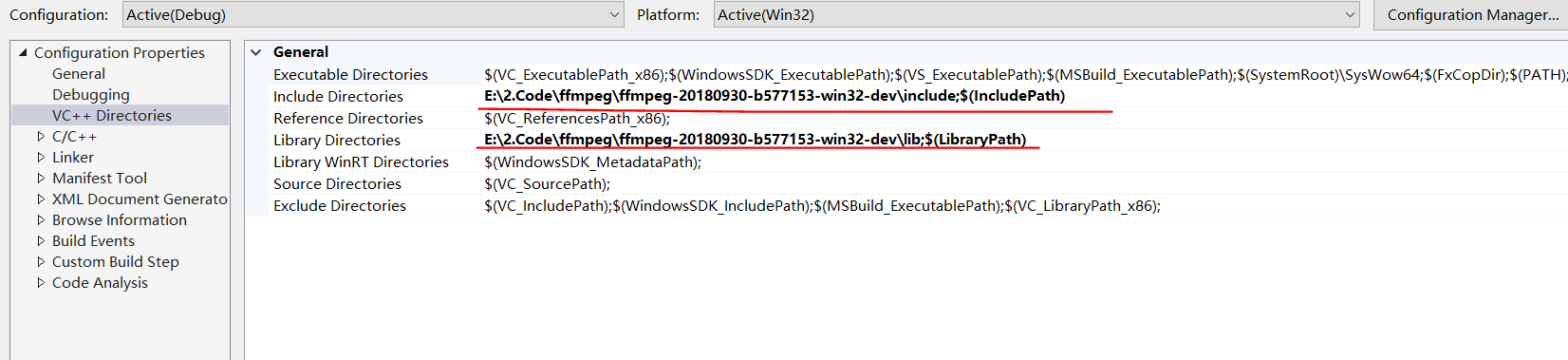
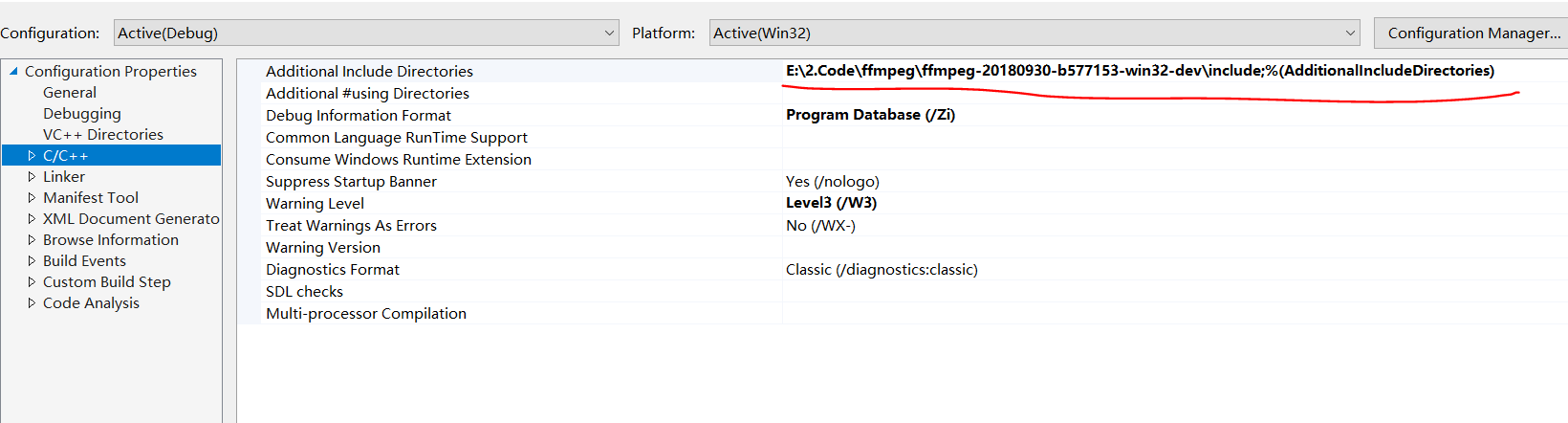
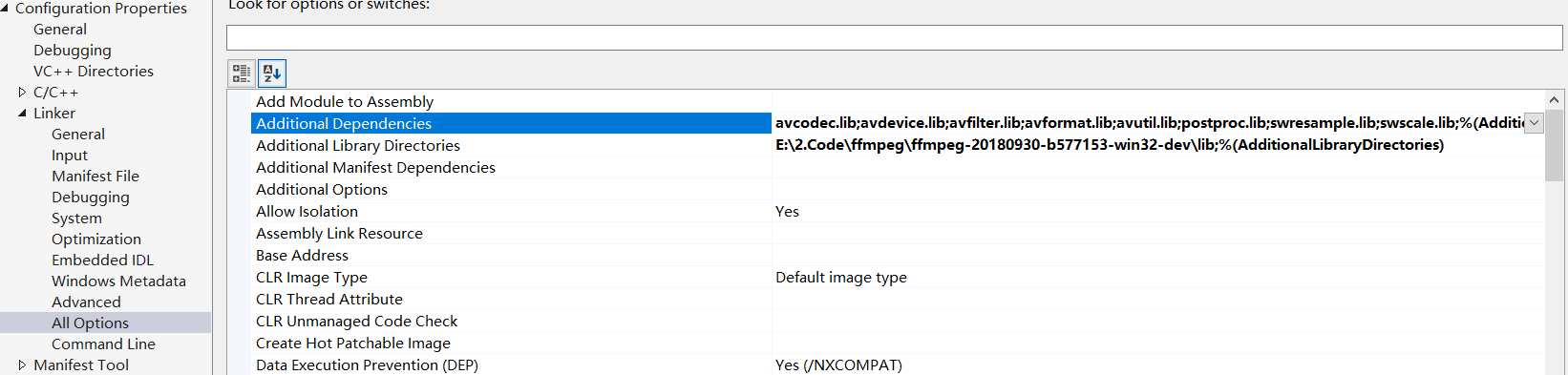
3. 设置 include path 和 library path, sample as follow,
记得把Shared里面的dll 拷贝到 debug目录。
 <?xml version="1.0" encoding="utf-8"?>

 <Project DefaultTargets="Build" ToolsVersion="15.0" xmlns="http://schemas.microsoft.com/developer/msbuild/2003">

   <ItemGroup Label="ProjectConfigurations">

     <ProjectConfiguration Include="Debug|Win32">

       <Configuration>Debug</Configuration>

       <Platform>Win32</Platform>

     </ProjectConfiguration>

     <ProjectConfiguration Include="Release|Win32">

       <Configuration>Release</Configuration>

       <Platform>Win32</Platform>

     </ProjectConfiguration>

     <ProjectConfiguration Include="Debug|x64">

       <Configuration>Debug</Configuration>

       <Platform>x64</Platform>

     </ProjectConfiguration>

     <ProjectConfiguration Include="Release|x64">

       <Configuration>Release</Configuration>

       <Platform>x64</Platform>

     </ProjectConfiguration>

   </ItemGroup>

   <PropertyGroup Label="Globals">

     <VCProjectVersion>15.0</VCProjectVersion>

     <ProjectGuid>{89E103CB-891F-49CF-A157-A1E806687913}</ProjectGuid>

     <Keyword>Win32Proj</Keyword>

     <WindowsTargetPlatformVersion>10.0.17134.0</WindowsTargetPlatformVersion>

   </PropertyGroup>

   <Import Project="$(VCTargetsPath)\Microsoft.Cpp.Default.props" />

   <PropertyGroup Condition="'$(Configuration)|$(Platform)'=='Debug|Win32'" Label="Configuration">

     <ConfigurationType>Application</ConfigurationType>

     <UseDebugLibraries>true</UseDebugLibraries>

     <PlatformToolset>v141</PlatformToolset>

   </PropertyGroup>

   <PropertyGroup Condition="'$(Configuration)|$(Platform)'=='Release|Win32'" Label="Configuration">

     <ConfigurationType>Application</ConfigurationType>

     <UseDebugLibraries>false</UseDebugLibraries>

     <PlatformToolset>v141</PlatformToolset>

   </PropertyGroup>

   <PropertyGroup Condition="'$(Configuration)|$(Platform)'=='Debug|x64'" Label="Configuration">

     <ConfigurationType>Application</ConfigurationType>

     <UseDebugLibraries>true</UseDebugLibraries>

     <PlatformToolset>v141</PlatformToolset>

   </PropertyGroup>

   <PropertyGroup Condition="'$(Configuration)|$(Platform)'=='Release|x64'" Label="Configuration">

     <ConfigurationType>Application</ConfigurationType>

     <UseDebugLibraries>false</UseDebugLibraries>

     <PlatformToolset>v141</PlatformToolset>

   </PropertyGroup>

   <Import Project="$(VCTargetsPath)\Microsoft.Cpp.props" />

   <ImportGroup Label="ExtensionSettings">

   </ImportGroup>

   <ImportGroup Label="Shared">

   </ImportGroup>

   <ImportGroup Label="PropertySheets" Condition="'$(Configuration)|$(Platform)'=='Debug|Win32'">

     <Import Project="$(UserRootDir)\Microsoft.Cpp.$(Platform).user.props" Condition="exists('$(UserRootDir)\Microsoft.Cpp.$(Platform).user.props')" Label="LocalAppDataPlatform" />

   </ImportGroup>

   <ImportGroup Label="PropertySheets" Condition="'$(Configuration)|$(Platform)'=='Release|Win32'">

     <Import Project="$(UserRootDir)\Microsoft.Cpp.$(Platform).user.props" Condition="exists('$(UserRootDir)\Microsoft.Cpp.$(Platform).user.props')" Label="LocalAppDataPlatform" />

   </ImportGroup>

   <ImportGroup Label="PropertySheets" Condition="'$(Configuration)|$(Platform)'=='Debug|x64'">

     <Import Project="$(UserRootDir)\Microsoft.Cpp.$(Platform).user.props" Condition="exists('$(UserRootDir)\Microsoft.Cpp.$(Platform).user.props')" Label="LocalAppDataPlatform" />

   </ImportGroup>

   <ImportGroup Label="PropertySheets" Condition="'$(Configuration)|$(Platform)'=='Release|x64'">

     <Import Project="$(UserRootDir)\Microsoft.Cpp.$(Platform).user.props" Condition="exists('$(UserRootDir)\Microsoft.Cpp.$(Platform).user.props')" Label="LocalAppDataPlatform" />

   </ImportGroup>

   <PropertyGroup Label="UserMacros" />

   <PropertyGroup Condition="'$(Configuration)|$(Platform)'=='Debug|Win32'">

     <LinkIncremental>true</LinkIncremental>

     <IncludePath>E:\2.Code\ffmpeg\ffmpeg-20180930-b577153-win32-dev\include;$(IncludePath)</IncludePath>

     <LibraryPath>E:\2.Code\ffmpeg\ffmpeg-20180930-b577153-win32-dev\lib;$(LibraryPath)</LibraryPath>

   </PropertyGroup>

   <PropertyGroup Condition="'$(Configuration)|$(Platform)'=='Release|Win32'">

     <LinkIncremental>true</LinkIncremental>

   </PropertyGroup>

   <ItemDefinitionGroup Condition="'$(Configuration)|$(Platform)'=='Debug|Win32'">

     <ClCompile>

       <PreprocessorDefinitions>WIN32;_DEBUG;_CONSOLE;%(PreprocessorDefinitions)</PreprocessorDefinitions>

       <RuntimeLibrary>MultiThreadedDebugDLL</RuntimeLibrary>

       <WarningLevel>Level3</WarningLevel>

       <DebugInformationFormat>ProgramDatabase</DebugInformationFormat>

       <Optimization>Disabled</Optimization>

       <AdditionalIncludeDirectories>E:\2.Code\ffmpeg\ffmpeg-20180930-b577153-win32-dev\include;%(AdditionalIncludeDirectories)</AdditionalIncludeDirectories>

     </ClCompile>

     <Link>

       <TargetMachine>MachineX86</TargetMachine>

       <GenerateDebugInformation>true</GenerateDebugInformation>

       <SubSystem>Console</SubSystem>

       <AdditionalLibraryDirectories>E:\2.Code\ffmpeg\ffmpeg-20180930-b577153-win32-dev\lib;%(AdditionalLibraryDirectories)</AdditionalLibraryDirectories>

       <AdditionalDependencies>avcodec.lib;avdevice.lib;avfilter.lib;avformat.lib;avutil.lib;postproc.lib;swresample.lib;swscale.lib;%(AdditionalDependencies)</AdditionalDependencies>

     </Link>

   </ItemDefinitionGroup>

   <ItemDefinitionGroup Condition="'$(Configuration)|$(Platform)'=='Release|Win32'">

     <ClCompile>

       <PreprocessorDefinitions>WIN32;NDEBUG;_CONSOLE;%(PreprocessorDefinitions)</PreprocessorDefinitions>

       <RuntimeLibrary>MultiThreadedDLL</RuntimeLibrary>

       <WarningLevel>Level3</WarningLevel>

       <DebugInformationFormat>ProgramDatabase</DebugInformationFormat>

     </ClCompile>

     <Link>

       <TargetMachine>MachineX86</TargetMachine>

       <GenerateDebugInformation>true</GenerateDebugInformation>

       <SubSystem>Console</SubSystem>

       <EnableCOMDATFolding>true</EnableCOMDATFolding>

       <OptimizeReferences>true</OptimizeReferences>

     </Link>

   </ItemDefinitionGroup>

   <ItemGroup>

     <ClCompile Include="..\examples\transcoding.c" />

   </ItemGroup>

   <Import Project="$(VCTargetsPath)\Microsoft.Cpp.targets" />

   <ImportGroup Label="ExtensionTargets">

   </ImportGroup>

 </Project>
Project
FFMPEG 入门的更多相关文章
- FFmpeg入门,简单播放器
一个偶然的机缘,好像要做直播相关的项目 为了筹备,前期做一些只是储备,于是开始学习ffmpeg 这是学习的第一课 做一个简单的播放器,播放视频画面帧 思路是,将视频文件解码,得到帧,然后使用定时器,1 ...
- FFmpeg 入门(7):Seeking
本文转自:FFmpeg 入门(7):Seeking | www.samirchen.com 处理 seek 命令 我们将为播放器添加 seek 的能力.这个过程中,我们会看到 av_seek_fram ...
- FFmpeg 入门(6):音频同步
本文转自:FFmpeg 入门(6):音频同步 | www.samirchen.com 音频同步 上一节我们做了将视频同步到音频时钟,这一节我们反过来,将音频同步到视频.首先,我们要实现一个视频时钟来跟 ...
- FFmpeg 入门(5):视频同步
本文转自:FFmpeg 入门(5):视频同步 | www.samirchen.com 视频如何同步 在之前的教程中,我们已经可以开始播放视频了,也已经可以开始播放音频了,但是视频和音频的播放还未同步, ...
- FFmpeg 入门(4):线程分治
本文转自:FFmpeg 入门(4):线程分治 | www.samirchen.com 概览 上一节教程中,我们使用 SDL 的音频相关的函数来支持音频播放.SDL 起了一个线程来在需要音频数据的时候去 ...
- FFmpeg 入门(2):输出视频到屏幕
本文转自:FFmpeg 入门(2):输出视频到屏幕 | www.samirchen.com SDL 我们这里使用 SDL 来渲染视频到屏幕.SDL 是 Simple Direct Layer 的缩写, ...
- FFmpeg 入门(3):播放音频
本文转自:FFmpeg 入门(3):播放音频 | www.samirchen.com 音频 SDL 提供了播放音频的方法.SDL_OpenAudio 函数用来让设备播放音频,它需要我们传入一个包含了所 ...
- FFmpeg 入门(1):截取视频帧
本文转自:FFmpeg 入门(1):截取视频帧 | www.samirchen.com 背景 在 Mac OS 上如果要运行教程中的相关代码需要先安装 FFmpeg,建议使用 brew 来安装: // ...
- ffmpeg入门
总入口 http://blog.csdn.net/leixiaohua1020/article/details/15811977 各结构体介绍 http://blog.csdn.net/leixiao ...
随机推荐
- Prime Path[POJ3126] [SPFA/BFS]
描述 孤单的zydsg又一次孤单的度过了520,不过下一次不会再这样了.zydsg要做些改变,他想去和素数小姐姐约会. 所有的路口都被标号为了一个4位素数,zydsg现在的位置和素数小姐姐的家也是这样 ...
- 命令和python模式转换
安装完paython成功之后,就必须了解一下:命令模式和python交互模式 1.我们输入 cmd 之后进入的运行环境就是命令模式 2.在命令模式下输入 python,看到>>> ...
- 关于 extern "C"的说明
在用C++的项目源码中,经常会不可避免的会看到下面的代码 #ifdef __cplusplus extern "C" { #endif /*...*/ #ifdef __cplus ...
- 【LCA&倍增】货物运输 @upcexam5909
时间限制: 1 Sec 内存限制: 128 MB 题目描述 在一片苍茫的大海上,有n座岛屿,岛屿与岛屿之间由桥梁连接,所有的岛屿刚好被桥梁连接成一个树形结构,即共n-1架桥梁,且从任何一座岛屿出发都能 ...
- 6、js初识
今天这篇将介绍javascript,学完javascript就可以使你的网页动起来. 本篇导航: JavaScript概述 JavaScript的基础 JS的数据类型 运算符 流程控制 一.JavaS ...
- SpringBoot无废话入门02:SpringBoot启动分析
1.核心注解 在上文中,我们讲到了@SpringBootApplication是SpringBoot的核心注解. 可以很方便的在idea中下载源码来查看该注解的源码,如下: 可以看到,该注解本身又被其 ...
- Jetpack 架构组件 Room 数据库 ORM MD
Markdown版本笔记 我的GitHub首页 我的博客 我的微信 我的邮箱 MyAndroidBlogs baiqiantao baiqiantao bqt20094 baiqiantao@sina ...
- [CSS] Useful CSS tool for Web designer and developer
1. Color Picker (Chrome) You might know how to use color picker in Chrome, recently there is a featu ...
- 2-08. 用扑克牌计算24点(25) (ZJU_PAT 数学 枚举)
题目链接:http://pat.zju.edu.cn/contests/ds/2-08 一副扑克牌的每张牌表示一个数(J.Q.K分别表示11.12.13,两个司令都表示6).任取4张牌.即得到4个1~ ...
- android自己定义控件之飞入飞出控件
近期呢,本人辞职了.在找工作期间.不幸碰到了这个求职淡季,另外还是大学生毕业求职的高峰期,简历发了无数份却都石沉大海.宝宝心里那是一个苦啊! 翻着过去的代码,本人偶然找到了一个有意思的控件.那时本人还 ...