
Spring Data Redis示例
说明
关于Redis:一个基于键值对存储的NoSQL内存数据库,可存储复杂的数据结构,如List, Set, Hashes。
关于Spring Data Redis:简称SDR, 能让Spring应用更加方便配置和访问Redis。
本工程基于spring boot ,spring data redis, spring io platform实现。
POM配置
<project xmlns="http://maven.apache.org/POM/4.0.0" xmlns:xsi="http://www.w3.org/2001/XMLSchema-instance"

    xsi:schemaLocation="http://maven.apache.org/POM/4.0.0 http://maven.apache.org/xsd/maven-4.0.0.xsd">

    <modelVersion>4.0.0</modelVersion>

    <groupId>cn.edu.hdu</groupId>

    <artifactId>examples.sdr</artifactId>

    <version>0.0.1-SNAPSHOT</version>

    <packaging>jar</packaging>

    <name>examples.sdr</name>

    <url>http://maven.apache.org</url>

    <properties>

        <project.build.sourceEncoding>UTF-8</project.build.sourceEncoding>

    </properties>

    <dependencyManagement>

        <dependencies>

            <dependency>

                <groupId>io.spring.platform</groupId>

                <artifactId>platform-bom</artifactId>

                <version>Athens-SR2</version>

                <type>pom</type>

                <scope>import</scope>

            </dependency>

            <dependency>

                <!-- Import dependency management from Spring Boot -->

                <groupId>org.springframework.boot</groupId>

                <artifactId>spring-boot-dependencies</artifactId>

                <version>1.4.3.RELEASE</version>

                <type>pom</type>

                <scope>import</scope>

            </dependency>

        </dependencies>

    </dependencyManagement>

    <dependencies>

        <!-- Compile -->

        <dependency>

            <groupId>org.springframework.boot</groupId>

            <artifactId>spring-boot-starter-data-redis</artifactId>

        </dependency>

        <!-- Test -->

        <dependency>

            <groupId>org.springframework.boot</groupId>

            <artifactId>spring-boot-starter-test</artifactId>

            <scope>test</scope>

        </dependency>

    </dependencies>

    <build>

        <finalName>examples.sdr</finalName>

        <plugins>

            <plugin>

                <artifactId>maven-compiler-plugin</artifactId>

                <version>3.0</version>

                <configuration>

                    <source>1.7</source>

                    <target>1.7</target>

                    <encoding>UTF-8</encoding>

                </configuration>

            </plugin>

            <plugin>

                <groupId>org.springframework.boot</groupId>

                <artifactId>spring-boot-maven-plugin</artifactId>

                <version>1.4.3.RELEASE</version>

                <executions>

                    <execution>

                        <goals>

                            <goal>repackage</goal>

                        </goals>

                    </execution>

                </executions>

            </plugin>

        </plugins>

    </build>

</project>
配置RedisTemplate Bean
主要生成两个bean,JedisConnectionFactory 和 RedisTemplate,RedisTemplate bean用于后续注入到PersonRepoImpl中操作Redis数据库。
@Configuration

public class RedisConfig

{

    @Bean

    JedisConnectionFactory jedisConnectionFactory()

    {

        JedisConnectionFactory connectionFactory = new JedisConnectionFactory();

        connectionFactory.setHostName("127.0.0.1");

        connectionFactory.setPort(6379);

        return new JedisConnectionFactory();

    }

    @Bean

    @Autowired

    public RedisTemplate<String, Object> redisTemplate(RedisConnectionFactory factory)

    {

        RedisTemplate<String, Object> template = new RedisTemplate<String, Object>();

        template.setConnectionFactory(factory);

        template.setKeySerializer(new StringRedisSerializer());

        return template;

    }

}
使用RedisTemplate操作Redis
这里我们通过RedisTemplate得到HashOperations对象,使用该对象来存取Redis数据。
package cn.edu.hdu.examples.sdr.repo.impl;

import java.util.Map;

import org.springframework.beans.factory.annotation.Autowired;

import org.springframework.data.redis.core.RedisTemplate;

import org.springframework.stereotype.Repository;

import cn.edu.hdu.examples.sdr.bean.Person;

import cn.edu.hdu.examples.sdr.repo.PersonRepo;

@Repository

public class PersonRepoImpl implements PersonRepo {

    @Autowired

    private RedisTemplate<String, Object> redisTemplate;

    private static String PERSON_KEY = "Person";

    @Override

    public void save(Person person) {

        this.redisTemplate.opsForHash().put(PERSON_KEY, person.getId(), person);

    }

    @Override

    public Person find(String id) {

        return (Person) this.redisTemplate.opsForHash().get(PERSON_KEY, id);

    }

    @Override

    public Map<Object, Object> findAll() {

        return this.redisTemplate.opsForHash().entries(PERSON_KEY);

    }

    @Override

    public void delete(String id) {

        this.redisTemplate.opsForHash().delete(PERSON_KEY, id);

    }

}
测试
使用如下代码进行测试,运行前,请先运行本地redis服务;
1、查看当前所有用户
2、存入三个用户
3、查看ID为3的用户
4、查看所有用户
5、删除ID为2的用户后,查看剩余的用户
@SpringBootApplication

public class Application implements CommandLineRunner {

    @Autowired

    private PersonRepo personRepo;

    public void testHash(){

           Map<Object, Object> personMatrixMap = personRepo.findAll();

            System.out.println("@@当前Redis存储的所有用户:" + personMatrixMap);

            Person person = new Person();

            person.setId("1");

            person.setAge(55);

            person.setGender(Gender.Female);

            person.setName("Oracle");

            personRepo.save(person);

            Person person2 = new Person();

            person2.setId("2");

            person2.setAge(60);

            person2.setGender(Gender.Male);

            person2.setName("TheArchitect");

            personRepo.save(person2);

            Person person3 = new Person();

            person3.setId("3");

            person3.setAge(25);

            person3.setGender(Gender.Male);

            person3.setName("TheOne");

            personRepo.save(person3);

            System.out.println("查找ID为3的用户 : " + personRepo.find("3"));

            personMatrixMap = personRepo.findAll();

            System.out.println("当前Redis存储的所有用户:" + personMatrixMap);

            personRepo.delete("2");

            personMatrixMap = personRepo.findAll();

            System.out.println("删除ID为2的用户后,剩余的所有用户: " + personMatrixMap);

    }

    @Override

    public void run(String... args) throws Exception {

        this.testHash();

    }

    public static void main(String[] args) {

        // Close the context so it doesn't stay awake listening for redis

        SpringApplication.run(Application.class, args).close();

    }

}
结果打印:
@@当前Redis存储的所有用户:{}
查找ID为3的用户 : Person [id=3, name=TheOne, gender=Male, age=25]
当前Redis存储的所有用户:{2=Person [id=2, name=TheArchitect, gender=Male, age=60], 3=Person [id=3, name=TheOne, gender=Male, age=25], 1=Person [id=1, name=Oracle, gender=Female, age=55]}
删除ID为2的用户后,剩余的所有用户: {3=Person [id=3, name=TheOne, gender=Male, age=25], 1=Person [id=1, name=Oracle, gender=Female, age=55]}
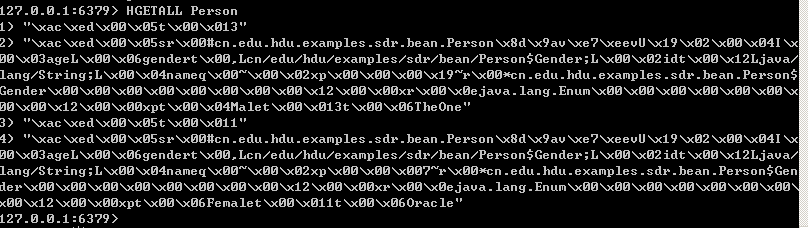
也可以打开redis-cli手动输入key, 查看当前Redis存储结果:
剩下的两个用户为:{3=Person [id=3, name=TheOne, gender=Male, age=25], 1=Person [id=1, name=Oracle, gender=Female, age=55]}
例子源码
https://github.com/peterchenhdu/spring-data-redis-example
参考资料
https://examples.javacodegeeks.com/enterprise-java/spring/spring-data-redis-example/
Spring Data Redis示例的更多相关文章
- Spring Data Redis入门示例:数据序列化 (四)
概述 RedisTemplate默认使用的是基于JDK的序列化器,所以存储在Redis的数据如果不经过相应的反序列化,看到的结果是这个样子的: 可以看到,出现了乱码,在程序层面上,不会影响程序的运行, ...
- Spring Data Redis入门示例:基于Jedis及底层API (二)
使用底层API:RedisConnectionFactory和RedisConnection可以直接操作Redis,下面是一个简单的例子: ### Maven依赖 <properties> ...
- Spring Data Redis入门示例:字符串操作(六)
Spring Data Redis对字符串的操作,封装在了ValueOperations和BoundValueOperations中,在集成好了SPD之后,在需要的地方引入: // 注入模板操作实例 ...
- Spring Data Redis入门示例:Hash操作(七)
将对象存为Redis中的hash类型,可以有两种方式,将每个对象实例作为一个hash进行存储,则实例的每个属性作为hash的field:同种类型的对象实例存储为一个hash,每个实例分配一个field ...
- Spring Data Redis 详解及实战一文搞定
SDR - Spring Data Redis的简称. Spring Data Redis提供了从Spring应用程序轻松配置和访问Redis的功能.它提供了与商店互动的低级别和高级别抽象,使用户免受 ...
- Spring Data Redis 让 NoSQL 快如闪电(2)
[编者按]本文作者为 Xinyu Liu,文章的第一部分重点概述了 Redis 方方面面的特性.在第二部分,将介绍详细的用例.文章系国内 ITOM 管理平台 OneAPM 编译呈现. 把 Redis ...
- Spring Data Redis 让 NoSQL 快如闪电 (1)
[编者按]本文作者为 Xinyu Liu,详细介绍了 Redis 的特性,并辅之以丰富的用例.在本文的第一部分,将重点概述 Redis 的方方面面.文章系国内 ITOM 管理平台 OneAPM 编译呈 ...
- Spring Boot使用Spring Data Redis操作Redis(单机/集群)
说明:Spring Boot简化了Spring Data Redis的引入,只要引入spring-boot-starter-data-redis之后会自动下载相应的Spring Data Redis和 ...
- Redis与Spring Data Redis
1.Redis概述 1.1介绍 官网:https://redis.io/ Redis是一个开源的使用ANSIC语言编写.支持网络.可基于内存 亦可持久化的日志型.Key-Value型的高性能数据库. ...
随机推荐
- java编译时出现——注:使用了未经检查或不安全的操作。注:有关详细信息,请使用 -Xlint:unchecked 重新编译
网上说是泛型问题 private List<Product> products = new ArrayList<Product>(); 这种用法绝对没错!(因为是照着书写的)在 ...
- JVM思考-init和clinit区别
JVM思考-init和clinit区别 目录:JVM总括:目录 clinit和init的区别其实也就是Class对象初始化对象初始化的区别,详情看我上一篇博客: JVM总括四-类加载过程.双亲委派模型 ...
- 关于java中的一些循环
1:switch语句 (1)格式: switch(表达式) { case 值1: 语句体1; break; case 值2: 语句体2; break; ... default: 语句体n+1; bre ...
- Failed to connect to 127.0.0.1 port 1080: Connection refused package 问题解决方法
错误: fatal: unable to access 'https://github.com/******': Failed to connect to 127.0.0.1 port 1080: C ...
- linux学习第十二天 (Linux就该这么学)找到一本不错的Linux电子书,附《Linux就该这么学》章节目录
本书是由全国多名红帽架构师(RHCA)基于最新Linux系统共同编写的高质量Linux技术自学教程,极其适合用于Linux技术入门教程或讲课辅助教材,目前是国内最值得去读的Linux教材,也是最有价值 ...
- thinkphp 5.1 同时选中多个文件上传
<form id="ajaxform" enctype="multipart/form-data" class="form"> ...
- winform改变启动界面
我们知道,有时做个小项目什么的,一般从登录开始,再到主页,再到其他业务,如果做到其他页面功能,调试时还要从登录页面一个个点进去,明显的降低开发进度. 这时,我们可以直接将目标界面改为启动页面即可. u ...
- [Linux/Ubuntu] vi/vim 使用方法讲解
vi/vim 基本使用方法 vi编辑器是所有Unix及Linux系统下标准的编辑器,它的强大不逊色于任何最新的文本编辑器,这里只是简单地介绍一下它的用法和一小部分指令.由于对Unix及Linux系统的 ...
- 一些有价值的Blog推荐
待看的一些文章 1. 性能调优攻略 http://coolshell.cn/articles/7490.html 2. 内存的存储管理--段式和页式管理的区别 http://blog.sina.com ...
- iOS逆向之iOSOpenDev
上篇谈到使用TheOS进行越狱开发,但是流程相对而言较复杂,本篇我们谈一下iOSOpenDev进行越狱开发.通过使用iOSOpenDev,我们可以使用Xcode进行开发.编译.生成并运行到设备上. 1 ...