
Fzu-html1
Fzu-趣考网-前端1
html
题目:
- 使用html写出h1~h6六种格式的hello world
- 使用html的table标签制作一个表格,存储本学期专业课程(参考教务处课表)
- 使用html的script输出hello world
- 使用html的字符实体输出一段简单的html代码。
- 写一个跳转到百度搜索的链接(或许也可以嵌入在网页中)
效果图:
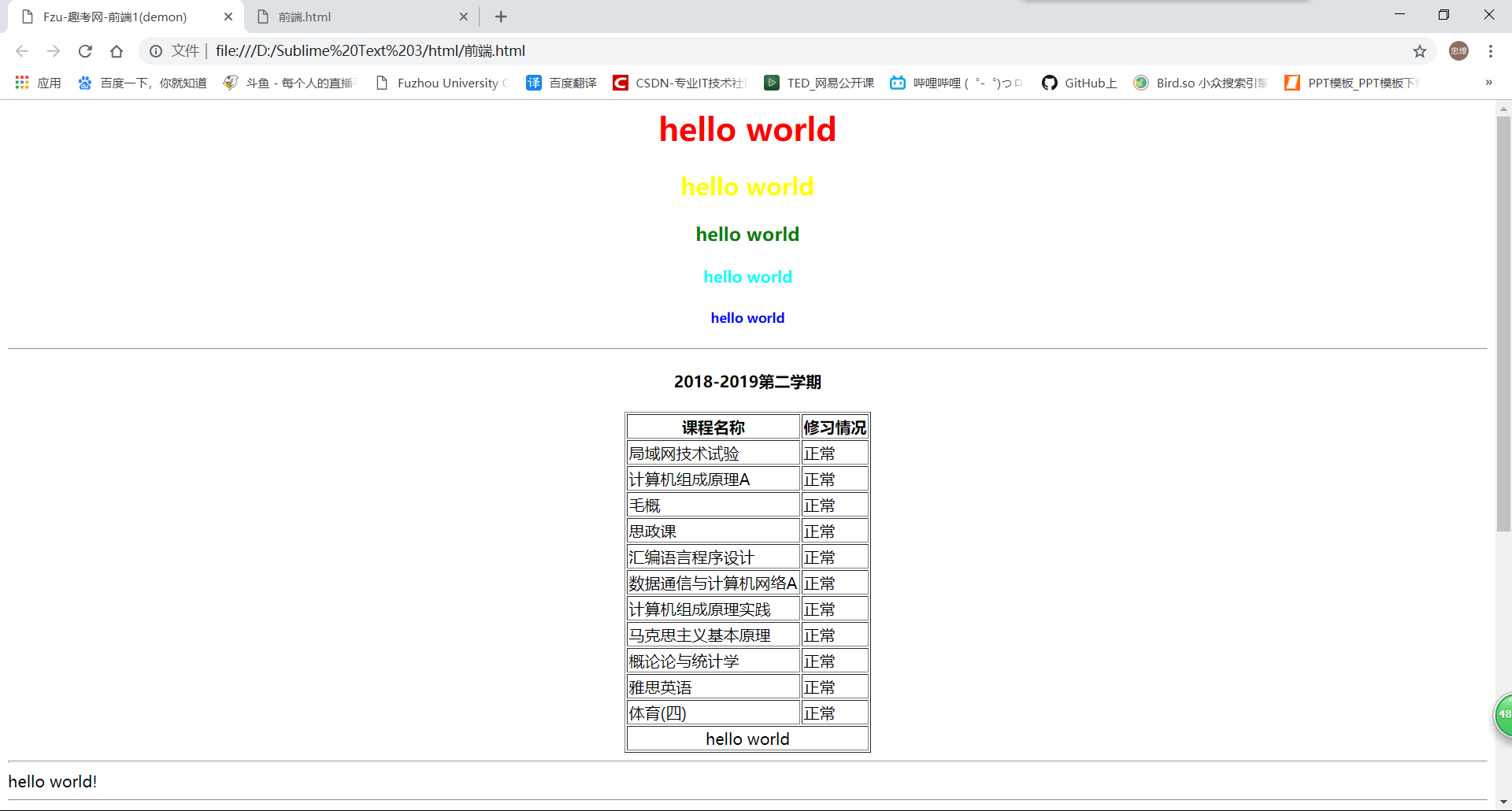
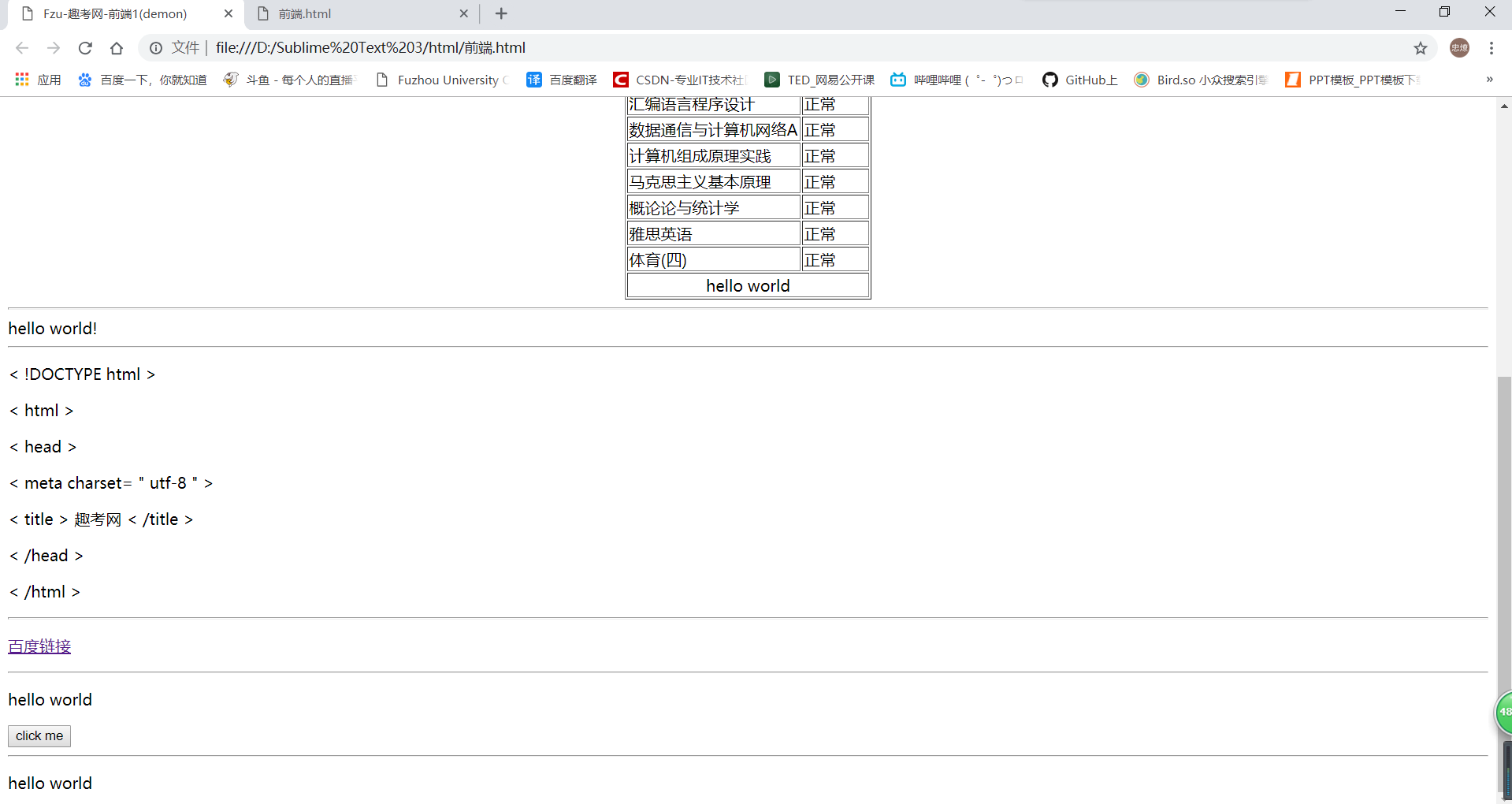
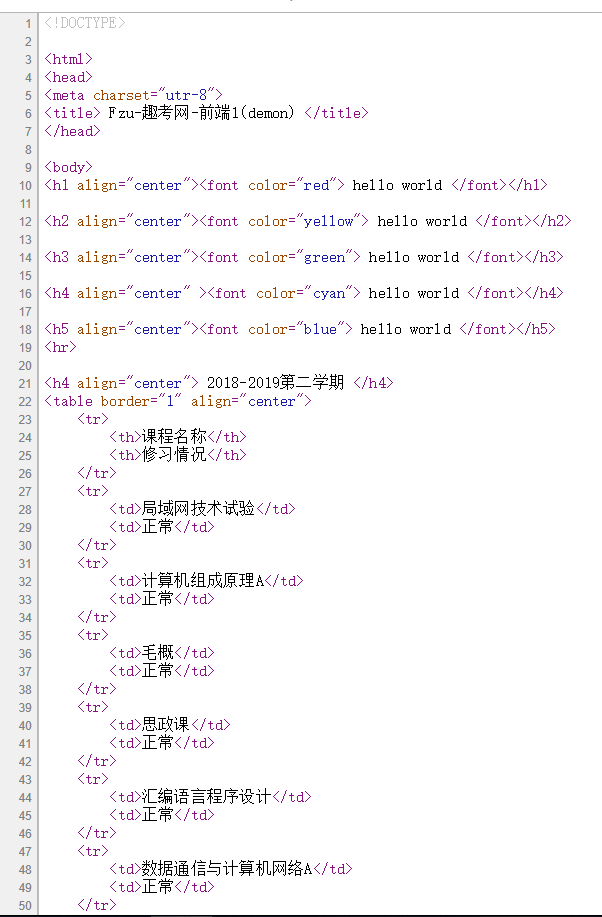
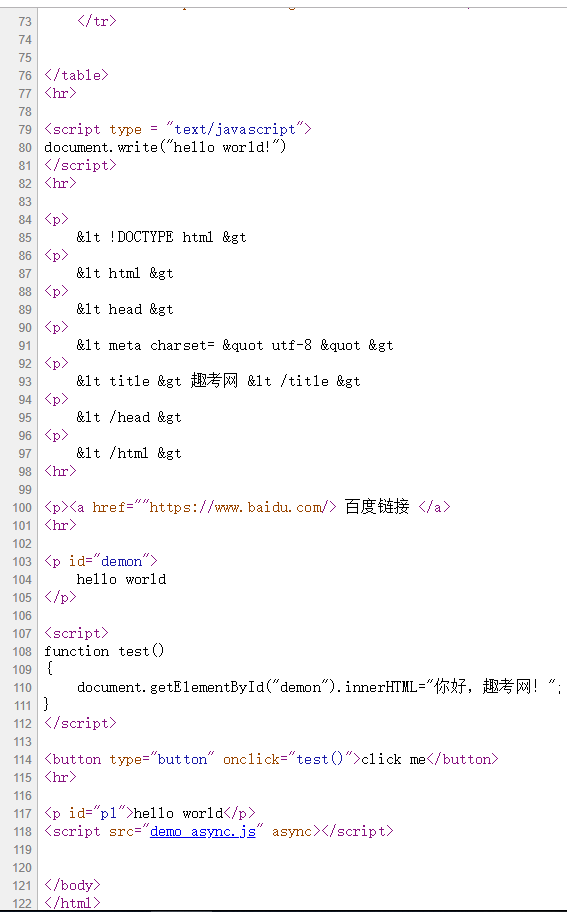
代码
<!DOCTYPE>
<html>
<head>
<meta charset="utr-8">
<title> Fzu-趣考网-前端1(demon) </title>
</head>
<body>
<h1 align="center"><font color="red"> hello world </font></h1>
<h2 align="center"><font color="yellow"> hello world </font></h2>
<h3 align="center"><font color="green"> hello world </font></h3>
<h4 align="center" ><font color="cyan"> hello world </font></h4>
<h5 align="center"><font color="blue"> hello world </font></h5>
<hr>
<h4 align="center"> 2018-2019第二学期 </h4>
<table border="1" align="center">
<tr>
<th>课程名称</th>
<th>修习情况</th>
</tr>
<tr>
<td>局域网技术试验</td>
<td>正常</td>
</tr>
……
……
……
<tr>
<td>体育(四)</td>
<td>正常</td>
</tr>
<tr>
<td colspan = "2" align=center>hello world</td>
</tr>
</table>
<hr>
<script type = "text/javascript">
document.write("hello world!")
</script>
<hr>
<p>
< !DOCTYPE html >
<p>
< html >
<p>
< head >
<p>
< meta charset= " utf-8 " >
<p>
< title > 趣考网 < /title >
<p>
< /head >
<p>
< /html >
<hr>
<p><a href=""https://www.baidu.com/> 百度链接 </a>
<hr>
<p id="demon">
hello world
</p>
<script>
function test()
{
document.getElementById("demon").innerHTML="你好,趣考网!";
}
</script>
<button type="button" onclick="test()">click me</button>
<hr>
<p id="p1">hello world</p>
<script src="demo_async.js" async></script>
</body>
</html>
收获:
1.初步了解了html的语法,以及接触些JavaScript
2.有很多点还是操作困难,得一直百度
3.布局是个很import的点,但是很难把握,以我这种直男审美。
4.html是页面的基础,css是页面的美观,js是页面的操作。---(个人觉得)
Fzu-html1的更多相关文章
- FZU 2137 奇异字符串 后缀树组+RMQ
题目连接:http://acm.fzu.edu.cn/problem.php?pid=2137 题解: 枚举x位置,向左右延伸计算答案 如何计算答案:对字符串建立SA,那么对于想双延伸的长度L,假如有 ...
- FZU 1914 单调队列
题目链接:http://acm.fzu.edu.cn/problem.php?pid=1914 题意: 给出一个数列,如果它的前i(1<=i<=n)项和都是正的,那么这个数列是正的,问这个 ...
- ACM: FZU 2105 Digits Count - 位运算的线段树【黑科技福利】
FZU 2105 Digits Count Time Limit:10000MS Memory Limit:262144KB 64bit IO Format:%I64d & ...
- FZU 2112 并查集、欧拉通路
原题:http://acm.fzu.edu.cn/problem.php?pid=2112 首先是,票上没有提到的点是不需要去的. 然后我们先考虑这个图有几个连通分量,我们可以用一个并查集来维护,假设 ...
- sublime-生成html1.0
文件--新建--输入--html:xt--CTRL+E.生成html1.0
- ACM: FZU 2107 Hua Rong Dao - DFS - 暴力
FZU 2107 Hua Rong Dao Time Limit:1000MS Memory Limit:32768KB 64bit IO Format:%I64d & %I6 ...
- ACM: FZU 2112 Tickets - 欧拉回路 - 并查集
FZU 2112 Tickets Time Limit:3000MS Memory Limit:32768KB 64bit IO Format:%I64d & %I64u P ...
- ACM: FZU 2102 Solve equation - 手速题
FZU 2102 Solve equation Time Limit:1000MS Memory Limit:32768KB 64bit IO Format:%I64d & ...
- ACM: FZU 2110 Star - 数学几何 - 水题
FZU 2110 Star Time Limit:1000MS Memory Limit:32768KB 64bit IO Format:%I64d & %I64u Pr ...
- FZU 2150 Fire Game
Fire Game Time Limit:1000MS Memory Limit:32768KB 64bit IO Format:%I64d & %I64u Submit St ...
随机推荐
- 在Linux下,使用Xmanager图形化显示
linux在安装Oracle时,需要图形化展示,本博客将使用xclock显示钟表进行测试 首先需要下载Xmanager网址:http://www.xshellcn.com/ 安装之后 打开之后,点击t ...
- path包 + pathfile 包 — 汇总
path包的使用 package main; import ( "fmt" "path" ) //go语言path包的学习 func main() { //返回 ...
- 链表习题(2)-一个集合用带头结点的单链表L表示,编写算法删除其值最大的结点。
/*一个集合用带头结点的单链表L表示,编写算法删除其值最大的结点.*/ /* 算法思想:使用pre,p,premax,max四个指针,pre和p进行比较,premax和max进行最后的删除操作 通过遍 ...
- Linux进程状态详解及状态转换
学而不思则罔,思而不学则殆. Linux下,进程状态有五种 : 运行态,可中断睡眠态,不可中断睡眠态,停止态和追踪态 运行态表示进程可执行或者正在执行, 可中断睡眠态表示进程被阻塞,等条 ...
- Tkinter & mysql 的登录框练习
import tkinter as tk from tkinter import messagebox import pymysql class SignIn(object): def __init_ ...
- Codeforces 1207 G. Indie Album
Codeforces 1207 G. Indie Album 解题思路 离线下来用SAM或者AC自动机就是一个单点加子树求和,套个树状数组就好了,因为这个题广义SAM不能存在 \(len[u] = l ...
- ITIL《信息技术基础架构库》
一 概述 1. ITIL 自上世纪70年代开始,个人计算机以及计算机网络开始在欧美发达国家普及.随着时间的推移,信息系统的规模越来越大,人们对信息系统的依赖也越来越强.特别是到了80年代,互联网开始普 ...
- JS权威指南读书笔记(四)
第十章 正则表达式 1 正则表达式直接量定义为包含在一对斜杠(/)之间的字符 a /s$/ == new RegExp("s$") 2 直接量字符:所有字母和数字都是按照字 ...
- Bootstrap框架 简单使用
目录 Bootstrap框架 简单使用 什么是Bootstrap 下载 Bootstrap 项目结构 Bootstrap 简单使用 表格格式 Bootstrap 按钮颜色 尺寸 Bootstrap框架 ...
- 分享一个vue项目“脚手架”项目的实现步骤
搭建缘由 源于公司每次新启动一个由多人协同开发的项目都由负责人初始化项目之后,每个人再去从私服pull一下项目才开始开发.但是每次初始化工程都是一步步的造轮子,一个个依赖去安装,新建一个个不同功能的文 ...