
AJAX 调用WebService 、WebApi 增删改查
WebService 页面:
|
1
2
3
4
5
6
7
8
9
10
11
12
13
14
15
16
17
18
19
20
21
22
23
24
25
26
27
28
29
30
31
32
33
34
35
36
37
38
39
40
41
42
43
44
45
|
/// <summary> /// TsetWeb 的摘要说明 /// </summary> [WebService(Namespace = "http://tempuri.org/")] [WebServiceBinding(ConformsTo = WsiProfiles.BasicProfile1_1)] [System.ComponentModel.ToolboxItem(false)] // 若要允许使用 ASP.NET AJAX 从脚本中调用此 Web 服务,请取消注释以下行。 [System.Web.Script.Services.ScriptService] public class TsetWeb : System.Web.Services.WebService { TestBll bll = new TestBll(); [WebMethod(Description = "获取所有对象信息")] public string AllUserJson() { return ToJson(bll.GetAllUser()); } [WebMethod(Description = "添加一个对象信息")] public string SetUserJson(string name ,string phone) { return ToJson(bll.SetAddUser(name,phone)); } [WebMethod(Description = "删除一个对象信息")] public string DelUserJson(int id) { return ToJson(bll.DelUser(id)); } [WebMethod(Description = "更改一个对象信息")] public string Update(int id, string name, string phone) { Test user = new Test(); user.id = id; user.name = name; user.phone = phone; return ToJson(bll.Update(user)); } //对数据序列化,返回JSON格式 public string ToJson(object obj) { JavaScriptSerializer serializer = new JavaScriptSerializer(); return serializer.Serialize(obj); } } |
AJAX调用WebService 页面:
|
1
2
3
4
5
6
7
8
9
10
11
12
13
14
15
16
17
18
19
20
21
22
23
24
25
26
27
28
29
30
31
32
33
34
35
36
37
38
39
40
41
42
43
44
45
46
47
48
49
50
51
52
53
54
55
56
57
58
59
60
61
62
63
64
65
66
67
68
69
70
71
72
73
74
75
76
77
78
79
80
81
82
83
84
85
86
87
88
|
<body> <form id="form1" runat="server"> <div> <table id="tab"> <tr> <td>编号</td> <td>名字</td> <td>电话</td> <th>操作</th> </tr> </table> </div> <input type="button" name="add" id="add" value="添加" /> </form> <script src="Scripts/jquery-1.7.1.min.js"></script> <script> $(function() { $.ajax({ url: "/TsetWeb.asmx/AllUserJson", contentType: 'application/json', dataType: "json", type: "post", success: function(data) { var a = eval("(" + data.d + ")"); //后台返回是字符串,所以转换为json对象 $.each(a, function(index, item) { var tr = $("<tr/>"); $("<td/>").html(item["id"]).appendTo(tr); $("<td/>").html(item["name"]).appendTo(tr); $("<td/>").html(item["phone"]).appendTo(tr); $("<button id ='d' onclick='del(" + item["id"] + ")'>").html("删除").appendTo(tr); $("<button id ='u' onclick='updata(" + item["id"] + ")'>").html("更新").appendTo(tr); tr.appendTo("#tab"); }); }, error: function(XMLHttpRequest, textStatus, errorThrown) { alert(XMLHttpRequest + "," + textStatus + "," + errorThrown); } }); }); $("#add").click(function() { $.ajax({ url: "/TsetWeb.asmx/SetUserJson", data: "{name:'李六',phone:'13727713819'}", contentType: 'application/json', dataType: "json", type: "post", success: function (data) { var a = eval("(" + data.d + ")"); //后台返回是字符串,所以转换为json对象 alert(a);//返回1表示成功 }, error: function (XMLHttpRequest, textStatus, errorThrown) { alert(XMLHttpRequest + "," + textStatus + "," + errorThrown); } }); }); function del(id) { $.ajax({ url: "/TsetWeb.asmx/DelUserJson", type: "Post", data: { "id": id }, dataType: "json", success: function (data) { var a = eval("(" + data.d + ")"); //后台返回是字符串,所以转换为json对象 alert(a);//返回1表示成功 }, error: function (XMLHttpRequest, textStatus, errorThrown) { alert(XMLHttpRequest + "," + textStatus + "," + errorThrown); } }); } function updata(id) { $.ajax({ url: "/TsetWeb.asmx/Update", type: "Post", data: { "id": id, "name": '九九', "phone": '15927713819' }, dataType: "json", success: function (data) { var a = eval("(" + data.d + ")"); //后台返回是字符串,所以转换为json对象 alert(a);//返回1表示成功 }, error: function (XMLHttpRequest, textStatus, errorThrown) { alert(XMLHttpRequest + "," + textStatus + "," + errorThrown); } }); } </script></body> |
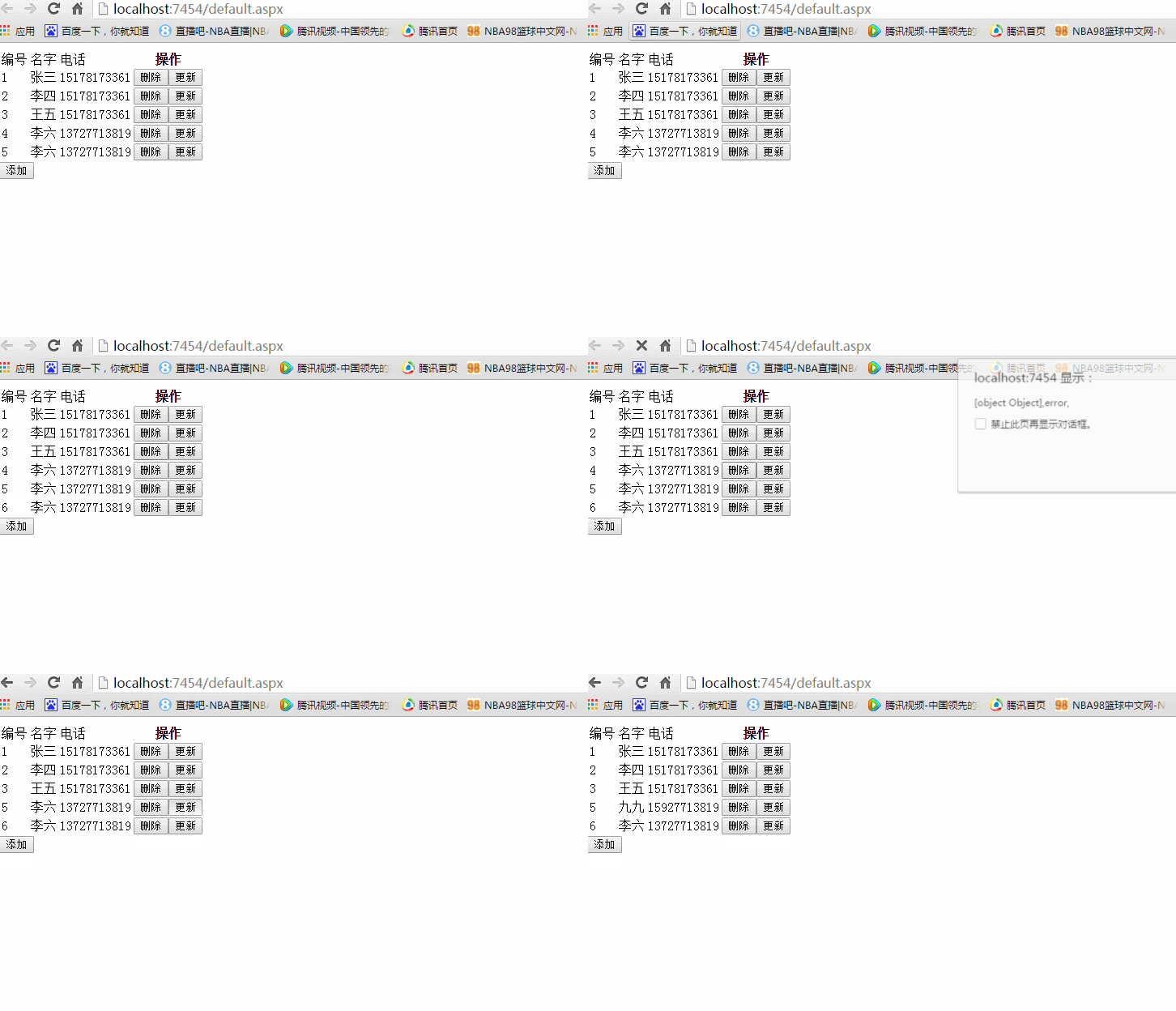
AJAX调用WebService结果:
WebApi页面:
|
1
2
3
4
5
6
7
8
9
10
11
12
13
14
15
16
17
18
19
20
21
22
23
24
25
26
27
28
29
30
31
32
33
|
public class ValuesController : ApiController { TestBll bll = new TestBll(); // GET api/values/GetAll() [HttpGet] public List<Test> GetAll() { return bll.GetAllUser(); } [HttpPost] public int PostNew([FromBody]Test user) { return bll.SetAddUser(user.name, user.phone); } [HttpPost] public int PostNew(string name ,string phone) { return bll.SetAddUser(name, phone); } [HttpDelete] public int Delete([FromBody]Test user) { return bll.DelUser(user.id); } [HttpPut] public int Put([FromBody] Test user) { return bll.Update(user); } } |
AJAX调用WebApi页面:
|
1
2
3
4
5
6
7
8
9
10
11
12
13
14
15
16
17
18
19
20
21
22
23
24
25
26
27
28
29
30
31
32
33
34
35
36
37
38
39
40
41
42
43
44
45
46
47
48
49
50
51
52
53
54
55
56
57
58
59
60
61
62
63
64
65
66
67
68
69
70
71
72
73
74
75
76
77
78
79
|
<div> <table id="tab"> <tr> <th>编号</th> <th>名字</th> <th>电话</th> <th>操作</th> </tr> </table> <input type="button" name="add" id="add" value="添加" /></div><script src="~/Scripts/jquery-1.7.1.min.js"></script> <script> $(function() { $.ajax({ url: "api/Values/GetAll", type: "GET", dataType: "json", success: function(data) { $.each(data, function(index, item) { var tr = $("<tr/>"); $("<td/>").html(item["id"]).appendTo(tr); $("<td/>").html(item["name"]).appendTo(tr); $("<td/>").html(item["phone"]).appendTo(tr); $("<button id ='d' onclick='del(" + item["id"] + ")'>").html("删除").appendTo(tr); $("<button id ='u' onclick='updata(" + item["id"] + ")'>").html("更新").appendTo(tr); tr.appendTo("#tab"); }); }, error: function(XMLHttpRequest, textStatus, errorThrown) { alert(XMLHttpRequest + "," + textStatus + "," + errorThrown); } }); }); $("#add").click(function () { $.ajax({ url: "api/Values/Put", type: "Put", data: {"id":id, "name":'赵七',"phone":'15727713819'}, dataType: "json", success: function (data) { alert(data);//返回1表示成功 }, error: function (XMLHttpRequest, textStatus, errorThrown) { alert(XMLHttpRequest + "," + textStatus + "," + errorThrown); } }); }); function del(id) { $.ajax({ url: "api/Values/Delete", type: "Delete", data: { "id": id }, dataType: "json", success: function (data) { alert(data);//返回1表示成功 }, error: function (XMLHttpRequest, textStatus, errorThrown) { alert(XMLHttpRequest + "," + textStatus + "," + errorThrown); } }); } function updata(id) { $.ajax({ url: "api/Values/Put", type: "Put", data: { "id": id, "name": '黄八', "phone": '15927713819' }, dataType: "json", success: function (data) { alert(data);//返回1表示成功 }, error: function (XMLHttpRequest, textStatus, errorThrown) { alert(XMLHttpRequest + "," + textStatus + "," + errorThrown); } }); } </script> |
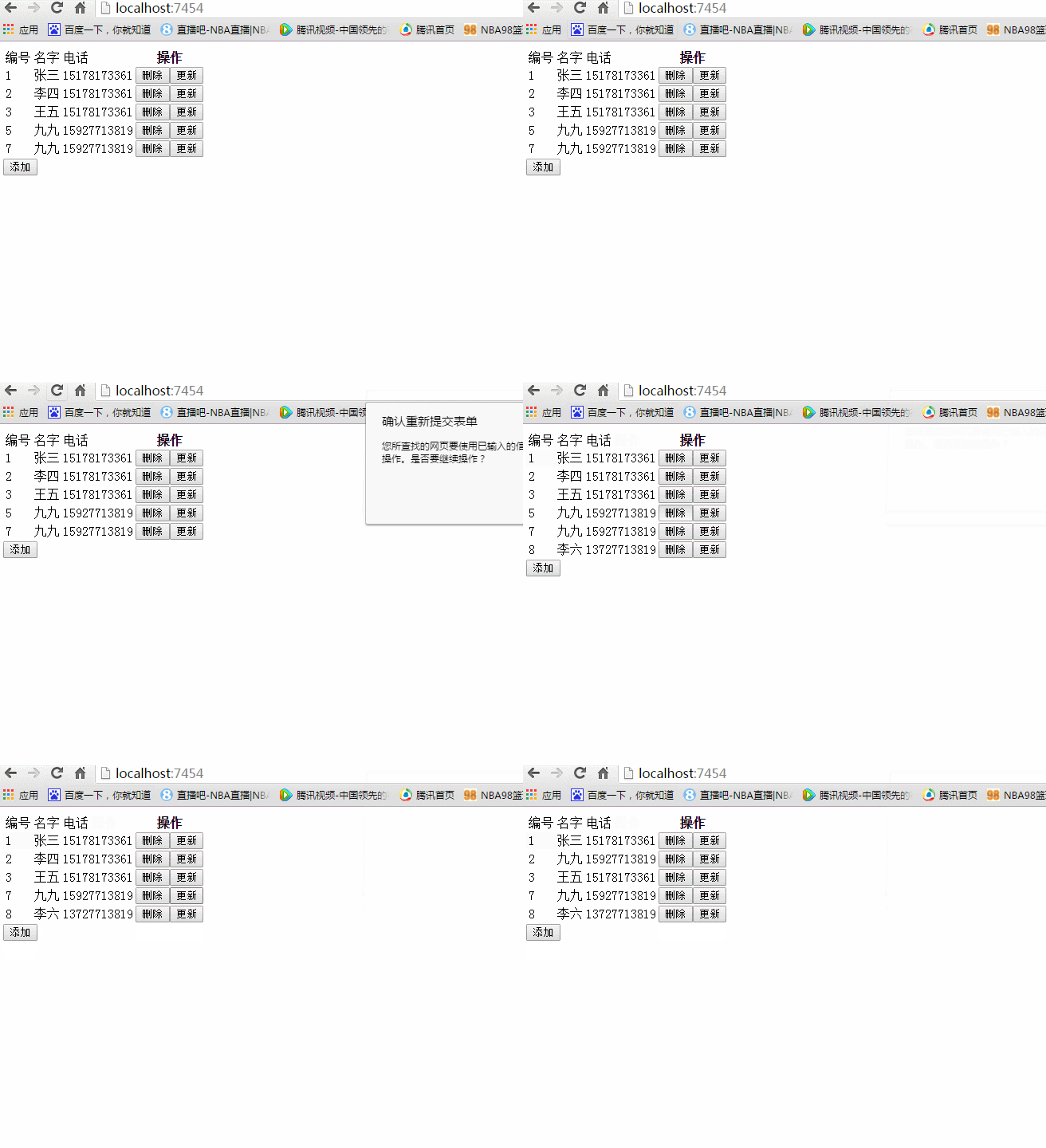
AJAX调用WebApi结果:
AJAX 调用WebService 、WebApi 增删改查的更多相关文章
- jQuery调用WebService实现增删改查的实现
第一篇博客,发下我自己写的jQuery调用WebService实现增删改查的实现. 1 <!DOCTYPE html> 2 3 <html xmlns="http://ww ...
- MVC3.0+knockout.js+Ajax 实现简单的增删改查
MVC3.0+knockout.js+Ajax 实现简单的增删改查 自从到北京入职以来就再也没有接触MVC,很多都已经淡忘了,最近一直在看knockout.js 和webAPI,本来打算采用MVC+k ...
- MVC3+EF5.0 code first+Flexigrid+ajax请求+jquery dialog 增删改查
MVC3+EF5.0 code first+Flexigrid+ajax请求+jquery dialog 增删改查 本文的目的: 1.MVC3项目简单配置EF code first生成并初始化数据 ...
- C#利用WinForm调用WebServices实现增删改查
实习导师要求做一个项目,用Winform调用WebServices实现增删改查的功能.写下这篇博客,当做是这个项目的总结.如果您有什么建议,可以给我留言.欢迎指正. 1.首先,我接到这个项目的时候,根 ...
- AJAX 调用WebService 、WebApi 增删改查(笔记)
经过大半天努力,终于完成增删改查了!心情有点小激动!!对于初学者的我来说,一路上都是迷茫,坑!!虽说网上有资料,可动手起来却不易(初学者的我).(苦逼啊!) WebService 页面: /// &l ...
- ASP.NET WebApi 增删改查
本篇是接着上一篇<ASP.NET WebApi 入门>来介绍的. 前言 习惯说 CRUD操作,它的意思是"创建. 读取. 更新和删除"四个基本的数据库操作.许多 HTT ...
- WebApi增删改查Demo
1.新建webapi项目 2.配置WebApiConfig public const string DEFAULT_ROUTE_NAME = "MyDefaultRoute"; p ...
- ajax——优化0126(增删改查:添加查看详情,返回结果类型为JSON型,在窗口显示)
效果: 鼠标点击查看详情时 数据库: 0126.php <!DOCTYPE html PUBLIC "-//W3C//DTD XHTML 1.0 Transitional//EN&qu ...
- 关于MVC工厂模式的增删改查sql存储过程
这里MVC中用到了反射,工厂,泛型,接口 在搭建框架的时候,除了MVC的三层以外,还有泛型的接口层和工厂层 下面是dal层调用sql存储过程,增删改查,dal层继承了接口层,实现了接口层里面的方法 1 ...
随机推荐
- Confluence 实现公司wiki【转】
Confluence是一个企业级的Wiki软件,可用于在企业.部门.团队内部进行信息共享和协同编辑一.安装过程1 安装并配置mysql [root@vm1 ~]# /etc/my.cnf charac ...
- idea 启动web项目
1>Run>Edit Configurations... 2>Server>Open browser>URL>http://localhost:8888/demo2 ...
- https://docs.huihoo.com/infoq/qconbeijing/2016/day1/工程效率提升专题/2-2-支持百度万人开发的工具装备及百度工程能力建设-夏仲璞.pdf
https://docs.huihoo.com/infoq/qconbeijing/2016/day1/工程效率提升专题/2-2-支持百度万人开发的工具装备及百度工程能力建设-夏仲璞.pdf http ...
- Spring Boot CLI——centos7
Spring Boot是一个命令行工具,用于使用Spring进行快速原型搭建.它允许你运行Groovy脚本,这意味着你可以使用类Java的语法,并且没有那么多的模板代码. 所有版本下载地址这里下载的版 ...
- linux下终端字体彩色显示
linux下python彩色显示 跨平台彩色显示库https://pypi.python.org/pypi/colorama jlive@MacBook-Pro:py_demo $pytho ...
- 用filter求素数
计算素数的一个方法是埃氏筛法, 所有的奇数: def _odd_iter(): n = 1 while True: n = n + 2 yield n 定义一个筛选函数: def _not_divis ...
- pytorch设置多GPU运行的方法
1.DataParallel layers (multi-GPU, distributed) 1)DataParallel CLASS torch.nn.DataParallel(module, de ...
- 软件定义网络基础---SDN数据平面
主要介绍SDN架构和转发模型 一:传统网络设备 (一)传统设备控制平面和数据平面 (二)数据平面的任务 数据平面对数据包的处理,主要通过查询由控制平面所生成的转发信息表来完成 (三)传统网络数据平面数 ...
- 数据结构与抽象 Java语言描述 第4版 pdf (内含标签)
数据结构与抽象 Java语言描述 第4版 目录 前言引言组织数据序言设计类P.1封装P.2说明方法P.2.1注释P.2.2前置条件和后置条件P.2.3断言P.3Java接口P.3.1写一个接口P.3. ...
- maven command line specified settings.xml
1. using argument parameter --settings / or -s for shot mvn install --settings c:\user\settings.xml ...