
matplotlib---画等高线
contour - 绘制等高线
mp.contour(x, y, z, 等高线条数,colors=颜色, linewidth=线宽)#等高线绘制
contourf - 填充等高线
mp.contourf(x, y, z, 等高线条数,cmap=颜色映射)# 等高线填充
clabel - 标记等高线,向CS(由contour函数返回的matplotlib.contour.ContourSet对象)中的轮廓线添加标签
clabel(CS, *args, **kwargs)
- CS - 由contour函数产生的句柄对象
- fontsize - string(smaller, x-large) or float ,optional
- colors - Color of each label
- None, 标记的颜色为轮廓的颜色
- one string color (e.g color = 'r' ), 所有的标签均为红色
- a tuple of matplotlib color args (string, float, rgb, etc), 不同的标签按照指定的颜色标记
- inline - bool, optional . 默认True(在标签位值移除轮廓线,也即标签覆盖轮廓线,而非穿越)
- inline_spacing - float, optional,默认5,放置内联时,标签两侧留有的像素空间
- fmt - string or dict, optional, 默认'%1.3f ',保留小数位。1.3中的1表示输出位宽,3表示小数位长度,此时实际数据会覆盖掉该数据对应的轮廓线;当9.3时,轮廓线会被覆盖掉9个位置,同时小数点后保留3位,也就是说,轮廓线移除的长度大于数据长度
- manual - bool or iterable, optional , 手动添加标签。忽略该字典
- rightside_up - bool, optional,默认 True(标签旋转均以正负90度计)
- use_clabeltext - bool, optional,默认False,若为True,则用 `ClabelText` class (instead of `Text`) 创建标签,当使用“CababelTress”绘制文本时,会重新计算文本的旋转角度,因此,如果轴的角度发生变化时,可以使用“CababelTress”来旋转角度。
举例:One-class SVM
import numpy as np

import matplotlib.pyplot as plt

import matplotlib.font_manager

from sklearn import svm

xx, yy = np.meshgrid(np.linspace(-5, 5, 500), np.linspace(-5, 5, 500))

# Generate train data

X = 0.3 * np.random.randn(100, 2)

X_train = np.r_[X + 2.4, X - 2.3]

X_test = np.r_[X + 2, X - 2]

# Generate some abnormal novel observations

X_outliers = np.random.uniform(low=0.1, high=4, size=(20, 2))

# fit the model

clf = svm.OneClassSVM(nu=0.1, kernel='rbf', gamma=0.1)

clf.fit(X_train)

y_pred_train = clf.predict(X_train)

y_pred_test = clf.predict(X_test)

y_pred_outliers = clf.predict(X_outliers)

n_error_train = y_pred_train[y_pred_train == -1].size

n_error_test = y_pred_test[y_pred_test == -1].size

n_error_outlier = y_pred_outliers[y_pred_outliers == 1].size

# plot the line , the points, and the nearest vectors to the plane

Z = clf.decision_function(np.c_[xx.ravel(), yy.ravel()])

Z = Z.reshape(xx.shape)

plt.title("Novelty Detection")

# 填充等高线图

plt.contourf(xx, yy, Z, levels=np.linspace(Z.min(), 0, 7), cmap=plt.cm.PuBu)

# 绘制等高线

a = plt.contour(xx, yy, Z, levels=[0, Z.max()], colors='palevioletred')

s = 40

b1 = plt.scatter(X_train[:, 0], X_train[:, 1], c='green', s=s, edgecolors='k')

b2 = plt.scatter(X_test[:, 0], X_test[:, 1], c='blueviolet', s=s, edgecolors='k')

c = plt.scatter(X_outliers[:, 0], X_outliers[:, 1], c='gold', s=s, edgecolors='k')

plt.axis('tight')

plt.xlim((-5, 5))

plt.ylim((-5, 5))

plt.legend([a.collections[0], b1, b2, c],

           ["learned frontier", 'training observations',

            "new regular observations", "new abnormal observations"],

           loc="upper left",

           prop=matplotlib.font_manager.FontProperties(size=11))

plt.xlabel("error train: %d/200; errors novel regular: %d/40; errors novel abnormal:%d/40" %

           (n_error_train, n_error_test, n_error_outlier))

plt.show()
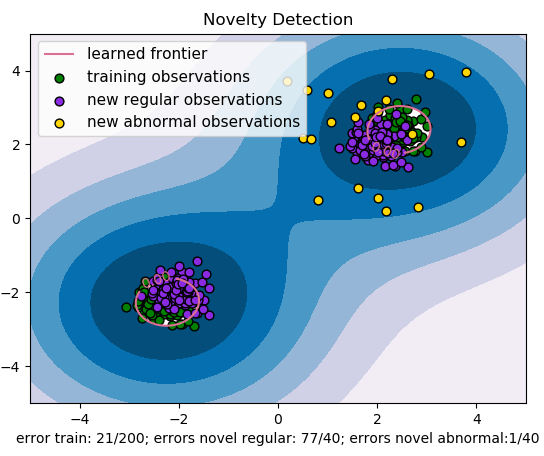
参考文献:
【1】基于matplotlib的数据可视化 - 等高线 contour 与 contourf
matplotlib---画等高线的更多相关文章
- matplotlib画图实例:pyplot、pylab模块及作图參数
http://blog.csdn.net/pipisorry/article/details/40005163 Matplotlib.pyplot画图实例 {使用pyplot模块} matplotli ...
- MatplotLib常用基本操作
本文记录matlibplot常用基本操作,都是基本功能,不涉及复杂联合操作,其中各用法详细用法可参考官网: 1. 基本画图操作 ##mofan_matplotlib.pyplot import mat ...
- matplotlib等高线图-【老鱼学matplotlib】
等高线图是在地理课中讲述山峰山谷时绘制的图形,在机器学习中也会被用在绘制梯度下降算法的图形中. 因为等高线的图有三个信息:x, y以及x,y所对应的高度值. 这个高度值的计算我们用一个函数来表述: # ...
- 基于matplotlib的数据可视化 - 等高线 contour 与 contourf
contour 与contourf 是绘制等高线的利器. contour - 绘制等高线 contourf - 填充等高线 两个的返回值值是一样的(return values are the sam ...
- matplotlib绘制等高线图
参考自Matplotlib Python 画图教程 (莫烦Python)(12)_演讲•公开课_科技_bilibili_哔哩哔哩 https://www.bilibili.com/video/av16 ...
- python+matplotlib 绘制等高线
python+matplotlib 绘制等高线 步骤有七: 有一个m*n维的矩阵(data),其元素的值代表高度 构造两个向量:x(1*n)和y(1*m).这两个向量用来构造网格坐标矩阵(网格坐标矩阵 ...
- python之《matplotlib》
# _*_coding:utf-8_*_# /usr/bin/env python3# Author:book Mikiimport matplotlib.pyplot as pltimport nu ...
- matplotlib的学习10-Contours 等高线图
import matplotlib.pyplot as plt import numpy as np ''' 画等高线 数据集即三维点 (x,y) 和对应的高度值,共有256个点. 高度值使用一个 h ...
- python安装numpy、scipy和matplotlib等whl包的方法
最近装了python和PyCharm开发环境,但是在安装numpy和matplotlib等包时出现了问题,现总结一下在windows平台下的安装方法. 由于现在找不到了工具包新版本的exe文件,所以采 ...
- matplotlib 高级用法实例--共享x轴
http://localhost:8888/notebooks/duanqs/matplotlib_advanced_example.ipynb 我不会弄呀, 刚才从matplotlib文档里吧示例用 ...
随机推荐
- B1001 害死人不偿命的(3n+1)猜想 (15 分)
一.参考代码: #include<iostream> using namespace std; int main(){ int n; int step = 0; cin >> ...
- BBS_02day
目录 BBS_02day: 展示个人所有文章: 点赞,点彩功能: 评论功能: BBS_02day: 展示个人所有文章: def article_detail(request,username,arti ...
- CSP2019蒸馏记
Day -\(\infty\) ~ Day -2 认真准备联赛. Day -1 复习模板,全真模拟比赛平衡树 下午进行了湖南大学 2 小时游. Day 0 上午睡过头了 下午日常训练,并没有什么开放日 ...
- 使用Shell上传/下载文件
来源:https://www.cnblogs.com/pcyy/p/7568820.html 1,安装lrzsz工具包 yum install lrzsz 2,安装完成后 输入rz选择文件进行上传
- c++中char类型的取值范围
-128~127,数字在计算机中以补码形式存储,因为正数的补码就是其本身且正数符号位置0,故最大值为01111111(一个0七个1)也就是127 而负数是对应正数值取反加一,拿最大的负数-1来说,就是 ...
- Python连载29-log的使用需求实现举例
一.Format类 1.直接实例化 2.可以继承Format添加特殊字符 3.三个参数 (1)fmt:指定消息格式化字符串,如果不指定该参数则默认使用message的原始值 (2)datemt:指定日 ...
- 面向对象之isinstance与issubclass(python内置方法)
isinstanceissubclass TOC isinstance 判断一个对象是否是另外一个类的实例,返回布尔值. 是:True 否:False class Foo: pass class Bo ...
- PHP服务端优化全面总结
一.优化PHP原则 1.1PHP代码的优化 (1)升级最新的PHP版本 鸟哥PPT里的对比数据,就是WordPress在PHP5.6执行100次会产生70亿次的CPU指令执行数目,而在PHP7中只需要 ...
- Redis学习之对象系统源码分析
背景知识: Redis并没有直接使用sds,双端链表,字典,压缩列表,跳表等这些数据结构来直接实现键值对数据库,而是基于这些对象创建了一个对象系统,这个对象系统包含5个对象:字符串对象,列表对象,哈希 ...
- tomcat闪退的解决思路
用Tomcat总会遇到启动Tomcat闪退的问题. 什么叫闪退啊,就是闪一下,就退出了控制台. 都闪退了,为啥闪退也不知道呀,又没有错误信息,所以就要先阻止闪退,先看到错误信息,知道启动不起来的原因. ...