
[转]Creating an OData v3 Endpoint with Web API 2
by Mike Wasson+
The Open Data Protocol (OData) is a data access protocol for the web. OData provides a uniform way to structure data, query the data, and manipulate the data set through CRUD operations (create, read, update, and delete). OData supports both AtomPub (XML) and JSON formats. OData also defines a way to expose metadata about the data. Clients can use the metadata to discover the type information and relationships for the data set.+
ASP.NET Web API makes it easy to create an OData endpoint for a data set. You can control exactly which OData operations the endpoint supports. You can host multiple OData endpoints, alongside non-OData endpoints. You have full control over your data model, back-end business logic, and data layer.+
Software versions used in the tutorial
- Visual Studio 2013
- Web API 2
- OData Version 3
- Entity Framework 6
- Fiddler Web Debugging Proxy (Optional)
Web API OData support was added in ASP.NET and Web Tools 2012.2 Update. However, this tutorial uses scaffolding that was added in Visual Studio 2013.+
In this tutorial, you will create a simple OData endpoint that clients can query. You will also create a C# client for the endpoint. After you complete this tutorial, the next set of tutorials show how to add more functionality, including entity relations, actions, and $expand/$select.+
Create the Visual Studio Project
In this tutorial, you will create an OData endpoint that supports basic CRUD operations. The endpoint will expose a single resource, a list of products. Later tutorials will add more features.+
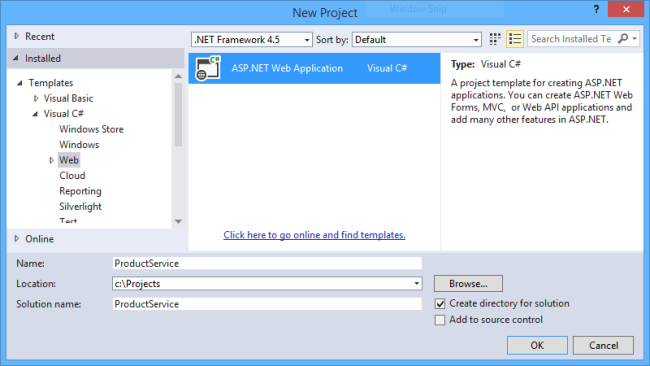
Start Visual Studio and select New Project from the Start page. Or, from the File menu, select New and then Project.+
In the Templates pane, select Installed Templates and expand the Visual C# node. Under Visual C#, select Web. Select the ASP.NET Web Application template.+
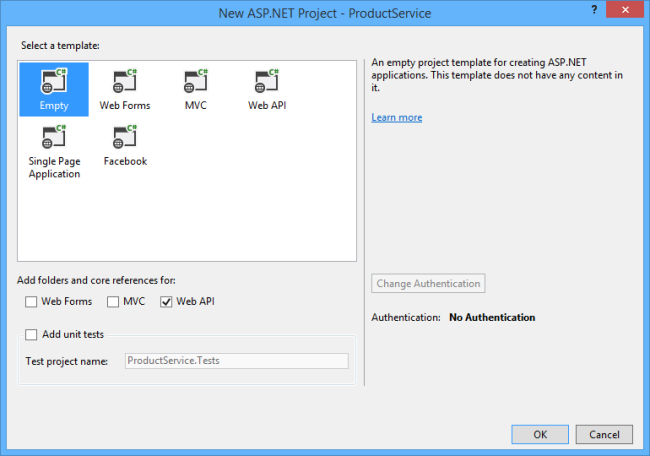
In the New ASP.NET Project dialog, select the Empty template. Under "Add folders and core references for...", check Web API. Click OK.+
Add an Entity Model
A model is an object that represents the data in your application. For this tutorial, we need a model that represents a product. The model corresponds to our OData entity type.+
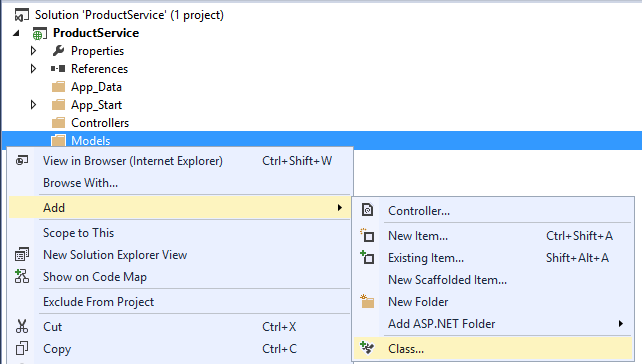
In Solution Explorer, right-click the Models folder. From the context menu, select Add then select Class.+
In the Add New Item dialog, name the class "Product".+

Note
By convention, model classes are placed in the Models folder. You don't have to follow this convention in your own projects, but we'll use it for this tutorial.+
In the Product.cs file, add the following class definition:+
public class Product

{

    public int ID { get; set; }

    public string Name { get; set; }

    public decimal Price { get; set; }

    public string Category { get; set; }

}
The ID property will be the entity key. Clients can query products by ID. This field would also be the primary key in the back-end database.+
Build the project now. In the next step, we'll use some Visual Studio scaffolding that uses reflection to find the Product type.+
Add an OData Controller
A controller is a class that handles HTTP requests. You define a separate controller for each entity set in you OData service. In this tutorial, we'll create a single controller.+
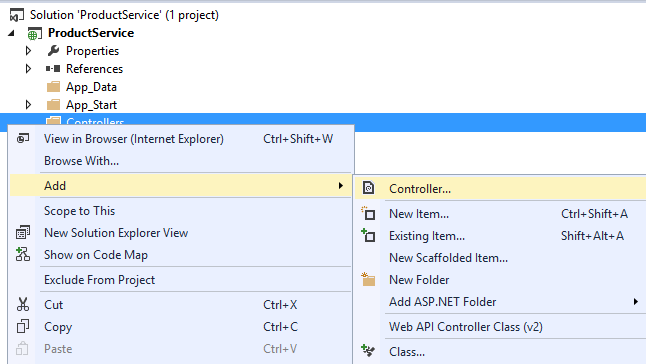
In Solution Explorer, right-click the the Controllers folder. Select Add and then select Controller.+
In the Add Scaffold dialog, select "Web API 2 OData Controller with actions, using Entity Framework".+
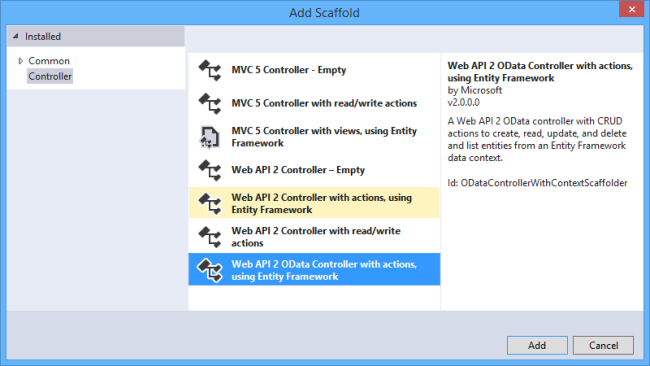
In the Add Controller dialog, name the controller "ProductsController". Select the "Use async controller actions" checkbox. In the Model drop-down list, select the Product class.+
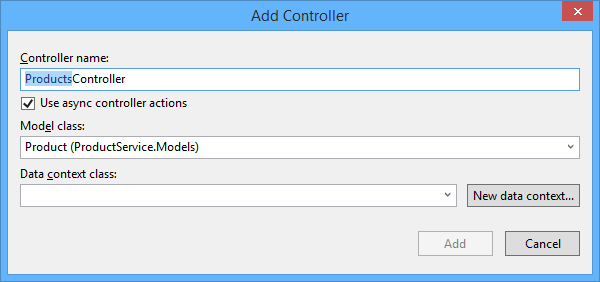
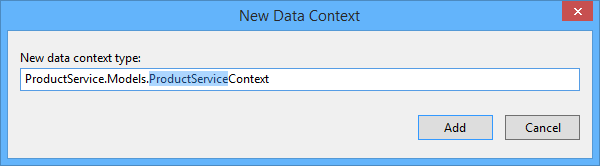
Click the New data context... button. Leave the default name for the data context type, and click Add.+
Click Add in the Add Controller dialog to add the controller.+

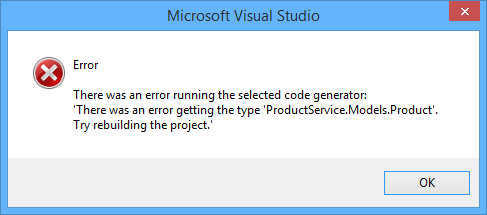
Note: If you get an error message that says "There was an error getting the type...", make sure that you built the Visual Studio project after you added the Product class. The scaffolding uses reflection to find the class.+
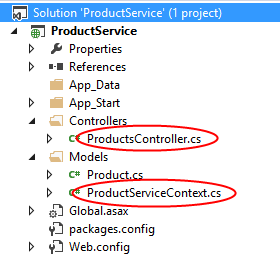
The scaffolding adds two code files to the project:+
- Products.cs defines the Web API controller that implements the OData endpoint.
- ProductServiceContext.cs provides methods to query the underlying database, using Entity Framework.
Add the EDM and Route
In Solution Explorer, expand the App_Start folder and open the file named WebApiConfig.cs. This class holds configuration code for Web API. Replace this code with the following:+
using ProductService.Models;

using System.Web.Http;

using System.Web.Http.OData.Builder;

namespace ProductService

{

    public static class WebApiConfig

    {

        public static void Register(HttpConfiguration config)

        {

            ODataConventionModelBuilder builder = new ODataConventionModelBuilder();

            builder.EntitySet<Product>("Products");

            config.Routes.MapODataRoute("odata", "odata", builder.GetEdmModel());

        }

    }

}
This code does two things:+
- Creates an Entity Data Model (EDM) for the OData endpoint.
- Adds a route for the endpoint.
An EDM is an abstract model of the data. The EDM is used to create the metadata document and define the URIs for the service. The ODataConventionModelBuilder creates an EDM by using a set of default naming conventions EDM. This approach requires the least code. If you want more control over the EDM, you can use the ODataModelBuilder class to create the EDM by adding properties, keys, and navigation properties explicitly.+
The EntitySet method adds an entity set to the EDM:+
modelBuilder.EntitySet<Product>("Products");
The string "Products" defines the name of the entity set. The name of the controller must match the name of the entity set. In this tutorial, the entity set is named "Products" and the controller is named ProductsController. If you named the entity set "ProductSet", you would name the controller ProductSetController. Note that an endpoint can have multiple entity sets. Call EntitySet<T> for each entity set, and then define a corresponding controller.+
The MapODataRoute method adds a route for the OData endpoint.+
config.Routes.MapODataRoute("ODataRoute", "odata", model);
The first parameter is a friendly name for the route. Clients of your service do not see this name. The second parameter is the URI prefix for the endpoint. Given this code, the URI for the Products entity set is http://hostname/odata/Products. Your application can have more than one OData endpoint. For each endpoint, call MapODataRoute and provide a unique route name and a unique URI prefix.+
Seed the Database (Optional)
In this step, you will use Entity Framework to seed the database with some test data. This step is optional, but it lets you test out your OData endpoint right away.+
From the Tools menu, select Library Package Manager, then select Package Manager Console. In the Package Manager Console window, enter the following command:+
Enable-Migrations
This adds a folder named Migrations and a code file named Configuration.cs.+
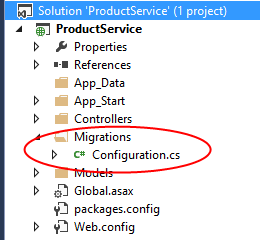
Open this file and add the following code to the Configuration.Seed method.+
protected override void Seed(ProductService.Models.ProductServiceContext context)

{

    // New code

    context.Products.AddOrUpdate(new Product[] {

        new Product() { ID = 1, Name = "Hat", Price = 15, Category = "Apparel" },

        new Product() { ID = 2, Name = "Socks", Price = 5, Category = "Apparel" },

        new Product() { ID = 3, Name = "Scarf", Price = 12, Category = "Apparel" },

        new Product() { ID = 4, Name = "Yo-yo", Price = 4.95M, Category = "Toys" },

        new Product() { ID = 5, Name = "Puzzle", Price = 8, Category = "Toys" },

    });

}
In the Package Manager Console Window, enter the following commands:+
Add-Migration Initial

Update-Database
These commands generate code that creates the database, and then executes that code.+
Exploring the OData Endpoint
In this section, we'll use the Fiddler Web Debugging Proxy to send requests to the endpoint and examine the response messages. This will help you to understand the capabilities of an OData endpoint.+
In Visual Studio, press F5 to start debugging. By default, Visual Studio opens your browser to http://localhost:*port*, where port is the port number configured in the project settings.+
You can change the port number in the project settings. In Solution Explorer, right-click the project and select Properties. In the properties window, select Web. Enter the port number under Project Url.+
Service Document
The service document contains a list of the entity sets for the OData endpoint. To get the service document, send a GET request to the root URI of the service.+
Using Fiddler, enter the following URI in the Composer tab: http://localhost:port/odata/, where port is the port number.+
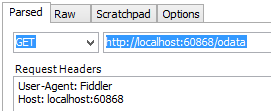
Click the Execute button. Fiddler sends an HTTP GET request to your application. You should see the response in the Web Sessions list. If everything is working, the status code will be 200.+
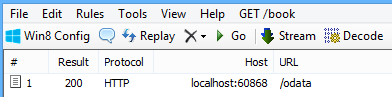
Double-click the response in the Web Sessions list to see the details of the response message in the Inspectors tab.+
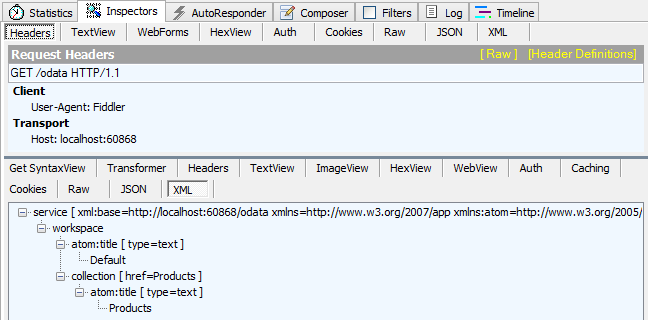
The raw HTTP response message should look similar to the following:+
HTTP/1.1 200 OK

Cache-Control: no-cache

Pragma: no-cache

Content-Type: application/atomsvc+xml; charset=utf-8

Expires: -1

Server: Microsoft-IIS/8.0

DataServiceVersion: 3.0

Date: Mon, 23 Sep 2013 17:51:01 GMT

Content-Length: 364

<?xml version="1.0" encoding="utf-8"?>

<service xml:base="http://localhost:60868/odata"

    xmlns="http://www.w3.org/2007/app" xmlns:atom="http://www.w3.org/2005/Atom">

  <workspace>

    <atom:title type="text">Default</atom:title>

    <collection href="Products">

        <atom:title type="text">Products</atom:title>

    </collection>

    </workspace>

</service></pre>
By default, Web API returns the service document in AtomPub format. To request JSON, add the following header to the HTTP request:+
Accept: application/json+
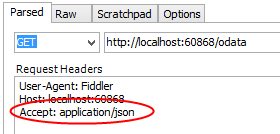
Now the HTTP response contains a JSON payload:+
HTTP/1.1 200 OK

Cache-Control: no-cache

Pragma: no-cache

Content-Type: application/json; charset=utf-8

Expires: -1

Server: Microsoft-IIS/8.0

DataServiceVersion: 3.0

Date: Mon, 23 Sep 2013 22:59:28 GMT

Content-Length: 136

{

  "odata.metadata":"http://localhost:60868/odata/$metadata","value":[

    {

      "name":"Products","url":"Products"

    }

  ]

}
Service Metadata Document
The service metadata document describes the data model of the service, using an XML language called the Conceptual Schema Definition Language (CSDL). The metadata document shows the structure of the data in the service, and can be used to generate client code.+
To get the metadata document, send a GET request to http://localhost:port/odata/$metadata. Here is the metadata for the endpoint shown in this tutorial.+
HTTP/1.1 200 OK

Cache-Control: no-cache

Pragma: no-cache

Content-Type: application/xml; charset=utf-8

Expires: -1

Server: Microsoft-IIS/8.0

DataServiceVersion: 3.0

Date: Mon, 23 Sep 2013 23:05:52 GMT

Content-Length: 1086

<?xml version="1.0" encoding="utf-8"?>

<edmx:Edmx Version="1.0" xmlns:edmx="http://schemas.microsoft.com/ado/2007/06/edmx">

  <edmx:DataServices m:DataServiceVersion="3.0" m:MaxDataServiceVersion="3.0"

    xmlns:m="http://schemas.microsoft.com/ado/2007/08/dataservices/metadata">

    <Schema Namespace="ProductService.Models" xmlns="http://schemas.microsoft.com/ado/2009/11/edm">

      <EntityType Name="Product">

        <Key>

          <PropertyRef Name="ID" />

        </Key>

        <Property Name="ID" Type="Edm.Int32" Nullable="false" />

        <Property Name="Name" Type="Edm.String" />

        <Property Name="Price" Type="Edm.Decimal" Nullable="false" />

        <Property Name="Category" Type="Edm.String" />

      </EntityType>

    </Schema>

    <Schema Namespace="Default" xmlns="http://schemas.microsoft.com/ado/2009/11/edm">

      <EntityContainer Name="Container" m:IsDefaultEntityContainer="true">

        <EntitySet Name="Products" EntityType="ProductService.Models.Product" />

      </EntityContainer>

    </Schema>

  </edmx:DataServices>

</edmx:Edmx>
Entity Set
To get the Products entity set, send a GET request to http://localhost:port/odata/Products.+
HTTP/1.1 200 OK

Cache-Control: no-cache

Pragma: no-cache

Content-Type: application/json; charset=utf-8

Expires: -1

Server: Microsoft-IIS/8.0

DataServiceVersion: 3.0

Date: Mon, 23 Sep 2013 23:01:31 GMT

Content-Length: 459

{

  "odata.metadata":"http://localhost:60868/odata/$metadata#Products","value":[

    {

      "ID":1,"Name":"Hat","Price":"15.00","Category":"Apparel"

    },{

      "ID":2,"Name":"Socks","Price":"5.00","Category":"Apparel"

    },{

      "ID":3,"Name":"Scarf","Price":"12.00","Category":"Apparel"

    },{

      "ID":4,"Name":"Yo-yo","Price":"4.95","Category":"Toys"

    },{

      "ID":5,"Name":"Puzzle","Price":"8.00","Category":"Toys"

    }

  ]

}
Entity
To get an individual product, send a GET request to http://localhost:port/odata/Products(1), where "1" is the product ID.+
HTTP/1.1 200 OK

Cache-Control: no-cache

Pragma: no-cache

Content-Type: application/json; charset=utf-8

Expires: -1

Server: Microsoft-IIS/8.0

DataServiceVersion: 3.0

Date: Mon, 23 Sep 2013 23:04:29 GMT

Content-Length: 140

{

  "odata.metadata":"http://localhost:60868/odata/$metadata#Products/@Element","ID":1,

      "Name":"Hat","Price":"15.00","Category":"Apparel"

}
OData Serialization Formats
OData supports several serialization formats:+
- Atom Pub (XML)
- JSON "light" (introduced in OData v3)
- JSON "verbose" (OData v2)
By default, Web API uses AtomPubJSON "light" format. +
To get AtomPub format, set the Accept header to "application/atom+xml". Here is an example response body:+
<?xml version="1.0" encoding="utf-8"?>

<entry xml:base="http://localhost:60868/odata" xmlns="http://www.w3.org/2005/Atom" xmlns:d="http://schemas.microsoft.com/ado/2007/08/dataservices" xmlns:m="http://schemas.microsoft.com/ado/2007/08/dataservices/metadata" xmlns:georss="http://www.georss.org/georss" xmlns:gml="http://www.opengis.net/gml">

  <id>http://localhost:60868/odata/Products(1)</id>

  <category term="ProductService.Models.Product" scheme="http://schemas.microsoft.com/ado/2007/08/dataservices/scheme" />

  <link rel="edit" href="http://localhost:60868/odata/Products(1)" />

  <link rel="self" href="http://localhost:60868/odata/Products(1)" />

  <title />

  <updated>2013-09-23T23:42:11Z</updated>

  <author>

    <name />

  </author>

  <content type="application/xml">

    <m:properties>

      <d:ID m:type="Edm.Int32">1</d:ID>

      <d:Name>Hat</d:Name>

      <d:Price m:type="Edm.Decimal">15.00</d:Price>

      <d:Category>Apparel</d:Category>

    </m:properties>

  </content>

</entry>
You can see one obvious disadvantage of the Atom format: It's a lot more verbose than the JSON light. However, if you have a client that understands AtomPub, the client might prefer that format over JSON.+
Here is the JSON light version of the same entity:+
{

  "odata.metadata":"http://localhost:60868/odata/$metadata#Products/@Element",

  "ID":1,

  "Name":"Hat",

  "Price":"15.00",

  "Category":"Apparel"

}
The JSON light format was introduced in version 3 of the OData protocol. For backward compatibility, a client can request the older "verbose" JSON format. To request verbose JSON, set the Accept header to application/json;odata=verbose. Here is the verbose version:+
{

  "d":{

    "__metadata":{

      "id":"http://localhost:18285/odata/Products(1)",

      "uri":"http://localhost:18285/odata/Products(1)",

      "type":"ProductService.Models.Product"

    },"ID":1,"Name":"Hat","Price":"15.00","Category":"Apparel"

  }

}
This format conveys more metadata in the response body, which can add considerable overhead over an entire session. Also, it adds a level of indirection by wrapping the object in a property named "d".+
Next Steps
using Microsoft.Data.OData;

using Microsoft.Data.OData.Query;

using ProductService.Models;

using System;

using System.Data.Entity;

using System.Data.Entity.Infrastructure;

using System.Linq;

using System.Net;

using System.Net.Http;

using System.Threading.Tasks;

using System.Web.Http;

using System.Web.Http.ModelBinding;

using System.Web.Http.OData;

using System.Web.Http.OData.Routing;

using System.Web.Http.Routing;

namespace ProductService.Controllers

{

    public class ProductsController : ODataController

    {

        private ProductServiceContext db = new ProductServiceContext();

        // GET odata/Products

        [Queryable]

        public IQueryable<Product> GetProducts()

        {

            return db.Products;

        }

        // GET odata/Products(5)

        [Queryable]

        public SingleResult<Product> GetProduct([FromODataUri] int key)

        {

            return SingleResult.Create(db.Products.Where(product => product.ID == key));

        }

        // PUT odata/Products(5)

        public async Task<IHttpActionResult> Put([FromODataUri] int key, Product product)

        {

            if (!ModelState.IsValid)

            {

                return BadRequest(ModelState);

            }

            if (key != product.ID)

            {

                return BadRequest();

            }

            db.Entry(product).State = EntityState.Modified;

            try

            {

                await db.SaveChangesAsync();

            }

            catch (DbUpdateConcurrencyException)

            {

                if (!ProductExists(key))

                {

                    return NotFound();

                }

                else

                {

                    throw;

                }

            }

            return Updated(product);

        }

        // POST odata/Products

        public async Task<IHttpActionResult> Post(Product product)

        {

            if (!ModelState.IsValid)

            {

                return BadRequest(ModelState);

            }

            db.Products.Add(product);

            await db.SaveChangesAsync();

            return Created(product);

        }

        // PATCH odata/Products(5)

        [AcceptVerbs("PATCH", "MERGE")]

        public async Task<IHttpActionResult> Patch([FromODataUri] int key, Delta<Product> patch)

        {

            if (!ModelState.IsValid)

            {

                return BadRequest(ModelState);

            }

            Product product = await db.Products.FindAsync(key);

            if (product == null)

            {

                return NotFound();

            }

            patch.Patch(product);

            try

            {

                await db.SaveChangesAsync();

            }

            catch (DbUpdateConcurrencyException)

            {

                if (!ProductExists(key))

                {

                    return NotFound();

                }

                else

                {

                    throw;

                }

            }

            return Updated(product);

        }

        // DELETE odata/Products(5)

        public async Task<IHttpActionResult> Delete([FromODataUri] int key)

        {

            Product product = await db.Products.FindAsync(key);

            if (product == null)

            {

                return NotFound();

            }

            db.Products.Remove(product);

            await db.SaveChangesAsync();

            return StatusCode(HttpStatusCode.NoContent);

        }

        // GET /Products(1)/Supplier

        public Supplier GetSupplier([FromODataUri] int key)

        {

            Product product = db.Products.FirstOrDefault(p => p.ID == key);

            if (product == null)

            {

                throw new HttpResponseException(HttpStatusCode.NotFound);

            }

            return product.Supplier;

        }

        protected override void Dispose(bool disposing)

        {

            if (disposing)

            {

                db.Dispose();

            }

            base.Dispose(disposing);

        }

        private bool ProductExists(int key)

        {

            return db.Products.Count(e => e.ID == key) > ;

        }

        // The next methods support entity relations.

        // For more information, see http://www.asp.net/web-api/overview/odata-support-in-aspnet-web-api/working-with-entity-relations

        public async Task<IHttpActionResult> CreateLink([FromODataUri] int key, string navigationProperty, [FromBody] Uri link)

        {

            if (!ModelState.IsValid)

            {

                return BadRequest(ModelState);

            }

            Product product = await db.Products.FindAsync(key);

            if (product == null)

            {

                return NotFound();

            }

            switch (navigationProperty)

            {

                case "Supplier":

                    string supplierKey = GetKeyFromLinkUri<string>(link);

                    Supplier supplier = await db.Suppliers.FindAsync(supplierKey);

                    if (supplier == null)

                    {

                        return NotFound();

                    }

                    product.Supplier = supplier;

                    await db.SaveChangesAsync();

                    return StatusCode(HttpStatusCode.NoContent);

                default:

                    return NotFound();

            }

        }

        public async Task<IHttpActionResult> DeleteLink([FromODataUri] int key, string navigationProperty)

        {

            Product product = await db.Products.FindAsync(key);

            if (product == null)

            {

                return NotFound();

            }

            switch (navigationProperty)

            {

                case "Supplier":

                    product.Supplier = null;

                    await db.SaveChangesAsync();

                    return StatusCode(HttpStatusCode.NoContent);

                default:

                    return NotFound();

            }

        }

        // Helper method to extract the key from an OData link URI.

        private TKey GetKeyFromLinkUri<TKey>(Uri link)

        {

            TKey key = default(TKey);

            // Get the route that was used for this request.

            IHttpRoute route = Request.GetRouteData().Route;

            // Create an equivalent self-hosted route.

            IHttpRoute newRoute = new HttpRoute(route.RouteTemplate,

                new HttpRouteValueDictionary(route.Defaults),

                new HttpRouteValueDictionary(route.Constraints),

                new HttpRouteValueDictionary(route.DataTokens), route.Handler);

            // Create a fake GET request for the link URI.

            var tmpRequest = new HttpRequestMessage(HttpMethod.Get, link);

            // Send this request through the routing process.

            var routeData = newRoute.GetRouteData(

                Request.GetConfiguration().VirtualPathRoot, tmpRequest);

            // If the GET request matches the route, use the path segments to find the key.

            if (routeData != null)

            {

                ODataPath path = tmpRequest.GetODataPath();

                var segment = path.Segments.OfType<KeyValuePathSegment>().FirstOrDefault();

                if (segment != null)

                {

                    // Convert the segment into the key type.

                    key = (TKey)ODataUriUtils.ConvertFromUriLiteral(

                        segment.Value, ODataVersion.V3);

                }

            }

            return key;

        }

        // The next method implements an OData action.

        // For more information, see http://www.asp.net/web-api/overview/odata-support-in-aspnet-web-api/odata-actions

        // POST /odata/Products(5)/RateProduct

        [HttpPost]

        public async Task<IHttpActionResult> RateProduct([FromODataUri] int key, ODataActionParameters parameters)

        {

            if (!ModelState.IsValid)

            {

                return BadRequest();

            }

            int rating = (int)parameters["Rating"];

            Product product = await db.Products.FindAsync(key);

            if (product == null)

            {

                return NotFound();

            }

            product.Ratings.Add(new ProductRating() { Rating = rating });

            db.SaveChanges();

            double average = product.Ratings.Average(x => x.Rating);

            return Ok(average);

        }

    }

}
[转]Creating an OData v3 Endpoint with Web API 2的更多相关文章
- AngularJS使用OData请求ASP.NET Web API资源的思路
本篇整理AngularJS使用OData请求ASP.NET Web API资源的思路. 首先给ASP.NET Web API插上OData的翅膀,通过NuGet安装OData. 然后,给control ...
- Creating Help Pages for ASP.NET Web API -摘自网络
When you create a web API, it is often useful to create a help page, so that other developers will k ...
- OData查询ASP.NET Web API全攻略
本篇使用ASP.NET Web API来体验OData各种query. 首先是本篇即将用到的Model.使用的OData版本是4.0. public class Customer { public i ...
- Create an OData v4 Endpoint Using ASP.NET Web API 2.2(使用ASP.NET Web API 2.2创建OData v4端点)
开放数据协议Open Data Protocol(OData)是web的一种数据存取协议,OData通过设置CRUD操作(Create创建.Read读取.Update更新,Delete删除)提供一种统 ...
- 对一个前端AngularJS,后端OData,ASP.NET Web API案例的理解
依然chsakell,他写了一篇前端AngularJS,后端OData,ASP.NET Web API的Demo,关于OData在ASP.NET Web API中的正删改查没有什么特别之处,但在前端调 ...
- Web API 2
Asp.Net Web API 2 官网菜鸟学习系列导航[持续更新中] 前言 本来一直参见于微软官网进行学习的, 官网网址http://www.asp.net/web-api.出于自己想锻炼一下学 ...
- 杂项:ASP.NET Web API
ylbtech-杂项:ASP.NET Web API ASP.NET Web API 是一种框架,用于轻松构建可以访问多种客户端(包括浏览器和移动设备)的 HTTP 服务. ASP.NET Web A ...
- ASP.NET Web API系列教程目录
ASP.NET Web API系列教程目录 Introduction:What's This New Web API?引子:新的Web API是什么? Chapter 1: Getting Start ...
- ASP.NET Web API系列教程(目录)(转)
注:微软随ASP.NET MVC 4一起还发布了一个框架,叫做ASP.NET Web API.这是一个用来在.NET平台上建立HTTP服务的Web API框架,是微软的又一项令人振奋的技术.目前,国内 ...
随机推荐
- C#文字转换语音朗读或保存MP3、WAV等格式
最近遇到一个需求,需要把文字转换语音,参考很多大佬写的方法,最后经过自己改造实现文字在线朗读.保存MP3.WAV等格式. //需要引用System.Speech程序集 //引用using System ...
- django drf 改变retrive的pk查询字段
lookup_filed可以改变retrive查询时默认以pk查询的逻辑 from django.shortcuts import render from rest_framework import ...
- P4211[BZOJ 3626] [LNOI2014]LCA
题目描述 给出一个n个节点的有根树(编号为0到n-1,根节点为0).一个点的深度定义为这个节点到根的距离+1. 设dep[i]表示点i的深度,LCA(i,j)表示i与j的最近公共祖先. 有q次询问,每 ...
- mxonline实战8,机构列表分页功能,以及按条件筛选功能
对应github地址:列表分页和按条件筛选 一. 列表分页 1. pip install django-pure-pagination 2. settings.py中 install ...
- java项目迁移
电脑重装系统以后或者从不同MyEclipse版本迁移项目时候会出现: Project facet Java 1.5 is not supported by target runtime Apache ...
- docker微服务部署之:三,搭建Zuul微服务项目
docker微服务部署之:二.搭建文章微服务项目 一.新增demo_eureka模块,并编写代码 右键demo_parent->new->Module->Maven,选择Module ...
- C#-类-string/Manth/Random/DateTime-及练习
类一.string类:.Length 字符串的长度 .Trim() 去掉开头以及结尾的空格.TrimStart() 去掉开头的空格.TrimEnd() 去掉结尾的空格 .ToLower() 全部转换为 ...
- jQuery EasyUI Datagrid组件的完整的基础DOM结构
标题可能有点长,什么叫“完整的基础DOM结构”,这里“基础”的意思是指这个结构不依赖具体数据,不依赖Datagrid的view属性,只要存在Datagrid实例就会存在这样的基础DOM结构:而“完整” ...
- Array flat的实现
if (!Array.prototype.flat) { Array.prototype.flat = function (num = 1) { if (!Number(num) || Number( ...
- Mac下一台电脑管理多个SSH KEY(转)
一.关于ssh是什么? http://www.ruanyifeng.com/blog/2011/12/ssh_remote_login.html 二.需求: 一台电脑上(Mac os)管理多个ssh ...