
Changing the load order/delay the start of the Server service
THE INFORMATION IN THIS ARTICLE APPLIES TO:
- Secure FTP Server (All Versions)
- EFT Server (All Versions)
QUESTION
How can the EFT Server or Secure FTP Server service loading order be changed/delayed?
ANSWER
Windows 2008 and 2012:
To delay start of the EFT server service on a Windows 2008 server that needs to be very sequence driven, you will need to perform the following steps to use the Windows built-in Delay Start option:
- Do one of the following to open the Services Microsoft Management Console (MMC) snap-in:
- In Windows 2008: Click Start, type
services.mscin the search box, then press ENTER. - In Windows 2012: In the Server Manager, click Tools > Services.
- Click to select the EFT Server Enterprise service, then right-click and click Properties. The Properties dialog box appears.
- On the General tab, click the Startup type drop down list and change it from Automatic to Automatic (Delayed Start).
- Click OK to save the change.
Windows 2003 or earlier:
Follow the steps below to change the load order of the EFT Server or Secure FTP Server service on Window 2003 or earlier:
Caution: The following steps involve editing the Windows registry on the server computer. Incorrectly editing the registry may severely damage your system. These instructions are intended for the advanced user who is prepared to both edit and restore the registry. We recommend that you backup the registry before proceeding.
- Start Registry Editor and navigate to the following subkey:
HKEY_LOCAL_MACHINE\SYSTEM\CurrentControlSet\Control\ServiceGroupOrder
2. Double-click on the list entry and add a new value in the list named GlobalSCAPE. Place the new value into the list at the point in the startup sequence where you want the Server service to start. (For example, to configure it so that the Server service starts after all other services, place the GlobalSCAPE value at the end of the list.)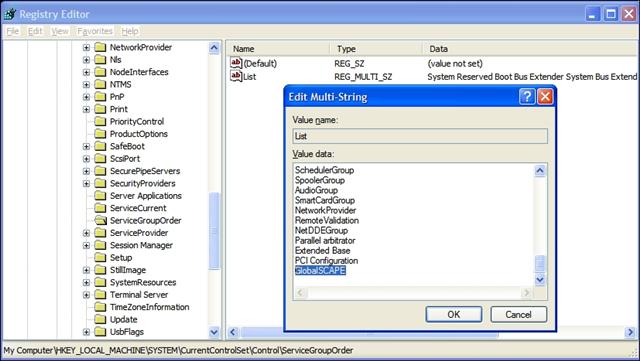
3 Click OK to close the editing screen.
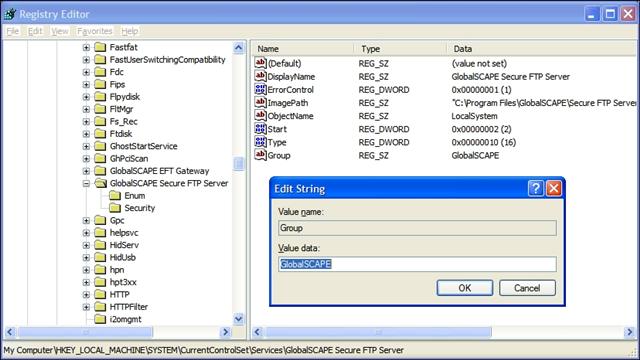
4.Navigate to the following subkey:
HKEY_LOCAL_MACHINE\SYSTEM\CurrentControlSet\Services\GlobalSCAPE EFT Server (or Secure FTP Server)
5.Right-click on the name of the subkey, click New and then click String Value.
6.For the name, type Group.
7.Double-click to modify the newly created Group entry and type GlobalSCAPE for the value.
8.Click OK and then close Registry Editor.
Changing the load order/delay the start of the Server service的更多相关文章
- Changing a Service's Configuration
Changing a Service's Configuration A service configuration program uses the ChangeServiceConfig an ...
- How to Configure Tomcat/JBoss and Apache HTTPD for Load Balancing and Failover
http://java.dzone.com/articles/how-configure-tomcatjboss-and In this post we will see how to setup a ...
- Multipath TCP and load balancers
Load balancers play a very important role in today’s Internet. Most Internet services are provided b ...
- 【架构】How To Use HAProxy to Set Up MySQL Load Balancing
How To Use HAProxy to Set Up MySQL Load Balancing Dec 2, 2013 MySQL, Scaling, Server Optimization U ...
- D:/apache2/conf/httpd.conf:Cannot load D:/apache2/modules/mod_actions.so
报错如下: errors reported here must be corrected before service can be started.httpd:Syntax error on lin ...
- YouTrack Changing Database Location for EXE Distribution(windows service)
If you have installed YouTrack from EXE Distribution, then the best way to change the database locat ...
- order by 导出数据不一致的问题
转自 http://blog.csdn.net/wwwwei_csdn/article/details/78181197 前言 数据库分页是后台经常要使用的技术手段,有时候进行数据库查询会根据业务 ...
- tomcat启动(三)Catalina分析-load方法分析
load()方法按从上到下顺序分析(主要分析本人所没学过的知识点,其它略过...). Digester类作用 使用sax技术对xml进行解析 未开始解析时Digester.push(this)这个用来 ...
- Load Balancing with NGINX 负载均衡算法
Using nginx as HTTP load balancer Using nginx as HTTP load balancer http://nginx.org/en/docs/http/lo ...
随机推荐
- 个人知识管理系统Version1.0开发记录(09)
MyBatis初试 MyBatis 是支持普通 SQL查询,存储过程和高级映射的优秀持久层框架.MyBatis 消除了几乎所有的JDBC代码和参数的手工设置以及结果集的检索. 运用Mybatis框 ...
- Linux 下升级JDK 1.7到1.8
1.下载1.8的jdk rpm文件到linux系统 2.执行rpm -ivh jdk-8u151-linux-x64.rpm 选项详解: -a:查询所有套件: -b<完成阶段><套件 ...
- MAPE 平均绝对百分误差
from fbprophet.diagnostics import performance_metrics df_p = performance_metrics(df_cv) df_p.head() ...
- 阿里云服务器购买 发布web项目全过程
http://blog.csdn.net/liona_koukou/article/details/50496946
- vue router动态路由
<div id="#app"> <router-link to="/user/header">路由1</router-link&g ...
- python基础教程笔记 第1单元 && 第2单元
1.http://docs.python.org/dev/3.0/whatsnew/3.0.htmlpython-announce-listpython-help2.交互式编译器3.非整数除法 .1. ...
- bzoj1449&&bzoj2895
题解: S连每场比赛流量1费用0 每场比赛连参赛队流量1费用0 我们发现调整一次 由win,lose变为 win+1,lose-1的费用为 (C*(win+1)^2+D*(lose-1)^2) - ( ...
- java的代理(编程思想)
代理 第三种关系被称为代理,java并没有提供对它的直接支持.这是继承和组合之间的中庸之道,因为我们将一个对象置于所要构造的类中(就像组合),但与此同时我们在新类中暴露了该成员对象的所有方法(就像继承 ...
- 工作中比较重要的经验分享-2016-bypkm
工作中总有一些经验能让人记忆深刻,能让人终生受用,相比技术而言,经验是宝贵的.无价的.在我的博客中,主要是技术类的博文,那些东西是相对死板的,价值也相对低廉.今天就记录一下我在工作中一次比较重要的经验 ...
- Leetcode 1024. Video Stitching
class Solution: def helper(self,l,r,clips)->int: maxL,maxR=0,0 iL,iR=-1,-1 for i,c in enumerate(c ...