
php多站点配置以及Forbidden You don't have permission to access / on this server问题解决
php多站点配置以及Forbidden You don't have permission to access / on this server问题解决
一、总结
一句话总结:我的问题是php的版本问题
php 版本
改变因素
找到问题的原因了,我把php的版本从5.4.45切换成了 5.6.27,切换回来之后就好了,php文件就能解析了,网站就能访问了
和配置实在没有半毛钱关系
收获吧:仔细思考你做了哪些改变因素(在正确和错误之间),我忘记我切换了版本
其实是我没有意识到php版本切换会造成网站无法访问的问题
因为php文件本身就是靠服务器来解析的,php版本切换肯定有可能会造成网站无法访问
1、apache 设置目录不可访问,具体目录下的文件可以访问?
之前访问部分网站,会出现这种情况,如果没有具体的访问文件,就会默认跳转到根目录,这样很多文件会暴露。
所以要修改httpd.conf文件,
Options Indexes FollowSymLinks
修改为
Options FollowSymLinks
其实就是将Indexes去掉,Indexes表示若当前目录没有index.html就会显示目录结构
2、apache+php配置多站点?
httpd.conf
httpd-vhosts.conf
hosts
在”C:\wamp\bin\apache\apache2.4.9\conf“目录下打开httpd.conf配置文件
大概516行左右在找到
# Virtual hosts
#Include conf/extra/httpd-vhosts.conf
把include 的注释去掉,让他去加载conf/extra/httpd-vhosts.conf文件在”C:\wamp\bin\apache\apache2.4.9\conf\extra“目录打开
httpd-vhosts.conf文件,直接在这里配置站点
上面全部注释,第一句
NameVirtualHost *:80(设置端口号)
# #以下是自己配置的站点1
< VirtualHost *:80 >
ServerName www.xiaozheng.com (网站的域名)
DocumentRoot “C:\wamp\www” (文件的路径)
< Directory “C:\wamp\www” > (文件的路径)
Options Indexes
Order allow,deny
Allow from all
Satisfy all
< /Directory >
< /VirtualHost >3.在“C:\Windows\System32\drivers\etc”的hosts文件里面配置
就可以了
二、php多站点配置以及Forbidden You don't have permission to access / on this server问题解决
问题一:
前几天在电脑上配置多站点的后突然出现了:”You don’t have permission to access / on this server!“ 究其原因是:swampserver默认访问的是www文件夹的站点,不允许访问其他的站点。
问题一解决方法:
first:首先教你如何配置多站点
在”C:\wamp\bin\apache\apache2.4.9\conf“目录下打开httpd.conf配置文件
大概516行左右在找到
# Virtual hosts
#Include conf/extra/httpd-vhosts.conf
把include 的注释去掉,让他去加载conf/extra/httpd-vhosts.conf文件在”C:\wamp\bin\apache\apache2.4.9\conf\extra“目录打开
httpd-vhosts.conf文件,直接在这里配置站点
上面全部注释,第一句
NameVirtualHost *:80(设置端口号)
# #以下是自己配置的站点1
< VirtualHost *:80 >
ServerName www.xiaozheng.com (网站的域名)
DocumentRoot “C:\wamp\www” (文件的路径)
< Directory “C:\wamp\www” > (文件的路径)
Options Indexes
Order allow,deny
Allow from all
Satisfy all
< /Directory >
< /VirtualHost >3.在“C:\Windows\System32\drivers\etc”的hosts文件里面配置
就可以了
问题二:
如果相似配置的时候出现了这样的一个问题~~如果说我的文件路径在wamp\www以外的话,比如“F:\xiaozheng”会出现“You don’t have permission to access / on this server!”问腿!接下来如何解决这个问题
问题二解决方法:
首先:swampserver服务器默认是只能访问站内的文件夹,在http.conf文件里面有
< Directory />
AllowOverride all
Require all denied (拒绝了外部的访问)
< /Directory >
必须把上面的改成:
< Directory />
Options FollowSymLinks
AllowOverride None
Order deny,allow
#Deny from all
Allow from all
#允许所有访问
Satisfy all
< /Directory>
第二步:
< Directory “D:/Wamp5/www”>
#

# Possible values for the Options directive are "None", "All",

# or any combination of:

#   Indexes Includes FollowSymLinks SymLinksifOwnerMatch ExecCGI MultiViews

#

# Note that "MultiViews" must be named *explicitly* --- "Options All"

# doesn't give it to you.

#

# The Options directive is both complicated and important.  Please see

# http://httpd.apache.org/docs/2.2/mod/core.html#options

# for more information.

#

Options Indexes FollowSymLinks

#

# AllowOverride controls what directives may be placed in .htaccess files.

# It can be "All", "None", or any combination of the keywords:

#   Options FileInfo AuthConfig Limit

#

AllowOverride all

#

# Controls who can get stuff from this server.

#

onlineoffline tag - don't remove

Order Deny,Allow

Deny from all

Allow from 127.0.0.1
< /Directory>
修改成
< Directory “D:/Wamp5/www”>
#

# Possible values for the Options directive are "None", "All",

# or any combination of:

#   Indexes Includes FollowSymLinks SymLinksifOwnerMatch ExecCGI MultiViews

#

# Note that "MultiViews" must be named *explicitly* --- "Options All"

# doesn't give it to you.

#

# The Options directive is both complicated and important.  Please see

# http://httpd.apache.org/docs/2.2/mod/core.html#options

# for more information.

#

Options Indexes FollowSymLinks

#

# AllowOverride controls what directives may be placed in .htaccess files.

# It can be "All", "None", or any combination of the keywords:

#   Options FileInfo AuthConfig Limit

#

AllowOverride all

#

# Controls who can get stuff from this server.

#

#  onlineoffline tag - don't remove

Order Deny,Allow

#Deny from all

# Allow from 127.0.0.1

Allow from all
< /Directory>
其实是可以把一些不必要的注释删掉的,我是把那些注释删掉了,简洁了好多,配图
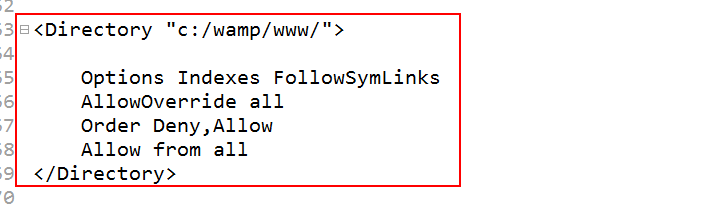
或者还有一种新的解决方法,在httpd-vhosts.conf配置站点的时候这样配置
< VirtualHost *:80 >
ServerName www.xiaozheng.com
DocumentRoot “C:\wamp\www”
<Directory "C:\wamp\www">

    Options Indexes FollowSymLinks   #原先是Options Indexes

    AllowOverride all                #原先是没有这句的,这两句不管是否超出先限制的文件

                                     范围,都可以访问,就不会出现权限问题了

    Order allow,deny

    Allow from all

    Satisfy all

</Directory>
< /VirtualHost>
然后保存,重启服务,在访问就解决了这个问题。
参考:php多站点配置以及Forbidden You don't have permission to access / on this server问题解决 - xiaozhegaa的博客 - CSDN博客
https://blog.csdn.net/xiaozhegaa/article/details/52512477
三、解决Forbidden You don't have permission to access /index.php on this server.错误实测
1、问题描述
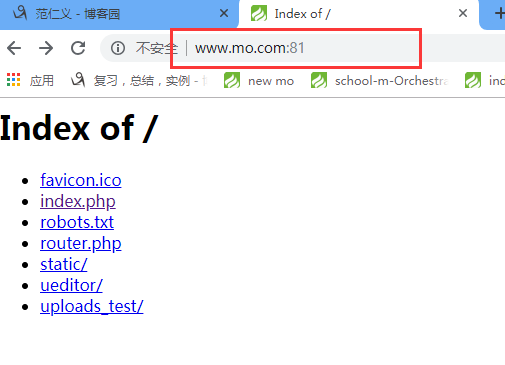
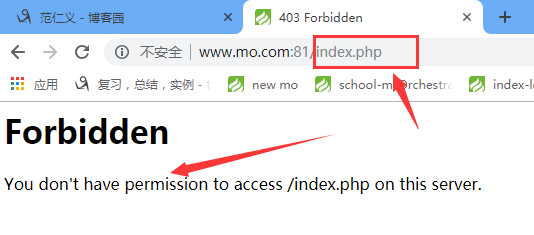
很久没用笔记本做开发了(3-4个月),这次换回笔记本开发,本机配置好服务器访问网站时,能进入目录,但是进入具体的index.php会出现Forbidden You don't have permission to access /index.php on this server.错误
具体如下图所示:
2、解决问题思路及过程
a、排查出错位置
分别试了www.blog.com:81和www.mo.com:81都是同样能访问目录不能访问index.php的问题,推测网站统一配置出现问题的情况比较大,当然也不排除这两个网站都设置错误的问题
开启了虚拟配置
# Virtual hosts

Include conf/extra/httpd-vhosts.conf
上述两个网站在conf/extra/httpd-vhosts.conf中的配置如下:
<VirtualHost *:81>

    DocumentRoot "E:\2017-02-21--SoftWare\PHP\SOFTWARE\phpStudy_New\PHPTutorial\WWW\github\personalBlog\personalBlog\public"

    ServerName www.blog.com

    <Directory "E:\2017-02-21--SoftWare\PHP\SOFTWARE\phpStudy_New\PHPTutorial\WWW\github\personalBlog\personalBlog\public">

        Options Indexes FollowSymLinks

        AllowOverride All

        Require all granted

    </Directory>

</VirtualHost>

<VirtualHost *:81>

    DocumentRoot "E:\2017-02-21--SoftWare\PHP\SOFTWARE\phpStudy_New\PHPTutorial\WWW\mo\m_Orchestrate\m_Orchestrate\public"

    ServerName www.mo.com

    <Directory "E:\2017-02-21--SoftWare\PHP\SOFTWARE\phpStudy_New\PHPTutorial\WWW\mo\m_Orchestrate\m_Orchestrate\public">

        Options Indexes FollowSymLinks

        AllowOverride All

        Allow from all

    </Directory>

</VirtualHost>
我之前是用这样的配置进行的开发,没出现问题,唯一的变量只是很久没用这台电脑而已
也可能是后面我对apache的配置文件做了什么修改我忘记了而已
权限配置中三句话的意思为:
Options Indexes FollowSymLinks

AllowOverride All

Allow from all
参照下面其它的配置,很容易知道这三句话的意思
<Directory "/applications/apache2.2.31/htdocs"> 站点目录(以下为默认站点目录的限制,如果读者私自配置了站点目录而没有配置这里就会出现 403错误)

Options Indexes FollowSymLinks FollowSymLinks表示允许符号链接,indexes表示允许目录浏览,如允许目录浏览,允许符号链接

这里很危险,应禁止目录浏览 应更改为 Options FollowSymLinks或Options -Indexes FollowSymLinks

AllowOverride None 表示禁止用户对目录配置文件(.htaccess进行修改)重载 尽量不开启.htaccess 安全隐患大,规则多了网站访问性能低

Order allow,deny 拒绝未被明确允许的 (从后往前读)

Allow from all 所有人都能访问

</Directory>
将www.blog.com:81对用配置中的:Options Indexes FollowSymLinks改成Options -Indexes FollowSymLinks(在Indexs前面加了-)后,www.blog.com:81对应的目录无法访问:
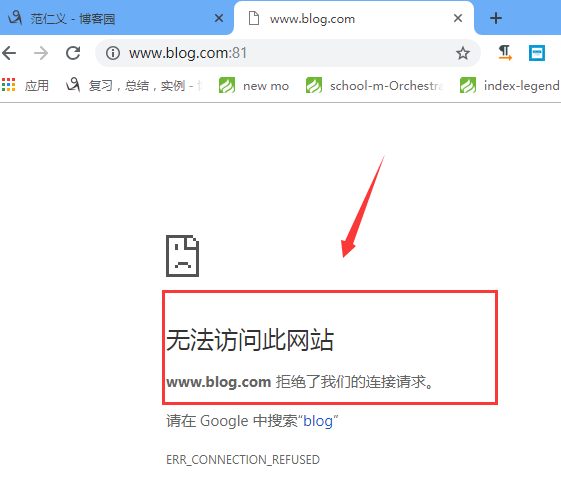
其实检查的时候才发现,在在Indexs前面加了-后,apache启动失败了,这里看到的效果是apache启动失败
把apache配置文件httpd,conf中的下面这句话前面的#号去掉,以便访问网站的时候直接进入文件,而不是目录
<IfModule dir_module>

#    DirectoryIndex index.html index.php index.htm l.php

</IfModule>
.
localhost:81也不行
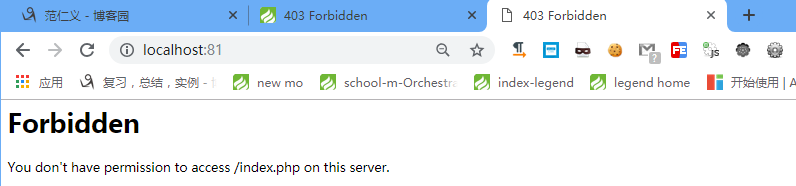
在apache的配置httpd.conf中,网站根路径的配置如下:
DocumentRoot  "E:\2017-02-21--SoftWare\PHP\SOFTWARE\phpStudy_New\PHPTutorial\WWW"

<Directory />

    Options +Indexes +FollowSymLinks +ExecCGI

    AllowOverride All

    Order allow,deny

    Allow from all

    Require all granted

</Directory>
现在出现的问题就是:apache 网站 目录可以访问 文件不能访问
进一步检查,发现txt,xml格式的文件都能访问,php格式的文件不能访问
找到问题的原因了,我把php的版本从5.4.45切换成了 5.6.27,切换回来之后就好了,php文件就能解析了,网站就能访问了
3、解决问题方法(最终解决)
找到问题的原因了,我把php的版本从5.4.45切换成了 5.6.27,切换回来之后就好了,php文件就能解析了,网站就能访问了
和配置实在没有半毛钱关系
收获吧:仔细思考你做了哪些改变因素(在正确和错误之间),我忘记我切换了版本
其实是我没有意识到php版本切换会造成网站无法访问的问题
因为php文件本身就是靠服务器来解析的,php版本切换肯定有可能会造成网站无法访问
php多站点配置以及Forbidden You don't have permission to access / on this server问题解决的更多相关文章
- 蛋疼的 403 Forbidden You don’t have permission to access / on this server.
参考博文: a.http://www.linuxidc.com/Linux/2016-09/134827.htm 这个解释挺好 昨天配置新服务器:以为自己老手 就一步到位结果一直出现 403 For ...
- PHP错误:Forbidden You don't have permission to access / on this server.
今天在测试一个php程序的时候,发现这个问题: Forbidden You don't have permission to access / on this server. 开始的时候我是用http ...
- Forbidden You don't have permission to access / on this server.
原文:Forbidden You don't have permission to access / on this server. Forbidden You don't have permissi ...
- Forbidden You don't have permission to access / on this server. You don't have permission to access /phpmyadmin/ on this server. 解决办法
Forbidden You don't have permission to access / on this server. 解决办法 打开 httpd.conf 文件, 将 # onli ...
- MAMP "403 Forbidden You don't have permission to access / on this server."
2015年01月22日 17:27:31 阅读数:3488 用MAMP搭建本地服务器的时候,设置好ip和端口等属性之后,浏览器访问,报 403错误: Forbidden You don't have ...
- Forbidden You don't have permission to access / on this server PHP
在新安装的谷歌游览器里,打不了PHP网站了,错误显示: Forbidden You don't have permission to access / on this server. 原因还是配置权限 ...
- server下apache2.4.*虚拟主机配置Forbidden You don't have permission to access / on this server.
前言: 继前面两节笔记之后,在配置一个虚拟主机时,这中间却遇见了一个问题,这里需要描述做一下笔记,刚刚安装的是Ubuntu server,apt-get下来的apache的版本是2.4.7,之前一直用 ...
- 搭建http静态网页服务器出现“Forbidden You don't have permission to access / on this server”
部分参考链接: 2.4+ httpd最简单example.conf, 存放目录:/etc/httpd/conf.d/example.conf Alias /newstart-zte/ "/n ...
- Wamp错误: Forbidden You don't have permission to access / on this server.
找到php的配置文件httpd.conf(找不到的话看这篇:http://www.cnblogs.com/liulangmao/p/3569807.html) 在原有的位置文件中找到配置节 <D ...
随机推荐
- PreparedStatement vs Statement
Statement和PreparedStatement之间的区别 1.PreparedStatement是预编译的,对于批量处理可以大大提高效率. 也叫JDBC存储过程 2.使用 Statemen ...
- 170721、springboot编程之注解(annotation)列表
(1)@SpringBootApplication 申明让spring boot自动给程序进行必要的配置,这个配置等同于: @Configuration ,@EnableAutoConfigurati ...
- Lucene.net的简单使用
一.Lucene.net的简单介绍 1.为什么要使用Lucene.net 使用like的模糊查询,模糊度太低,中间添加几个字就无法查找.同时会造成数据库的全文检索,效率低下,数据库服务器造 ...
- Hadoop生态上几个技术的解释:hive、pig、hbase 关系与区别
hadoop生态圈 Pig 一种操作hadoop的轻量级脚本语言,最初又雅虎公司推出,不过现在正在走下坡路了.当初雅虎自己慢慢退出pig的维护之后将它开源贡献到开源社区由所有爱好者来维护.不过现在还是 ...
- scribe、chukwa、kafka、flume日志系统对比
scribe.chukwa.kafka.flume日志系统对比 1. 背景介绍许多公司的平台每天会产生大量的日志(一般为流式数据,如,搜索引擎的pv,查询等),处理 这些日志需要特定的日志系统,一 ...
- Integer.valueof 和 Integer.parseInt
System.out.println(Integer.valueOf("127")==Integer.valueOf("127")); System.out.p ...
- django-base
1.django创建 2.django常用命令 3.django配置 一.创建django程序 1.终端:django-admin startproject sitename 2.IDE创建Djang ...
- ubuntu常用操作命令以及它的通道模式简解
1.tail tail -f filename :可以动态查看文件的写入,按ctrl+c结束查看. 要显示 notes 文件的最后十行,输入: tail -n -10 notes tail notes ...
- PHP 自动加载的简单实现(推荐)
基于psr的规范,使用命名空间和spl_autoload_register()来实现自动加载 文件结构: |--Api |--Account.php |--User.php |--Service |- ...
- t检验&z检验学习[转载]
转自:https://blog.csdn.net/m0_37777649/article/details/74937242 1.什么是T检验? T检验是假设检验的一种,又叫student t检验(St ...