
WPF EventAggregator(基于EventAggregator的事件发布及订阅)
一、EventAggregator简介
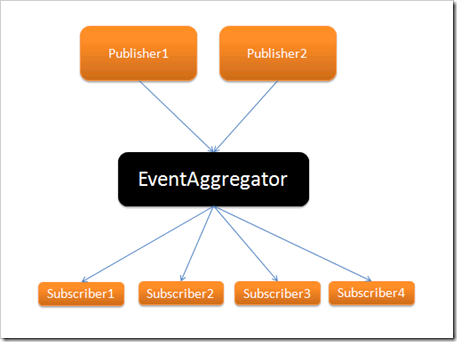
EventAggregator是Prism中专门处理ViewModel与ViewModel之间事件传递的类对象,它提供了针对事件的发布方法和订阅方法,所以可以非常方便的来管理事件。下面的图就是其实现的一个比较简便的说明:
二、EventAggregator单页传递数据
首先,新建一个WPF项目,然后安装好Prism,这里我们可以通过程序包管理器控制台安装,待到都安装好以后,我们就可以开始使用了。
其次,创建一个GetInputMessages的类,继承自CompositePresentationEvent<string>方法,由于我们传递的都是String类型的数据,所以这里我采用String类型。这个类不提供任何实现,只需要继承就好了:
using System;

using System.Collections.Generic;

using System.Linq;

using System.Text;

using Microsoft.Practices.Prism.Events;

namespace EventAggregatorPratice

{

    /// <summary>

    /// 自定义的事件,一定要继承自CompositePresentationEvent类,或者继承EventBase,不做任何实现,相当于一个标志,给这个事件一个名字

    /// </summary>

    public class GetInputMessages:CompositePresentationEvent<string>

    {

    }

}

然后,创建EventAggregatorRepository类,这个类主要存储eventAggregator对象并保证其唯一:

using System;

using System.Collections.Generic;

using System.Linq;

using System.Text;

using Microsoft.Practices.Prism.Events;

namespace EventAggregatorPratice

{

    public class EventAggregatorRepository

    {

        public EventAggregatorRepository()

        {

            eventAggregator = new EventAggregator();

        }

        public IEventAggregator eventAggregator;

        public static EventAggregatorRepository eventRepository = null;

        //单例,保持内存唯一实例

        public static EventAggregatorRepository GetInstance()

        {

            if (eventRepository == null)

            {

                eventRepository = new EventAggregatorRepository();

            }

            return eventRepository;

        }

    }

}
最后则是创建EventAggregatorWindow.xaml窗体,然后编写窗体代码:
前台的XAML代码如下:
<Window x:Class="EventAggregatorPratice.MainWindow"

        xmlns="http://schemas.microsoft.com/winfx/2006/xaml/presentation"

        xmlns:x="http://schemas.microsoft.com/winfx/2006/xaml"

        Title="测试Event Aggregator的使用方法" Height="365" Width="471" WindowStartupLocation="CenterScreen" >

    <Grid>

        <Button Content="获取输入" Height="23" HorizontalAlignment="Right" Margin="0,291,53,0" Name="button1" VerticalAlignment="Top" Width="75" Click="button1_Click" />

        <GroupBox Header="用户信息" Height="273" HorizontalAlignment="Left" Margin="12,12,0,0" Name="groupBox1" VerticalAlignment="Top" Width="425">

            <Grid>

                <Label Content="用户昵称:" Height="28" HorizontalAlignment="Left" Margin="19,18,0,0" Name="label1" VerticalAlignment="Top" />

                <Label Content="用户性别:" Height="28" HorizontalAlignment="Left" Margin="19,52,0,0" Name="label2" VerticalAlignment="Top" />

                <Label Content="用户住址:" Height="28" HorizontalAlignment="Left" Margin="19,86,0,0" Name="label3" VerticalAlignment="Top" />

                <Label Content="用户年龄:" Height="28" HorizontalAlignment="Left" Margin="205,18,0,0" Name="label4" VerticalAlignment="Top" />

                <Label Content="用户电话:" Height="28" HorizontalAlignment="Left" Margin="205,52,0,0" Name="label5" VerticalAlignment="Top" />

                <TextBox Height="23" HorizontalAlignment="Left" Margin="79,20,0,0" Name="txtNick" VerticalAlignment="Top" Width="109" TabIndex="1" />

                <TextBox Height="23" HorizontalAlignment="Left" Margin="269,54,0,0" Name="txtTel" VerticalAlignment="Top" Width="109" TabIndex="4" />

                <TextBox Height="23" HorizontalAlignment="Left" Margin="79,54,0,0" Name="txtSex" VerticalAlignment="Top" Width="109" TabIndex="3" />

                <TextBox Height="23" HorizontalAlignment="Left" Margin="269,20,0,0" Name="txtAge" VerticalAlignment="Top" Width="109" TabIndex="2" />

                <TextBox Height="23" HorizontalAlignment="Left" Margin="79,88,0,0" Name="txtAddress" VerticalAlignment="Top" Width="299" />

                <Border BorderBrush="Black" BorderThickness="1" Height="1" HorizontalAlignment="Left" Margin="6,117,0,0" Name="border1" VerticalAlignment="Top" Width="401" />

                <Label Content="获取输入:" Height="28" HorizontalAlignment="Left" Margin="19,124,0,0" Name="label6" VerticalAlignment="Top" />

                <TextBlock Height="124" HorizontalAlignment="Left" Margin="79,124,0,0" Name="txtResult" Text="" VerticalAlignment="Top" Width="299" Background="#FFF2F2F2" />

            </Grid>

        </GroupBox>

    </Grid>

</Window>
后台的代码如下:
using System.Windows;

using Microsoft.Practices.Prism.Events;

using System.Text;

using System;

namespace EventAggregatorPratice

{

    /// <summary>

    /// MainWindow.xaml 的交互逻辑

    /// </summary>

    public partial class MainWindow : Window

    {

        public MainWindow()

        {

            InitializeComponent();

            //订阅事件,一旦有事件引发,将会在这里接住

            SetSubscribe();

        }

        public void SetPublish(string messageData)

        {

            EventAggregatorRepository

                .GetInstance()

                .eventAggregator

                .GetEvent<GetInputMessages>()

                .Publish(messageData);

        }

        public void SetSubscribe()

        {

            EventAggregatorRepository

                .GetInstance()

                .eventAggregator

                .GetEvent<GetInputMessages>()

                .Subscribe(ReceiveMessage,ThreadOption.UIThread,true);

        }

        public void ReceiveMessage(string messageData)

        {

            this.txtResult.Text = messageData;

        }

        private void button1_Click(object sender, RoutedEventArgs e)

        {

            //抛出事件

            StringBuilder strBuilder = new StringBuilder();

            strBuilder.Append("用户昵称:").Append(txtNick.Text).Append(Environment.NewLine);

            strBuilder.Append("用户年龄:").Append(txtAge.Text).Append(Environment.NewLine);

            strBuilder.Append("用户性别:").Append(txtSex.Text).Append(Environment.NewLine);

            strBuilder.Append("用户电话:").Append(txtTel.Text).Append(Environment.NewLine);

            strBuilder.Append("用户住址:").Append(txtAddress.Text).Append(Environment.NewLine);

            SetPublish(strBuilder.ToString());

        }

    }

}
在这里,我来做一下解释:
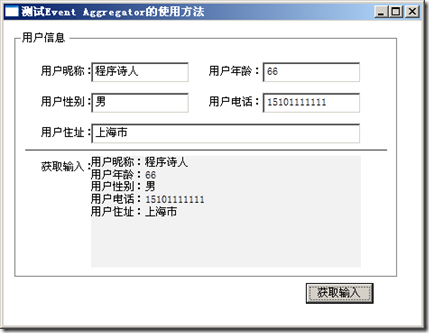
首先,程序先通过SetSubscribe方法来订阅事件,一旦有事件抛出的时候,SetSubscribe便会利用其ReceiveMessage回调方法处理接收到的事件。
其次,当我们点击按钮的时候,一个SetPublish事件就被抛出了,并且会被SetSubscribe事件接住。效果如图:
WPF EventAggregator(基于EventAggregator的事件发布及订阅)的更多相关文章
- 基于EventAggregator的事件发布及订阅
EventAggregator简介 EventAggregator是Prism中专门处理ViewModel与ViewModel之间事件传递的类对象,它提供了针对事件的发布方法和订阅方法,所以可以非常方 ...
- Dapr实现.Net Grpc服务之间的发布和订阅,并采用WebApi类似的事件订阅方式
大家好,我是失业在家,正在找工作的博主Jerry,找工作之余,总结和整理以前的项目经验,动手写了个洋葱架构(整洁架构)示例解决方案 OnionArch.其目的是为了更好的实现基于DDD(领域驱动分析) ...
- 模块(类)之间解耦利器:EventPublishSubscribeUtils 事件发布订阅工具类
如果熟悉C#语言的小伙伴们一般都会知道委托.事件的好处,只需在某个类中提前定义好公开的委托或事件(委托的特殊表现形式)变量,然后在其它类中就可以很随意的订阅该委托或事件,当委托或事件被触发执行时,会自 ...
- WPF的EventAggregator的发布和订阅
EventAggregator是Prism中专门处理ViewModel与ViewModel之间事件传递的类对象,它提供了针对事件的发布方法和订阅方法,所以可以非常方便的来管理事件.下面分几步来实现相关 ...
- 基于A2DFramework的事件机制实现
随笔- 102 文章- 3 评论- 476 发布订阅 - 基于A2DFramework的事件机制实现 SUMMARY 能做什么 DEMO 原理图 应用场景 能做什么 A2DFramework ...
- 使用MediatR重构单体应用中的事件发布/订阅
标题:使用MediatR重构单体应用中的事件发布/订阅 作者:Lamond Lu 地址:https://www.cnblogs.com/lwqlun/p/10640280.html 源代码:https ...
- ASP.NET Core中实现单体程序的事件发布/订阅
标题:ASP.NET Core中实现单体程序的事件发布/订阅 作者:Lamond Lu 地址:https://www.cnblogs.com/lwqlun/p/10468058.html 项目源代码: ...
- Spring的事件发布机制
一:Spring的事件发布 ApplicationContext提供了针对Bean的事件传播功能,其中的主角是publishEvent()方法,通过这个方法可以将事件通知给系统内的监听器(需实现App ...
- 深入理解Spring的容器内事件发布监听机制
目录 1. 什么是事件监听机制 2. JDK中对事件监听机制的支持 2.1 基于JDK实现对任务执行结果的监听 3.Spring容器对事件监听机制的支持 3.1 基于Spring实现对任务执行结果的监 ...
随机推荐
- 2.自己的Github试用过程
打开我个人的Github,我试着做些简单的试用.首先,经过简短描述,我成功创建了一个新的存储库
- SQL Server 2014与TFS 2013的错误(TF53001:管理员已取消数据库操作)
服务器环境: - TFS 2013 with Update 2 - SQL Server 2014(两个节点数据库服务器配置了AlwaysOn高可用性) - Windows Server 2012 R ...
- solr特点三: 排序样例汇总
目的是提供solrj 实现 查询的样例参考 单维度排序 //查询条件 query.setQuery(queryString); // add 是添加 query.addSortField(field_ ...
- ie11下ajax用escape发送中文参数失败
一个项目中,登录请求是ajax,get模式.登录名无中文可以正常登录:登录名是中文则偶尔可以登录,大部分情况下无法登录,ajax请求无法发送成功. 登录名是用js的escape函数转码. 经过多次测试 ...
- WM_COPYDATA+BHO+Qt实现进程间通信
最近项目有一个需求:点击网页上某个按钮,通知Qt客户端.网页相关操作使用了BHO,BHO与Qt通信通过WB_COPYDATA,为什么这么麻烦呢,因为项目正好用到了BHO,可能还有其他方式,能直接通过网 ...
- django系列6--Ajax03 ajax参数
ajax的参数 data: 当前ajax请求要携带的数据,是一个json的object对象,ajax方法会默认的把它编码成某种格式 (urlencoded:?a=1&b=2)发送给服务端;此外 ...
- python网络编程--线程的方法,线程池
一.线程的其他方法(Thread其他属性和方法) ident() 获取线程id Thread实例对象的方法 isAlive() 设置线程名 getName() 返回线程名 setName() 设置线程 ...
- 封装继承多态-java面向对象三大特征
第七章 封装和继承 一.面向对象的三大特征 封装.继承.多态 二.封装 将类的属性(字段)设置为私有的(private),并添加getter/setter方法操作属性. 注意:get|set方法的固 ...
- js正则包含三位
var reg = new RegExp("^(?![A-Za-z]+$)(?![A-Z\\d]+$)(?![A-Z_\\W]+$)(?![a-z\\d]+$)(?![a-z_\\W]+$) ...
- zTree第一章,纯静态
zTree v3.5 Demo 演示 http://www.treejs.cn/v3/demo.php#_101 ------------------------------------------- ...