
WPF EventAggregator(基于EventAggregator的事件发布及订阅)
一、EventAggregator简介
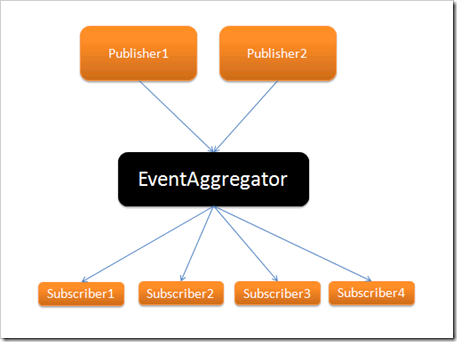
EventAggregator是Prism中专门处理ViewModel与ViewModel之间事件传递的类对象,它提供了针对事件的发布方法和订阅方法,所以可以非常方便的来管理事件。下面的图就是其实现的一个比较简便的说明:
二、EventAggregator单页传递数据
首先,新建一个WPF项目,然后安装好Prism,这里我们可以通过程序包管理器控制台安装,待到都安装好以后,我们就可以开始使用了。
其次,创建一个GetInputMessages的类,继承自CompositePresentationEvent<string>方法,由于我们传递的都是String类型的数据,所以这里我采用String类型。这个类不提供任何实现,只需要继承就好了:
using System;

using System.Collections.Generic;

using System.Linq;

using System.Text;

using Microsoft.Practices.Prism.Events;

namespace EventAggregatorPratice

{

    /// <summary>

    /// 自定义的事件,一定要继承自CompositePresentationEvent类,或者继承EventBase,不做任何实现,相当于一个标志,给这个事件一个名字

    /// </summary>

    public class GetInputMessages:CompositePresentationEvent<string>

    {

    }

}

然后,创建EventAggregatorRepository类,这个类主要存储eventAggregator对象并保证其唯一:

using System;

using System.Collections.Generic;

using System.Linq;

using System.Text;

using Microsoft.Practices.Prism.Events;

namespace EventAggregatorPratice

{

    public class EventAggregatorRepository

    {

        public EventAggregatorRepository()

        {

            eventAggregator = new EventAggregator();

        }

        public IEventAggregator eventAggregator;

        public static EventAggregatorRepository eventRepository = null;

        //单例,保持内存唯一实例

        public static EventAggregatorRepository GetInstance()

        {

            if (eventRepository == null)

            {

                eventRepository = new EventAggregatorRepository();

            }

            return eventRepository;

        }

    }

}
最后则是创建EventAggregatorWindow.xaml窗体,然后编写窗体代码:
前台的XAML代码如下:
<Window x:Class="EventAggregatorPratice.MainWindow"

        xmlns="http://schemas.microsoft.com/winfx/2006/xaml/presentation"

        xmlns:x="http://schemas.microsoft.com/winfx/2006/xaml"

        Title="测试Event Aggregator的使用方法" Height="365" Width="471" WindowStartupLocation="CenterScreen" >

    <Grid>

        <Button Content="获取输入" Height="23" HorizontalAlignment="Right" Margin="0,291,53,0" Name="button1" VerticalAlignment="Top" Width="75" Click="button1_Click" />

        <GroupBox Header="用户信息" Height="273" HorizontalAlignment="Left" Margin="12,12,0,0" Name="groupBox1" VerticalAlignment="Top" Width="425">

            <Grid>

                <Label Content="用户昵称:" Height="28" HorizontalAlignment="Left" Margin="19,18,0,0" Name="label1" VerticalAlignment="Top" />

                <Label Content="用户性别:" Height="28" HorizontalAlignment="Left" Margin="19,52,0,0" Name="label2" VerticalAlignment="Top" />

                <Label Content="用户住址:" Height="28" HorizontalAlignment="Left" Margin="19,86,0,0" Name="label3" VerticalAlignment="Top" />

                <Label Content="用户年龄:" Height="28" HorizontalAlignment="Left" Margin="205,18,0,0" Name="label4" VerticalAlignment="Top" />

                <Label Content="用户电话:" Height="28" HorizontalAlignment="Left" Margin="205,52,0,0" Name="label5" VerticalAlignment="Top" />

                <TextBox Height="23" HorizontalAlignment="Left" Margin="79,20,0,0" Name="txtNick" VerticalAlignment="Top" Width="109" TabIndex="1" />

                <TextBox Height="23" HorizontalAlignment="Left" Margin="269,54,0,0" Name="txtTel" VerticalAlignment="Top" Width="109" TabIndex="4" />

                <TextBox Height="23" HorizontalAlignment="Left" Margin="79,54,0,0" Name="txtSex" VerticalAlignment="Top" Width="109" TabIndex="3" />

                <TextBox Height="23" HorizontalAlignment="Left" Margin="269,20,0,0" Name="txtAge" VerticalAlignment="Top" Width="109" TabIndex="2" />

                <TextBox Height="23" HorizontalAlignment="Left" Margin="79,88,0,0" Name="txtAddress" VerticalAlignment="Top" Width="299" />

                <Border BorderBrush="Black" BorderThickness="1" Height="1" HorizontalAlignment="Left" Margin="6,117,0,0" Name="border1" VerticalAlignment="Top" Width="401" />

                <Label Content="获取输入:" Height="28" HorizontalAlignment="Left" Margin="19,124,0,0" Name="label6" VerticalAlignment="Top" />

                <TextBlock Height="124" HorizontalAlignment="Left" Margin="79,124,0,0" Name="txtResult" Text="" VerticalAlignment="Top" Width="299" Background="#FFF2F2F2" />

            </Grid>

        </GroupBox>

    </Grid>

</Window>
后台的代码如下:
using System.Windows;

using Microsoft.Practices.Prism.Events;

using System.Text;

using System;

namespace EventAggregatorPratice

{

    /// <summary>

    /// MainWindow.xaml 的交互逻辑

    /// </summary>

    public partial class MainWindow : Window

    {

        public MainWindow()

        {

            InitializeComponent();

            //订阅事件,一旦有事件引发,将会在这里接住

            SetSubscribe();

        }

        public void SetPublish(string messageData)

        {

            EventAggregatorRepository

                .GetInstance()

                .eventAggregator

                .GetEvent<GetInputMessages>()

                .Publish(messageData);

        }

        public void SetSubscribe()

        {

            EventAggregatorRepository

                .GetInstance()

                .eventAggregator

                .GetEvent<GetInputMessages>()

                .Subscribe(ReceiveMessage,ThreadOption.UIThread,true);

        }

        public void ReceiveMessage(string messageData)

        {

            this.txtResult.Text = messageData;

        }

        private void button1_Click(object sender, RoutedEventArgs e)

        {

            //抛出事件

            StringBuilder strBuilder = new StringBuilder();

            strBuilder.Append("用户昵称:").Append(txtNick.Text).Append(Environment.NewLine);

            strBuilder.Append("用户年龄:").Append(txtAge.Text).Append(Environment.NewLine);

            strBuilder.Append("用户性别:").Append(txtSex.Text).Append(Environment.NewLine);

            strBuilder.Append("用户电话:").Append(txtTel.Text).Append(Environment.NewLine);

            strBuilder.Append("用户住址:").Append(txtAddress.Text).Append(Environment.NewLine);

            SetPublish(strBuilder.ToString());

        }

    }

}
在这里,我来做一下解释:
首先,程序先通过SetSubscribe方法来订阅事件,一旦有事件抛出的时候,SetSubscribe便会利用其ReceiveMessage回调方法处理接收到的事件。
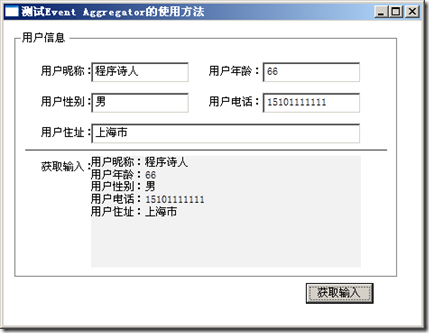
其次,当我们点击按钮的时候,一个SetPublish事件就被抛出了,并且会被SetSubscribe事件接住。效果如图:
WPF EventAggregator(基于EventAggregator的事件发布及订阅)的更多相关文章
- 基于EventAggregator的事件发布及订阅
EventAggregator简介 EventAggregator是Prism中专门处理ViewModel与ViewModel之间事件传递的类对象,它提供了针对事件的发布方法和订阅方法,所以可以非常方 ...
- Dapr实现.Net Grpc服务之间的发布和订阅,并采用WebApi类似的事件订阅方式
大家好,我是失业在家,正在找工作的博主Jerry,找工作之余,总结和整理以前的项目经验,动手写了个洋葱架构(整洁架构)示例解决方案 OnionArch.其目的是为了更好的实现基于DDD(领域驱动分析) ...
- 模块(类)之间解耦利器:EventPublishSubscribeUtils 事件发布订阅工具类
如果熟悉C#语言的小伙伴们一般都会知道委托.事件的好处,只需在某个类中提前定义好公开的委托或事件(委托的特殊表现形式)变量,然后在其它类中就可以很随意的订阅该委托或事件,当委托或事件被触发执行时,会自 ...
- WPF的EventAggregator的发布和订阅
EventAggregator是Prism中专门处理ViewModel与ViewModel之间事件传递的类对象,它提供了针对事件的发布方法和订阅方法,所以可以非常方便的来管理事件.下面分几步来实现相关 ...
- 基于A2DFramework的事件机制实现
随笔- 102 文章- 3 评论- 476 发布订阅 - 基于A2DFramework的事件机制实现 SUMMARY 能做什么 DEMO 原理图 应用场景 能做什么 A2DFramework ...
- 使用MediatR重构单体应用中的事件发布/订阅
标题:使用MediatR重构单体应用中的事件发布/订阅 作者:Lamond Lu 地址:https://www.cnblogs.com/lwqlun/p/10640280.html 源代码:https ...
- ASP.NET Core中实现单体程序的事件发布/订阅
标题:ASP.NET Core中实现单体程序的事件发布/订阅 作者:Lamond Lu 地址:https://www.cnblogs.com/lwqlun/p/10468058.html 项目源代码: ...
- Spring的事件发布机制
一:Spring的事件发布 ApplicationContext提供了针对Bean的事件传播功能,其中的主角是publishEvent()方法,通过这个方法可以将事件通知给系统内的监听器(需实现App ...
- 深入理解Spring的容器内事件发布监听机制
目录 1. 什么是事件监听机制 2. JDK中对事件监听机制的支持 2.1 基于JDK实现对任务执行结果的监听 3.Spring容器对事件监听机制的支持 3.1 基于Spring实现对任务执行结果的监 ...
随机推荐
- Oracle E-Business Suite R12.1.x Installation And Upgrade Guide Step by Step
1. Install Oracle E- Business Suite R12.1.1 2. Upgrade E- Business Suite From 12 ...
- ASP.NET Core2使用Autofac实现IOC依赖注入竟然能如此的优雅简便
初识ASP.NET Core的小伙伴一定会发现,其几乎所有的项目依赖都是通过依赖注入方式进行链式串通的.这是因为其使用了依赖注入 (DI) 的软件设计模式,代码的设计是遵循着“高内聚.低耦合”的原则, ...
- Python入门基础学习 三
Python入门基础学习 三 数据类型 Python区分整型和浮点型依靠的是小数点,有小数点就是浮点型. e记法:e就是10的意思,是一种科学的计数法,15000=1.5e4 布尔类型是一种特殊的整形 ...
- 基于SSH的网上图书商城-JavaWeb项目-有源码
开发工具:Myeclipse/Eclipse + MySQL + Tomcat 项目简介: 技术:Java:JSP:JDBC,struts2,spring,hibernate数据库: mysqlweb ...
- 清除浏览器缓存meta标签
<meta http-equiv="Cache-Control" content="no-cache" /> <meta http-equiv ...
- 描述一下 cookies,sessionStorage 和 localStorage 的区别?
sessionStorage 和 localStorage 是HTML5 Web Storage API 提供的,可以方便的在web请求之间保存数据.有了本地数据,就可以避免数据在浏览器和服务器间不必 ...
- Linux—virtualbox系统安装(1)
安装过程 1 点击新建 2 内存大小一般512M即可 3 按照默认的硬盘空间大小8G 4 选择第一个VDI 5 选择固定大小,系统运行速度快,效率高 6 保存文件位置 7 创建成功后,点击设置,将软驱 ...
- [USACO17FEB]Why Did the Cow Cross the Road III P(CDQ分治)
题意 两列$n$的排列,相同的数连边,如果一对数有交叉且差的绝对值$>k$,则$++ans$,求$ans$ 题解 可以把每一个数字看成一个三元组$(x,y,z)$,其中$x$表示在第一列的位置, ...
- LOJ#3085. 「GXOI / GZOI2019」特技飞行(KDtree+坐标系变换)
题面 传送门 前置芝士 请确定您会曼哈顿距离和切比雪夫距离之间的转换,以及\(KDtree\)对切比雪夫距离的操作 题解 我们发现\(AB\)和\(C\)没有任何关系,所以关于\(C\)可以直接暴力数 ...
- AssertionError: View function mapping is overwriting an existing endpoint function: admin.main
刚才给views.py文件添加了一个路由地址: @admin_view.route('/test', methods=["get", "post"]) @log ...