
从SVN一键对比版本
公司的部署程序太多,每次部署安装完后,还得从SVN上对比版本,手工做实在太麻烦。
比如下面的一个版本
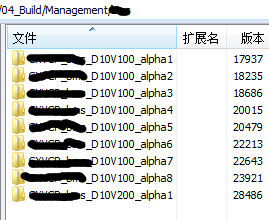
思路:
将需要检查的部件及安装的位置、SVN相关信息写入配置文件,然后程序读取配置文件
配置文件内容如下:
[server1]

ipaddr=192.168.3.2

password=qqqqq

port=

dir=/home/gx/    ----##部件按装的位置

compent=sc,cag,ghomeAgent,IfTImg,Stream,TransDownload  ---###服务器上安装的部件

[Server2]

ipaddr=192.168.14.31

password=qqqqq

port=

dir=/home/gx/

compent=bms,bussinessAgent

[SVN]

svnserver=192.168.3.185

user=nenenen

password=xxxx

url=http://192.168.3.185/TM/VS/VSP/04_Build

~
因设计到公司内部的产品,代码屏蔽了一些东西:
#!/usr/bin/python
#coding:utf-8
import paramiko
import sys
import subprocess
import ConfigParser
import os,time
import re
import urllib2
from urlparse import urlparse
import unittest #从SVN获取组件及版本号
class snvparser(): aa={}
def __init__(self,url,server,user,passwd): auth_handler = urllib2.HTTPBasicAuthHandler()
auth_handler.add_password(realm='TM Repository',
uri=server,
user=user,
passwd=passwd)
self.opener = urllib2.build_opener(auth_handler)
urllib2.install_opener(self.opener)
self.url=url #print self.url
a=self.opener.open(self.url)
data=a.read()
patten='href="(\w*?)/"'
self.compentlist=re.findall(patten,data)
#print self.compentlist
if 'mvp' in "".join(self.compentlist) or 'GXVCP' in ''.join(self.compentlist):
urldd = urlparse(self.url)
result=urldd.path.split('/')[-1]
self.compentlist.sort(reverse=True)
#print self.compentlist
#print self.compentlist[0]
self.aa[result]=self.compentlist[0]
else:
for self.subb in self.compentlist:
#print self.subb
#print '-'*50
self.suburl=self.url+'/'+self.subb
#print self.suburl
self.openurl(self.suburl) def openurl(self,url):
#self.url=url
#print url
a=self.opener.open(url)
data=a.read()
patten='href="(\w*?)/"'
self.compentlist=re.findall(patten,data) if 'mvp' in "".join(self.compentlist) or 'GXVCP' in ''.join(self.compentlist):
urldd = urlparse(url)
result=urldd.path.split('/')[-1]
self.compentlist.sort(reverse=True)
# print self.compentlist
# print self.compentlist[0]
self.aa[result]=self.compentlist[0]
else:
for self.subb in self.compentlist:
#print self.subb
#print '-'*50
self.suburl=url+'/'+self.subb
#print self.suburl
self.openurl(self.suburl) def result(self):
return self.aa #配置文件判断及读取
config=ConfigParser.ConfigParser()
if not os.path.exists('config.ini'):
print "config.ini is not exists,please check it!!"
exit(-1) config.read('config.ini')
print "You want to check follow Component:"
print config.get('server1','compent')
print config.get('Server2','compent') #SSH远程操作函数
def ssh2(ip,pt,pw,us,comm):
try:
ssh = paramiko.SSHClient()
ssh.load_system_host_keys()
ssh.set_missing_host_key_policy(paramiko.AutoAddPolicy())
ssh.connect(ip,port=int(pt),username=us,password=pw)
#for COMM in comm:
stdin,stdout,stderr = ssh.exec_command(comm)
print "The Installed Version is :",
read = stdout.read()
#print read
compi=re.compile('Implementation-Version:(.*)')
qq=re.search(compi,read).group(1)
#print '======================'
print "\033[36m %s \033[0m" % (qq.strip())
print '-'*30
ssh.close()
except Exception,e:
print "\033[36mError\033[0m is :",ip,e class testCheckVersion(unittest.TestCase):
def setUp(self):
pass
def tearDown(self):
pass
def testVersion(self):
#self.assert(1==2)
pass if __name__ == '__main__':
#print config.sections()
server=config.get('SVN','svnserver')
user=config.get('SVN','user')
password=config.get('SVN','password')
url=config.get('SVN','url')
try: cc=snvparser(url,server,user,password)
result=cc.result()
except Exception,e:
print e
exit(-1)
#print result
#print '='*70 for section_name in config.sections():
if not section_name=='SVN':
print '='*70
configdd=dict(config.items(section_name))
#configdd=getconfig(section_name)
# print configdd
for compent in configdd['compent'].split(","):
try:
if compent=='sc' or compent=='bussinessAgent' or compent=='cag':
comm='cat %s%s-vcp/META-INF/MANIFEST.MF' % (configdd['dir'],compent)
print "The SVN \033[31m %-13s \033[0m Version is:" % compent ,
print "\033[36m %s \033[0m" % result[compent]
ssh2(configdd['ipaddr'],configdd['port'],configdd['password'],us='root',comm=comm)
if compent=='ghomeAgent':
comm='cat %s%s/META-INF/MANIFEST.MF' % (configdd['dir'],compent)
print "The SVN \033[31m %-13s \033[0m Version is:" % compent,
print "\033[36m %s \033[0m" % result[compent]
ssh2(configdd['ipaddr'],configdd['port'],configdd['password'],us='root',comm=comm)
if compent=='bms':
comm='cat %sbms/apache-tomcat-6.0.36/webapps/bms/META-INF/MANIFEST.MF' % configdd['dir']
print "The SVN \033[31m %-13s \033[0m Version is:" % compent,
print "\033[36m %s \033[0m" % result[compent]
ssh2(configdd['ipaddr'],configdd['port'],configdd['password'],us='root',comm=comm)
#if compent=='IfTImg' or compent=='Stream' or compent=='TransDownload':
#comm='ls /home/gx'
#print result except KeyError,e:
print "Please Check input !",e
except Exception,e:
print "Error",e
print '='*70
在写完程序后才发现,公司的SVN 命令太不规范,甚至单词也有拼错;目录安装也非常随意,查看版本方式多样花。一时没心情再将程序往下写了,有需要的可以根据实际情况更改
程序运行如下:
[root@localhost tools]# python checkVersion.py

['sc', 'bussinessAgent', 'cag', 'bms', 'ghomeAgent', 'server1', 'Server2']

======================================================================

 sc

 :: The Installed Version is: 'NoneType' object has no attribute 'group'

The SVN NESTEST Version is : GXVCP_sc_D10V200_alpha1

======================================================================

bussinessAgent

[Errno None] Unable to connect to port  on  or 192.168.14.31  --#服务器密码被更改了

The SVN NESTEST Version is : GXVCP_businessAgent_D10V200_alpha1

======================================================================

cag

 :: The Installed Version is: 'NoneType' object has no attribute 'group'   ---文件已改名了

The SVN NESTEST Version is : GXVCP_cag_D10V200_alpha1

======================================================================

bms

[Errno None] Unable to connect to port  on  or 192.168.14.31

The SVN NESTEST Version is : GXVCP_bms_D10V200_alpha1

======================================================================

ghomeAgent

 :: The Installed Version is:  GXVCP_ghomeAgent_D10V200_alpha1

------------------------------

The SVN NESTEST Version is : GXVCP_ghomeAgent_D10V200_alpha1

======================================================================
从SVN一键对比版本的更多相关文章
- svn还原到指定版本
svn还原到指定版本 1,选中文件夹,右健,show log 2,选中指定版本,右健,Revert to this revision 3,svn commit 4,ok
- svn回复历史版本的操作方法
svn恢复历史版本的操作方法svn update 保证最新svn log login.php 获得版本号svn diff -r 11026:11027 login.php 发现11027出问题svn ...
- 细说SVN集中式版本控制器
svn全称Subversion,实现多人开发同一个项目时,对源代码进行管理的工具.在公司里边,一个项目是由多人同时在开发,大家在本地自己电脑开发php代码,完毕后就commit上传给服务器运行. 如 ...
- SVN仓库连同版本信息迁移新服务器的步骤
SVN仓库连同版本信息迁移新服务器的步骤 步骤一:导出(1)链接原服务器,找到SVN Server安装路径下的bin文件,并复制文件路径,如 C:\Program File\SVN Server\bi ...
- linux进阶之SVN集中式版本控制系统篇
代码上线--版本控制系统 SVN 集中式版本控制系统 git 分布式版本控制系统 SVN是subversion的缩写,即版本控制系统,是一个开放 ...
- SVN集中式版本控制器的安装、使用与常见问题汇总
SVN是Subversion的简称,是一个开放源代码的版本控制系统,它采用了分支管理系统,集中式版本控制器 官方网站:https://www.visualsvn.com/ 下载右边的服务器端,左边的客 ...
- SVN源代码的版本控制系统使用简介
SVN是以个开放源代码的版本控制系统,当前最流行的版本控制系统,GIT是近段时间刚兴起的. 下面开始介绍如何安装也配置 1先下载或者从别的地方弄一个安装包(本人是64位的,32位的就用32位的安装包) ...
- SVN 集中式版本控制软件
简介: 目前流行的版本控制软件中,SVN ( 集中式版本控制 ) 算是使用范围更广.且使用时间更早的一款了,现在 git ( 分布式版本控制 ) 更火爆一点. 一.安装svn [root@localh ...
- Linux svn 回滚版本库
Linux代码 svn up Index/ 然后找出要撤销的确切版本: Linux代码 svn log --limit 10 Index/tpl/css/global.css 根据log怀疑是 ...
随机推荐
- golang 垃圾回收 gc
http://ruizeng.net/golang-gc-internals/ 摘要 在实际使用go语言的过程中,碰到了一些看似奇怪的内存占用现象,于是决定对go语言的垃圾回收模型进行一些研究.本文对 ...
- 开源图形数据库Neo4j使用 php开发
先看看它的示例数据 打开 Neo4j Browser :play movie graph 写代码,然后点play执行 Cypher, the graph query language.Neo4j提供了 ...
- Ubuntu之音效调节
sudo add-apt-repository ppa:nilarimogard/webupd8 sudo apt-get update sudo apt-get install pulseaudio ...
- python + opencv: 解决不能读取视频的问题
博主一开始使用python2.7和Opencv2.4.10来获取摄像头图像,程序如下: cap = cv2.VideoCapture(0) ret, frame = cap.read() 使用这个程序 ...
- HttpComponents 基础接口/类与HTTP message的对应关系
前提一: 什么是HTTP Message -- 遵循HTTP协议发送的消息!其格式是固定的:HTTP Message = Message Line + Message Header + Message ...
- Unity中的Transform Gizmo中的Pivot和Center
选择中心(Center)意味着使用当前所选所有物体的共同轴心, 选择轴心(Pivot)意味着将使用各个物体的实际轴心 区别在于是否选中了多个物体或者有层级关系的物体. 第一张图是Center,中心在组 ...
- Ubuntu server版上使用命令行操作VPNclient
Ubuntu server版上使用命令行操作VPNclient VPN,虚拟专用网络,这个技术还是非常有用的.近期笔者參与的项目中就使用上了VPN,大概情况是这种.有两个开发团队,在异地,代码服务器在 ...
- 终于AC了“最短路径”
今天做了一道关于最短路径的算法题,虽然最后AC了,但是我写的第一个算法,我认为是没有问题的,自己编写的测试用例也全部通过,反复调试了,都没有错误.可是在OJ上一提交就提示Wrong Answer,真是 ...
- 一直误解的memset函数
1.“想当然”导致的后果 今天犯了一个十分低级的错误,在对一个整型数组用memset进行初始化设置所有元素值为1.可是结果却大出所料,很意外啊!接着,我就做了代码测试. #include <io ...
- C++ 获取当前时间
#include <time.h> #include <stdio.h> int main( void ) { time_t t = time(0); char ...