
Spring与Web
一、定义页面及Servlet
在jsp页面加入以下,避免乱码
<meta charset="utf-8">
<body>

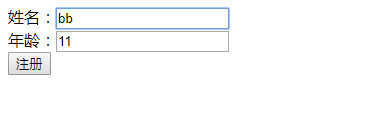
    <form action="RegisterServlte" method="post">

        姓名:<input type="text" name="name" /><br>

        年龄:<input type="text" name="age" /><br>

        <input type="submit" value="注册" />

    </form>

  </body>
import java.io.IOException;

import javax.servlet.ServletException;

import javax.servlet.http.HttpServlet;

import javax.servlet.http.HttpServletRequest;

import javax.servlet.http.HttpServletResponse;

import com.jmu.beans.Student;

/**

 * Servlet implementation class RegisterServlte

 */

public class RegisterServlte extends HttpServlet {

    private static final long serialVersionUID = 1L;

    /**

     * @see HttpServlet#doGet(HttpServletRequest request, HttpServletResponse response)

     */

    protected void doGet(HttpServletRequest request, HttpServletResponse response) throws ServletException, IOException {

        // TODO Auto-generated method stub

        doPost(request, response);

    }

    /**

     * @see HttpServlet#doPost(HttpServletRequest request, HttpServletResponse response)

     */

    protected void doPost(HttpServletRequest request, HttpServletResponse response) throws ServletException, IOException {

        // TODO Auto-generated method stub

        request.setCharacterEncoding("utf-8");

        String name=request.getParameter("name");

        String ageStr=request.getParameter("age");

        Integer age=Integer.valueOf(ageStr);

        Student student=new Student(name,age);

        request.getRequestDispatcher("/welcome.jsp").forward(request, response);

    }

}
三、测试环境搭建
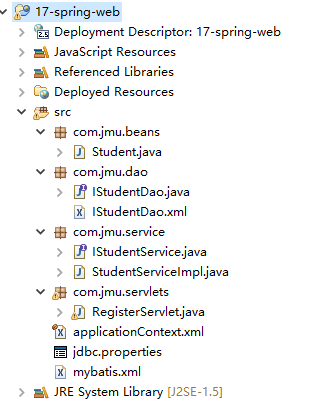
 public class Student {

     private Integer id;

     private String name;

     private int age;

     public Student() {

         super();

     }

     public Student( String name, int age) {

         super();

         this.name = name;

         this.age = age;

     }

     public Integer getId() {

         return id;

     }

     public void setId(Integer id) {

         this.id = id;

     }

     public String getName() {

         return name;

     }

     public void setName(String name) {

         this.name = name;

     }

     public int getAge() {

         return age;

     }

     public void setAge(int age) {

         this.age = age;

     }

     @Override

     public String toString() {

         return "Student [id=" + id + ", name=" + name + ", age=" + age + "]";

     }

 }
Student
 //Dao增删改查

 public interface IStudentDao {

     void insertStudent(Student student);

     void deleteById(int id);

     void updateStudent(Student student);

     List<Student> selectAllStudents();

     Student selectStudentById(int id);

 }
IStudentDao
 <?xml version="1.0" encoding="UTF-8" ?>

 <!DOCTYPE mapper

 PUBLIC "-//mybatis.org//DTD Mapper 3.0//EN"

 "http://mybatis.org/dtd/mybatis-3-mapper.dtd">

 <mapper namespace="com.jmu.dao.IStudentDao">

     <insert id="insertStudent">

         insert into student(name,age) values(#{name},#{age})

     </insert>

     <delete id="deleteById">

         delete from student where id=#{XXX}

     </delete>

     <update id="updateStudent">

         update student set name=#{name},age=#{age} where id=#{id}

     </update>

     <select id="selectAllStudents" resultType="student">

         select id,name,age from student

     </select>

     <select id="selectStudentById" resultType="student">

         select id,name,age from student where id=#{XXX}

     </select>

 </mapper>
IStudentDao.xml
 public class StudentServiceImpl implements IStudentService {

     private IStudentDao dao;

     public void setDao(IStudentDao dao) {

         this.dao = dao;

     }

     public void addStudent(Student student) {

         // TODO Auto-generated method stub

         dao.insertStudent(student);

     }

     public void removeById(int id) {

         // TODO Auto-generated method stub

         dao.deleteById(id);

     }

     public void modifyStudent(Student student) {

         // TODO Auto-generated method stub

         dao.updateStudent(student);

     }

     public List<String> findAllStudentsNames() {

         // TODO Auto-generated method stub

         List<String> names = new ArrayList<String>();

         List<Student> sudents = this.findAllStudents();

         for (Student student : sudents) {

           names.add(student.getName());

         }

         return names;

     }

     public String findStudentNameById(int id) {

         // TODO Auto-generated method stub

         Student student = this.findStudentById(id);

         return student.getName();

     }

     public List<Student> findAllStudents() {

         // TODO Auto-generated method stub

         return dao.selectAllStudents();

     }

     public Student findStudentById(int id) {

         // TODO Auto-generated method stub

         return dao.selectStudentById(id);

     }

 }
StudentServiceImpl
// 获取Spring容器对象

        ApplicationContext ac = new ClassPathXmlApplicationContext("applicationContext.xml");

        // 从Spring容器中获取到service对象

        IStudentService service = (IStudentService) ac.getBean("studentService");

        // 调用Service的addStudent()完成插入

        service.addStudent(student);
RegisterServlet
 <?xml version="1.0" encoding="UTF-8"?>

 <beans xmlns="http://www.springframework.org/schema/beans"

     xmlns:xsi="http://www.w3.org/2001/XMLSchema-instance" xmlns:context="http://www.springframework.org/schema/context"

     xsi:schemaLocation="

         http://www.springframework.org/schema/beans http://www.springframework.org/schema/beans/spring-beans.xsd

         http://www.springframework.org/schema/context http://www.springframework.org/schema/context/spring-context.xsd">

     <!--注册数据源:C3P0 -->

     <bean id="myDataSource" class="com.mchange.v2.c3p0.ComboPooledDataSource">

         <property name="driverClass" value="${jdbc.driver}" />

         <property name="jdbcUrl" value="${jdbc.url}" />

         <property name="user" value="${jdbc.user}" />

         <property name="password" value="${jdbc.password}" />

     </bean>

     <!-- 注册属性文件 -->

     <context:property-placeholder location="classpath:jdbc.properties" />

     <bean id="mySqlSessionFactory" class="org.mybatis.spring.SqlSessionFactoryBean">

        <property name="configLocation" value="classpath:mybatis.xml"></property>

        <property name="dataSource" ref="myDataSource"></property>

     </bean>

     <!--生成Dao的代理对象

      当前配置会被本包中所有的接口生成代理对象

     -->

     <bean  class="org.mybatis.spring.mapper.MapperScannerConfigurer">

         <property name="sqlSessionFactoryBeanName" value="mySqlSessionFactory" />

         <property name="basePackage" value="com.jmu.dao" />

     </bean>

     <!-- 注册Service -->

     <bean id="studentService" class="com.jmu.service.StudentServiceImpl">

          <!-- 这里的Dao的注入需要使用ref属性,且其作为接口的简单类名 -->

         <property name="dao" ref="IStudentDao" />

     </bean>

 </beans>
applicationContext.xml
 <?xml version="1.0" encoding="UTF-8" ?>

 <!DOCTYPE configuration

 PUBLIC "-//mybatis.org//DTD Config 3.0//EN"

 "http://mybatis.org/dtd/mybatis-3-config.dtd">

 <configuration>

     <!--配置别名 -->

     <typeAliases>

         <package name="com.jmu.beans" />

     </typeAliases>

     <mappers>

         <package name="com.jmu.dao" />

     </mappers>

 </configuration>
mybatis.xml
四、当前程序存在问题
刷新会创建不同spring容器对象,而不同servlet创建不同容器。当一个应用只能有一个spring容器
五、注册ContextLoaderListener
复制之前web项目,需要修改web context root
ctrl+shift+t open Type

ctrl+o 查看结构

ctrl+t 查看继承关系
myeclipse快捷键
方法一:读源码ContextLoaderListener与ContextLoader获取key
注册ServletContext监听器,完成2件工作:
1、在Servletcontext被创建时,创建Spring容器对象;
2、将创建好的Spring容器对象放入到ServletContext的域属性空间
<listener>

    <listener-class>org.springframework.web.context.ContextLoaderListener</listener-class>
 </listener>
修改applicationContext.xml为spring.xml在web.xml中添加如下(Spring在web项目中必须有的2项配置):
 <context-param>

    <param-name>contextConfigLocation </param-name>

    <param-value>classpath:spring.xml</param-value>

  </context-param>

<!--   注册servletContext监听器 -->

  <listener>

    <listener-class>org.springframework.web.context.ContextLoaderListener</listener-class>

  </listener>
修改servlet中
    // 获取Spring容器对象

        String acKey = WebApplicationContext.ROOT_WEB_APPLICATION_CONTEXT_ATTRIBUTE;

        ApplicationContext ac = (ApplicationContext) this.getServletContext().getAttribute(acKey);
 public class RegisterServlet extends HttpServlet {

     private static final long serialVersionUID = 1L;

     /**

      * @see HttpServlet#doGet(HttpServletRequest request, HttpServletResponse

      *      response)

      */

     protected void doGet(HttpServletRequest request, HttpServletResponse response)

             throws ServletException, IOException {

         // TODO Auto-generated method stub

         doPost(request, response);

     }

     /**

      * @see HttpServlet#doPost(HttpServletRequest request, HttpServletResponse

      *      response)

      */

     protected void doPost(HttpServletRequest request, HttpServletResponse response)

             throws ServletException, IOException {

         // TODO Auto-generated method stub

         request.setCharacterEncoding("utf-8");

         String name = request.getParameter("name");

         String ageStr = request.getParameter("age");

         Integer age = Integer.valueOf(ageStr);

         Student student = new Student(name, age);

         // 获取Spring容器对象

         String acKey = WebApplicationContext.ROOT_WEB_APPLICATION_CONTEXT_ATTRIBUTE;

         ApplicationContext ac = (ApplicationContext) this.getServletContext().getAttribute(acKey);

         // 从Spring容器中获取到service对象

         IStudentService service = (IStudentService) ac.getBean("studentService");

         // 调用Service的addStudent()完成插入

         service.addStudent(student);

         request.getRequestDispatcher("/welcome.jsp").forward(request, response);

     }

 }
RegisterServlet
 <?xml version="1.0" encoding="UTF-8"?>

 <web-app xmlns:xsi="http://www.w3.org/2001/XMLSchema-instance" xmlns="http://java.sun.com/xml/ns/javaee" xsi:schemaLocation="http://java.sun.com/xml/ns/javaee http://java.sun.com/xml/ns/javaee/web-app_2_5.xsd" id="WebApp_ID" version="2.5">

   <display-name>17-spring-web</display-name>

   <welcome-file-list>

     <welcome-file>index.jsp</welcome-file>

   </welcome-file-list>

   <context-param>

     <param-name>contextConfigLocation </param-name>

     <param-value>classpath:spring.xml</param-value>

   </context-param>

 <!--   注册servletContext监听器 -->

   <listener>

     <listener-class>org.springframework.web.context.ContextLoaderListener</listener-class>

   </listener>

   <servlet>

     <description></description>

     <display-name>RegisterServlet</display-name>

     <servlet-name>RegisterServlet</servlet-name>

     <servlet-class>com.jmu.servlets.RegisterServlet</servlet-class>

   </servlet>

   <servlet-mapping>

     <servlet-name>RegisterServlet</servlet-name>

     <url-pattern>/RegisterServlet</url-pattern>

   </servlet-mapping>

   <servlet>

     <description></description>

     <display-name>LoginServlet</display-name>

     <servlet-name>LoginServlet</servlet-name>

     <servlet-class>com.jmu.servlets.LoginServlet</servlet-class>

   </servlet>

   <servlet-mapping>

     <servlet-name>LoginServlet</servlet-name>

     <url-pattern>/LoginServlet</url-pattern>

   </servlet-mapping>

 </web-app>
web.xml
方法二:使用工具类获取Spring容器
修改servlet中
    // 获取Spring容器对象

        WebApplicationContext ac= WebApplicationContextUtils.getRequiredWebApplicationContext(getServletContext());
Spring与Web的更多相关文章
- 转载:如何让spring mvc web应用启动时就执行
转载:如何让spring mvc web应用启动时就执行特定处理 http://www.cnblogs.com/yjmyzz/p/4747251.html# Spring-MVC的应用中 一.Appl ...
- Spring的web应用启动加载数据字典方法
在一个基于Spring的web项目中,当我们需要在应用启动时加载数据字典时,可写一个监听实现javax.servlet.ServletContextListener 实现其中的contextIniti ...
- Spring实战5:基于Spring构建Web应用
主要内容 将web请求映射到Spring控制器 绑定form参数 验证表单提交的参数 对于很多Java程序员来说,他们的主要工作就是开发Web应用,如果你也在做这样的工作,那么你一定会了解到构建这类系 ...
- 使用XFire+Spring构建Web Service(一)——helloWorld篇
转自:http://www.blogjava.net/amigoxie/archive/2007/09/26/148207.html原文出处:http://tech.it168.com/j/2007- ...
- 使用Maven创建一个Spring MVC Web 项目
使用Maven创建java web 项目(Spring MVC)用到如下工具: 1.Maven 3.2 2.IntelliJ IDEA 13 3.JDK 1.7 4.Spring 4.1.1 rele ...
- 使用XFire+Spring构建Web Service
XFire是与Axis 2并列的新一代Web Service框架,通过提供简单的API支持Web Service各项标准协议,帮助你方便快速地开发Web Service应用. 相 对于Axis来说,目 ...
- 基于Spring的Web缓存
缓存的基本思想其实是以空间换时间.我们知道,IO的读写速度相对内存来说是非常比较慢的,通常一个web应用的瓶颈就出现在磁盘IO的读写上.那么,如果我们在内存中建立一个存储区,将数据缓存起来,当浏览器端 ...
- Spring Boot Web Executable Demo
Spring Boot Web Executable Demo */--> pre.src {background-color: #292b2e; color: #b2b2b2;} pre.sr ...
- Spring之WEB模块
Spring的WEB模块用于整合Web框架,例如Struts 1.Struts 2.JSF等 整合Struts 1 继承方式 Spring框架提供了ActionSupport类支持Struts 1的A ...
- J2EE进阶(五)Spring在web.xml中的配置
J2EE进阶(五)Spring在web.xml中的配置 前言 在实际项目中spring的配置文件applicationcontext.xml是通过spring提供的加载机制自动加载到容器中.在web ...
随机推荐
- 利用django form 模块处理post请求
在django框架中,利用 form 模块处理post请求提交的数据,可以大大提高开发效率,减小代码冗余度,提高性能 models.py 中: from django.db import models ...
- [flex] as3.0 实现基于air的简单浏览器
<?xml version="1.0" encoding="utf-8"?> <s:WindowedApplication xmlns:fx= ...
- Oauth2.0 整合springCloud的Zuul 解决关键BUG 报错信息:Principal must not be null
不清楚Oauth2.0 的 可以查看我前几篇博文 2018.4.8 补充 我出现这个原因:是我在资源服务器使用了 如下图所示 Principal Oauth2.0 提供的获取用户信息的方法 使其找到相 ...
- 苹果隐私条例更新:收集用户电话和 Email 数据
简评:苹果现在会收集用户的电话和电子邮件,作为用户「信任评级」的一部分,我还是支持的,因为园长被黑产攻击 AppleID,直接刷爆了我的卡!但是在大环境看,隐私已经不存在了. Apple 最近悄悄为 ...
- 新人须知的网站文件和MySQL数据库备份流程思路
昨天老左再次遇到一个网友告知使用的一台服务器自己无意中点击主机商面板的导致服务器被重新安装系统(居然这也可以),问问是否可以恢复数据.这个同学和之前遇到好几次的网友真相似,从开始购买服务器,到自己网站 ...
- 最新版IntelliJ IDEA2019.1破解教程(2019.04.08更新)
[原文链接]:https://www.tecchen.xyz/idea-crack.html 我的个人博客:https://www.tecchen.xyz,博文同步发布到博客园. 由于精力有限,对文章 ...
- LOJ3069. 「2019 集训队互测 Day 1」整点计数(min_25筛)
题目链接 https://loj.ac/problem/3069 题解 复数真神奇. 一句话题意:令 \(f(x)\) 表示以原点 \((0, 0)\) 为圆心,半径为 \(x\) 的圆上的整点数量, ...
- 本地docker镜像上传Docker Hub,并且在腾讯云上pull该镜像,最后运行成功。
1:在docker hub 上注册一个账号(本人直接能注册,有的说不能),然后创建自己的仓库. 2:登录docker hub ( longdbdocker --hub账号,longdb --仓库名称) ...
- 威尔逊定理--HDU2973
参考博客 HDU-2973 题目 Problem Description The math department has been having problems lately. Due to imm ...
- 没事用html5 canvas画一个仪表盘自用,自适应的哦
<!DOCTYPE html> <html lang="en"> <head> <meta charset="UTF-8&quo ...