
Web API(五):Web API跨域问题
一、什么是跨域问题
跨域:指的是浏览器不能执行其他网站的脚本。是由浏览器的同源策略造成的,是浏览器施加的安全限制。(服务端可以正常接收浏览器发生的请求,也可以正常返回,但是由于浏览器的安全策略,浏览器不能处理服务端的返回)。
那么什么是同源策略呢?
同源策略/SOP(Same origin policy)是一种约定,由Netscape公司1995年引入浏览器,它是浏览器最核心也最基本的安全功能,如果缺少了同源策略,浏览器很容易受到XSS、CSFR等攻击。所谓同源是指"协议+域名+端口"三者相同,即便两个不同的域名指向同一个ip地址,也非同源。
正是由于这个原因,如果是在不同的项目之间进行调用(这里说的调用指的是浏览器调用后端,如果是后端直接调用就不会存在跨域问题)就会被浏览器阻止。WebApi中常见的场景:Web Api作为单独的数据服务层,提供接口供前端界面调用,MVC项目作为显示层,这种情况下如果在MVC的前端界面里面通过ajax调用WebApi的接口,就会存在跨域问题。
二、如何解决跨域问题
网上有很多跨域问题的解决方案,这里就不在一一列举了,下面主要讲解一下在WebApi中如何使用CORS解决跨域问题。CORS全称Cross-Origin Resource Sharing,中文全称是跨域资源共享。CORS解决跨域问题的原理是在http的请求报文和响应报文里面加入响应的标识告诉浏览器能够访问哪些域名的请求。
三、使用代码解决跨域问题
下面结合一个具体的实例来讲解在WebApi里面如何使用CORS解决跨域问题。
1、场景描述
新建两个单独的项目:一个WebApi项目(带有MVC功能,用来提供数据和页面显示),一个MVC项目(只是负责页面显示),项目结构如下图所示:
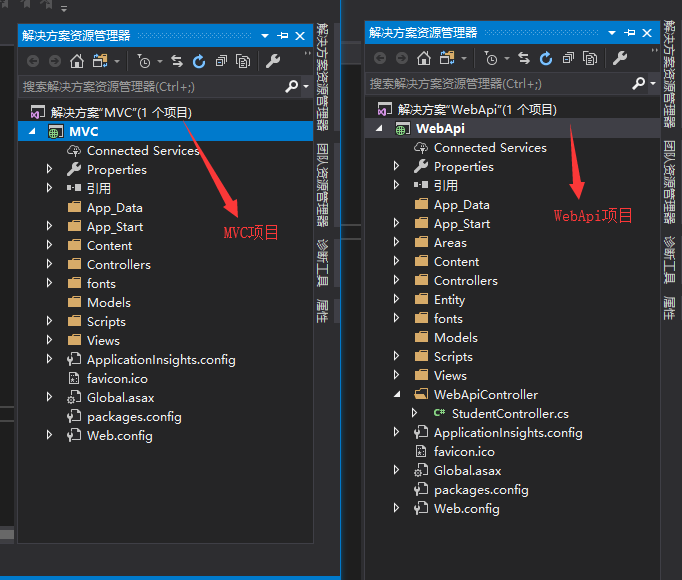
其中,WebApi项目的端口号是:33982,MVC项目的端口号是:34352(这两个端口号是在本机的地址,在其他电脑上端口号可能不同)。显而易见:两个项目的端口号不同,不属于同源,如果在MVC里面通过前端调用WebApi提供的数据接口,就会出现跨域的问题。
2、项目结构
2.1 WebApi项目结构
新建WebApiController文件夹,用来存放WebApi控制器,并新建一个WebApi控制器,命名为Student。StudentController控制器的代码如下:
 using System;

 using System.Collections.Generic;

 using System.Linq;

 using System.Net;

 using System.Net.Http;

 using System.Web.Http;

 using WebApi.Entity;

 namespace WebApi.WebApiController

 {

     public class StudentController : ApiController

     {

         public static List<Student> studentList = InitStudentList();

         private static List<Student> InitStudentList()

         {

             return new List<Student>()

             {

                new Student {StudentID =,StudentName="唐僧",Age=,Sex="男",Major="师范"},

                new Student {StudentID =,StudentName="孙悟空",Age=,Sex="男",Major="管理"},

                new Student {StudentID =,StudentName="沙悟净",Age=,Sex="男",Major="水利工程"},

                new Student {StudentID =,StudentName="白骨精",Age=,Sex="女",Major="表演"},

                new Student {StudentID =,StudentName="玉兔精",Age=,Sex="女",Major="舞蹈"}

             };

         }

         [HttpGet]

         public IHttpActionResult GetAllStudent()

         {

             return Json<List<Student>>(studentList);

         }

     }

 }
修改WebApi配置文件类,路由规则里面增加action,代码如下:
using System;

using System.Collections.Generic;

using System.Linq;

using System.Web.Http;

namespace WebApi

{

    public static class WebApiConfig

    {

        public static void Register(HttpConfiguration config)

        {

            // Web API 配置和服务

            // Web API 路由

            config.MapHttpAttributeRoutes();

            config.Routes.MapHttpRoute(

                name: "DefaultApi",

                routeTemplate: "api/{controller}/{action}/{id}",

                defaults: new { id = RouteParameter.Optional }

            );

        }

    }

}
新建一个MVC控制器,命名为Student,并添加Index视图,Index视图代码如下:
 @{

     Layout = null;

 }

 <!DOCTYPE html>

 <html>

 <head>

     <meta name="viewport" content="width=device-width" />

     <title>测试跨域问题</title>

     <script src="~/Scripts/jquery-1.10.2.min.js" type="text/javascript"></script>

 </head>

 <body>

     <div style="background-color:#008000;padding:10px;margin:5px;">

         <div style="font-weight:bold;margin-bottom:5px;">Get Student List</div>

         <div style="padding-bottom:5px;">

             <input id="btnGetStudentList" name="btnGetStudentList" type="button" value="Get Student List" />

         </div>

         <div id="students"></div>

     </div>

     <script>

         $('#btnGetStudentList').click(function () {

             $.ajax({

                 url: '/api/Student/GetAllStudent',

                 type: 'GET',

                 dataType: 'json'

             }).success(function (result) {

                 DisplayStudentList(result);

             }).error(function (data) {

                 alert(data);

             });

         });

         function DisplayStudentList(result) {

             var studentTable = $("<table cellpadding='3' cellspacing='3'></table>");

             var studentTableTitle = $("<tr><th>StudentID</th><th>StudentName</th><th>Age</th><th>Sex</th><th>Major</th></tr>");

             studentTableTitle.appendTo(studentTable);

             for (var i = ; i < result.length; i++) {

                 var studentTableContent = $("<tr><td>"

                     + result[i].StudentID + "</td><td>"

                     + result[i].StudentName + "</td><td>"

                     + result[i].Age + "</td><td>"

                     + result[i].Sex + "</td><td>"

                     + result[i].Major + "</td></tr>"

                 );

                 studentTableContent.appendTo(studentTable);

             }

             $('#students').html(studentTable);

         }

     </script>

 </body>

 </html>
2.2 MVC项目结构
MVC项目结构比较简单,新建一个名为Student的控制器,并添加视图,视图如下:
 @{

     Layout = null;

 }

 <!DOCTYPE html>

 <html>

 <head>

     <meta name="viewport" content="width=device-width" />

     <title>测试跨域问题</title>

     <script src="~/Scripts/jquery-1.10.2.min.js" type="text/javascript"></script>

 </head>

 <body>

     <div style="background-color:#008000;padding:10px;margin:5px;">

         <div style="font-weight:bold;margin-bottom:5px;">Get Student List</div>

         <div style="padding-bottom:5px;">

             <input id="btnGetStudentList" name="btnGetStudentList" type="button" value="Get Student List" />

         </div>

         <div id="students"></div>

     </div>

     <script>

         $('#btnGetStudentList').click(function () {

             $.ajax({

                 url: 'http://localhost:33982//api/Student/GetAllStudent',

                 type: 'GET',

                 dataType: 'json'

             }).success(function (result) {

                 DisplayStudentList(result);

             }).error(function (data) {

                 alert("失败");

             });

         });

         function DisplayStudentList(result) {

             var studentTable = $("<table cellpadding='3' cellspacing='3'></table>");

             var studentTableTitle = $("<tr><th>StudentID</th><th>StudentName</th><th>Age</th><th>Sex</th><th>Major</th></tr>");

             studentTableTitle.appendTo(studentTable);

             for (var i = ; i < result.length; i++) {

                 var studentTableContent = $("<tr><td>"

                     + result[i].StudentID + "</td><td>"

                     + result[i].StudentName + "</td><td>"

                     + result[i].Age + "</td><td>"

                     + result[i].Sex + "</td><td>"

                     + result[i].Major + "</td></tr>"

                 );

                 studentTableContent.appendTo(studentTable);

             }

             $('#students').html(studentTable);

         }

     </script>

 </body>

 </html>
四、测试
1、在不做任何处理情况下的测试
先看看同源下的访问情况,直接启动WebApi项目,截图如下:
 点击按钮,测试结果如下:
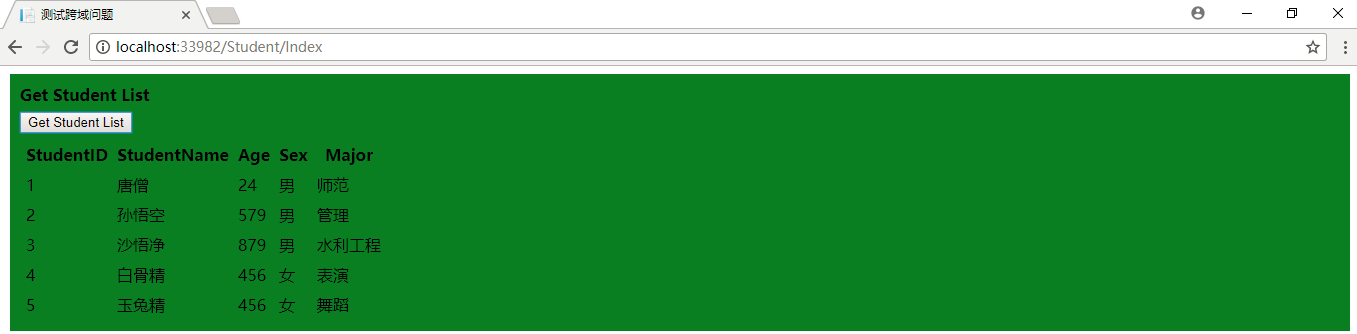
因为是在同一个域中,所以访问没有问题,前端可以正常获取到WebApi返回的数据。下面在来看看在MVC项目中的测试情况。测试截图如下:

从图中可以看出访问失败了,按F12查看访问情况:
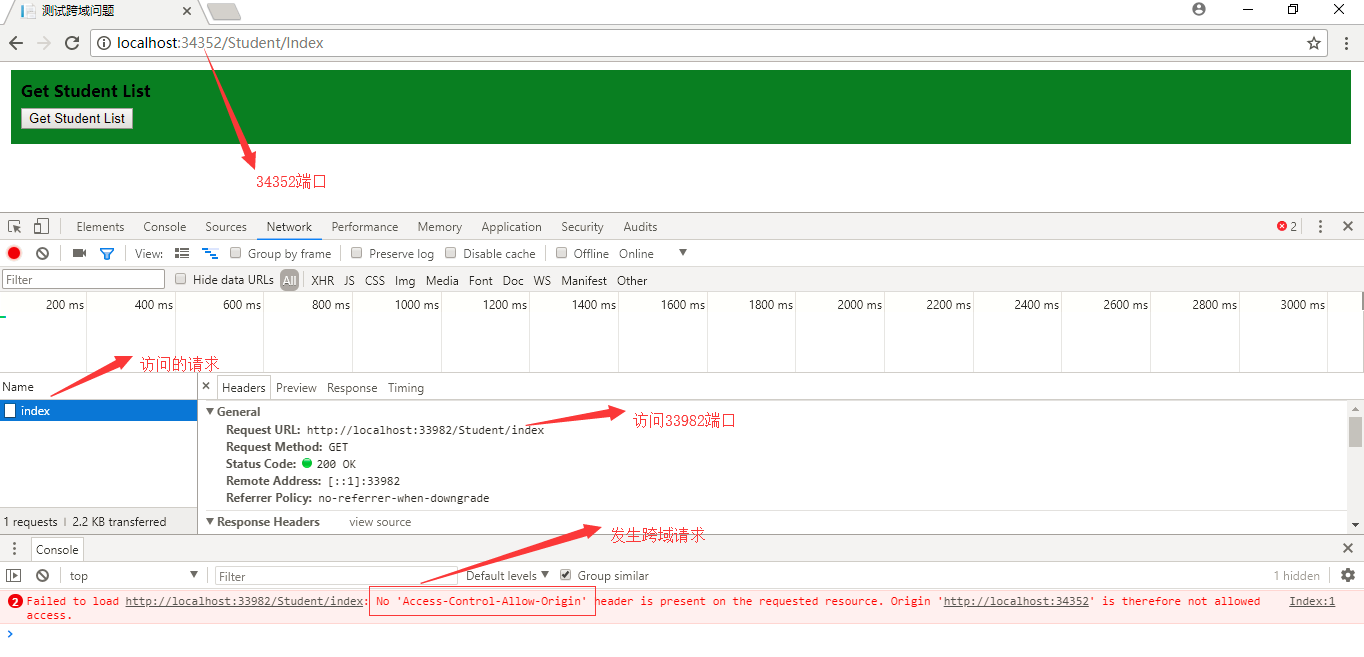
从上面的截图中可以看出,发生了跨域访问,浏览器出于安全性的考虑,不能接收返回的数据。
五、使用CORS解决跨域问题
1、安装CORS
在WebApi项目上右键->管理NuGet程序包,然后搜索“microsoft.aspnet.webapi.cors”,选择第一个进行安装
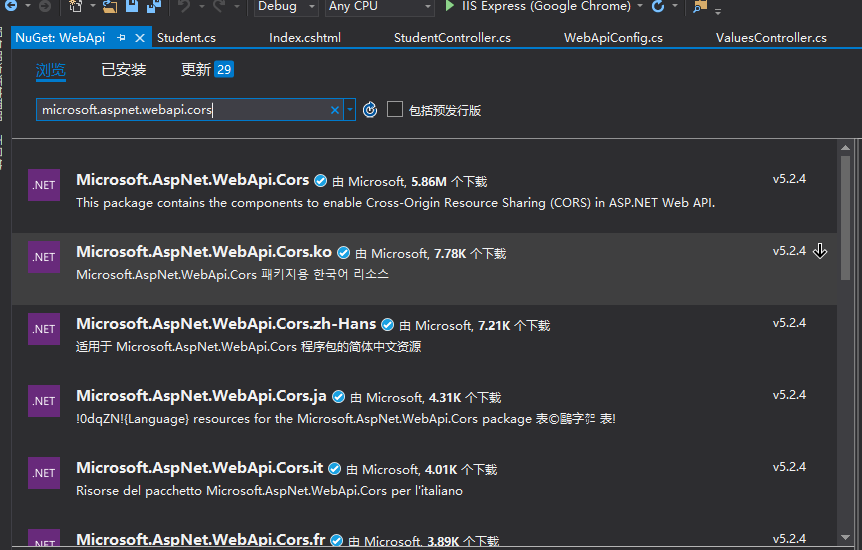
具体的安装过程在这里不再详细解释。
2、配置跨域
在WebApiConfig.cs类中配置跨域,修改后的代码如下:
 using System;

 using System.Collections.Generic;

 using System.Linq;

 using System.Web.Http;

 using System.Web.Http.Cors;

 namespace WebApi

 {

     public static class WebApiConfig

     {

         public static void Register(HttpConfiguration config)

         {

             // 跨域配置

             config.EnableCors(new EnableCorsAttribute("*","*","*"));

             // Web API 路由

             config.MapHttpAttributeRoutes();

             config.Routes.MapHttpRoute(

                 name: "DefaultApi",

                 routeTemplate: "api/{controller}/{action}/{id}",

                 defaults: new { id = RouteParameter.Optional }

             );

         }

     }

 }
这里使用“*”号表示对所有的域名都可以跨域。再次从MVC里面访问WebApi,查看测试结果:
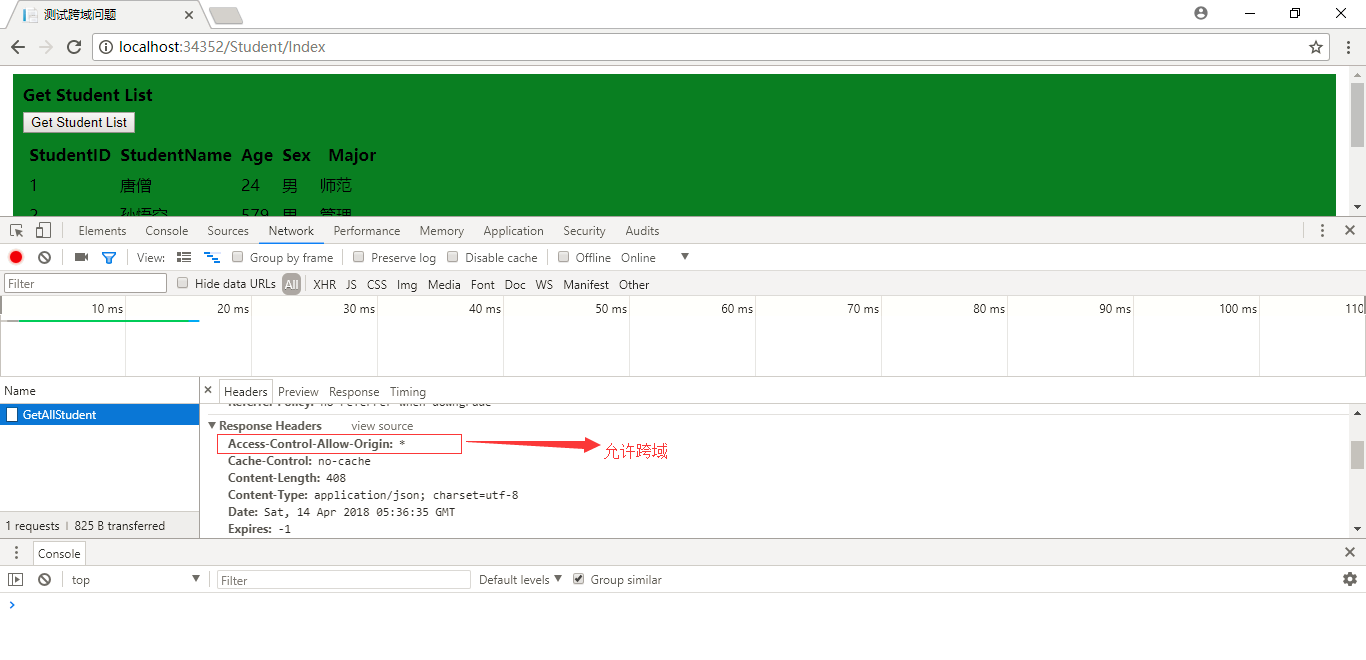
从上面的截图中可以看出,这时就可以允许跨域访问了,在Response Headers里面添加了:Access-Control-Allow-Origin:*。
六、CORS参数详解
在上面我们在WebApi的配置文件中使用了:
config.EnableCors(new EnableCorsAttribute("*","*","*"));
这一句代码解决了跨域问题。但是这种“*”号是不安全的。查看MSDN,发现EnableCorsAttribute类有如下的构造函数:
public EnableCorsAttribute(

    string origins,

    string headers,

    string methods

)
知道了EnableCorsAttribute类的构造函数以后,我们可以使用下面的方法进行改进。
方法一:在Web.Config文件的appSettings节点里面配置参数:
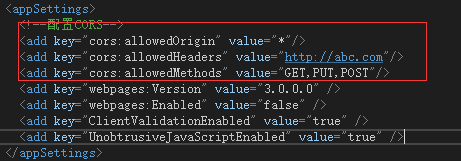
然后修改WebApiConfig.cs文件的Register方法:
using System;

using System.Collections.Generic;

using System.Linq;

using System.Web.Http;

using System.Web.Http.Cors;

using System.Configuration;

namespace WebApi

{

    public static class WebApiConfig

    {

        public static void Register(HttpConfiguration config)

        {

            #region 跨域配置

            string allowedOrigin = ConfigurationManager.AppSettings["allowedOrigin"];

            string allowedHeaders = ConfigurationManager.AppSettings["allowedHeaders"];

            string allowedMethods = ConfigurationManager.AppSettings["allowedMethods"];

            config.EnableCors(new EnableCorsAttribute(allowedOrigin, allowedHeaders, allowedMethods));

            #endregion

            // Web API 路由

            config.MapHttpAttributeRoutes();

            config.Routes.MapHttpRoute(

                name: "DefaultApi",

                routeTemplate: "api/{controller}/{action}/{id}",

                defaults: new { id = RouteParameter.Optional }

            );

        }

    }

}
方法二:如果只想对某些api或者api里面的某些方法做跨域,可以直接在API控制器类上面使用特性标注或者在方法上面使用特性标注。
允许Student控制器可以跨域:
 using System;

 using System.Collections.Generic;

 using System.Linq;

 using System.Net;

 using System.Net.Http;

 using System.Web.Http;

 using WebApi.Entity;

 using System.Web.Http.Cors;

 namespace WebApi.WebApiController

 {

     [EnableCors(origins:"http://localhost:34352",headers:"*",methods:"GET,POST,PUT,DELETE")]

     public class StudentController : ApiController

     {

         public static List<Student> studentList = InitStudentList();

         private static List<Student> InitStudentList()

         {

             return new List<Student>()

             {

              new Student {StudentID =,StudentName="唐僧",Age=,Sex="男",Major="师范"},

                 new Student {StudentID =,StudentName="孙悟空",Age=,Sex="男",Major="管理"},

                new Student {StudentID =,StudentName="沙悟净",Age=,Sex="男",Major="水利工程"},

                new Student {StudentID =,StudentName="白骨精",Age=,Sex="女",Major="表演"},

                new Student {StudentID =,StudentName="玉兔精",Age=,Sex="女",Major="舞蹈"}

             };

         }

         [HttpGet]

         public IHttpActionResult GetAllStudent()

         {

             return Json<List<Student>>(studentList);

         }

     }

 }
只允许Student控制器里面的GetAllStudent方法可以跨域:
 using System;

 using System.Collections.Generic;

 using System.Linq;

 using System.Net;

 using System.Net.Http;

 using System.Web.Http;

 using WebApi.Entity;

 using System.Web.Http.Cors;

 namespace WebApi.WebApiController

 {

     public class StudentController : ApiController

     {

         public static List<Student> studentList = InitStudentList();

         private static List<Student> InitStudentList()

         {

             return new List<Student>()

             {

              new Student {StudentID =,StudentName="唐僧",Age=,Sex="男",Major="师范"},

                 new Student {StudentID =,StudentName="孙悟空",Age=,Sex="男",Major="管理"},

                new Student {StudentID =,StudentName="沙悟净",Age=,Sex="男",Major="水利工程"},

                new Student {StudentID =,StudentName="白骨精",Age=,Sex="女",Major="表演"},

                new Student {StudentID =,StudentName="玉兔精",Age=,Sex="女",Major="舞蹈"}

             };

         }

         /// <summary>

         /// 允许跨域

         /// </summary>

         /// <returns></returns>

         [EnableCors(origins: "http://localhost:34352", headers: "*", methods: "GET,POST,PUT,DELETE")]

         [HttpGet]

         public IHttpActionResult GetAllStudent()

         {

             return Json<List<Student>>(studentList);

         }

         /// <summary>

         /// 不允许跨域

         /// </summary>

         [HttpPost]

         public void Post()

         { }

     }

 }
Web API(五):Web API跨域问题的更多相关文章
- Web Api 利用 cors 实现跨域
一.安装 cors 二.修改 Web.config <appSettings> <add key="cors:allowedMethods" value=&quo ...
- 基于JWT的web api身份验证及跨域调用实践
随着多终端的出现,越来越多的站点通过web api restful的形式对外提供服务,很多网站也采用了前后端分离模式进行开发,因而在身份验证的方式上可能与传统的基于cookie的Session Id的 ...
- Web 前端必备的各种跨域方式汇总
Web 前端必备的各种跨域方式汇总 跨域方式汇总 同源策略 协议相同 + 域名相同 + 端口相同 https://www.xgqfrms.xyz/index.html https://www.xgqf ...
- 直接用postman测试api ,服务器端没提供跨域也可以访问。
1. 直接用postman测试api ,服务器端没提供跨域也可以访问. 但是,如果用本地的 sever 搭的server, 然后去访问api的话,浏览器会提示 跨域错误.
- 浅谈Web Api配合SignalR的跨域支持
最近接手的一个项目中,涉及到一个简单的消息模块,由于之前有简单了解过SignalR,所以打算尝试着摸索摸索~! 首先,通过Nuget管理器添加Microsoft ASP.NET SignalR引用~目 ...
- Web Api 2(Cors)Ajax跨域访问
支持Ajax跨域访问ASP.NET Web Api 2(Cors)的简单示例教程演示 随着深入使用ASP.NET Web Api,我们可能会在项目中考虑将前端的业务分得更细.比如前端项目使用Ang ...
- 在ASP.NET Web API中实现CORS(跨域资源共享)
默认情况下,是不允许网页从不同的域访问服务器资源的,访问遵循"同源"策略的原则. 会遇到如下的报错: XMLHttpRequest cannot load http://local ...
- web api 解决Ajax请求跨域问题
前端ajax请求接口时,经常出现跨域问题,当然了解决方法有很多种,比如: http://www.jb51.net/article/68424.htm 我本人恰好前后端都会一点,所以直接在接口端处理. ...
- .net core web api 添加对session跨域实现
1.配置Startup /ConfigureServices添加: services.AddSession(options => { options.Cookie.Name = ".A ...
- Solon Web 开发,九、跨域处理
Solon Web 开发 一.开始 二.开发知识准备 三.打包与运行 四.请求上下文 五.数据访问.事务与缓存应用 六.过滤器.处理.拦截器 七.视图模板与Mvc注解 八.校验.及定制与扩展 九.跨域 ...
随机推荐
- eclipse修改文件编码
http://topic.csdn.net/u/20080724/14/428de399-790d-442a-8340-3a5fb6dcfcee.html[修改文件编码,假设JS] 在Eclips ...
- 【ASP.NET Web API教程】2.4 创建Web API的帮助页面[转]
注:本文是[ASP.NET Web API系列教程]的一部分,如果您是第一次看本博客文章,请先看前面的内容. 2.4 Creating a Help Page for a Web API2.4 创建W ...
- OAF_OAF增删改-新增的实现(案例)
2014-09-14 Created By BaoXinjian
- OAF_OAF控件系列1 - Region Type汇总(概念)
2014-06-22 Created By BaoXinjian
- Linux进程概述
一.介绍 当linux系统中的一个进程运行起来的时候,总是要访问系统的资源,访问文件或者向其他的进程发送信号.系统是否允许其进行这些操作?系统是根据什么来判断该进程的权限?这些问题是和进程信任状(pr ...
- Yii2 mongodb 扩展的where的条件加入大于小于号浅析(转)
1. mongodb的where中有比较丰富的 条件,如下: static $builders = [ 'NOT' => 'buildNotCondition', 'AND' => 'bu ...
- jenkins 发送邮件模板
jenkins 发送邮件模板 <!DOCTYPE html> <html> <head> <meta charset="UTF-8"> ...
- nginx是以多进程的方式来工作的
nginx是以多进程的方式来工作的. nginx在启动后,会有一个master进程和多个worker进程. master进程主要用来管理worker进程: 包含: 1.接收来自外界的信号,向各work ...
- Spring事务管理实现方式之编程式事务与声明式事务详解(转)
原文:https://blog.csdn.net/liaohaojian/article/details/70139151 编程式事务 编码方式实现事务管理(代码演示为JDBC事务管理) Spring ...
- 64位win8.1系统安装intelhaxm
加快安卓模拟器的启动速度,需要装intelhaxm,以前win8时直接双击网上下载的exe文件就安装得了,但是win8.1的时候双击了总提示说是vt-x没有启用的,但是我看任务管理器→性能标签页那里的 ...