
如何用纯 CSS 创作炫酷的同心矩形旋转动画
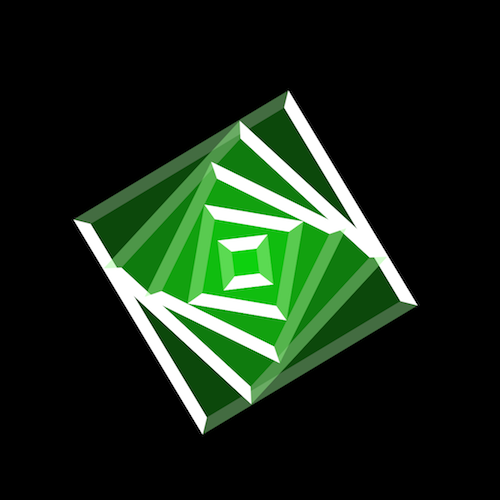
效果预览
按下右侧的“点击预览”按钮可以在当前页面预览,点击链接可以全屏预览。
https://codepen.io/comehope/pen/bMvbRp
可交互视频教程
此视频是可以交互的,你可以随时暂停视频,编辑视频中的代码。
请用 chrome, safari, edge 打开观看。
https://scrimba.com/p/pEgDAM/cp2dZcQ
源代码下载
请从 github 下载。
代码解读
定义 dom,一个容器中包含一个 span:
<div class="loader">

    <span></span>

</div>
居中显示:
html,

body,

.loader {

    height: 100%;

    display: flex;

    align-items: center;

    justify-content: center;

    background-color: black;

}
设置 span 的样式:
.loader {

    width: 10em;

    height: 10em;

    font-size: 28px;

    position: relative;

}

.loader span {

    position: absolute;

    width: 100%;

    height: 100%;

    background-color: rgba(100%, 0%, 0%, 0.3);

    box-sizing: border-box;

    border: 0.5em solid;

    border-color: white rgba(100%, 100%, 100%, 0.2);

}
在 dom 中把 span 增加到 5 个:
<div class="loader">

    <span></span>

    <span></span>

    <span></span>

    <span></span>

    <span></span>

</div>
分别设置 5 个 span 的尺寸:
.loader span:nth-child(1) {

    width: calc(20% + 20% * (5 - 1));

    height: calc(20% + 20% * (5 - 1));

}

.loader span:nth-child(2) {

    width: calc(20% + 20% * (5 - 2));

    height: calc(20% + 20% * (5 - 2));

}

.loader span:nth-child(3) {

    width: calc(20% + 20% * (5 - 3));

    height: calc(20% + 20% * (5 - 3));

}

.loader span:nth-child(4) {

    width: calc(20% + 20% * (5 - 4));

    height: calc(20% + 20% * (5 - 4));

}

.loader span:nth-child(5) {

    width: calc(20% + 20% * (5 - 5));

    height: calc(20% + 20% * (5 - 5));

}
增加颜色变幻的动画效果:
.loader span {

    animation: animate 5s ease-in-out infinite alternate;

}

@keyframes animate {

    0% {

        /* red */

        background-color: rgba(100%, 0%, 0%, 0.3);

    }

    25% {

        /* yellow */

        background-color: rgba(100%, 100%, 0%, 0.3);

    }

    50% {

        /* green */

        background-color: rgba(0%, 100%, 0%, 0.3);

    }

    75% {

        /* blue */

        background-color: rgba(0%, 0%, 100%, 0.3);

    }

    100% {

        /* purple */

        background-color: rgba(100%, 0%, 100%, 0.3);

    }

}
再增加旋转效果:
@keyframes animate {

    0% {

        transform: rotate(0deg);

    }

    100% {

        transform: rotate(720deg);

    }

}
最后,为每个 span 设置动画延时,增加动感:
.loader span:nth-child(1) {

    animation-delay: calc(0.2s * (5 - 1));

}

.loader span:nth-child(2) {

    animation-delay: calc(0.2s * (5 - 2));

}

.loader span:nth-child(3) {

    animation-delay: calc(0.2s * (5 - 3));

}

.loader span:nth-child(4) {

    animation-delay: calc(0.2s * (5 - 4));

}

.loader span:nth-child(5) {

    animation-delay: calc(0.2s * (5 - 5));

}
知识点
- border-color https://developer.mozilla.org/en-US/docs/Web/CSS/border-color
- calc() https://developer.mozilla.org/en-US/docs/Web/CSS/calc
- rotate() https://developer.mozilla.org/en-US/docs/Web/CSS/transform-function/rotate
- animation-delay https://developer.mozilla.org/en-US/docs/Web/CSS/animation-delay
原文地址:https://segmentfault.com/a/1190000014807564
如何用纯 CSS 创作炫酷的同心矩形旋转动画的更多相关文章
- 前端每日实战:17# 视频演示如何用纯 CSS 创作炫酷的同心矩形旋转动画
效果预览 按下右侧的"点击预览"按钮可以在当前页面预览,点击链接可以全屏预览. https://codepen.io/comehope/pen/bMvbRp 可交互视频教程 此视频 ...
- 17.纯 CSS 创作炫酷的同心矩形旋转动画
原文地址:https://segmentfault.com/a/1190000014807564 感想: 这个特效不难,但是这想法可能想不到,哈哈,怎么又废了. HTML代码: <div cla ...
- 17.1拓展之纯 CSS 创作炫酷的同心圆旋转动画
效果地址:https://codepen.io/flyingliao/pen/ebjEMm?editors=1100 HTML代码: <div class="loader"& ...
- 如何用纯 CSS 创作一个文本淡入淡出的 loader 动画
效果预览 在线演示 按下右侧的"点击预览"按钮可以在当前页面预览,点击链接可以全屏预览. https://codepen.io/comehope/pen/ERwpeG 可交互视频 ...
- 前端每日实战:53# 视频演示如何用纯 CSS 创作一个文本淡入淡出的 loader 动画
效果预览 按下右侧的"点击预览"按钮可以在当前页面预览,点击链接可以全屏预览. https://codepen.io/comehope/pen/ERwpeG 可交互视频 此视频是可 ...
- 前端每日实战:160# 视频演示如何用纯 CSS 创作一个打开内容弹窗的交互动画
效果预览 按下右侧的"点击预览"按钮可以在当前页面预览,点击链接可以全屏预览. https://codepen.io/comehope/pen/GYXvez 可交互视频 此视频是可 ...
- 前端每日实战:149# 视频演示如何用纯 CSS 创作一个宝路薄荷糖的动画
效果预览 按下右侧的"点击预览"按钮可以在当前页面预览,点击链接可以全屏预览. https://codepen.io/comehope/pen/oagrvz 可交互视频 此视频是可 ...
- 前端每日实战:52# 视频演示如何用纯 CSS 创作一个小球绕着圆环盘旋的动画
效果预览 按下右侧的"点击预览"按钮可以在当前页面预览,点击链接可以全屏预览. https://codepen.io/comehope/pen/gKxyWo 可交互视频 此视频是可 ...
- 如何用纯 CSS 创作文本滑动特效的 UI 界面
效果预览 在线演示 按下右侧的"点击预览"按钮可以在当前页面预览,点击链接可以全屏预览. https://codepen.io/comehope/pen/QrxxaW 可交互视频教 ...
随机推荐
- macOS 设置Root密码
用管理员帐号进入Terminal: 1) 输入:sudo passwd root ,回车: 2) 输入新的root密码: 3) 输入:su : 4) 输入新密码: 这样就进入到root帐号了.
- swiper.js插件的使用
swiper切换动画效果,需要先加载swiper.animate.min.js和animate.min.css. <!DOCTYPE html><html> <he ...
- HttpURLConnection 发送PUT请求 json请求体 与服务端接收
发送请求: public void testHttp() { String result = ""; try { URL postURL = new URL("http: ...
- 简单记录下@RequestBody(关于它和@RequestParam接收数据方式的拓展)
内容参考自博客:https://blog.csdn.net/ff906317011/article/details/78552426 这个标注是用来注释controller中的请求方法中的参数的,那么 ...
- [转]VC++的类头文件
本文转自:http://blog.csdn.net/forevertali/article/details/4370602 animal.h //在头文件中包含类的定义及类成员函数的声明 clas ...
- RecyclerView 缓存机制学习笔记2
RecyclerView 初始化所有的视图后,调用 去缓存(StaggeredGridLayoutManager), 而不是初始化一次缓存一次 存储后系统又会去调用tryGetViewHolderFo ...
- 《Python基础教程》 读书笔记 第五章(下)循环语句
5.5.1while循环 x=1 while x<=100: print x x+=1 确保用户输入了名字: name="" while not name: name=raw ...
- Database coalesce
coalesce 语法 注意:连接操作符“||”是一个值得注意的例外. 例如,空值加任何值都是空值,空值 乘任何值也都是空值,依此类推. 参数 expression 任何类型的表达式. n 表示可以指 ...
- C++#pragma pack指令
微软官方文档说#pragma pack 指令的作用是为结构.联合和类成员指定 pack 对齐.的主要作用就是改变编译器的内存对齐方式,这个指令在网络报文的处理中有着重要的作用,#pragma pack ...
- Qt 为QPushButton、QLabel添加鼠标移入移出事件
QT 为QPushButton.QLabel添加鼠标移入移出事件**要实现的效果:**鼠标移入QPushButton时与移出时按钮变换字体颜色,鼠标移入QLabel时显示上面的文字,移出时不显示.** ...