
nodejs URL 详解
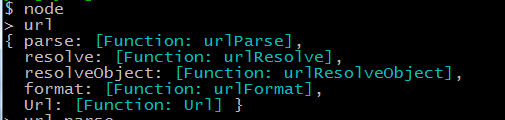
1 我们可以使用.parse方法来将一个URL字符串转换为URL对象
例如:
url.parse('http://user:pass@host.com:8080/p/a/t/h?query=string#hash');
/* =>
{ protocol: 'http:',
auth: 'user:pass',
host: 'host.com:8080',
port: '8080',
hostname: 'host.com',
hash: '#hash',
search: '?query=string',
query: 'query=string',
pathname: '/p/a/t/h',
path: '/p/a/t/h?query=string',
href: 'http://user:pass@host.com:8080/p/a/t/h?query=string#hash' }
*/
url.parse(urlStr, [parseQueryString], [slashesDenoteHost])
接收参数:
urlStr url字符串
parseQueryString 为true时将使用查询模块分析查询字符串,默认为false
slashesDenoteHost
默认为false,//foo/bar 形式的字符串将被解释成 { pathname: ‘//foo/bar' }
如果设置成true,//foo/bar 形式的字符串将被解释成 { host: ‘foo', pathname: ‘/bar' }
例子:
var url = require('url');
var a = url.parse('http://example.com:8080/one?a=index&t=article&m=default');
console.log(a);
//输出结果:
{
protocol : 'http' ,
auth : null ,
host : 'example.com:8080' ,
port : '8080' ,
hostname : 'example.com' ,
hash : null ,
search : '?a=index&t=article&m=default',
query : 'a=index&t=article&m=default',
pathname : '/one',
path : '/one?a=index&t=article&m=default',
href : 'http://example.com:8080/one?a=index&t=article&m=default'
}
如果parseQueryString 设置为true url对象中的query会变成一个对象,如: query:{a:"index",t::"article",m:"default"}
2 .resolve方法可以用于拼接URL
url.resolve('http://www.example.com/foo/bar', '../baz');
/* =>
http://www.example.com/baz
*/
3 反过来,.format方法允许将一个URL对象转换为URL字符串
url.format({
protocol: 'http:',
host: 'www.example.com',
pathname: '/p/a/t/h',
search: 'query=string'
});
/* =>
'http://www.example.com/p/a/t/h?query=string'
*/
URL 参数说明:
{
nodejs URL 详解的更多相关文章
- Fiddler抓包6-get请求(url详解)
前言 上一篇介绍了Composer的功能,可以模拟get和post请求,get请求有些是不带参数的,这种比较容易,直接放到url地址栏就行.有些get请求会带有参数,本篇详细介绍url地址格式. 一. ...
- Nodejs this详解
[Nodejs this详解] Nodejs中, 文件层this,指向的是module.export. 函数层this,指向的是global对象. 参考:http://www.jb51.net/art ...
- Fiddler抓包6-get请求(url详解)【转载】
本篇转自博客:上海-悠悠 原文地址:http://www.cnblogs.com/yoyoketang/tag/fiddler/ 前言 上一篇介绍了Composer的功能,可以模拟get和post请求 ...
- 3、get请求(url详解)
前言 上一篇介绍了Composer的功能,可以模拟get和post请求,get请求有些是不带参数的,这种比较容易,直接放到url地址栏就行.有些get请求会带有参数,本篇详细介绍url地址格式. 一. ...
- 基础篇-http协议《http 简介、url详解、request》
目录 一.http 简介 二.url 详解 三.request 1.get 和 post 2.请求方法 3.request 组成 4.请求头 5.get 请求参数 6.post 请求参数 7.post ...
- URI与URN与URL详解
当没有URI时 什么是URI和URN和URL URI详解 Uniform Resource Identifier 统一资源标识符 URI的组成 案例: https://tools.ietf.org/h ...
- 【基础进阶】URL详解与URL编码
作为前端,每日与 URL 打交道是必不可少的.但是也许每天只是单纯的用,对其只是一知半解,随着工作的展开,我发现在日常抓包调试,接口调用,浏览器兼容等许多方面,不深入去理解URL与URL编码则会踩到很 ...
- URL详解与URL编码
作为前端,每日与 URL 打交道是必不可少的.但是也许每天只是单纯的用,对其只是一知半解,随着工作的展开,我发现在日常抓包调试,接口调用,浏览器兼容等许多方面,不深入去理解URL与URL编码则会踩到很 ...
- Nodejs mongoose 详解
前言 Mongoose 是在nodejs环境下,对mongodb进行便捷操作的对象模型工具.本文介绍解(翻)密(译)Mongoose插件. Schema 开始我们就要讲到Schema,一个Schema ...
随机推荐
- sqlplus登陆scott用户,以及退出连接
进入sqlplus界面 即登陆成功,PLsql也一样 退出连接:
- 用户空间&内核空间学习 & top命令 & time命令
参考了这篇文章 http://www.ruanyifeng.com/blog/2016/12/user_space_vs_kernel_space.html 简单说,Kernel space 是 Li ...
- CentOS 6.x安装多GCC版本号,cmake的安装与使用
操作系统:CentOS release 6.5 (Final) 当前gcc版本号:build=x86_64-redhat-linux Thread ...
- aSmack连接server异常smack.SmackException$ ConnectionException thrown by XMPPConnection.connect();
以下是我在研究asmack4.0出现的异常 06-17 12:02:56.924: W/System.err(10622): org.jivesoftware.smack.SmackException ...
- STL源代码分析--deque
一.deque的中控器 deque是连续空间(至少逻辑上看来如此),连续线性空间总令我们联想到array或vector.array无法成长,vector虽可成长,却仅仅能向尾端成长.并且其 ...
- Visual Studio VS2013模块对于SAFESEH 映像是不安全的 怎么办
打开该项目的"属性页"对话框,会出现如下界面打开该项目的"属性页"对话框,会出现如下界面 然后单击"链接器"--"命令行&qu ...
- SolidEdge 如何绘制剖视图
如果要创建剖视图,则点击切割平面按钮,然后绘制剖面线,画好之后点击完成 然后点击剖视图按钮,鼠标单击刚才的剖面线,往要的方向拖动,即可生成剖面视图 剖视图有时也需要用到旋转剖视图 如下图所示, ...
- Multi-company rules
Object Name Domain 说明 Point of Sale Point Of Sale Order [('company_id', '=', user.company_id.id)] 指派 ...
- string方法 PadLeft 返回一个新字符串,该字符串通过在此实例中的字符左侧填充指定的 Unicode 字符来达到指定的总长度,从而使这些字符右对齐。 PadRight 右边
- 史上最全的CSS hack方式一览 jQuery 图片轮播的代码分离 JQuery中的动画 C#中Trim()、TrimStart()、TrimEnd()的用法 marquee 标签的使用详情 js鼠标事件 js添加遮罩层 页面上通过地址栏传值时出现乱码的两种解决方法 ref和out的区别在c#中 总结
史上最全的CSS hack方式一览 2013年09月28日 15:57:08 阅读数:175473 做前端多年,虽然不是经常需要hack,但是我们经常会遇到各浏览器表现不一致的情况.基于此,某些情况我 ...