
RHEL 6.5----CDN(lumanger)
| 主机名 | IP | 服务 |
| master | 192.168.30.130 | CDN(LuManager) |
| slave | 192.168.30.131 | DNS |
软件安装包下载地址及安装方法
http://www.zijidelu.org/thread-47148-1-1.html
安装
master上安装LuMangaer
[root@master ~]# mkdir /zijidelu

[root@master ~]# cd /zijidelu/

[root@master zijidelu]# wget http://down.zijidelu.org/zijidelu_install.tar.gz

[root@master zijidelu]# wget http://down.zijidelu.org/LuNamp_last.tar.gz

[root@master zijidelu]# wget http://down.zijidelu.org/LuManager_last.tar.gz

[root@master zijidelu]# ll -h

total 182M

-rw-r--r--  root root 2.1M Dec     LuManager_last.tar.gz

-rw-r--r--  root root 180M Apr     LuNamp_last.tar.gz

-rw-r--r--  root root  39K Dec     zijidelu_install.tar.gz

[root@master zijidelu]# tar -xf zijidelu_install.tar.gz

[root@master zijidelu]# cd zijidelu_install

[root@master zijidelu_install]# mv ../Lu* .  #将LuManager.tar.gz和LuNamp_last.tar.gz移动到zijidelu_install目录下

[root@master zijidelu_install]# ls

common.inc.sh  i.sh                   lun_install_config.sh  zijidelu_install.sh

config.inc.sh  LuManager_last.tar.gz  sh                     zijidelu_update.sh

gogogo         LuNamp_last.tar.gz     update.sh

[root@master zijidelu_install]# ./i.sh -y  #

This system is not registered to Red Hat Subscription Management. You can use subscription-manager to register.

++++++++++++++++++++++++++++++++++++++++++++++++++++++++++++++

+

+ [] USA download mirror

+ [] China telecom download mirror

+ [] Cancel.

+

++++++++++++++++++++++++++++++++++++++++++++++++++++++++++++++

请选择一个下载点,然后回车!

Please select a download mirror and press enter!

++++++++++++++++++++++++++++++++++++++++++++++++++++++++++++++

+

+ [] Install LuManager 2.1.

+ [] Install LuManager 1.1.

+ [] Cancel.

+

++++++++++++++++++++++++++++++++++++++++++++++++++++++++++++++

请输入您的选择,然后回车!

Please choosing your option and press enter!

useradd: warning: the home directory already exists.

Not copying any file from skel directory into it.

useradd: warning: the home directory already exists.

Not copying any file from skel directory into it.

useradd: warning: the home directory already exists.

Not copying any file from skel directory into it.

useradd: warning: the home directory already exists.

Not copying any file from skel directory into it.

useradd: warning: the home directory already exists.

Not copying any file from skel directory into it.

useradd: warning: the home directory already exists.

Not copying any file from skel directory into it.

要使用rpm包来安装LuNamp吗(安装速度更快)?[Y/n]

Do you want use RPM package to install LuNamp(faster)? [Y/n]

Y

---- ::--  http://down.zijidelu.org/rpms/lun2.7/LuNamp_last.x86_64.reh6.rpm

Resolving down.zijidelu.org... 115.29.195.102

Connecting to down.zijidelu.org|115.29.195.102|:... connected.

HTTP request sent, awaiting response...  OK

Length:  (158M) [application/x-redhat-package-manager]

Saving to: “LuNamp_last.x86_64.reh6.rpm”

修复完成!

LuManager was repaired successfully!

 May :: ntpdate[]: the NTP socket is in use, exiting

pg_ctl: another server might be running; trying to start server anyway

server starting

PgSQL 启动成功!

PgSQL was started successfully.

Apache_LuManager 启动成功!

Apache_LuManager was started successfully.

PgSQL 已经在运行状态!

PgSQL is already running!

 :: mysqld_safe Logging to '/home/mysql_data/master.err'.

 :: mysqld_safe Starting mysqld daemon with databases from /home/mysql_data

MySQL 启动成功!

MySQL was started successfully.

The pid file: /var/run/lu_mysqld.pid

Starting php_fpm  done

Nginx和php-cgi 启动成功!

Nginx and php-cgi ware started successfully.

Pure-ftpd 启动成功!

Pure-ftpd was started successfully.

Apache_LuManager 已经在运行状态!

Apache_LuManager is already running!

PgSQL 已经在运行状态!

PgSQL is already running!

Starting test LuNamp status ........................

LuManager in good condition.

PgSQL in good condition.

Nginx in good condition.

Apache in good condition.

MySQL in good condition.

Pure-ftpd in good condition.

Thank you for choosing LuNamp and LuManager! [Website support: zijidelu.org]

LuManager安装完成,谢谢您的使用!

LuManager was successfully installed, Thank you for choose it!

请使用http://IP:8888或http://domain:8888访问后台管理系统(IP就是您的服务器IP,domain即是指向该IP的域名)。

Please use "http://your ip:8888" or "http://your domain:8888" and login LuManager to manager your system!

为保证所有程序都能正常使用,需重启系统,立即重启吗?[Y/n]

In order to LuManager normal operation, You must reboot the system, reboot now?[Y/n]
Y
Broadcast message from root@master
(/dev/pts/0) at 15:52 ...
The system is going down for reboot NOW!
You have mail in /var/spool/mail/root
slave上安装DNS
[root@slave ~]# yum install -y bind bind-chroot bind-utils

[root@slave ~]# service  named start

Generating /etc/rndc.key:                                  [  OK  ]

Starting named:                                            [  OK  ]

[root@slave ~]# vim /var/named/chroot/etc/named.conf

...........

options {

        listen-on port  { any; };

        listen-on-v6 port  { ::; };

        directory       "/var/named";

        dump-file       "/var/named/data/cache_dump.db";

        statistics-file "/var/named/data/named_stats.txt";

        memstatistics-file "/var/named/data/named_mem_stats.txt";

        allow-query     { any; };

        recursion yes;

#       dnssec-enable yes;

#       dnssec-validation yes;

#       dnssec-lookaside auto;

...........只需修改这些

[root@slave ~]# vim /var/named/chroot/etc/named.rfc1912.zones

.........末尾添加

zone "sishen.cn" IN {

        type master;

        file "sishen.zone";

        allow-update { none; };

};

# 创建sishen.zone文件

[root@slave ~]# cd /var/named/chroot/var/named/

[root@slave named]# cp -p named.localhost  sishen.zone

[root@slave named]# vim sishen.zone

$TTL 1D

@       IN SOA  dns.sishen.cn root.sishen.cn. (

                                               ; serial

                                        1D      ; refresh

                                        1H      ; retry

                                        1W      ; expire

                                        3H )    ; minimum

        NS      dns.sishen.cn.

dns     A       192.168.30.131

source  A       192.168.30.131

wwww    A       192.168.30.130

修改完成后重启named服务

[root@slave ~]# service named restart

Stopping named: .                                          [  OK  ]

Starting named:                                            [  OK  ]
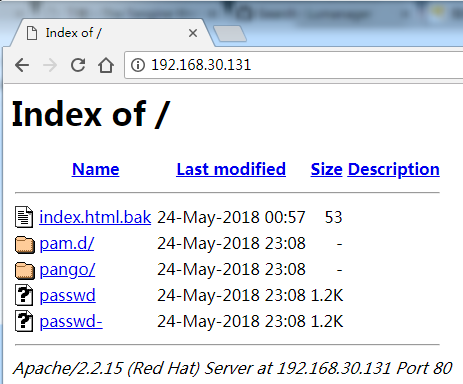
在slave安装httpd
[root@slave ~]# yum install -y httpd

[root@slave ~]# cp -r /etc/pa* /var/www/html/       #创建测试文件

[root@slave ~]# vim /etc/httpd/conf.d/welcome.conf

#

# This configuration file enables the default "Welcome"

# page if there is no default index page present for

# the root URL.  To disable the Welcome page, comment

# out all the lines below.

#

#<LocationMatch "^/+$">

#    Options -Indexes

#    ErrorDocument  /error/noindex.html

#</LocationMatch>

重启httpd服务

[root@slave ~]# service httpd restart

Stopping httpd:                                            [FAILED]

Starting httpd:                                            [  OK  ]
配置CDN
启动LuManager

[root@master ~]# lu-start

 May :: ntpdate[]: the NTP socket is in use, exiting

PgSQL 已经在运行状态!

PgSQL is already running!

Apache_LuManager 启动成功!

Apache_LuManager was started successfully.

PgSQL 已经在运行状态!

PgSQL is already running!

MySQL 已经在运行状态!

MySQL is already running!

Starting php_fpm  done

Nginx和php-cgi 启动成功!

Nginx and php-cgi ware started successfully.

Pure-ftpd 启动成功!

Pure-ftpd was started successfully.

Apache_LuManager 已经在运行状态!

Apache_LuManager is already running!

PgSQL 已经在运行状态!

PgSQL is already running!

Starting test LuNamp status ........................

LuManager in good condition.

PgSQL in good condition.

Nginx in good condition.

Apache in good condition.

MySQL in good condition.

Pure-ftpd in good condition.

Thank you for choosing LuNamp and LuManager! [Website support: zijidelu.org]
win客户端打开浏览器输入192.168.30.131:8888
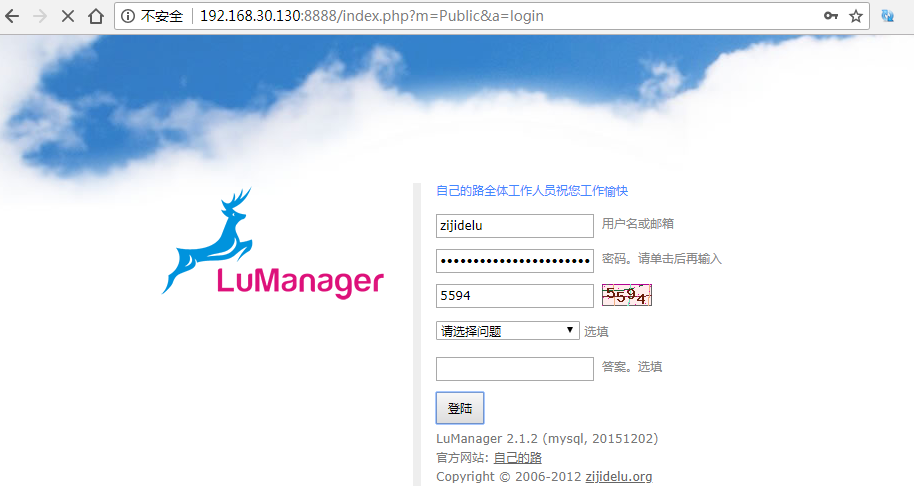
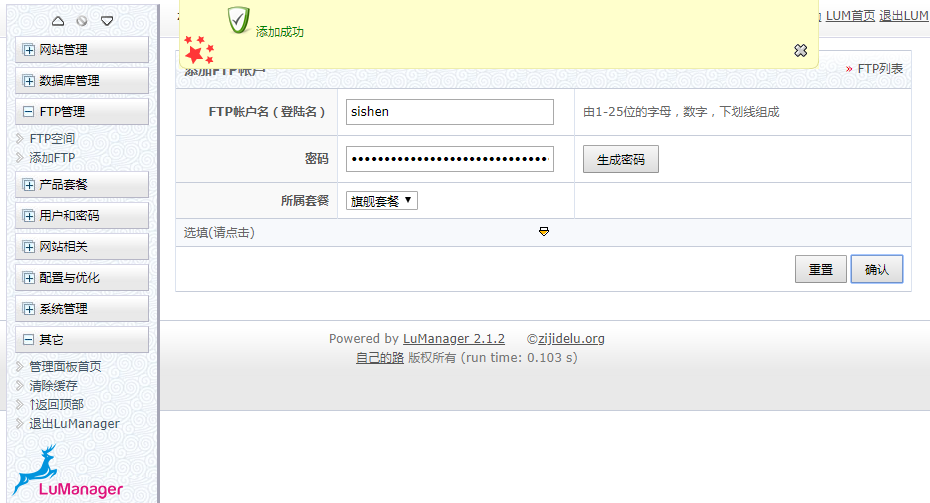
首先添加一个ftp空间,这是一个bug,否则没办法进行下一步。
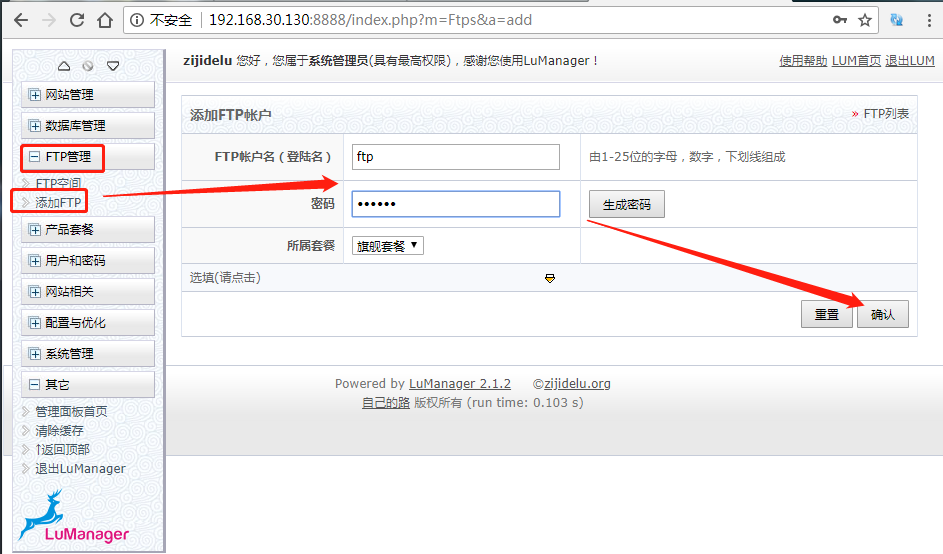
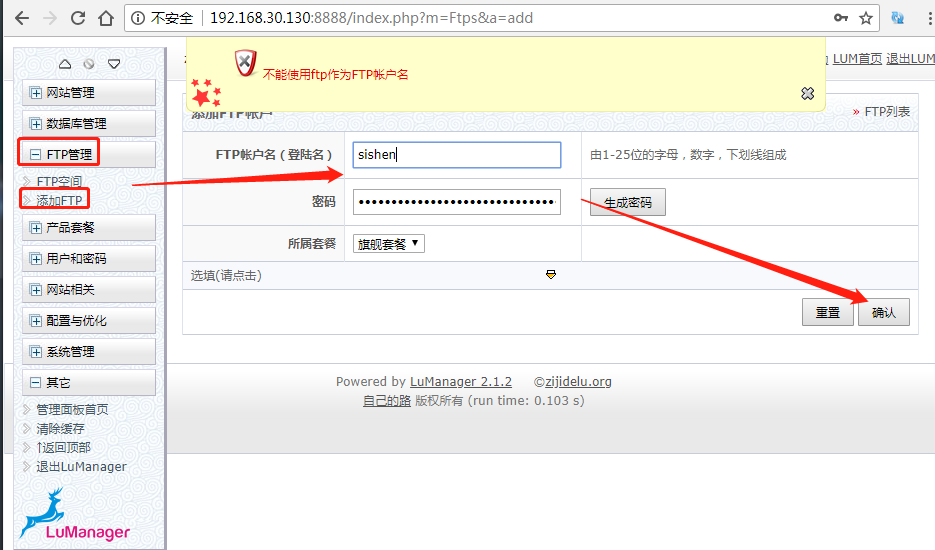
如上如所示,如果帐户名使用的是ftp作为用户名,就会抛出错误。
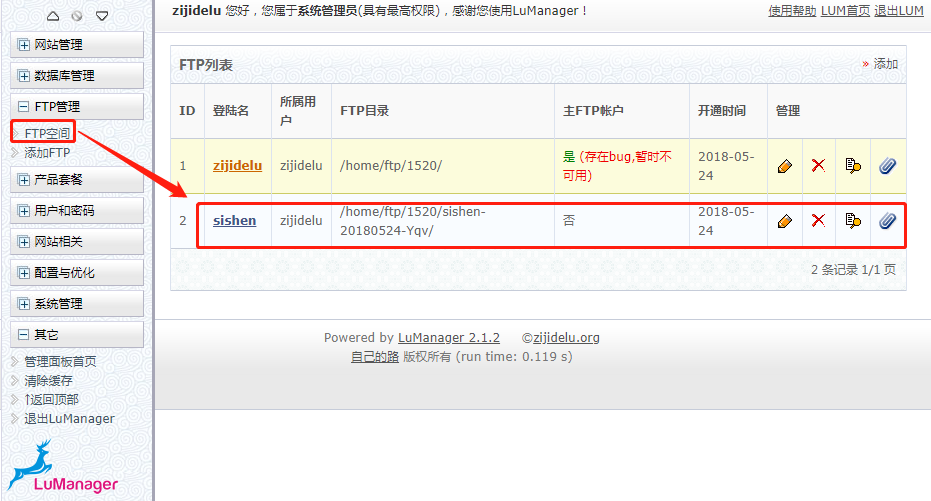
添加完FPT空间后,添加网站
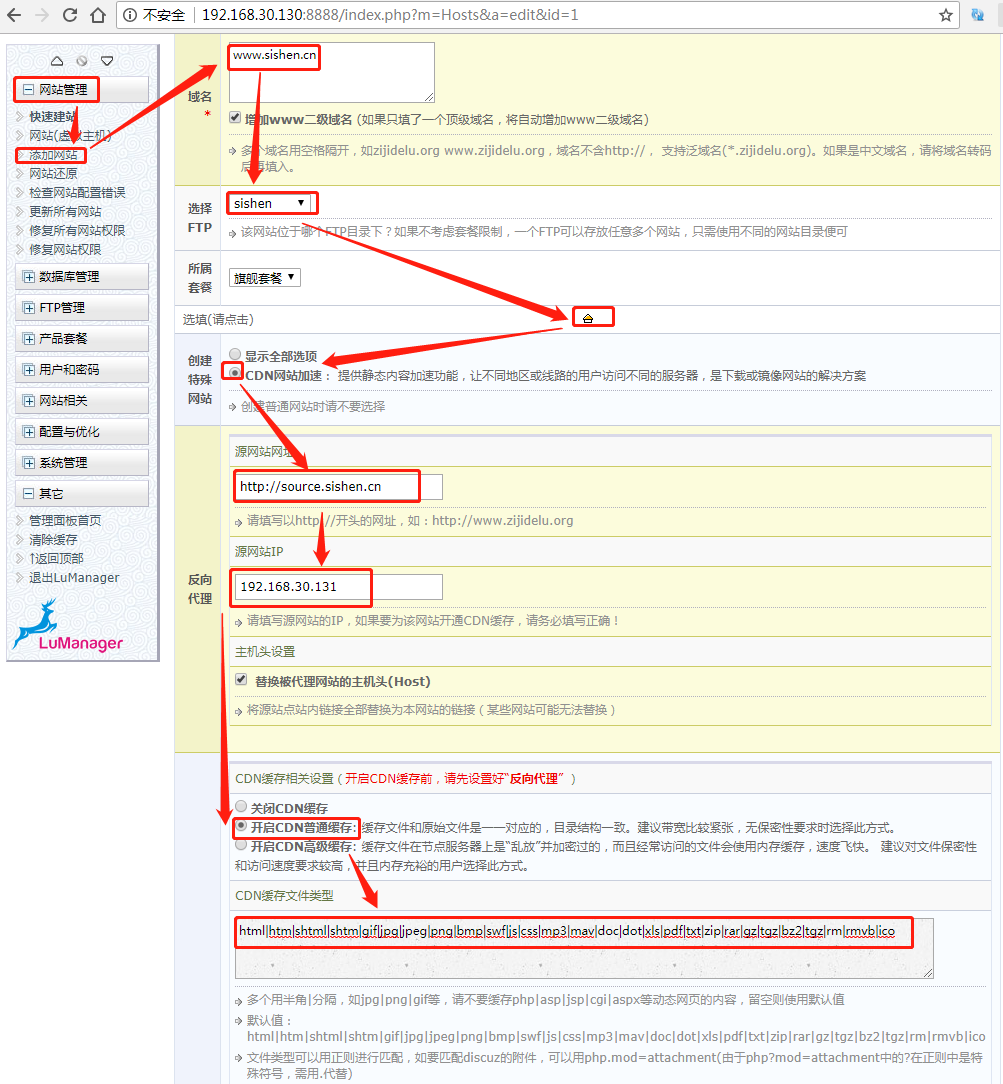

配置完成后,会发现CDN服务器上一些文件的变化
[root@master ~]# cat /etc/hosts

#lum_proxy_store start

192.168.30.131 source.sishen.cn

#lum_proxy_store end

#lum_local_domains start

127.0.0.1 ::1 localhost.localdomain localhost 1.lum www.sishen.cn

#lum_local_domains end

127.0.0.1   localhost localhost.localdomain localhost4 localhost4.localdomain4

::1         localhost localhost.localdomain localhost6 localhost6.localdomain6

192.168.30.130 master
修改nameserver使其指向192.168.30.131
[root@master ~]# vim /etc/resolv.conf

# Generated by NetworkManager

#nameserver 119.29.29.29

nameserver 192.168.30.131
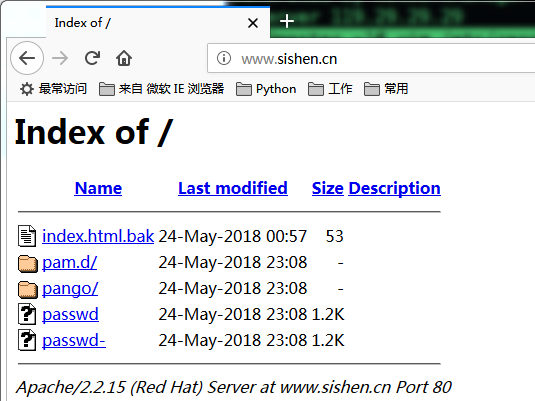
win7客户端测试
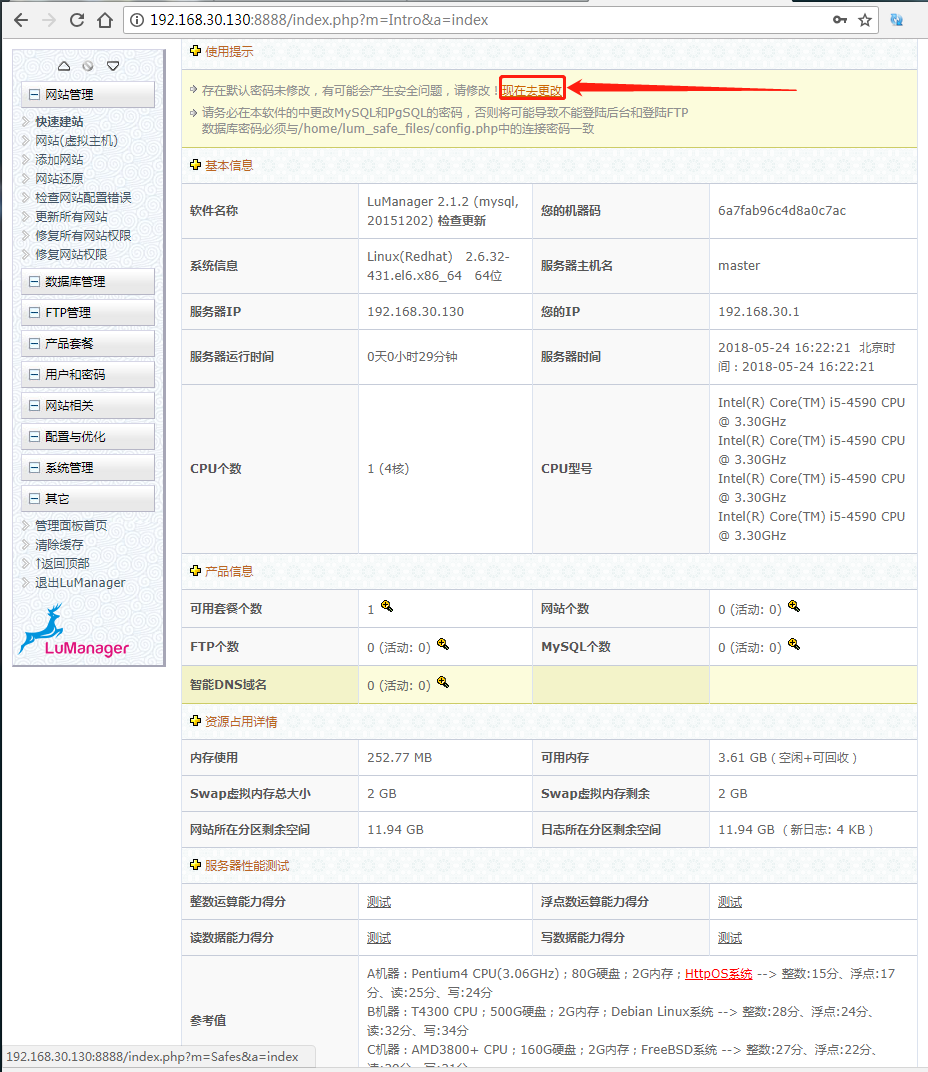
如果想更改管理员密码则
RHEL 6.5----CDN(lumanger)的更多相关文章
- RHEL 7特性说明(七):编译程序及工具
转载自:RedHat https://access.redhat.com/documentation/zh-CN/Red_Hat_Enterprise_Linux/7/html/7.0_Release ...
- RHEL 7特性说明(六):集群
来自:Linux中国 2014-07-16 00:00:00 ed Hat Enterprise Linux 7.0 是 Red Hat 的下一代操作系统完整套件,旨在用于关键任务企业级计算以及顶 ...
- 带宽 VS CDN (转载)
并发的影响因素:带宽.web server(含php).static server.数据库 带宽价格: 静态IP企业宽带 5M 10M 50M 100M 200M 盛大云 华东双线 216/月 396 ...
- CDN(转载)
CDN是什么? 谈到CDN的作用,可以用8年买火车票的经历来形象比喻: 8年前,还没有火车票代售点一说,12306.cn更是无从说起.那时候火车票还只能在火车站的售票大厅购买,而我所住的小县城并不通火 ...
- CDN(翻译)
http://dojotoolkit.org/documentation/tutorials/1.10/cdn/index.html 从CDN上加载dojo模块时非常有用的.从CDN上加载Dojo并同 ...
- oneinstack如何安装ssl证书和配置Let's Encrypt免费SSL证书教程汇总(转)
OneinStack包含以下组合:lnmp(Linux + Nginx+ MySQL+ PHP) LNMP安装SSL安全证书 部署HTTPS:https://www.gworg.com/ssl/309 ...
- Vue(一):简介和安装
概况 Vue.js(读音 /vjuː/, 类似于 view) 是一套构建用户界面的渐进式框架. Vue 只关注视图层, 采用自底向上增量开发的设计. Vue 的目标是通过尽可能简单的 API 实现响应 ...
- .Net Core自动化部署系列(一):Jenkins + GitLab
项目进行微服化改造后系统发布就变得愈为重要,因为持续集成导致部署变得越来越频繁,人工部署带来的一些问题日渐凸显,大家可能都有被系统部署线问题困扰过的经历. 本篇我们将会使用Jenkins+Gitlab ...
- 跟老刘学运维day02~部署虚拟环境安装Linux系统(1)
第1章 部署虚拟环境安装Linux系统 所谓“工欲善其事,必先利其器” 1.准备工具 VmwareWorkStation 15.5——虚拟机软件(必需) RedHatEnterpriseLinux ...
随机推荐
- Ehcache CacheManager
CacheManager是Ehcache框架的核心类和入口,它负责管理一个或多个Cache对象.要使用Ehcache框架,必须要先创建 CacheManager 对象.现在我们学习下,如何创建 Cac ...
- Sequelize入门一
最近刚开始接触Sequelize,当中遇到不少坑,所以想写篇Sequelize入门和大家分享,避免有道友和我一样爬坑. 学习sequelize的初衷是想解决SQL注入,它支持MySQL, SQLite ...
- golang-----golang sync.WaitGroup解决goroutine同步
go提供了sync包和channel来解决协程同步和通讯.新手对channel通道操作起来更容易产生死锁,如果时缓冲的channel还要考虑channel放入和取出数据的速率问题. 从字面就可以理解, ...
- leetcode 684. Redundant Connection
We are given a "tree" in the form of a 2D-array, with distinct values for each node. In th ...
- Your Firefox profile cannot be loaded. It may be missing or inaccessible
ubuntu下出现打开frefox出现Your Firefox profile cannot be loaded. It may be missing or inaccessible 1:用命令行输入 ...
- CSS中的那点事儿(一)--- CSS中的单位2
在上篇博客提到了%.px.em三个单位,其中最复杂的是em,因为要计算当前元素内的font-size,必须知道其父元素的font-size,层层累积,容易出错.现在CSS3中引入了新的单位rem,改变 ...
- js 中整理(一)
一. 冒泡与冒泡阻止 var arr={5,0,-56,900,12,9000,-123}; var flag=false; //大的排序次数(arr.length-1) for(var i=0; ...
- bzoj3462: DZY Loves Math II
状态很差脑子不清醒了,柿子一直在推错.... ... 不难发现这个题实际上是一个完全背包 问题在于n太大了,相应的有质数的数量不会超过7个 假设要求sigema(1~plen)i pi*ci=n 的方 ...
- HDU 1257:最少拦截系统
最少拦截系统 Time Limit: 2000/1000 MS (Java/Others) Memory Limit: 65536/32768 K (Java/Others) Total Sub ...
- hdu 1963 Investment 解题报告
题目链接:http://acm.hdu.edu.cn/showproblem.php?pid=1963 题目意思:有 本金 money,还有一些股票的种类,第 i 种股票买入需要 value[i] 这 ...