
Cortex-M3 / M4 Hard Fault Handler (转载)
转自大伟的,感谢大伟的帮助调试:http://www.cnblogs.com/shangdawei/archive/2013/04/30/3052491.html
http://blog.frankvh.com/2011/12/07/cortex-m3-m4-hard-fault-handler/
If you’re seeing a Hard Fault exception on your Cortex M3 or Cortex M4 processor, this handler and information may help. I can’t take credit for it – this code was provided by Joseph Yiu on a few different forums, as well as in his book (Definitive Guide to the ARM Cortex M3). I’m simply providing some assistance on how to install and use it.
Hard Fault Handler Installation
These instructions work for an STM32F2xx or STM32F4xx processor using a GNU-based toolchain (eg Yagarto or Sourcery G++). They should work with other processors and toolchains but may require a small tweak – no doubt your compiler will be pleased to tell you if it’s not happy! As always with programming, the following is not the only way to do it – it’s simply the way I did it. If you want to rearrange things or do things a bit differently then feel free.
Joseph’s hard fault handler is in two pieces – a small piece of assembly, and a small piece of C. You need the processor’s hardfault exception vector to jump to the assembly, and then the assembly code will itself call the C code.
Here’s the assembly code. It extracts the location of the stack frame, then passes it as a pointer to the C code, which is named hard_fault_handler_c.

.syntax unified

.cpu cortex-m3

.thumb

.global HardFault_Handler

.extern hard_fault_handler_c

HardFault_Handler:

  TST LR, #4

  ITE EQ

  MRSEQ R0, MSP

  MRSNE R0, PSP

  B hard_fault_handler_c
For those of you using the IAR tool chain, the assembly stub must be specified in a modules and section to compile and link properly. Below is the code that I used to apply this example to the IAR tool chain:
MODULE HARDFAULT_MOD

SECTION HARDFAULT_SECT : CODE(2)

THUMB

PUBLIC HardFault_Handler

EXTERN HardFault_Handler_C

HardFault_Handler:

TST LR, #4

ITE EQ

MRSEQ R0, MSP

MRSNE R0, PSP

B HardFault_Handler_C

END
void HardFault_Handler( void )

{

__ASM(“TST LR, #4″);

__ASM(“ITE EQ”);

__ASM(“MRSEQ R0, MSP”);

__ASM(“MRSNE R0, PSP”);

__ASM(“B hard_fault_handler_c”);

}
This assembly needs to be immediately called when the hard fault exception occurs.
If you look at the vectors list, you’ll see something like this:
g_pfnVectors:

  .word  _estack

  .word  Reset_Handler

  .word  NMI_Handler

  .word  HardFault_Handler

  .word  MemManage_Handler

  .word  BusFault_Handler

  .word  UsageFault_Handler

  etc
Given that the name in the vector table is HardFault_Handler, we give the assembler code that name (and declare the name as a global so the linker can find it). If your vector table contains a different name, then change the name of the assembler code to suit.
You need to include this bit of assembler in your build. Just save the assembler code in its own .s file (eg: hardfault.s) and then include it in your build, the same way as your other .s files (like that startup file) are.
Now we need to add the C code. Here it is:
// From Joseph Yiu, minor edits by FVH

// hard fault handler in C,

// with stack frame location as input parameter

// called from HardFault_Handler in file xxx.s

void hard_fault_handler_c (unsigned int * hardfault_args)

{

  unsigned int stacked_r0;

  unsigned int stacked_r1;

  unsigned int stacked_r2;

  unsigned int stacked_r3;

  unsigned int stacked_r12;

  unsigned int stacked_lr;

  unsigned int stacked_pc;

  unsigned int stacked_psr;

  stacked_r0 = ((unsigned long) hardfault_args[0]);

  stacked_r1 = ((unsigned long) hardfault_args[1]);

  stacked_r2 = ((unsigned long) hardfault_args[2]);

  stacked_r3 = ((unsigned long) hardfault_args[3]);

  stacked_r12 = ((unsigned long) hardfault_args[4]);

  stacked_lr = ((unsigned long) hardfault_args[5]);

  stacked_pc = ((unsigned long) hardfault_args[6]);

  stacked_psr = ((unsigned long) hardfault_args[7]);

  printf ("\n\n[Hard fault handler - all numbers in hex]\n");

  printf ("R0 = %x\n", stacked_r0);

  printf ("R1 = %x\n", stacked_r1);

  printf ("R2 = %x\n", stacked_r2);

  printf ("R3 = %x\n", stacked_r3);

  printf ("R12 = %x\n", stacked_r12);

  printf ("LR [R14] = %x  subroutine call return address\n", stacked_lr);

  printf ("PC [R15] = %x  program counter\n", stacked_pc);

  printf ("PSR = %x\n", stacked_psr);

  printf ("BFAR = %x\n", (*((volatile unsigned long *)(0xE000ED38))));

  printf ("CFSR = %x\n", (*((volatile unsigned long *)(0xE000ED28))));

  printf ("HFSR = %x\n", (*((volatile unsigned long *)(0xE000ED2C))));

  printf ("DFSR = %x\n", (*((volatile unsigned long *)(0xE000ED30))));

  printf ("AFSR = %x\n", (*((volatile unsigned long *)(0xE000ED3C))));

  printf ("SCB_SHCSR = %x\n", SCB->SHCSR);

  while (1);

}
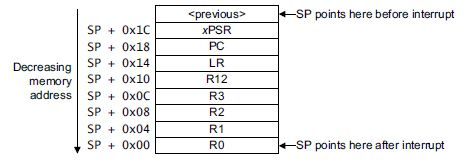
This code goes wherever the existing (previous) Hard Fault Handler went. In our example, the vector table pointed to a function called HardFault_Handler. We are replacing that function with the assembler code, so the original HardFault_Handler function needs to be commented out (otherwise we’ll have two functions with the same name). For the STM32F2xx all exception handlers are found in the file: stm32f2xx_it.c So comment out the function HardFault_Handler() from that C file, and paste the C code for Joseph’s hard_fault_handler_c() into the same file.
That’s it. In summary, you commented out the old hard fault handler, and you added in some assembly code and some C code instead. Try building your project and see what happens.
Note that this code will only work if the main stack pointer hasn’t been badly corrupted prior to the hard fault occurring – if the stack pointer is off in never-never land then the C handler may not work. In my experience this has never been a problem.
Cortex-M3 / M4 Hard Fault Handler (转载)的更多相关文章
- 【ARM-Linux开发】ARM7 ARM9 ARM Cortex M3 M4 有什么区别
ARM7 ARM9 ARM Cortex M3 M4 区别 arm7 arm9 可以类比386和奔腾, 不同代,arm9相比arm7指令集和性能都有所增强,arm7和arm9都有带mmu和无mmu的版 ...
- ARM 架构、ARM7、ARM9、STM32、Cortex M3 M4 、51、AVR 之间有什么区别和联系?(转载自知乎)
ARM架构: 由英国ARM公司设计的一系列32位的RISC微处理器架构总称,现有ARMv1~ARMv8种类. ARM7: 一类采用ARMv3或ARMv4架构的,使用冯诺依曼结构的内核. ...
- 【freertos】002-posix模拟器设计与cortex m3异常处理
目录 前言 posix 标准接口层设计 模拟器的系统心跳 模拟器的task底层实质 模拟器的任务切换原理 cortex M3/M4异常处理 双堆栈指针 双操作模式 栈帧 EXC_RETURN 前言 如 ...
- ARM Cortex M3(V7-M架构)硬件启动程序 一
Cortex-m3启动代码分析笔记 启动代码文件名是STM32F10X.S,它的作用先总结下,然后再分析. 启动代码作用一般是: 1)堆和栈的初始化: 2)中断向量表定义: 3)地址重映射及中断向量表 ...
- Implementation of Serial Wire JTAG flash programming in ARM Cortex M3 Processors
Implementation of Serial Wire JTAG flash programming in ARM Cortex M3 Processors The goal of the pro ...
- ARM Cortex M3系列GPIO口介绍(工作方式探讨)
一.Cortex M3的GPIO口特性 在介绍GPIO口功能前,有必要先说明一下M3的结构框图,这样能够更好理解总线结构和GPIO所处的位置. Cortex M3结构框图 从图中可以看出 ...
- IBM X3650 M3/M4的服务器装系统
IBM X3650 M3/M4的服务器一般都有两块以上的硬盘.所以如果没有做RAID,那首先应该做好raid 磁盘阵列.本文装系统的前提是RAID已经做好. 一般安装系统的方式为先在IBM官网下载对应 ...
- STM32学习之路入门篇之指令集及cortex——m3的存储系统
STM32学习之路入门篇之指令集及cortex——m3的存储系统 一.汇编语言基础 一).汇编语言:基本语法 1.汇编指令最典型的书写模式: 标号 操作码 操作数1, 操作数2,... ...
- T-SQL - 习题02_将数据表year|month|amount查询成year|m1|m2|m3|m4的样式
时间:2017-09-11 整理:byzqy 题目:有个年度统计表,结构如下: 怎么样把这个表,查询成这样一个结果: 这是在面试过程中遇到的一个关于数据库的题,没有一点思路,不知它考查到的知识点是什么 ...
随机推荐
- CodeForces - 750D New Year and Fireworks
因为 烟花的最大范围是各个方向150格 所以 最大的空间应该是 300*300 BFS和DFS均可 模拟每一个烟花爆炸的过程 但是要注意 需要一个数组来排重 在某一个爆炸点 如果爆炸的方向 和爆炸的层 ...
- unbuntu下安装多个JAVA JDK版本及如何切换
当前环境已经安装过jdk1.6.0_45安装JDK 1.7.x时,若安装错误,可执行以下步骤:sudo add-apt-repository ppa:openjdk-r/ppa sudo apt-ge ...
- Shell脚本的编写,sed的使用以及一些正则表达式
Shell脚本的简单编写以及sed的使用 标签(空格分隔): 博客文章 前一阵子为了批量修改Web审计规则,故编写了一个Shell脚本,顺便使用了下sed,顺便把正则表达式也重新学习一遍,感觉还是需要 ...
- python学习之-- RabbitMQ 消息队列
记录:异步网络框架:twisted学习参考:www.cnblogs.com/alex3714/articles/5248247.html RabbitMQ 模块 <消息队列> 先说明:py ...
- NOIP2017 酱油记
Day0: 怀着激动无比的小心情,坐上了学校的校车. 然后司机在某个小县城迷路了,迷路了两个多小时.... 来到酒店,去吃了几把鸡,没见到鸡屁股... 洗了个澡早早睡了.. Day1: 一早被闹铃叫醒 ...
- 学习日常笔记<day16>mysql加强
1.数据约束 1.1什么是数据约束 对用户操作表的数据进行约束 1.2 默认值 作用:当永辉对使用默认值的字段不插入值的时候,就使用默认值 注意: 1)对默认值字段插入null是可以的 2)对默认值字 ...
- 210 Course ScheduleII
/* * 210 Course ScheduleII * 2016-6-9 by Mingyang * http://www.jyuan92.com/blog/leetcode-course-sche ...
- Spring @Value用法
Spring 通过注解获取*.porperties文件的内容,除了xml配置外,还可以通过@value方式来获取. 使用方式必须在当前类使用@Component,xml文件内配置的是通过pakage扫 ...
- 破解电信光猫华为HG8120C关闭路由功能方法
昨天电信的工作人员来安装了电信的光纤宽带,使用的是华为HG8120C这款光电转换器与路由器一体机 这导致下级路由无法直接使用PPPOE拨号连接到互联网,且无法使用端口映射来实现外网访问 而华为开放给用 ...
- django 简易博客开发 4 comments库使用及ajax支持
首先还是贴一下源代码地址 https://github.com/goodspeedcheng/sblog 上一篇文章我们介绍了静态文件使用以及如何使用from实现对blog的增删改,这篇将介绍如何给 ...