
postgresql备份和恢复
备份: pg_dump -d m3vg -h localhost -p 5432 -U delta -W -f 1024.dump -F tar
恢复: pg_restore -h localhost -p 5432 -Udelta -W 1024.dump -d m3vg
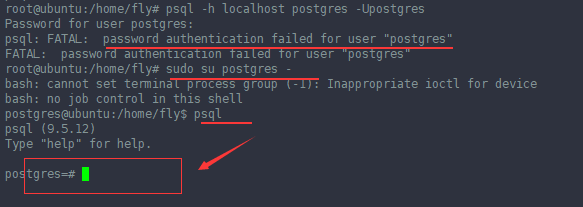
忘记postgresql的用户的密码,怎么进入psql呢?
1. sudo su postgres -
2. psql
执行上面两部就可以进入了
-------------------------------------------------------------------------------------------------------------------------------------------------------------------------------------------------
pg_dump is an effective tool to backup postgres database. It creates a *.sql file with CREATE TABLE, ALTER TABLE, and COPY SQL statements of source database. To restore these dumps psql command is enough.
Using pg_dump, you can backup a local database and restore it on a remote database at the same time, using a single command. In this article, let us review several practical examples on how to use pg_dump to backup and restore.
For the impatient, here is the quick snippet of how backup and restore postgres database using pg_dump and psql:
Backup:  $ pg_dump -U {user-name} {source_db} -f {dumpfilename.sql}

Restore: $ psql -U {user-name} -d {desintation_db}-f {dumpfilename.sql}
1. Backup a single postgres database
This example will backup erp database that belongs to user geekstuff, to the file mydb.sql
$ pg_dump -U geekstuff erp -f mydb.sql
It prompts for password, after authentication mydb.sql got created with create table, alter table and copy commands for all the tables in the erp database. Following is a partial output of mydb.sql showing the dump information of employee_details table.
2. Backup all postgres databases
To backup all databases, list out all the available databases as shown below.
Login as postgres / psql user:
$ su postgres
List the databases:
$ psql -l

List of databases

Name | Owner | Encoding

-----------+-----------+----------

article | sathiya | UTF8

backup | postgres | UTF8

erp | geekstuff | UTF8

geeker | sathiya | UTF8
Backup all postgres databases using pg_dumpall:
You can backup all the databases using pg_dumpall command.
$ pg_dumpall > all.sql
Verify the backup:
Verify whether all the databases are backed up,
$ grep "^[\]connect" all.sql

\connect article

\connect backup

\connect erp

\connect geeker
3. Backup a specific postgres table
$ pg_dump --table products -U geekstuff article -f onlytable.sql
To backup a specific table, use the –table TABLENAME option in the pg_dump command. If there are same table names in different schema then use the –schema SCHEMANAME option.
How To Restore Postgres Database
1. Restore a postgres database
$ psql -U erp -d erp_devel -f mydb.sql
This restores the dumped database to the erp_devel database.
Restore error messages
While restoring, there may be following errors and warning, which can be ignored.
psql:mydb.sql:13: ERROR:  must be owner of schema public

psql:mydb.sql:34: ERROR:  must be member of role "geekstuff"

psql:mydb.sql:59: WARNING:  no privileges could be revoked

psql:mydb.sql:60: WARNING:  no privileges could be revoked

psql:mydb.sql:61: WARNING:  no privileges were granted

psql:mydb.sql:62: WARNING:  no privileges were granted
2. Backup a local postgres database and restore to remote server using single command:
$ pg_dump dbname | psql -h hostname dbname
The above dumps the local database, and extracts it at the given hostname.
3. Restore all the postgres databases
$ su postgres

$ psql -f alldb.sql
4. Restore a single postgres table
The following psql command installs the product table in the geek stuff database.
$ psql -f producttable.sql geekstuff
postgresql备份和恢复的更多相关文章
- PostgreSQL 备份和恢复
备份和恢复有三种不同的基本方法来备份PostgreSQL数据SQL转储文件系统级备份File system level backup连续归档 1. SQL转储 pg_dump dbname > ...
- PostgreSQL备份和恢复数据表
备份数据表: pg_dump -U user_name db_name -t table_name -f /tmp/backup_file.suffix 恢复数据表: 方法1: 登录数据库:\i /t ...
- postgresql数据库备份和恢复
PostgreSQL自带一个客户端pgAdmin,里面有个备份,恢复选项,也能对数据库进行备份 恢复(还原),但最近发现数据库慢慢庞大的时候,经常出错,备份的文件过程中出错的几率那是相当大,手动调节灰 ...
- PostgreSQL的备份和恢复
关于PostgreSQL的备份和恢复详细信息请参阅<PostgreSQL中文文档>. 备份: #pg_dump --username=postgres v70_demo > v70_ ...
- postgresql数据库备份和恢复(超快)
PostgreSQL自带一个客户端pgAdmin,里面有个备份,恢复选项,也能对数据库进行备份 恢复(还原),但最近发现数据库慢慢庞大的时候,经常出错,备份的文件过程中出错的几率那是相当大,手动调节灰 ...
- PostgreSQL数据库常用脚本-初始化、备份、恢复推荐脚本
公司最近开始逐步推广使用PostgreSQL,为方便开发人员和实施人员操作,特整理数据库初始化.备份.恢复的推荐脚本如下: 1. 连接数据库 psql -h 127.0.0.1 -p 1921 -U ...
- Gitlab备份和恢复操作记录
前面已经介绍了Gitlab环境部署记录,这里简单说下Gitlab的备份和恢复操作记录: 1)Gitlab的备份目录路径设置 [root@code-server ~]# vim /etc/gitlab/ ...
- 转载:Gitlab备份和恢复操作记录
转载:Gitlab备份和恢复操作记录 包含了备份和数据恢复的操作记录,实验可行 前面已经介绍了Gitlab环境部署记录,这里简单说下Gitlab的备份和恢复操作记录: 1)Gitlab的备份目录路径设 ...
- Gitlab+Jenkins学习之路(四)之gitlab备份和恢复
gitlab的备份和恢复 (1)创建备份目录,并授权 [root@linux-node1 ~]# mkdir /data/backups/gitlab -p [root@linux-node1 ~]# ...
随机推荐
- IDE 快捷键汇总
一.webstorm div.head + tab-------------------- div#btn + tab---------------------------- div.head#btn ...
- mysql timeout expired处理
一.发现问题 二.分析问题 .net长时间连接mysql导致超时: 方式一:连接用完后,就关闭连接 方式二:增加C#的执行sqlcommand时间 三.解决问题 增加了这一句,问题解决了 using ...
- 网上商城 Incorrect datetime value: '' for column 'ordertime' at row 1
今天在做商城项目的[提交订单]功能的时候,向数据库插入数据报错:Incorrect datetime value: '' for column 'ordertime' at row 1 public ...
- Smarty的应用
smarty模板的核心是一个类,下载好的模板中有这么几个重要的文件夹 (1)libs核心文件夹(2)int.inc.php这是入口文件(3)plugins:自己写的插件文件夹(4)templates_ ...
- 【转】jvm类加载
类加载机制 JVM把class文件加载的内存,并对数据进行校验.转换解析和初始化,最终形成JVM可以直接使用的Java类型的过程就是加载机制. 类从被加载到虚拟机内存中开始,到卸载出内存为止,它的生命 ...
- jboss之启动加载过程详解
今天看了看jboss的boot.log和server.log日志,结合自己的理解和其他的资料,现对jboss的启动和加载过程做出如下总结: boot.xml是服务器的启动过程的日志,不涉及后续的操作过 ...
- python学习笔记(2)——练习小程序之 " input " 隐藏陷阱
练习小程序之 ----------" input " 隐藏陷阱 age=input('please enter your age:') if age>=18: print(' ...
- 苹果和虫子问题C++
如果需要转载,请注明出处:http://www.cnblogs.com/wongyi/p/8205305.html 最近在给小朋友补奥数课,顺便看了几道题目,觉得写出来会比较集中,整理一下哈哈哈. 问 ...
- 小程序wx:key = “{{*this}}”报错
解决方案:改为 wx:key = "*this"
- Address already in use: JVM_Bind:8080错误的解决办法
解决办法:先到命令行查找8080端口号被那个占用,输入后面的命令:netstat -ano 查到 然后到任务管理器把PID为20904的进程给结束掉,就OK了 -------------------- ...