
maven+struts2环境搭建
首先在struts2.xml文件配置一个包,在包中配置一个action,新建action,新建视图,在action中定义由method定义的方法,这个方法一定要返回String类型,返回的是视图的名称。
直接上图
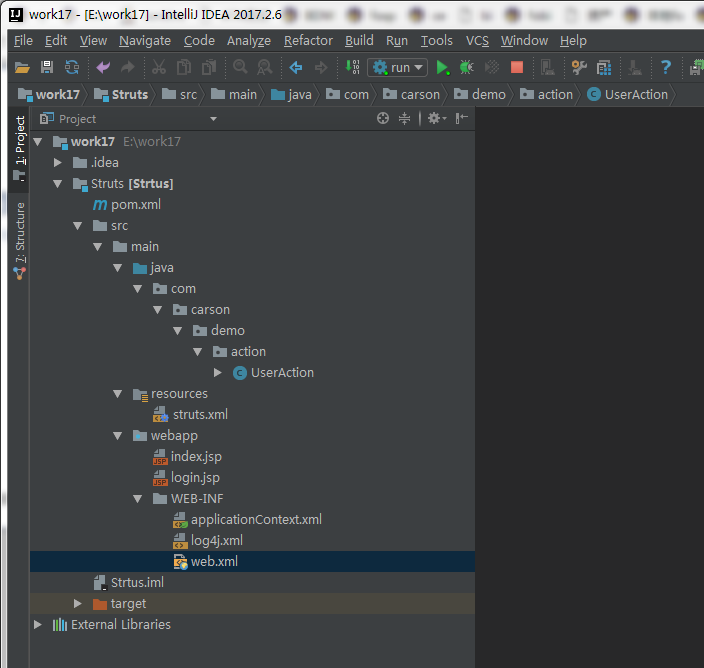
一,首先是pom.xml,引入所需jar
<?xml version="1.0" encoding="UTF-8"?>

<!--

  Licensed to the Apache Software Foundation (ASF) under one

  or more contributor license agreements.  See the NOTICE file

  distributed with this work for additional information

  regarding copyright ownership.  The ASF licenses this file

  to you under the Apache License, Version 2.0 (the

  "License"); you may not use this file except in compliance

  with the License.  You may obtain a copy of the License at

   http://www.apache.org/licenses/LICENSE-2.0

  Unless required by applicable law or agreed to in writing,

  software distributed under the License is distributed on an

  "AS IS" BASIS, WITHOUT WARRANTIES OR CONDITIONS OF ANY

  KIND, either express or implied.  See the License for the

  specific language governing permissions and limitations

  under the License.

-->

<!-- $Id: pom.xml 642118 2008-03-28 08:04:16Z reinhard $ -->

<project xmlns="http://maven.apache.org/POM/4.0.0" xmlns:xsi="http://www.w3.org/2001/XMLSchema-instance" xsi:schemaLocation="http://maven.apache.org/POM/4.0.0 http://maven.apache.org/maven-v4_0_0.xsd">

  <modelVersion>4.0.0</modelVersion>

  <packaging>war</packaging>

  <name>Strtus</name>

  <groupId>com.cyf</groupId>

  <artifactId>Strtus</artifactId>

  <version>1.0-SNAPSHOT</version>

  <build>

    <plugins>

      <plugin>

        <groupId>org.mortbay.jetty</groupId>

        <artifactId>maven-jetty-plugin</artifactId>

        <version>6.1.7</version>

        <configuration>

          <connectors>

            <connector implementation="org.mortbay.jetty.nio.SelectChannelConnector">

              <port>8888</port>

              <maxIdleTime>30000</maxIdleTime>

            </connector>

          </connectors>

          <webAppSourceDirectory>${project.build.directory}/${pom.artifactId}-${pom.version}</webAppSourceDirectory>

          <contextPath>/</contextPath>

        </configuration>

      </plugin>

      <plugin>

        <artifactId>maven-resources-plugin</artifactId>

        <version>2.6</version>

        <executions>

          <execution>

            <id>copy-xmls</id>

            <phase>process-resources</phase>

            <goals>

              <goal>copy-resources</goal>

            </goals>

            <configuration>

              <outputDirectory>${basedir}/target/classes</outputDirectory>

              <resources>

                <resource>

                  <directory>${basedir}/src/main/java</directory>

                  <includes>

                    <include>**/*.xml</include>

                  </includes>

                </resource>

              </resources>

            </configuration>

          </execution>

        </executions>

      </plugin>

    </plugins>

  </build>

  <!-- 属性配置 -->

  <properties>

    <project.build.sourceEncoding>UTF-8</project.build.sourceEncoding>

  </properties>

  <dependencies>

    <dependency>

      <groupId>javax.servlet</groupId>

      <artifactId>servlet-api</artifactId>

      <version>2.5</version>

      <scope>provided</scope>

    </dependency>

    <dependency>

      <groupId>org.apache.struts</groupId>

      <artifactId>struts2-core</artifactId>

      <version>2.5.1</version>

    </dependency>

  </dependencies>

</project>
二,web.xml
<!DOCTYPE web-app PUBLIC

        "-//Sun Microsystems, Inc.//DTD Web Application 2.3//EN"

        "http://java.sun.com/dtd/web-app_2_3.dtd" >

<web-app>

  <display-name>Archetype Created Web Application</display-name>

  <init-param>

    <param-name>config</param-name>

    <param-value>../../resources/struts.xml</param-value>

  </init-param>

  <filter>

    <filter-name>struts2</filter-name>

    <filter-class>

      org.apache.struts2.dispatcher.filter.StrutsPrepareAndExecuteFilter

    </filter-class>

  </filter>

  <filter-mapping>

    <filter-name>struts2</filter-name>

    <url-pattern>/*</url-pattern>

  </filter-mapping>

  <welcome-file-list>

    <welcome-file>login.jsp</welcome-file>

  </welcome-file-list>

</web-app>
三,struts.xml
<?xml version="1.0" encoding="UTF-8" ?>

<!DOCTYPE struts PUBLIC

        "-//Apache Software Foundation//DTD Struts Configuration 2.3//EN"

        "http://struts.apache.org/dtds/struts-2.3.dtd">

<struts>

    <constant name="struts.i18n.reload" value="false"/>

    <constant name="struts.devMode" value="false"/>

    <include file="struts-default.xml"/>

    <package name="default" extends="struts-default" namespace="/">

        <action name="login" class="com.carson.demo.action.UserAction" method="login">

            <result name="success">index.jsp</result>

            <result name="login">login.jsp</result>

        </action>

    </package>

</struts>
四,action
package com.carson.demo.action;

import com.opensymphony.xwork2.ActionSupport;

import org.apache.struts2.ServletActionContext;

import javax.servlet.http.HttpServletRequest;

import javax.servlet.http.HttpServletResponse;

import java.io.UnsupportedEncodingException;

public class UserAction extends ActionSupport {

    private static final long serialVersionUID = 1L;

    private String msg;

    public String getMessage() {

        System.out.println("测试有没有走");

        return msg;

    }

    public String execute() {

        System.out.println("测试有没有走!!!!!!!!!!");

        msg = "哈哈,我是struts2";

        return SUCCESS;

    }

    public String login() {

        try {

            HttpServletRequest request = ServletActionContext.getRequest();

            HttpServletResponse response = ServletActionContext.getResponse();

            request.setCharacterEncoding("UTF-8");

            response.setContentType("text/html;charset=utf-8");

            String username = request.getParameter("username");

            String password = request.getParameter("password");

            if ("admin".equals(username) && "123456".equals(password)) {

                return SUCCESS;

            } else {

                return "login";

            }

        } catch (UnsupportedEncodingException e) {

            e.printStackTrace();

        }

        return SUCCESS;

    }

}
五,视图
<%@ page language="java" contentType="text/html; charset=UTF-8"

         pageEncoding="UTF-8"%>

<!DOCTYPE html PUBLIC "-//W3C//DTD HTML 4.01 Transitional//EN" "http://www.w3.org/TR/html4/loose.dtd">

<html>

<head>

    <meta http-equiv="Content-Type" content="text/html; charset=UTF-8">

    <title>登录界面</title>

</head>

<body>

<form action="login" method="post">

    <table>

        <tr>

            <td>用户名:</td>

            <td><input type="text" name="username" /> </td>

        </tr>

        <tr>

            <td>密码:</td>

            <td><input type="text" name="password" /> </td>

        </tr>

        <tr>

            <td colspan="2">

                <input type="submit" value="登录" />

                <input type="reset" value="重置" /></td>

        </tr>

    </table>

</form>

</body>

</html>
<%@ page language="java" contentType="text/html; charset=UTF-8"

         pageEncoding="UTF-8" isELIgnored="false" %>

<!DOCTYPE html PUBLIC "-//W3C//DTD HTML 4.01 Transitional//EN" "http://www.w3.org/TR/html4/loose.dtd">

<html>

<head>

    <meta http-equiv="Content-Type" content="text/html; charset=UTF-8">

    <title>Hello Maven</title>

</head>

<body>

${message}

</body>

</html>
六,访问地址
http://localhost:8080/Strtus/

七,注意事项
在用${}取值的时候老是不成功
事情的真相是,你的页面没有开EL支持……

<%@ page language="java" import="java.util.*" pageEncoding="utf-8" isELIgnored="false"%>
maven+struts2环境搭建的更多相关文章
- 最新版ssh hibernate spring struts2环境搭建
最新版ssh hibernate spring struts2环境搭建 最新版spring Framework下载地址:spring4.0.0RELEASE环境搭建 http://repo.sprin ...
- 第3章 Struts2框架--1、Struts2环境搭建
第3章 Struts2框架--1.Struts2环境搭建 搭建步骤: 1.从下载http://struts.apache.org 没找到Struts2.3.16版,就下载了2.3.29 2.拷贝后解压 ...
- 【搬运工】之——Selenium+IDEA+Maven+TestNG环境搭建(转)
Selenium+IDEA+Maven+TestNG环境搭建 第一 安装java环境. 1. 下载并安装Jdk1.7或Jdk1.8 http://www.oracle.com/technetwork/ ...
- TestNG+Maven+IDEA环境搭建
TestNG+Maven+IDEA环境搭建 前言: 主要进行TestNG测试环境的搭建 所需环境: 1.IDEA UItimate 2.JDK 3.Maven 一.创建工程 File –>new ...
- 【SSH】 之 Struts2环境搭建及简单应用开发
在上一篇文章中,我们一起了解了一下struts2的工作机制原理,接下来让我们进行一下简单应用的开发 (一)配置环境 1.建立web项目 2.导入jar包 其中struts2中有很多jar包,我们不需要 ...
- Spark Idea Maven 开发环境搭建
一.安装jdk jdk版本最好是1.7以上,设置好环境变量,安装过程,略. 二.安装Maven 我选择的Maven版本是3.3.3,安装过程,略. 编辑Maven安装目录conf/settings.x ...
- struts2环境搭建和第一个程序
环境搭建 项目目录 导入依赖jar包,如上图lib目录所示. 不同的版本可能会不一样,没关系在tomcat启动时,如果报错java.lang.ClassNotFoundException,我们可以按照 ...
- SSM Spring+SpringMVC+mybatis+maven+mysql环境搭建
SSM Spring+SpringMVC+mybatis+maven环境搭建 1.首先右键点击项目区空白处,选择new->other..在弹出框中输入maven,选择Maven Project. ...
- selenium java maven testNg环境搭建
maven获取jar的xml地址:http://mvnrepository.com 步骤一安装jdk(略) 步骤二 安装eclipse(略) 步骤三 安装testNG 步骤四 maven安装 步骤三 ...
随机推荐
- android动画(3)layout动画,layoutChanged动画及算定义它,ListViewActivity的Layout动画(代码和xm配置两种实现l)
1.layout切换动画 代码: 本示例是fragment切换.在它的oncreateView中 public class LayoutAnimationFrgmt extends Fragment ...
- cpp extern 关键字用法
语法说明: extern 可以置于变量或者函数前,以标示变量或者函数的在别的文件中定义,提示编译器遇到此变量和函数后,在其他模块中寻找其定义.此外extern也可用来进行链接指定. 即 extern ...
- string类常用方法3
- Git团队协作 - 新feature的开发过程
新feature的开发过程 建议使用SmartGit,以下是命令行操作 git checkout -b dev (对于没有分支的人)新建dev分支 git pull origin dev拉取最新数据 ...
- 前端打印console
很多时候,我们都想知道,是否已经选中或得到数据时,我们可以利用console 打印出来.console有几种方式使用.具体有: console.log($scope.getParkId); conso ...
- H5图片预览功能
<html> <head> <meta http-equiv="Content-Type" content="text/html; char ...
- 【转】Iconfont
Iconfont Iconfont 是指用字体文件取代图片文件,来展示图标.特殊字体等元素的一种方法.很多网站都会用它,比如手淘.新浪微博等. 在使用它之前,先来了解一下它的优缺点: 优点:(1)文件 ...
- unity内存管理
最近一直在研究unity的内存加载,因为它是游戏运行的重中之重,如果不深入理解和合理运用,很可能导致项目因内存太大而崩溃. 详细说一下细节概念:AssetBundle运行时加载:来自文件就用Creat ...
- Thymeleaf 在项目中的应用及前后端交互的一些知识(1)
经过一段时间的工作,我的第一个项目已经快要上线了.本篇文章介绍些thymeleaf在工作中的实际应用,但是更多的还是一些前端处理后台数据的一些思路,如果有什么不正确的地方,希望大家指点. 1.th:e ...
- Spring-bean(一)
配置形式:基于xml文件的方式:基于注解的方式 Bean的配置方式:通过全类名(反射),通过工厂方法(静态工厂方法&实例工厂方法),FactoryBean 依赖注入的方式:属性注入,构造器注入 ...