
【先定一个小目标】Asp.net Core 在IIS上的托管运行
1.安装 .NET Core Framework
下载.net core地址:官网地址
2.Install IIS
在控制面板->程序与功能-》Internet Infomation Services
3.站点部署
实例: https://github.com/aspnet/mvc
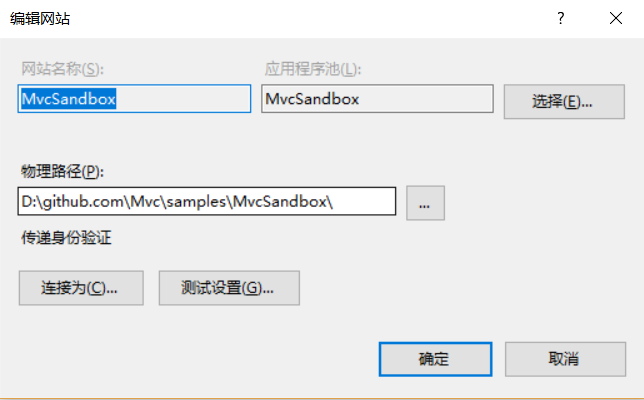
在IIS管理器,新建站点->物理路径Path:为项目的根目录。
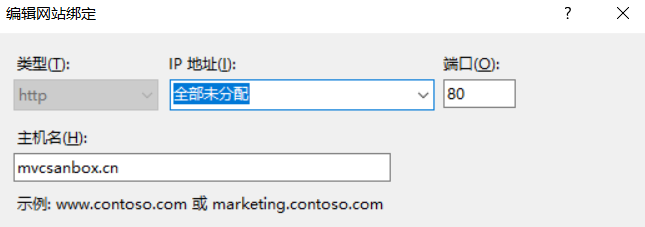
网站绑定:
在host文件中添加127.0.0.1 mvcsanbox.cn,刷新dns缓存:cmd->ipconfig /flushdns
设置主机域名为:mvcsanbox.cn 端口:80
4.安装 .net Core Windows Server Hosting
下载地址: .NET Core Windows Server Hosting
5.设置网站的web.config

<?xml version="1.0"?>

<configuration>

  <system.webServer>

    <directoryBrowse enabled="true"/>

    <handlers>

      <add name="aspNetCore" path="*" verb="*" modules="AspNetCoreModule" resourceType="Unspecified"/>

    </handlers>

    <!--<aspNetCore processPath="C:\Program Files\dotnet\dotnet.exe" arguments=".\AspNetCoreSampleForNano.dll" stdoutLogEnabled="false" stdoutLogFile=".\logs\stdout" forwardWindowsAuthToken="false" />-->

 <aspNetCore processPath=".\bin\Debug\net451\win7-x64\MvcSandbox.exe" arguments=""   stdoutLogEnabled="true" stdoutLogFile=".\logs\stdout" forwardWindowsAuthToken="false" />

</system.webServer>

</configuration>
参数说明:
| Attribute | Description |
|---|---|
| processPath |
Required string attribute. Path to the executable that will launch a process listening for HTTP requests. Relative paths are supported. If the path begins with '.', the path is considered to be relative to the site root. There is no default value. |
| arguments |
Optional string attribute. Arguments to the executable specified in processPath. The default value is an empty string. |
| startupTimeLimit |
Optional integer attribute. Duration in seconds that the module will wait for the executable to start a process listening on the port. If this time limit is exceeded, the module will kill the process. The module will attempt to launch the process again when it receives a new request and will continue to attempt to restart the process on subsequent incoming requests unless the application fails to start rapidFailsPerMinute number of times in the last rolling minute. The default value is 120. |
| shutdownTimeLimit |
Optional integer attribute. Duration in seconds for which the module will wait for the executable to gracefully shutdown when theapp_offline.htm file is detected. The default value is 10. |
| rapidFailsPerMinute |
Optional integer attribute. Specifies the number of times the process specified in processPath is allowed to crash per minute. If this limit is exceeded, the module will stop launching the process for the remainder of the minute. The default value is 10. |
| requestTimeout |
Optional timespan attribute. Specifies the duration for which the ASP.NET Core Module will wait for a response from the process listening on %ASPNETCORE_PORT%. The default value is "00:02:00". |
| stdoutLogEnabled |
Optional Boolean attribute. If true, stdout and stderr for the process specified in processPath will be redirected to the file specified in stdoutLogFile. The default value is false. |
| stdoutLogFile |
Optional string attribute. Specifies the relative or absolute file path for which stdout and stderr from the process specified inprocessPath will be logged. Relative paths are relative to the root of the site. Any path starting with '.' will be relative to the site root and all other paths will be treated as absolute paths. A timestamp and the file extension will automatically be added to the filename provided. Any folders provided in the path must exist in order for the module to create the log file. The default value is |
| forwardWindowsAuthToken | true or false.
If true, the token will be forwarded to the child process listening on %ASPNETCORE_PORT% as a header 'MS-ASPNETCORE-WINAUTHTOKEN' per request. It is the responsibility of that process to call CloseHandle on this token per request. The default value is false. |
| disableStartUpErrorPage | true or false.
If true, the 502.5 - Process Failure page will be suppressed, and the 502 status code page configured in your web.config will take precedence.+ The default value is false. |
参考地址:
https://docs.microsoft.com/en-us/aspnet/core/publishing/iis#common-errors
https://docs.microsoft.com/en-us/aspnet/core/publishing/iis#iis-configuration
https://docs.microsoft.com/en-us/aspnet/core/hosting/aspnet-core-module
【先定一个小目标】Asp.net Core 在IIS上的托管运行的更多相关文章
- 【先定一个小目标】dotnet core 命令详解
本篇博客来了解一下dotnet这个神奇的命令.我会依次对dotnet,dotnet new,dotnet restore,dotnet build,dotnet test,dotnet run,dot ...
- 先定一个小目标,自己封装个ajax
你是否发现项目中有很多页面只用到了框架不到十分之一的内容,还引了压缩后还有70多kb的jquery库 你是否发现项目中就用了两三个underscore提供的方法,其他大部分的你方法你甚至从来没有看过 ...
- 记一次asp.net core 在iis上运行抛出502.5错误
asp.net core 在iis上运行抛出502.5异常的部分原因以及解决方案 环境说明 已安装 .net core runtime 2.1.401 已安装 .net core windows ho ...
- 先定一个小目标:10天自学C语言编程,教你如何改变一生
C语言是面向过程的,而C++是面向对象的 C和C++的区别: C是一个结构化语言,它的重点在于算法和数据结构.C程序的设计首要考虑的是如何通过一个过程,对输入(或环境条件)进行运算处理得到输出(或实现 ...
- 【先定一个小目标】怎么解决mysql不允许远程连接的错误
最近使用Navicat for MySQl访问远程mysql数据库,出现报错,显示“1130 - Host'xxx.xxx.xxx.xxx' is not allowed to connect to ...
- 【先定一个小目标】windows下安装RabbitMQ消息服务器
RabbitMQ是一个在AMQP基础上完整的,可复用的企业消息系统.他遵循Mozilla Public License开源协议. 1:安装RabbitMQ 需要先安装Erlang语言开发包.下载地址 ...
- 【先定一个小目标】Windows下安装MongoDB 3.2
1.MongoDB 安装 官网提供了三个版本下载: - MongoDB for Windows 64-bit 适合 64 位的 Windows Server 2008 R2, Windows 7 , ...
- 【先定一个小目标】在Windows下的安装Elasticsearch
ElasticSearch是一个基于Lucene的搜索服务器.它提供了一个分布式多用户能力的全文搜索引擎,基于RESTful web接口.Elasticsearch是用Java开发的,并作为Apach ...
- 【先定一个小目标】Windows下Redis的安装使用
Redis是一个key-value存储系统.和Memcached类似,它支持存储的value类型相对更多,包括string(字符串).list(链表).set(集合).zset(sorted set ...
随机推荐
- Eureka 简介
Eureka 简介
- Java入门 第一季第五章 编程练习解析
这是我学习慕课网Java课程的笔记.原视频链接为:http://www.imooc.com/learn/85 5-1 基本写法 自己主动补全快捷键:alt + / 5-2 输入输出 使用Scanner ...
- activiti自己定义流程之自己定义表单(一):环境配置
先补充说一下自己定义流程整个的思路,自己定义流程的目的就是为了让一套代码解决多种业务流程.比方请假单.报销单.採购单.协作单等等.用户自己来设计流程图. 这里要涉及到这样几个基本问题,一是不同的业务需 ...
- API Copy Big FIles
public class ApiCopyFile { private const int FO_COPY = 0x0002; private const int FOF_ALLOWUNDO = 0x0 ...
- 【iOS9系列】-3DTouch开发
[iOS9系列]-3DTouch开发 第一:简介 3DTouch 是iOS9系统系统下,在iPhone6s(iPhone6s Plus)手机上才能够使用的功能.熟练使用后,发现还是很便捷的. 但是模拟 ...
- 【iOS系列】-oc中特有的语法
[iOS系列]-oc中特有的语法 oc数据类型: 1,基本类型 2,对象类型 3,id 4,BOOL 5,block 6,SEL 1:category 使用继承关系来扩充一个类,有一个弊病,高耦合性 ...
- oracle 10g 实例用localhost无法访问的处理
我在笔记本上安装了一个Oracle10g,安装好了之后,查看E:\oracle\product\10.2.0\db_1\network\ADMIN\tnsnames.ora文件,发现SID对应的IP地 ...
- CodeChef Consecutive Snakes 三分(整数)
题意 在年度阅兵中,所有的士兵蛇都在阅兵场集合了,但这些蛇的站位不对.整场阅兵必须能从主席台看清楚,所有蛇都应该站成一排.但这些士兵非常懒惰,你必须指挥士兵重新排队,使得所有人的移动距离之和最短. 形 ...
- ou've likely run out of ephemeral ports on your system
redis.exceptions.ConnectionError: Error 99 connecting to 127.0.0.1:6379. Cannot assign requested add ...
- Rod Johnson
Spring Framework创始人,著名作者. Rod在悉尼大学不仅获得了计算机学位,同时还获得了音乐学位.更令人吃惊的是在回到软件开发领域之前,他还获得了音乐学的博士学位. 有着相当丰富的C/C ...