
CentOS7 磁盘管理
一、磁盘查看
查看所有磁盘
ll /dev/sd*
不带数字的为磁盘,带数字的为磁盘的分区
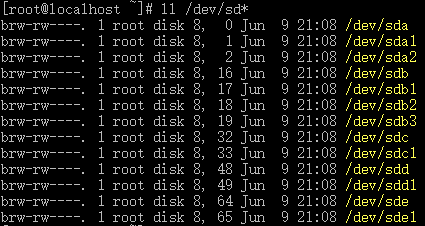
查看所有磁盘的分区情况
fdisk -l
结果
WARNING: fdisk GPT support is currently new, and therefore in an experimental phase. Use at your own discretion.

Disk /dev/sdd: 1000.2 GB, 1000204886016 bytes, 1953525168 sectors

Units = sectors of 1 * 512 = 512 bytes

Sector size (logical/physical): 512 bytes / 512 bytes

I/O size (minimum/optimal): 512 bytes / 512 bytes

Disk label type: gpt

#         Start          End    Size  Type            Name

 1         2048   1953525134  931.5G  unknown         ceph data

WARNING: fdisk GPT support is currently new, and therefore in an experimental phase. Use at your own discretion.

Disk /dev/sdc: 1000.2 GB, 1000204886016 bytes, 1953525168 sectors

Units = sectors of 1 * 512 = 512 bytes

Sector size (logical/physical): 512 bytes / 512 bytes

I/O size (minimum/optimal): 512 bytes / 512 bytes

Disk label type: gpt

#         Start          End    Size  Type            Name

 1         2048   1953525134  931.5G  unknown         ceph data

Disk /dev/sda: 300.0 GB, 300000000000 bytes, 585937500 sectors

Units = sectors of 1 * 512 = 512 bytes

Sector size (logical/physical): 512 bytes / 512 bytes

I/O size (minimum/optimal): 512 bytes / 512 bytes

Disk label type: dos

Disk identifier: 0x000de82e

   Device Boot      Start         End      Blocks   Id  System

/dev/sda1   *        2048     1026047      512000   83  Linux

/dev/sda2         1026048   585936895   292455424   8e  Linux LVM

WARNING: fdisk GPT support is currently new, and therefore in an experimental phase. Use at your own discretion.

Disk /dev/sde: 1000.2 GB, 1000204886016 bytes, 1953525168 sectors

Units = sectors of 1 * 512 = 512 bytes

Sector size (logical/physical): 512 bytes / 512 bytes

I/O size (minimum/optimal): 512 bytes / 512 bytes

Disk label type: gpt

#         Start          End    Size  Type            Name

 1         2048   1953525134  931.5G  unknown         ceph data

WARNING: fdisk GPT support is currently new, and therefore in an experimental phase. Use at your own discretion.

Disk /dev/sdb: 300.0 GB, 300000000000 bytes, 585937500 sectors

Units = sectors of 1 * 512 = 512 bytes

Sector size (logical/physical): 512 bytes / 512 bytes

I/O size (minimum/optimal): 512 bytes / 512 bytes

Disk label type: gpt

#         Start          End    Size  Type            Name

 1         2048     62916607     30G  unknown         ceph journal

 2     62916608    125831167     30G  unknown         ceph journal

 3    125831168    188745727     30G  unknown         ceph journal

Disk /dev/mapper/centos-root: 53.7 GB, 53687091200 bytes, 104857600 sectors

Units = sectors of 1 * 512 = 512 bytes

Sector size (logical/physical): 512 bytes / 512 bytes

I/O size (minimum/optimal): 512 bytes / 512 bytes

Disk /dev/mapper/centos-swap: 30.0 GB, 30001856512 bytes, 58597376 sectors

Units = sectors of 1 * 512 = 512 bytes

Sector size (logical/physical): 512 bytes / 512 bytes

I/O size (minimum/optimal): 512 bytes / 512 bytes

Disk /dev/mapper/centos-home: 215.7 GB, 215721443328 bytes, 421330944 sectors

Units = sectors of 1 * 512 = 512 bytes

Sector size (logical/physical): 512 bytes / 512 bytes

I/O size (minimum/optimal): 512 bytes / 512 bytes
二、磁盘分区
连接磁盘硬件 -> 对磁盘分区 -> 对分区进行格式化 -> 挂载分区到目录 -> 使用
https://blog.51cto.com/yueyue207/2072255
# 对指定磁盘操作

fdisk /dev/sdc

# 显示帮助

m

# 显示已有分区

p

# 删除分区,只有1个分区时,会自动删除已有分区,不用选择

d

# 创建新的分区

n

# 保存分区
w

# 退出不保存
q
三、磁盘格式化
mkfs -t xfs -f /dev/sdb1
四、磁盘挂载
查看挂载情况
# 或 lsblk

lsblk -f

挂载已格式化的磁盘分区
# 创建目录

mkdir /home/data2

# 挂载磁盘到该目录

mount /dev/sdd1 /home/data2/

# 卸载

umount /dev/sdd1

开机自动挂载
# 最后一行为新增挂载

vim /etc/fstab

#

# /etc/fstab

# Created by anaconda on Fri May  ::

#

# Accessible filesystems, by reference, are maintained under '/dev/disk'

# See man pages fstab(), findfs(), mount() and/or blkid() for more info

#

/dev/mapper/centos-root /                       xfs     defaults

UUID=80774ba5-c734-40b3-90ec-5817bd434ce8 /boot xfs     defaults

/dev/mapper/centos-home /home                   xfs     defaults

/dev/mapper/centos-swap swap                    swap    defaults

/dev/sdc1 /home/data                            xfs     defaults

五、已挂载磁盘查看
查看已挂载磁盘使用情况
df -h

查看目录占用容量

https://blog.csdn.net/qq_30604989/article/details/81163270
CentOS7 磁盘管理的更多相关文章
- centos7 磁盘管理—— lvm的使用
Linux用户安装Linux操作系统时遇到的一个常见的难以决定的问题就是如何正确地评估各分区大小,以分配合适的硬盘空间.普通的磁盘分区管理方式在逻辑分区划分好之后就无法改变其大小,当一个逻辑分区存放不 ...
- Linux的VMWare中Centos7磁盘分区管理 fdisk分区和制作文件系统格式化和开机自动挂载
一.硬盘的组成零件扇区 磁道 磁盘容量 磁盘分区 简介 硬盘由容量.柱面数.磁头数.扇区数 C/H/S, Cylinder, Head, Sector(柱面/磁头数/扇区数) 1.磁头数表示硬盘总共有 ...
- centOS7服务管理与启动流程
centOS7服务管理与启动流程 centOS7启动流程 systemd简介 unit对象 unit类型 特性 service unit文件格式 service unit file文件通常由三部分组成 ...
- 磁盘管理 之 parted命令添加swap,文件系统
第1章 磁盘管理 1.1 必须要了解的. 1.1.1 ps aux 命令中 RSS 与VSZ的含义 rss 进程占用的物理内存的大小 单位:kb : vsz 进程占用的虚拟的内存大小(物理内存+swa ...
- linux磁盘管理系列-软RAID的实现
1 什么是RAID RAID全称是独立磁盘冗余阵列(Redundant Array of Independent Disks),基本思想是把多个磁盘组合起来,组合一个磁盘阵列组,使得性能大幅提高. R ...
- linux磁盘管理系列-LVM的使用
LVM是什么 LVM是Linux操作系统的逻辑卷管理器. 现在有两个Linux版本的LVM,分别是 LVM1,LVM2.LVM1是一种已经被认为稳定了几年的成熟产品,LVM2 是最新最好的LVM版本. ...
- linux 磁盘管理三部曲——(2)管理分区,文件系统类型格式化
上篇小编给大家讲解了磁盘结构和分区的介绍,这篇小编就给大家演示如何管理分区和文件系统类型格式化. 小编上篇已经提到如何使用磁盘,今天这两步,就是其中很重要的两步.(前几天写的有点急,有点乱,今天又整理 ...
- linux磁盘管理系列三:LVM的使用
磁盘管理系列 linux磁盘管理系列一:磁盘配额管理 http://www.cnblogs.com/zhaojiedi1992/p/zhaojiedi_linux_040_quota.html l ...
- linux磁盘管理系列二:软RAID的实现
磁盘管理系列 linux磁盘管理系列一:磁盘配额管理 http://www.cnblogs.com/zhaojiedi1992/p/zhaojiedi_linux_040_quota.html l ...
随机推荐
- 1 .net 用事物提交执行存储过程
public static void delModelReturn(string performanceId,DateTime? effectiveDate=null) { using (SqlCon ...
- php扩展库解释
扩展库 说明 注解 php_bz2.dll bzip2 压缩函数库 无 php_calendar.dll 历法转换函数库 自 PHP 4.0.3 起内置 php_cpdf.dll ClibPDF 函数 ...
- 采购订单保存生成PO号后增强点。
EXIT_SAPMM06E_013 这个增强可用于生成的PO后,调用外部接口把变更或生成的PO信息下发出去. 这里面的参数 I_EKKO 是新的抬头 I_EKKO_OLD 是更改前的抬头 XEKPO ...
- delphi FMX APP程序图标,闪屏,程序名
- mysql8安装
1.先卸载当前系统中已安装的mariadb rpm -qa | grep mariadb rpm -e --nodeps 文件名 2.安装mysql依赖包 yum install gcc gcc-c+ ...
- springboot搭建web项目与使用配置文件
目录 一.准备工作 二.创建基础web项目 1. maven配置 2.创建maven项目.配置pom.xml为web基础项目 3.编写启动类 4.使用maven打包 5.使用命令java -jar x ...
- 用 Portainer 远程管理 docker
参考的官网地址为:https://portainer.readthedocs.io/en/stable/deployment.html 先更新Centos docker 镜像加速地址: curl -s ...
- pandas中的Series
我们使用pandas经常会用到其下面的一个类:Series,那么这个类都有哪些方法呢?另外Series和DataFrame都继承了NDFrame这个类,df.to_sql()这个方法其实就是NDFra ...
- thinkphp5 二维码生成
1.下载二维码插件Phpqrcode,地址 https://sourceforge.net/projects/phpqrcode/files/,把下载的文件夹放到\thinkphp\vendor下 2 ...
- Decrator 装饰模式
注:装饰模式是结构型设计模式,动态地给一个对象增加一些额外的职责,就增加的功能来说,Decorator模式相比生成子类更加灵活. 主要是利用组合代替继承来实现业务功能,对动态改变业务实现来说,相比更灵 ...