
3.通道 Channel
一、通道(Channel):由java.nio.channels包定义的 。Channel 表示 IO 源与目标打开的连接。
Channel 类似于传统的 ‘流’。只不过 Channel 本身不能直接访问数据,Channel只能与Buffer进行交互
二、 /*通道的主要实现类*/
Java 为 Channel 接口提供的 最主要实现类如下:
FileChannel:用于读取、写入、映射和操作文件的通道
SocketChannel:通过TCP 读写网络中的数据
ServerSocketChannel:可以监听新进来的TCP连接,对每一个新进来的连接都会创建一个 SocketChannel
三、 /*如何获取通道*/
获取通道
* 1.Java针对 支持通道的类提供了 getChannel()方法
* 本地IO:
* FileInputStream/FileOutputStream
* RandomAccessFile
* 网络IO:
* Socket
* ServerSocket
* DatagramSocket
2.在 JDK1.7 中 的 NIO.2 针对各个通道提供了静态方法 open()
3.在 JDK1.7 中 的 NIO.2 的 File 工具类的newByteChannel()
利用通道进行数据传输
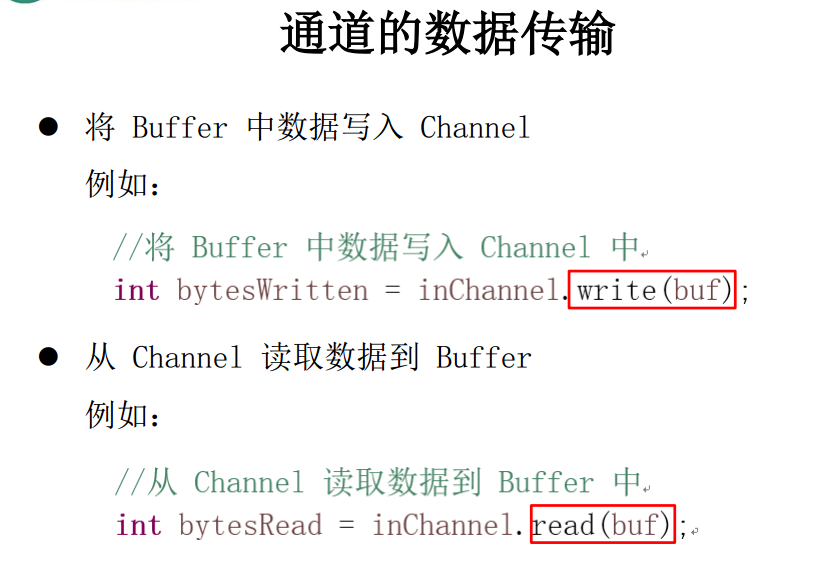
四、 /*通道之间的数据传输*/
transferForm() 将数据从源通道 传输到其他 Channel中
transferTo() 其他 Channel 从 原通道中 获取数据
五、 /*分散(Scatter) 与 聚集(Gather)*/
分散读取(Scattering Reads):将通道中的数据分散到多个缓冲区
聚集写入(Gathering Writes):将多个缓冲区中的 数据 聚集到通道中
六、 /*字符集:Charset*/
编码:字符串 -> 字节数组
解码: 字节数组 -> 字符串
 /*

  * 一、通道(Channel):用于源节点 与目标节点的连接 ,在java nio 中 负责缓冲区中数据的传输。Channel 本身不存储数据,因此需要配合缓冲区进行传输

  *

  * 二、通道的主要实现类

  *     java.nio.channels.Channel 接口

  *         |--FileChannel

  *         |--SocketChannel

  *         |--ServerSocketChannel

  *         |--DatagramChannel

  *

  * 三、获取通道

  * 1.Java针对 支持通道的类提供了 getChannel()方法

  *      本地IO:

  *      FileInputStream/FileOutputStream

  *      RandomAccessFile

  *

  *   网络IO:

  *   Socket

  *   ServerSocket

  *   DatagramSocket

  *

  * 2.在 JDK1.7 中 的 NIO.2 针对各个通道提供了静态方法 open()

  *

  * 3.在 JDK1.7 中 的 NIO.2 的 File 工具类的newByteChannel()

  *

  * 四、通道之间的数据传输

  * transferForm()

  * transferTo()

  *

  * 五、分散(Scatter) 与 聚集(Gather)

  * 分散读取(Scattering Reads):将通道中的数据分散到多个缓冲区

  * 聚集写入(Gathering Writes):将多个缓冲区中的 数据 聚集到通道中

  *

  * 六、字符集:Charset

  * 编码:字符串 -> 字节数组

  * 解码: 字节数组 -> 字符串

  *

  * */

 public class TestChannel {

     //使用指定字符集 进行编码 和 解码

     @Test

     public void test6() throws IOException {

         //1.选择字符集

         Charset charset1 = Charset.forName("GBK");

         //2.获取编码器

         CharsetEncoder encoder = charset1.newEncoder();

         //3.获取解码器

         CharsetDecoder decoder = charset1.newDecoder();

         //4.创建字符串缓冲区,放入需要编码的字符串

         CharBuffer charBuffer = CharBuffer.allocate(1024);

         charBuffer.put("迅雷影音");

         //5.对字符串进行编码  (编码:字符串 -> 字节数组)

         charBuffer.flip();    //操作字符串缓冲区,解码字符串之前 需要 flip 一下

         ByteBuffer byteBuffer = encoder.encode(charBuffer);

         // byteBuffer 此时 是 初始状态,即position 是0

         //调用 这个 for ,每 get 一次,position + 1

         //这样才能 在 flip 之后, 解码 需要操作的数据

         for(int i = 0;i<8;i++) {

             System.out.println(byteBuffer.position());

             System.out.println(byteBuffer.get());

         }

         //6.对字节数组进行解码 (解码: 字节数组 -> 字符串)

         byteBuffer.flip();    //操作字节缓冲区,解码字节数组之前 需要 flip 一下

         CharBuffer charBuffer2 = decoder.decode(byteBuffer);

         //打印解码后的数据

         System.out.println(charBuffer2.toString());

     }

     //5.显示所有的字符集

     @Test

     public void test5() {

         Map<String,Charset> map = Charset.availableCharsets();

         Set<Entry<String, Charset>> set = map.entrySet();

         for(Entry<String, Charset> entry:set) {

             System.out.println(entry.getKey() + " = " + entry.getValue());

         }

     }

     //4.分散和 聚集 (多个缓冲区)

     @Test

     public void test4() throws IOException {

         // "rw" 是指 具有read 和 write 的 权限

         RandomAccessFile raf = new RandomAccessFile("1.txt", "rw");

         //1.获取通道

         FileChannel channel1 = raf.getChannel();

         //2.分配指定大小的缓冲区 (多个)

         ByteBuffer buf1 = ByteBuffer.allocate(100);

         ByteBuffer buf2 = ByteBuffer.allocate(1024);

         ByteBuffer[] bufs = {buf1,buf2};

         //4.聚集写入

         RandomAccessFile raf2 = new RandomAccessFile("2.txt","rw");

         FileChannel channel2 = raf2.getChannel();

         //3.分散读取

         while(channel1.read(bufs)!= -1) {

             for(ByteBuffer buf:bufs) {

                 buf.flip();

             }

             //4.聚集写入

             channel2.write(bufs);

             System.out.println("-----------------缓冲区1---------------");

             System.out.println(new String(bufs[0].array(),0,bufs[0].limit()) );

             System.out.println("-----------------缓冲区1---------------");

             System.out.println("-----------------缓冲区2---------------");

             System.out.println(new String(bufs[1].array(),0,bufs[1].limit()));

             System.out.println("-----------------缓冲区2---------------");

             for(ByteBuffer buf:bufs) {

                 buf.clear();

             }

         }

     }

     //3.通道之间的数据传输

     @Test

     public void test3() throws Exception {

         FileChannel inChannel = FileChannel.open(Paths.get("1.jpg"), StandardOpenOption.READ);

         FileChannel outChannel = FileChannel.open(Paths.get("2.jpg"), StandardOpenOption.READ,StandardOpenOption.WRITE,StandardOpenOption.CREATE);

         //直接使用transferTo 或者 transferFrom 完成通道之间的数据传输

         inChannel.transferTo(0, inChannel.size(), outChannel);

         outChannel.transferFrom(inChannel, 0, inChannel.size());

         inChannel.close();

         outChannel.close();

     }

     //2.使用直接缓冲区完成文件的复制(内存映射文件)(这种方式效率更高)

     //会出现的问题 :文件传输已经完成,但是程序仍然没有结束,因为 java 虚拟机无法及时 对 内存映射文件进行  进行释放,必须要等指向映射文件的那个变量被回收

     @Test

     public void test2() {

         long start = System.currentTimeMillis();

         FileChannel inChannel = null;

         FileChannel outChannel = null;

         MappedByteBuffer inMapperBuf = null;

         MappedByteBuffer outMapperBuf = null;

         try {

             //使用 FileChannel 的 open方法 (可以不用创建流就可以得到通道)

             inChannel = FileChannel.open(Paths.get("1.jpg"), StandardOpenOption.READ);

             outChannel = FileChannel.open(Paths.get("2.jpg"), StandardOpenOption.READ,StandardOpenOption.WRITE,StandardOpenOption.CREATE);

             //内存映射文件 (也是一个 缓冲区 ,继承自 ByteBuffer,直接缓冲区也只能使用 ByteBuffer)

             inMapperBuf = inChannel.map(MapMode.READ_ONLY,0 , inChannel.size());

             outMapperBuf = outChannel.map(MapMode.READ_WRITE,0 , inChannel.size());

         } catch (IOException e) {

             e.printStackTrace();

         }

         //直接对缓冲区进行数据读写操作

         byte[] bytes = new byte[inMapperBuf.limit()];

         inMapperBuf.get(bytes);

         outMapperBuf.put(bytes);

         try {

             if(inChannel != null) {

                 inChannel.close();

             }

             if(outChannel != null) {

                 outChannel.close();

             }

         } catch (IOException e) {

             e.printStackTrace();

         }

         long end = System.currentTimeMillis();

         System.out.println("花费:" +  (end-start));

     }

     //1.利用通道完成文件的复制

     @Test

     public void test1() {

         long start = System.currentTimeMillis();

         FileInputStream fis = null;

         FileOutputStream fos = null;

         try {

             fis = new FileInputStream("1.jpg");

             fos = new FileOutputStream("2.jpg");

         } catch (FileNotFoundException e) {

             e.printStackTrace();

         }

         //1.获取流对应的 通道

         FileChannel inChannel = fis.getChannel();

         FileChannel outChannel = fos.getChannel();

         //2.分配指定大小的缓冲区

         ByteBuffer buffer = ByteBuffer.allocate(1024);

         //3.将通道中的数据存入缓存区

         try {

             //read 方法,从Channel 中读取数据到 ByteBuffer (即往 缓冲区中 put 数据),所以不用 flip

             while(inChannel.read(buffer) != -1) {

                 buffer.flip();  //切换到读取数据模式

                 //4.将缓存区中的数据写入通道中 (需要get 出 缓冲区中的 数据 ,所以需要 flip)

                 outChannel.write(buffer);

                 buffer.clear();  //清空缓冲区,使其继续循环

             }

         } catch (IOException e) {

             e.printStackTrace();

         } finally {

             if(inChannel != null) {

                 try {

                     inChannel.close();

                 } catch (IOException e) {

                     e.printStackTrace();

                 }

             }

             if(outChannel != null) {

                 try {

                     outChannel.close();

                 } catch (IOException e) {

                     e.printStackTrace();

                 }

             }

             if(fis != null) {

                 try {

                     fis.close();

                 } catch (IOException e) {

                     e.printStackTrace();

                 }

             }

             if(fos != null) {

                 try {

                     fos.close();

                 } catch (IOException e) {

                     e.printStackTrace();

                 }

             }

         }

         long end = System.currentTimeMillis();

         System.out.println("花费:" +  (end-start));

     }

 }
3.通道 Channel的更多相关文章
- nio再学习之通道channel
通道(Channel):用于在数据传输过程中,进行输入输出的通道,其与(流)Stream不一样,流是单向的,在BIO中我们分为输入流,输出流,但是在通道中其又具有读的功能也具有写的功能或者两者同时进行 ...
- Java NIO中的通道Channel(一)通道基础
什么是通道Channel 这个说实话挺难定义的,有点抽象,不过我们可以根据它的用途来理解: 通道主要用于传输数据,从缓冲区的一侧传到另一侧的实体(如文件.套接字...),反之亦然: 通道是访问IO服务 ...
- NIO之通道(Channel)的原理与获取以及数据传输与内存映射文件
通道(Channel) 由java.nio.channels包定义的,Channel表示IO源与目标打开的连接,Channel类似于传统的“流”,只不过Channel本身不能直接访问数据,Channe ...
- 理解CNN中的通道 channel
在深度学习的算法学习中,都会提到 channels 这个概念.在一般的深度学习框架的 conv2d 中,如 tensorflow .mxnet ,channels 都是必填的一个参数. channel ...
- go中的数据结构通道-channel
1. channel的使用 很多文章介绍channel的时候都和并发揉在一起,这里我想把它当做一种数据结构来单独介绍它的实现原理. channel,通道.golang中用于数据传递的一种数据结构.是g ...
- 详解 通道 (Channel 接口)
在本篇博文中,本人主要讲解NIO 的两个核心点 -- 缓冲区(Buffer) 和 通道 (Channel)之一的 缓冲区(Buffer), 有关NIO流的其他知识点请观看本人博文<详解 NIO流 ...
- Java NIO之通道Channel
channel与流的区别: 流基于字节,且读写为单向的. 通道基于快Buffer,可以异步读写.除了FileChannel之外都是双向的. channel的主要实现: FileChannel Data ...
- go实例之轻量级线程goroutine、通道channel与select
1.goroutine线程 goroutine是一个轻量级的执行线程.假设有一个函数调用f(s),要在goroutine中调用此函数,请使用go f(s). 这个新的goroutine将与调用同时执行 ...
- Java-NIO(四):通道(Channel)的原理与获取
通道(Channel): 由java.nio.channels包定义的,Channel表示IO源与目标打开的连接,Channel类似于传统的“流”,只不过Channel本身不能直接访问数据,Chann ...
- Java NIO中的通道Channel(二)分散/聚集 Scatter/Gather
什么是Scatter/Gather scatter/gather指的在多个缓冲区上实现一个简单的I/O操作,比如从通道中读取数据到多个缓冲区,或从多个缓冲区中写入数据到通道: scatter(分散): ...
随机推荐
- div和span显示在同一行
div和span标签的区别 div 是块级元素标签,独占一行,后面跟的内容换行显示 span 是内联元素标签,后面可以跟其他显示内容,不独占一行 display属性可以改变内联元素和块级元素的状态 ...
- PAT 甲级 1037 Magic Coupon (25 分) (较简单,贪心)
1037 Magic Coupon (25 分) The magic shop in Mars is offering some magic coupons. Each coupon has an ...
- delphi字符串分隔函数用法实例
这篇文章主要介绍了delphi字符串分隔函数用法,通过自定义函数SeparateTerms2实现将字符串分割后存入字符串列表的功能,具有一定的实用价值,需要的朋友可以参考下 本文实例讲述了delphi ...
- (八)UML之状态图
一.概念 状态图(Statechart Diagram)主要用于描述一个对象在其生存期间的动态行为,表现为一个对象所经历的状态序列,引起状态转移的事件(Event),以及因状态转移而伴随的动作(Act ...
- ansible软件部署
每一个软件或集群都创建一个单独的角色. mkdir -pv ansible/roles/{jdk,hadoop,spark}/{tasks,files,templates,meta,handlers, ...
- 【Leetcode_easy】633. Sum of Square Numbers
problem 633. Sum of Square Numbers 题意: solution1: 可以从c的平方根,注意即使c不是平方数,也会返回一个整型数.然后我们判断如果 i*i 等于c,说明c ...
- SpringCloud入门01之基础知识
一.Spring Cloud 什么是spring cloud, 为什么要使用微服务架构? 参考度娘 Spring Cloud是一系列框架的有序集合, 它利用Spring Boot的开发便利性巧妙地简化 ...
- 【实验】ssh私钥泄露
翻自己的笔记看到之前做过的一个实验,一个关于ssh私钥泄露的实验,贴出来与大家交流. 做这种题脑洞需要特别大,而且也需要运气. 1.实验环境准备 2.实验流程 1)探测信息 用namp进行端口扫描,扫 ...
- css实现可伸缩的搜索框
效果图: 代码: <!DOCTYPE html> <html> <head> <meta http-equiv="Content-Type" ...
- input标签自动填充问题
<input type='text' placeholder='手机号' /> <input type='text' placeholder='地址' /> <input ...