
Angular 自定义模块以及配置路由实现模块懒加载
项目目录
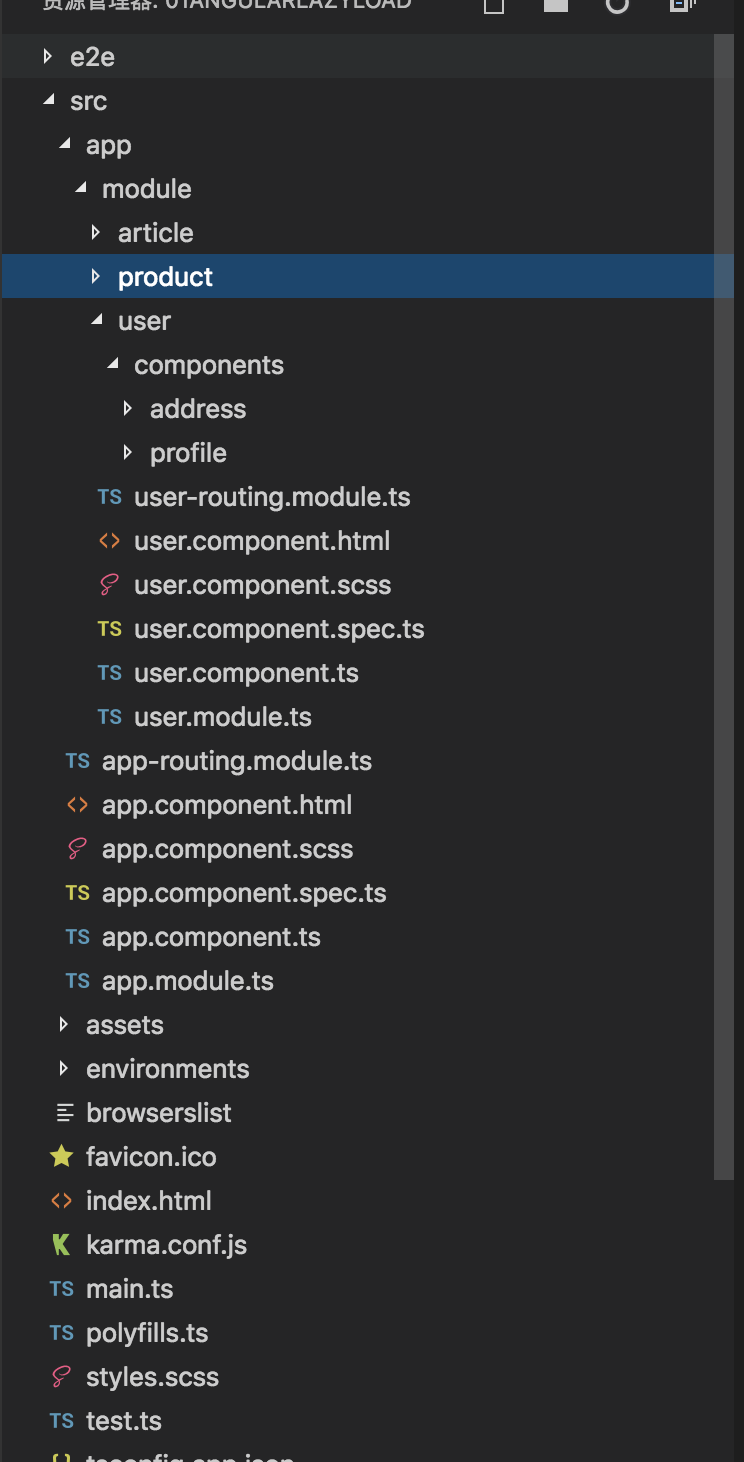
创建模块
ng g module module/user --routing

ng g module module/article --routing

ng g module module/product --routing
创建组件
ng g component module/user

ng g component module/user/components/profile

ng g component module/user/components/order

ng g component module/article

ng g component module/article/components/articlelist

ng g component module/article/components/info

ng g component module/product

ng g component module/product/components/plist

ng g component module/product/components/pinfo
1.app.module.ts
import { BrowserModule } from '@angular/platform-browser';

import { NgModule } from '@angular/core';

import { AppRoutingModule } from './app-routing.module';

import { AppComponent } from './app.component';

@NgModule({

  declarations: [

    AppComponent

  ],

  imports: [

    BrowserModule,

    AppRoutingModule

  ],

  providers: [],

  bootstrap: [AppComponent]

})

export class AppModule { }
app.component.html
<header>

  <a [routerLink]="['/user']">用户模块</a>

  <a [routerLink]="['/article']">文章模块</a>

  <a [routerLink]="['/product']">商品模块</a>

</header>

<router-outlet></router-outlet>
app-routing.module.ts
import { NgModule } from '@angular/core';

import { Routes, RouterModule } from '@angular/router';

const routes: Routes = [

  {

    path:'user',loadChildren:'./module/user/user.module#UserModule'

  },

  {

    path:'article',loadChildren:'./module/article/article.module#ArticleModule'

  },

  {

    path:'product',loadChildren:'./module/product/product.module#ProductModule'

  },

  {

    path:'**',redirectTo:'user'

  }

];

@NgModule({

  imports: [RouterModule.forRoot(routes)],

  exports: [RouterModule]

})

export class AppRoutingModule { }
用户模块user.module.ts
import { NgModule } from '@angular/core';

import { CommonModule } from '@angular/common';

import { UserRoutingModule } from './user-routing.module';

import { UserComponent } from './user.component';

import { ProfileComponent } from './components/profile/profile.component';

import { AddressComponent } from './components/address/address.component';

@NgModule({

  declarations: [UserComponent, ProfileComponent, AddressComponent],

  imports: [

    CommonModule,

    UserRoutingModule

  ]

})

export class UserModule { }
user-routing-module.ts
import { NgModule } from '@angular/core';

import { Routes, RouterModule } from '@angular/router';

import { UserComponent } from './user.component';

import { ProfileComponent } from './components/profile/profile.component';

import { AddressComponent } from './components/address/address.component';

const routes: Routes = [

  {

    path:'',component:UserComponent

  },

  {

    path:'profile',component:ProfileComponent

  },

  {

    path:'address',component:AddressComponent

  }

];

@NgModule({

  imports: [RouterModule.forChild(routes)],

  exports: [RouterModule]

})

export class UserRoutingModule { }
其他模块类似配置
自定义模块的父子路由
import { NgModule } from '@angular/core';

import { Routes, RouterModule } from '@angular/router';

import { ProductComponent } from './product.component';

import { PlistComponent } from './components/plist/plist.component';

import { CartComponent } from './components/cart/cart.component';

import { PcontentComponent } from './components/pcontent/pcontent.component';

const routes: Routes = [

  {

    path:'',component:ProductComponent,

    children:[

      {path:'cart',component:CartComponent},

      {path:'pcontent',component:PcontentComponent}

    ]

  },

  {path:'plist',component:PlistComponent}

];

@NgModule({

  imports: [RouterModule.forChild(routes)],

  exports: [RouterModule]

})

export class ProductRoutingModule { }
Angular 自定义模块以及配置路由实现模块懒加载的更多相关文章
- angular配置懒加载路由的思路
前言 本人记性不好,对于别人很容易记住的事情,我愣是记不住,所以还是靠烂笔头来帮我长长记性. 参考文章:https://blog.csdn.net/xif3681/article/details/84 ...
- Angular性能优化实践——巧用第三方组件和懒加载技术
应该有很多人都抱怨过 Angular 应用的性能问题.其实,在搭建Angular项目时,通过使用打包.懒加载.变化检测策略和缓存技术,再辅助第三方组件,便可有效提升项目性能. 为了帮助开发者深入理解和 ...
- vue-cli 项目实现路由懒加载
在vue 单页应用中,如果路由不实现懒加载,那么打包出来的文件将会非常大,加载也会非常慢.vue-router 官网也有相应的介绍,但是具体怎么去实现还是讲的比较模糊的,下面将一步步讲解配置路由懒加载 ...
- vue路由懒加载
大项目中,为了提高初始化页面的效率,路由一般使用懒加载模式,一共三种实现方式.(1)第一种写法: component: (resolve) => require(['@/components/O ...
- vue2.x 路由懒加载 优化打包体积
当打包构建应用时,Javascript 包会变得非常大,影响页面加载.如果我们能把不同路由对应的组件分割成不同的代码块,然后当路由被访问的时候才加载对应组件,这样就更加高效了. 结合 Vue 的异步组 ...
- vue+webpack2实现路由的懒加载
当打包构建应用时,Javascript 包会变得非常大,影响页面加载.如果我们能把不同路由对应的组件分割成不同的代码块,然后当路由被访问的时候才加载对应组件,这样就更加高效了. 结合 Vue 的异步组 ...
- 「Vue.js」Vue-Router + Webpack 路由懒加载实现
一.前言 当打包构建应用时,Javascript 包会变得非常大,影响页面加载.如果我们能把不同路由对应的组件分割成不同的代码块,然后当路由被访问的时候才加载对应组件,这样就更加高效了.结合 Vue ...
- 路由懒加载---Vue Router
一.什么是懒加载? 懒加载也就是延迟加载或者按需加载,即在需要的时候进行加载. 二.为什么在Vue路由中使用懒加载? 像vue这种单页面应用,如果没有应用懒加载,运用webpack打包后的文件将会异常 ...
- 18-Angular 自定义模块以及配置路由模块懒加载
新建项目,新建几个子模块,实现懒加载 用户.商品.文章 新建这三个模块 创建模块的时候后面加 --routing.会自动生成模块的路由文件 先删掉. 重新创建模块带routing 这样就会生成两个文件 ...
随机推荐
- git使用——忽略文件
一般我们总会有些文件无需纳入 Git 的管理,也不希望它们总出现在未跟踪文件列表. 通常都是些自动生成的文件,比如日志文件,或者编译过程中创建的临时文件等.git下有2种方式实现忽略文件的目的.方法一 ...
- IAR 为 STM32新建工程模板(最详细)
今天给小伙伴分享一篇给stm32新建工程模版 1.首先打开IAR,就是这个样子 2.再建一个目录文件夹 3.建立一个工作空间,以及建好工作空间如右图所示 4.接下来建立工程,Project------ ...
- JAVA设计模式之单例模式(单件模式)—Singleton Pattern
1.什么是单例模式? <Head First 设计模式>中给出如下定义:确保一个类只有一个实例,并提供一个全局访问点. 关键词:唯一实例对象. 2.单例模式的实现方式: 2.1 懒汉式 对 ...
- 基于Java+Selenium的WebUI自动化测试框架(二)-----页面操作接口
在有了基础的Position类之后,我们需要考虑我们在寻找完页面元素之后,需要做什么.这个“做”什么,可以理解为我们在页面上需要对应的一系列动作.比如:点击,输入,切换窗口,寻找元素,判断元素是否存在 ...
- 2. kafka
目录: 1.kafka概念 2.kafka使用场景 3.相关术语 4.原理解析 5.项目实战 一. kafka是什么 https://www.jianshu.com/p/014af2b34159 Ka ...
- 在cmd运行窗口运行.py文件
步骤
- postgresql学习笔记--基础篇 -psql工具
--创建用户 CREATE ROLE pguser WITH ENCRYPTED PASSWORD 'pguser'; --创建表空间目录 mkdir -p /database/pg10/pg_tbs ...
- Hdu 4312-Meeting point-2——哈夫曼距离与切比雪夫距离
题意 从 $n$ 个点中选择一点,使得其他点到其的切比雪夫距离最小($0 < n \leq 1e5$). 分析 定理:$(x_1, y_1)$ 与 $(x_2, y_2)$ 的曼哈顿距离等于 $ ...
- [Dart] final vs const
void main() { ; print(a); ; print(b); final c = 'Hello'; // c = 'Hello again'; // Uncomment to throw ...
- 002_simulink中显示模块中的名字
(一)Display--->Hide Automatic Names(√去掉)