
Messagebox自定义计时关闭
Messagebox自定义计时关闭
新建Winform项目WindowsFormsAppTESTMessageBoxAutoClose
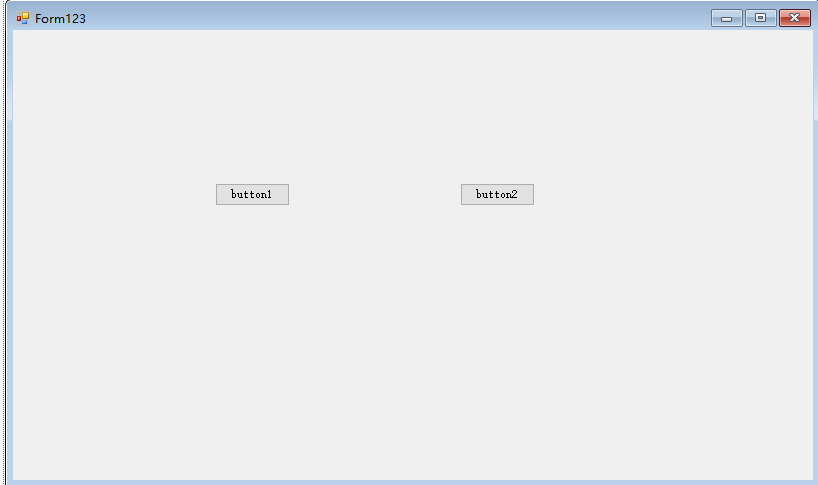
主窗体代码
using System;
using System.Collections.Generic;
using System.ComponentModel;
using System.Data;
using System.Drawing;
using System.Runtime.InteropServices;
using System.Text;
using System.Windows.Forms;
namespace WindowsFormsAppTESTMessageBoxAutoClose
{
public partial class Form1 : Form
{
public Form1()
{
InitializeComponent();
}
private void Button1_Click(object sender, EventArgs e)
{
MessageBoxTimeOut mb = new MessageBoxTimeOut();
mb.Show("123", "提示:");
}
private void Button2_Click(object sender, EventArgs e)
{
FunCord = 1;
StartTimer(1000);
t = 10;
timer1.Enabled = true;
if (MessageBox.Show("系统提示:确认关闭请点击【确定】, 继续使用请点击【取消】", t + "秒后关闭", MessageBoxButtons.OKCancel, MessageBoxIcon.Warning, MessageBoxDefaultButton.Button2)== DialogResult.OK)
{
MessageBox.Show("哈哈哈,你选择了ok");
}
//MessageBox.Show("系统提示:确认关闭请点击【确定】, 继续使用请点击【取消】", t + "秒后关闭", MessageBoxButtons.OKCancel, MessageBoxIcon.Warning, MessageBoxDefaultButton.Button2);
//MessageBox.Show("直接关闭");
}
[DllImport("User32.dll", CharSet = CharSet.Auto)]
public static extern int SetWindowText(IntPtr hWnd, string text);
[DllImport("User32.dll", EntryPoint = "FindWindow", CharSet = CharSet.Auto)]
private extern static IntPtr FindWindow(string lpClassName, string lpWindowName);
[DllImport("user32.dll", EntryPoint = "FindWindowEx")]
private static extern IntPtr FindWindowEx(IntPtr hwndParent, IntPtr hwndChildAfter, string lpszClass, string lpszWindow);
/// <summary>
[DllImport("user32.dll", EntryPoint = "SendMessage")]
private static extern int SendMessage(IntPtr hwnd, int wMsg, int wParam, int lParam);
const int WM_CLOSE = 0x10;
const int BM_CLICK = 0xF5;
int FunCord;
IntPtr hwnd;
int t;
System.Windows.Forms.Timer timer1;
private void StartTimer(int interval)
{
timer1 = new Timer();
timer1.Interval = interval;
timer1.Tick += new EventHandler(timer1_Tick);
timer1.Enabled = true;
}
private void timer1_Tick(object sender, EventArgs e)
{
if (FunCord == 1)
{
hwnd = FindWindow(null, t.ToString() + "秒后关闭");
t = t - 1;
SetWindowText(hwnd, t.ToString() + "秒后关闭");
if (t == 0)
{
timer1.Enabled = false;
SendMessage(hwnd, WM_CLOSE, 0, 0);
}
}
else if (FunCord == 2)
{
hwnd = FindWindow(null, "关闭提示");
IntPtr a = FindWindowEx(hwnd, (IntPtr)null, null,t.ToString() + "秒后关闭");
t = t - 1;
SetWindowText(a, t.ToString() + "秒后关闭");
if (t == 0)
{
timer1.Enabled = false;
SendMessage(hwnd, WM_CLOSE, 0, 0);
}
}
else if (FunCord == 3)
{
hwnd = FindWindow(null, t.ToString() + "秒后关闭");
t = t - 1;
SetWindowText(hwnd, t.ToString() + "秒后关闭");
if (t == 0)
{
IntPtr OKHwnd = FindWindowEx(hwnd, IntPtr.Zero, null, "确定");
SendMessage(OKHwnd, BM_CLICK, 0, 0);
timer1.Enabled = false;
}
}
else if (FunCord == 4)
{
hwnd = FindWindow(null, t.ToString() + "秒后关闭");
t = t - 1;
SetWindowText(hwnd, t.ToString() + "秒后关闭");
if (t == 0)
{
IntPtr OKHwnd = FindWindowEx(hwnd, IntPtr.Zero, null, "取消");
SendMessage(OKHwnd, BM_CLICK, 0, 0);
timer1.Enabled = false;
}
}
}
private void button2_Click(object sender, EventArgs e)
{
FunCord = 2;
t = 5;
timer1.Enabled = true;
MessageBox.Show(t + "秒后关闭", "关闭提示");
timer1.Enabled = false;
}
}
}
扩展类MessageBoxTimeOut:
using System;
using System.Collections.Generic;
using System.Runtime.InteropServices;
using System.Text;
using System.Windows.Forms;
namespace WindowsFormsAppTESTMessageBoxAutoClose
{
public class MessageBoxTimeOut
{
private string _caption;
public void Show(string text, string caption)
{
Show(3000, text, caption);
}
public void Show(int timeout, string text, string caption)
{
Show(timeout, text, caption, MessageBoxButtons.OKCancel, MessageBoxIcon.Information);
}
public void Show(int timeout, string text, string caption, MessageBoxButtons buttons, MessageBoxIcon icon)
{
this._caption = caption;
StartTimer(timeout);
MessageBox.Show(text, caption, buttons, icon);
}
private void StartTimer(int interval)
{
Timer timer = new Timer();
timer.Interval = interval;
timer.Tick += new EventHandler(Timer_Tick);
timer.Enabled = true;
}
private void Timer_Tick(object sender, EventArgs e)
{
KillMessageBox();
//停止计时器
((Timer)sender).Enabled = false;
}
[DllImport("User32.dll", EntryPoint = "FindWindow", CharSet = CharSet.Auto)]
private extern static IntPtr FindWindow(string lpClassName, string lpWindowName);
[DllImport("User32.dll", CharSet = CharSet.Auto)]
public static extern int PostMessage(IntPtr hWnd, int msg, IntPtr wParam, IntPtr lParam);
public const int WM_CLOSE = 0x10;
private void KillMessageBox()
{
//查找MessageBox的弹出窗口,注意对应标题
IntPtr ptr = FindWindow(null, this._caption);
if (ptr != IntPtr.Zero)
{
//查找到窗口则关闭
PostMessage(ptr, WM_CLOSE, IntPtr.Zero, IntPtr.Zero);
}
}
}
}
Messagebox自定义计时关闭的更多相关文章
- winform 关于Messagebox自动定时关闭
添加一个类库MessageBoxTimeOut public class MessageBoxTimeOut { private string _caption; public void Show(s ...
- 茗洋Easy UI 1.3.5 部分问题解决系列专题[自定义alert关闭时间,自动关]
[评论,楼层数为30的倍数的,我送你我自己的博客园的皮肤,该博客参与活动] 这次我又给大家带来的EasyUI的我研究拓展的新特性 我使用的是 EasyUI 1.3.5版本的,项目是ASP.NET M ...
- 自定义延时关闭弹窗,替代MesssageBox
1,新建一个窗体MessageForm,在里面加一个label控件和timer 2,代码如下: public partial class MessageForm : Form { int t; str ...
- WPF 自定义 MessageBox (相对完善版)
WPF 自定义 MessageBox (相对完善版) 基于WPF的自定义 MessageBox. 众所周知WPF界面美观.大多数WPF元素都可以简单的修改其样式,从而达到程序的风格统一.可是当 ...
- WPF 自定义 MessageBox (相对完善版 v1.0.0.6)
基于WPF的自定义 MessageBox. 众所周知WPF界面美观.大多数WPF元素都可以简单的修改其样式,从而达到程序的风格统一.可是当你不得不弹出一个消息框通知用户消息时(虽然很不建议在程序中频繁 ...
- 自定义 MessageBox 组件
效果: 公共组件页面: js部分: <script> export default { props: { title: { type: String ...
- DELPHI中MDI子窗口的关闭和打开
DELPHI中MDI子窗口的关闭 和打开 Delphi中MDI子窗口的关闭方式默认为缩小而不是关闭,所以当你单击子窗口右上角的关闭按钮时会 发觉该子窗口只是最小化,而不是你预期的那样被 ...
- MessageBox页面消息弹出框类
MessageBox页面消息弹出框类: public class MessageBox { /// <summary> /// 自定义弹出窗口内容,不跳转 /// </summary ...
- MessageBox 弹框
模拟系统的消息提示框而实现的一套模态对话框组件,用于消息提示.确认消息和提交内容. 从场景上说,MessageBox 的作用是美化系统自带的 alert.confirm 和 prompt,因此适合展 ...
随机推荐
- Interval 用法总结
语法:INTERVAL 'integer [- integer]' {YEAR | MONTH} [(precision)][TO {YEAR | MONTH}] 该数据类型常用来表示一段时间差, 注 ...
- java - day011 - 集合, ArrayList HashMap,HashSet, Iterator 接口, for-each 循环格式
集合 ArrayList 丑数: 能被3,5,7整除多次, ArrayList list 接口 | - ArrayList | - Linked ...
- 二叉树遍历(非递归版)——python
二叉树的遍历分为广度优先遍历和深度优先遍历 广度优先遍历(breadth first traversal):又称层次遍历,从树的根节点(root)开始,从上到下从从左到右遍历整个树的节点. 深度优先遍 ...
- python3 wordcloud词云
wordclou:根据文本生成词云 一.词云设置 wc=WordCloud(width=400, height=200, #画布长.宽,默认(400,200)像素 margin=1, #字与字之间的距 ...
- Activity之launchMode理解
对于Activity中的四个lauchMode[standard(默认).singleTop.singleTask.singleInstance]的介绍网上已经有大把的文章了,但是在实际应用开发时,对 ...
- mybatis3.0-[topic10-14] -全局配置文件_plugins插件简介/ typeHandlers_类型处理器简介 /enviroments_运行环境 /多数据库支持/mappers_sql映射注册
mybatis3.0-全局配置文件_ 下面为中文官网解释 全局配置文件的标签需要按如下定义的顺序: <!ELEMENT configuration (properties?, setting ...
- .NET Core SignalR 和 .NET SignalR 区别
由于要转 .NET Core ,对于以前用到的一些进行迁移. 在迁移 SignalR 的时候发现 .NET Core 下的和 .NET 下的区别还是挺大的. 功能差异 自定重新连接 .NET 下的 S ...
- P2P system: Chord
DHT= Distributed Hash Table store the objects(files) at nodes (hosts, machines) in a cluster. The cl ...
- 用vue开发一个所谓的数独
1.前言 最近的后台管理系统页面,功能暂时没有新的需求,就在想首页放什么东西,最近我想到的就是放个所谓的数独,为什么是所谓的数独,因为规则不同于标准的数独,只要求每一行每一列数字不一样就可以了!这个实 ...
- git的优点跟缺点?
优点: 1.分布式开发时,可以git clone克隆一个本地版本,然后在本地进行操作提交,本地可以完成一个完整的版本控制.在发布的时 候,使用git push来推送到远程即可. 2.git分支的本质是 ...