
UI5-技术篇-Expand与Deep 服务测试
1.SEGW创建服务

2.创建Data Model

2.1Entity Types
ZRICO_USR 设置主键、排序字段、过滤字段

ZRICO_USRITM设置主键 
2.2Associations
创建associations,设置主要实体 ZRICO_USR ,依赖实体ZRICO_USRITM,两者对应关系N:M

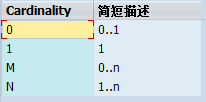
0:0...1 记录可有可无,最多一条记录
1:1必须存在一条记录
M:0..n记录可有可无,可有n条记录
N:1...n至少存在一条记录,可有n条记录

主表与从表字段关联关系,如上图。

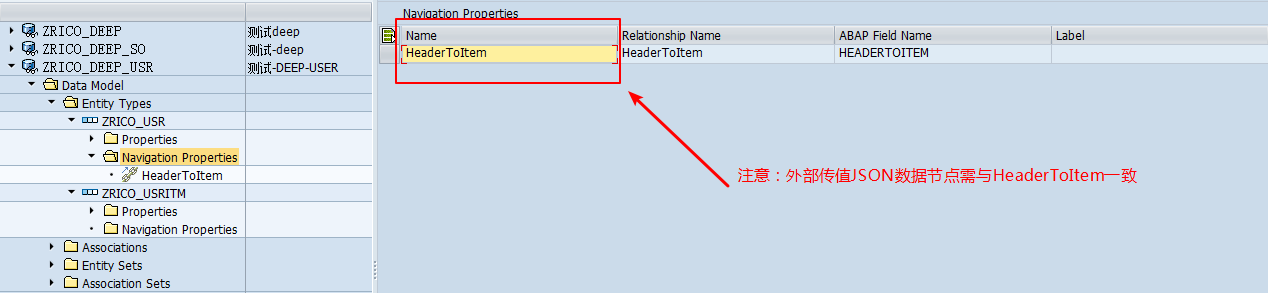
2.3Navigation Properties
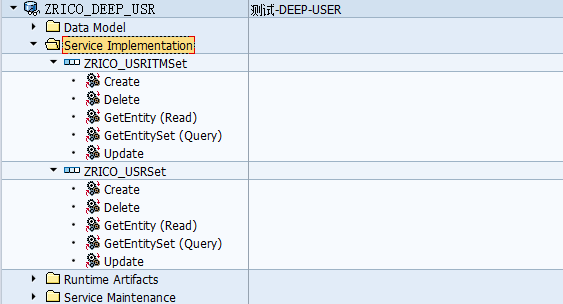
3.Service Implementation
4.Runtime Artifacts

5.类方法重写
/IWBEP/IF_MGW_APPL_SRV_RUNTIME~CREATE_DEEP_ENTITY
   method /IWBEP/IF_MGW_APPL_SRV_RUNTIME~CREATE_DEEP_ENTITY.

 **try.

 *CALL METHOD SUPER->/IWBEP/IF_MGW_APPL_SRV_RUNTIME~CREATE_DEEP_ENTITY

 *  EXPORTING

 **    iv_entity_name          =

 **    iv_entity_set_name      =

 **    iv_source_name          =

 *    IO_DATA_PROVIDER        =

 **    it_key_tab              =

 **    it_navigation_path      =

 *    IO_EXPAND               =

 **    io_tech_request_context =

 **  importing

 **    er_deep_entity          =

 *    .

 ** catch /iwbep/cx_mgw_busi_exception .

 ** catch /iwbep/cx_mgw_tech_exception .

 **endtry.

    data:

      begin of wa_deep_entity ,

      mandt   type zrico_usr-mandt,

      usrid   type zrico_usr-usrid,

      usrname type zrico_usr-usrname,

      usraddr type zrico_usr-usraddr,

      headertoitem type standard table of zrico_usritm with default key.

    data:end of wa_deep_entity .

    data:

      ls_deep_entity like wa_deep_entity,

      ls_header      type zrico_usr.

    data:

      lt_deep_entity like table of wa_deep_entity,

      lt_items       type table of zrico_usritm.

    field-symbols:

      <fs_item>      like line of lt_items.

    "Get data from front-end

    io_data_provider->read_entry_data(

       importing

          es_data = ls_deep_entity ).

     "Process data received

     "Data-action here****************

     loop at ls_deep_entity-headertoitem assigning <fs_item>.

       <fs_item>-usrte = ''.

     endloop.

     "Data-action here****************

     "Returned processed data back to front-end

     copy_data_to_ref( exporting is_data = ls_deep_entity changing cr_data = er_deep_entity ).

     clear ls_deep_entity.

   endmethod.
/IWBEP/IF_MGW_APPL_SRV_RUNTIME~GET_EXPANDED_ENTITYSET
   method /IWBEP/IF_MGW_APPL_SRV_RUNTIME~GET_EXPANDED_ENTITYSET.

 **try.

 *CALL METHOD SUPER->/IWBEP/IF_MGW_APPL_SRV_RUNTIME~GET_EXPANDED_ENTITYSET

 **  exporting

 **    iv_entity_name           =

 **    iv_entity_set_name       =

 **    iv_source_name           =

 **    it_filter_select_options =

 **    it_order                 =

 **    is_paging                =

 **    it_navigation_path       =

 **    it_key_tab               =

 **    iv_filter_string         =

 **    iv_search_string         =

 **    io_expand                =

 **    io_tech_request_context  =

 **  importing

 **    er_entityset             =

 **    et_expanded_clauses      =

 **    et_expanded_tech_clauses =

 **    es_response_context      =

 *    .

 ** catch /iwbep/cx_mgw_busi_exception .

 ** catch /iwbep/cx_mgw_tech_exception .

 **endtry.

     data:

       begin of wa_deep_entity ,

       mandt   type zrico_usr-mandt,

       usrid   type zrico_usr-usrid,

       usrname type zrico_usr-usrname,

       usraddr type zrico_usr-usraddr,

       headertoitem type standard table of zrico_usritm with default key.

     data:end of wa_deep_entity .

     data:

       rt_usrid     type range of zrico_usr-usrid.

     data:

       lt_deep_stru like table of wa_deep_entity.

     data:

       ls_usr       type zcl_zrico_deep_usr_mpc_ext=>ts_zrico_usr,

       ls_usritm    type zcl_zrico_deep_usr_mpc_ext=>ts_zrico_usritm,

       ls_filter    type /iwbep/s_mgw_select_option,

       ls_option    type /iwbep/s_cod_select_option,

       ls_deep_stru like wa_deep_entity,

       ls_expand    like line of et_expanded_tech_clauses,

       ls_range     like line of rt_usrid.

     data:

       lv_usrid     type zrico_usr-usrid.

     "过滤条件

     loop at it_filter_select_options into ls_filter.

       loop at ls_filter-select_options into ls_option.

         translate ls_filter-property to upper case.

         case ls_filter-property.

           when 'USRID'.

             lv_usrid = ls_option-low.

           when others.

         endcase.

       endloop.

     endloop.

     if lv_usrid is not initial.

       ls_range-sign   = 'I'.

       ls_range-option = 'EQ'.

       ls_range-low    = lv_usrid.

       append ls_range to rt_usrid.

     endif.

     select *

       into corresponding fields of ls_deep_stru

       from zrico_usr

      where usrid in rt_usrid.

       if sy-subrc = .

         select *

           into corresponding fields of table ls_deep_stru-headertoitem

           from zrico_usritm

          where usrid = ls_deep_stru-usrid.

         append ls_deep_stru to lt_deep_stru.

         clear:ls_deep_stru.

       endif.

     endselect.

     ls_expand = 'HEADERTOITEM'.

     append ls_expand to et_expanded_tech_clauses.

     if  iv_entity_set_name = 'ZRICO_USRSet'

     and io_expand->compare_to_tech_names( 'HEADERTOITEM') EQ io_expand->gcs_compare_result-match_equals .

       clear:er_entityset.

       copy_data_to_ref(

          exporting

            is_data = lt_deep_stru

          changing

            cr_data = er_entityset ).

    endif.

   endmethod.
6.服务注册

7.Postman服务测试
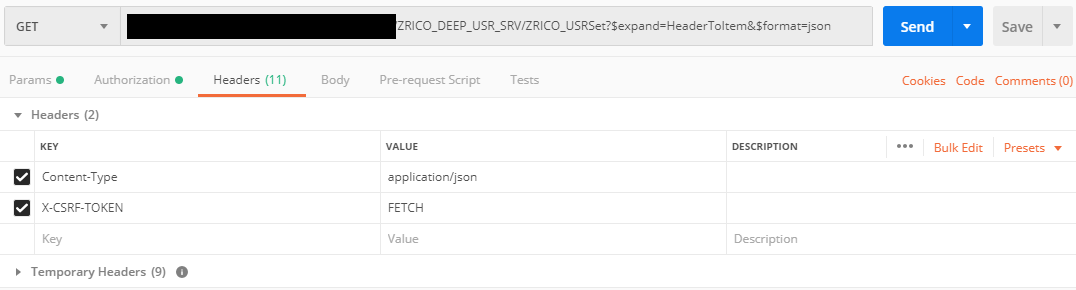
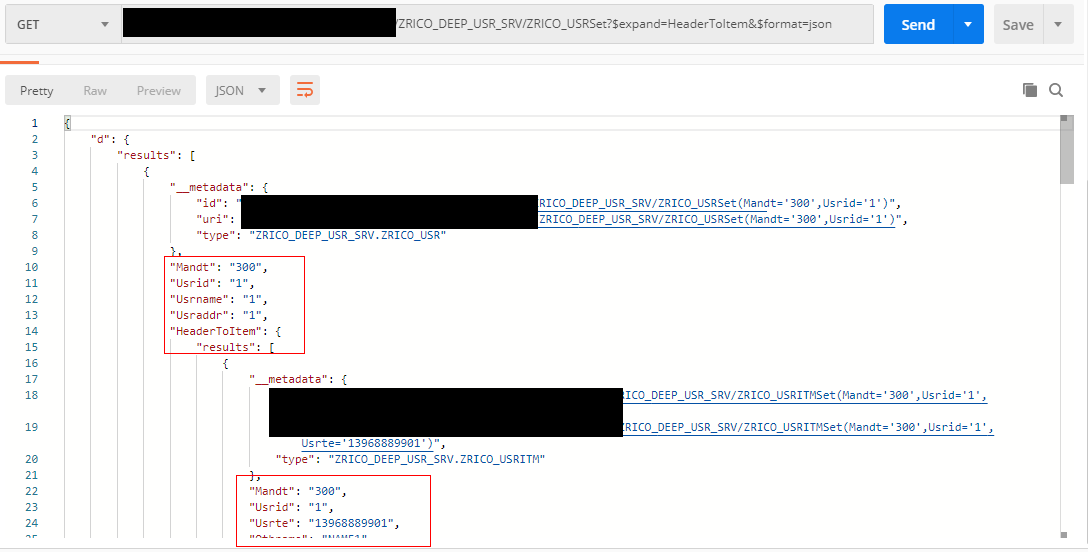
7.1GET_EXPANDED_ENTITYSET测试

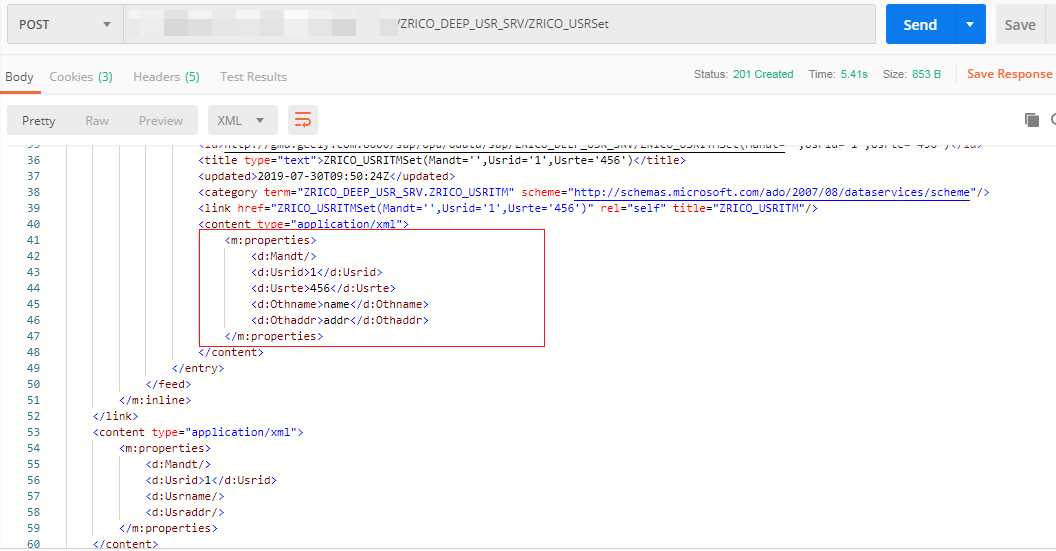
7.2CREATE_DEEP_ENTITY测试

获取上一步GET到的TOKEN
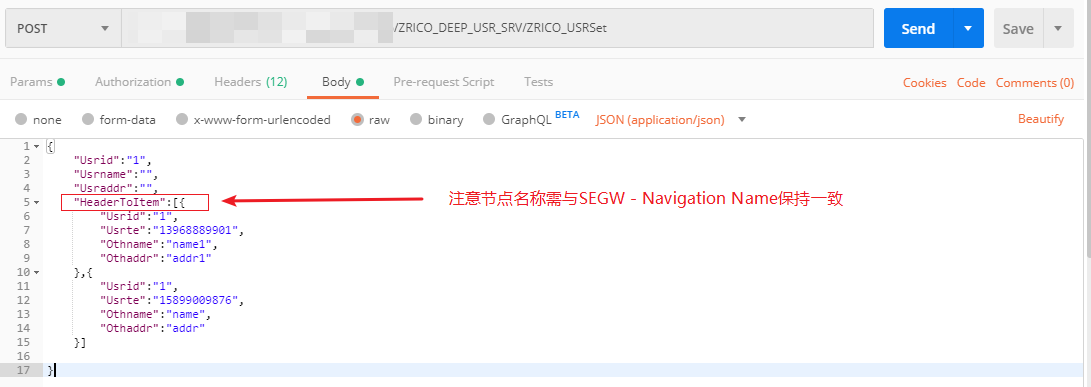
BODY赋值,如上图。
UI5-技术篇-Expand与Deep 服务测试的更多相关文章
- vs自带服务测试工具
在vs安装目录有一个vs自带的服务测试工具,地址为: "C:\Program Files (x86)\Microsoft Visual Studio 11.0\Common7\IDE\Wcf ...
- 12个强大的Web服务测试工具
在过去的几年中,web服务或API的普及和使用有所增加. web服务或API是程序或软件组件的集合,可以帮助应用程序进行交互或通过形成其他应用程序或服务器之间的连接执行一些进程/事务处理.基本上有两种 ...
- swagger结合dubbo的rest服务测试
swagger结合dubbo的rest服务测试 背景介绍 我们应用的dubbo服务导出,可能没有直接的触发点去发起调用测试,除非自己手写controller和test类,缺乏一个动态工具,类似流行的s ...
- centos HA高可用集群 heartbeat搭建 heartbeat测试 主上停止heartbeat服务 测试脑裂 两边都禁用ping仲裁 第三十二节课
centos HA高可用集群 heartbeat搭建 heartbeat测试 主上停止heartbeat服务 测试脑裂 两边都禁用ping仲裁 第三十二节课 heartbeat是Linu ...
- CODING DevOps 系列第五课:微服务测试——微服务下展开体系化的微服务测试
微服务测试的痛点与挑战 这张图可以形象地展示单体服务和微服务的对比,单体应用就像左边巨大的集装箱,软件模块和应用都包括其中:而微服务就像是由一个小集装箱组成,微小的服务组成一个庞大.完整的系统.单体服 ...
- UI5-技术篇-SEGW DEEP ENTITY测试
参考:http://blog.sina.com.cn/s/blog_a7d67d810102xgms.html 一般调用后端的OData服务需要同时传输多个记录表对业务逻辑进行处理(例如BAPI),今 ...
- Asp.net 面向接口可扩展框架之使用“类型转化基础服务”测试四种Mapper(AutoMapper、EmitMapper、NLiteMapper及TinyMapper)
Asp.net 面向接口可扩展框架的“类型转化基础服务”是我认为除了“核心容器”之外最为重要的组成部分 但是前面博文一出,争议很多,为此我再写一篇类型转化基础服务和各种Mapper结合的例子,顺便对各 ...
- ASP.NET WebAPI 生成帮助文档与使用Swagger服务测试
帮助HELP 要实现如WCF中的Help帮助文档,Web API 2 中已经支持很方便的实现了这一特性 http://www.asp.net/web-api/overview/creating-we ...
- 服务测试碰钉子Server GC
如果发现你的dotnet core服务并发上不去,但cpu资源还比较充足那就要注意了!因为这很有可能是你没有设置一个运行项导致...,下面要提到的就是GC.Server这玩意,实际上项目编译中并没有这 ...
随机推荐
- shell编程系列6--shell中的函数
shell编程系列6--shell中的函数 .函数介绍 linux shell中的函数和大多数编程语言中的函数一样 将相似的任务或者代码封装到函数中,供其他地方调用 语法格式 第一种格式 name() ...
- glib 检索地址
http://ftp.acc.umu.se/pub/GNOME/sources/glib/
- 【Mybatis】MyBatis之配置多数据源(十)
在做项目的过程中,有时候一个数据源是不够,那么就需要配置多个数据源.本例介绍mybatis多数据源配置 前言 一般项目单数据源,使用流程如下: 单个数据源绑定给sessionFactory,再在Dao ...
- 【Linux】Jenkins以war包运行及开机启动配置(四)
本例介绍jenkins已war包运行及开机启动配置 环境:Linux环境(CentOS 7.4) 以war包运行 1.下载jenkins.war包 2.启动war包( 默认端口:8080,默认JENK ...
- 通过直方图进行PCA准备
import graphviz import mglearn from mpl_toolkits.mplot3d import Axes3D from sklearn.datasets import ...
- 123457123456#4#----com.MC.mathGame246----前拼后广--数学Q版训练Game-mc4444
com.MC.mathGame246----前拼后广--数学Q版训练Game-mc
- LeetCode_263. Ugly Number
263. Ugly Number Easy Write a program to check whether a given number is an ugly number. Ugly number ...
- Redis应用场景大全
1.字符串使用场景 a) 缓存功能 典型使用场景:Redis作为缓存层,MySQL作为存储层,绝大部分请求的数据都是从Redis中获取,由于Redis具有支撑高并发的特性,所以缓存通常能起到加速读写和 ...
- google浏览器插件开发教程
谷歌插件开发之notifications通知API全解析https://blog.csdn.net/WU5229485/article/details/82012167浏览器API大全https:// ...
- Swift4.0复习Optional
1.Optional基本使用: 当我们声明一个Optional对象时,无论该对象是在文件作用域还是在函数体内作为局部对象声明,如果不对它初始化,那么它的值默认为空(nil). // 声明a为Int类型 ...