
LAMP集群项目三 配置业务服务器
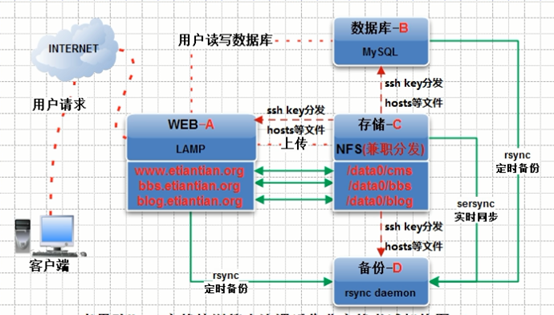
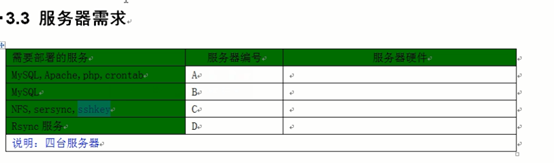
安装MySQL
参考脚本:CentOS6.5一键安装MySQL5.5.32(源码编译)
在备份服务器上配置rsync推送任务
在备份服务器上配置 /etc/rsyncd.conf
#在所有的客户端都配置密码
#客户端的配置为 echo "oldboy" > /etc/rsync.password
#客户端先测试推送是否成功:rsync -avzP a.log rsync_backup@192.168.1.30::www/ --password-file=/etc/rsync.password
具体内容参考脚本:rsync.sh
#rsync

#echo "oldboy123" >/etc/rsync.password

#chmod  /etc/rsync.password

cat >>/etc/rsyncd.conf<<EOF

#Rsync server

#created by oldboy : --

##rsyncd.conf start##

uid = root

gid = root

use chroot = no

max connections =

timeout =

pid file = /var/run/rsyncd.pid

lock file = /var/run/rsync.lock

log file = /var/log/rsyncd.log

ignore errors

read only = false

list = false

hosts allow = 192.168.1.0/

hosts deny = 0.0.0.0/

auth users = rsync_backup

secrets file = /etc/rsync.password

#####################################

#服务端备份的目录

[www]

comment = www by old0boy : --

path = /data0/www/www/

#####################################

[bbs]

comment = bbs by old0boy : --

path = /data0/www/bbs/

#####################################

[blog]

comment = blog by old0boy : --

path = /data0/www/blog/

EOF

#在所有的客户端都配置密码

#客户端的配置为 echo "oldboy" > /etc/rsync.password

#客户端先测试推送是否成功:rsync -avzP a.log rsync_backup@192.168.1.29::www/ --password-file=/etc/rsync.password

echo "rsync_backup:oldboy" >/etc/rsync.password

chmod  /etc/rsync.password

#写入开机自启动

rsync --daemon

echo "/usr/bin/rsync --daemon" >>/etc/rc.local

mkdir -p /data0/www/bbs/ /data0/www/www/ /data0/www/blog/
NFS(兼职分发)服务器上配置
生成ssh-key,利用expect软件分发到服务器上。

在分发客户端的家目录下 创建密钥:
ssh-keygen -t dsa
全部回车
tree .ssh
ssh-copy-id 只能copy公钥
ssh-copy-id -i .ssh/id_rsa.pub "-p 22 root@192.168.1.27"
需要输入密码后,就能分发公钥了
现在采用expect来批量分发
yum install expect -y
通过在expect的配置文件中fenfa_sshkey.exp配置分发内容,然后通过脚本调用来为不同的服务器分发执行脚本。
验证ssh root@192.168.1.27 /sbin/ifconfig eth0 查看ip
LAMP集群项目三 配置业务服务器的更多相关文章
- LAMP集群项目五 nfs分发文件到服务器
前边已经配置了免密钥登录,现在脚本直接调用scp即可 ./etc/init.d/functions ] then echo “argv is not correct” exit fi for ip i ...
- LAMP集群项目
vi /etc/sysconfig/network 一.安装硬件环境(安装虚拟机) 1.安装VMware步骤 1.修改网卡配置 vi /etc/sysconfig/network-scripts/if ...
- LAMP集群项目五 部署NFS存储服务并设置WEB服务挂载
yum install nfs-utils portmap -y 在centos6.5中portmap已经改为rpcbind 先启动rpcbind /etc/init.d/rpcbind start ...
- LAMP集群项目五 nfs存储的数据实时同步到backupserver
tar fxzsersync2.5.4_64bit_binary_stable_final.tar.gz -C /usr/local/ mv GNU-Linux-x86 sersync cp sers ...
- LAMP集群项目四 安装apache、php及其插件
rpm -qa httpd* 查看是否有apache rpm -e httpd-2.2.22.2 卸载该文件,如果不让卸载,则加参数:--nodeps 不做软件中的依赖检查 ./configure ...
- LAMP集群项目二 初始化系统
1.关闭防火墙 /etc/init.d/iptables stop chkconfig iptables off 2.关闭selinux cat /etc/selinux/config #查看状态 s ...
- LAMP集群项目五 项目备份
1.打包到本地 2.推送到备份服务器 3.删除若干天前的备份 ip=`awk '/IPADDR/' /etc/sysconfig/network-scripts/ifcfg-eth0 |awk -F ...
- MySQL数据库企业集群项目实战(阶段三)
MySQL数据库企业集群项目实战(阶段三) 作者 刘畅 时间 2020-10-25 目录 1 架构拓扑图 1 1.1 方案一 1 1.2 方案二 2 ...
- Linux服务器集群系统(三)--转
引用地址:http://www.linuxvirtualserver.org/zh/lvs3.html LVS集群中的IP负载均衡技术 章文嵩(wensong@linux-vs.org) 2002 年 ...
随机推荐
- Bitmap OutOfMemoryError
在创建Bitmap的时候因为对象过多而没有即使回收,导致的内存不足: java.lang.OutOfMemoryError E/AndroidRuntime(21898): at androi ...
- CYQ学习主要摘要2
数据库配置假设如下: <connectionStrings> <add name="Conn" connectionString="Se ...
- iPhone How-to:如何调整UIView的Z-Order
转自:http://bj007.blog.51cto.com/1701577/541572 在界面设计中,最终用户看到的呈现通常是由不同层的视图组成的,通过控制视图的层次就可以实现不同的效果和功能.而 ...
- Spring学习10-SpringMV核心组件2及SpringMVC项目示例
一.SpringMVC核心接口 5.ViewResolver接口--视图解析接口 继承体系: 5.View接口--视图接口 二.SpringMVC项目示例 (1)建立动态we ...
- 思科ACL不连续通配符掩码的计算
access-list 120 permit ip 10.0.0.0 0.0.0.191 any 这条ACL看似简单,却又复杂,因为正常我们见到的通配符掩码都是诸如0.0.0.255(255. ...
- 4个著名VCS的比较
特征 CVS Git Mercurial Subversion 是否原子提交 CVS: 没有. CVS提交不是原子的 Git: 是的. 提交都是原子的 Mercurial: 是的 Subversion ...
- linux系统中/etc/syslog.conf文件解读
1: syslog.conf的介绍 对于不同类型的Unix,标准UnixLog系统的设置,实际上除了一些关键词的不同,系统的syslog.conf格式是相同的.syslog采用可配置的.统一的系统登记 ...
- c配置库ccl使用小结
配置文件为key=value键值对形式 下载与安装 库文件下载:ccl-0.1.1.tar.gz 安装: tar -zxvf ccl-0.1.1.tar.gz cd ccl-0.1.1 ./con ...
- 关于SQL高量问题
一工作今天在用DataTable.Table.Select("字段 like")查询时候老是碰到格式不正确 dtrFoundRow = dtvOOView.Table.Select ...
- 理财---炒股之kdj
http://jingyan.baidu.com/article/ac6a9a5ea4e9032b643eac4f.html 28转换: http://zhidao.baidu.com/link?ur ...