
Exception (2) Java Exception Handling
The Java programming language uses exceptions to handle errors and other exceptional events.An exception is an event that occurs during the execution of a program that disrupts the normal flow of instructions.
- Java Exception Handling Overview
- Exception Handling Keywords
- Exception Hierarchy
- Useful Exception Methods
- Creating Custom Exception Classes
Java Exception Handling Overview
Java Exception handling framework is very robust and easy to understand and use. Exception can arise from different kind of situations such as wrong data entered by user, hardware failure, network connection failure, Database server down etc.
Java being an object oriented programming language, whenever an error occurs while executing a statement, creates an exception object and then the normal flow of the program halts and JRE tries to find someone that can handle the raised exception. The exception object contains a lot of debugging information such as method hierarchy, line number where the exception occurred, type of exception etc. When the exception occurs in a method, the process of creating the exception object and handing it over to runtime environment is called “throwing the exception”.
Once runtime receives the exception object, it tries to find the handler for the exception. Exception Handler is the block of code that can process the exception object. The logic to find the exception handler is simple – starting the search in the method where error occurred, if no appropriate handler found, then move to the caller method and so on. So if methods call stack is A->B->C and exception is raised in method C, then the search for appropriate handler will move from C->B->A. If appropriate exception handler is found, exception object is passed to the handler to process it. The handler is said to be “catching the exception”. If there are no appropriate exception handler found then program terminates printing information about the exception.
Note that Java Exception handling is a framework that is used to handle runtime errors only, compile time errors are not handled by exception handling framework.
Exception Handling Keywords
Java provides specific keywords for exception handling purposes.
- throw – We know that if any exception occurs, an exception object is getting created and then Java runtime starts processing to handle them. Sometime we might want to generate exception explicitly in our code, for example in a user authentication program we should throw exception to client if the password is null. throw keyword is used to throw exception to the runtime to handle it.
- throws – When we are throwing any exception in a method and not handling it, then we need to use throws keyword in method signature to let caller program know the exceptions that might be thrown by the method. The caller method might handle these exceptions or propagate it to it’s caller method using throws keyword. We can provide multiple exceptions in the throws clause and it can be used with main() method also.
- try-catch – We use try-catch block for exception handling in our code. try is the start of the block and catch is at the end of try block to handle the exceptions. We can have multiple catch blocks with a try and try-catch block can be nested also. catch block requires a parameter that should be of type Exception.
- finally – finally block is optional and can be used only with try-catch block. Since exception halts the process of execution, we might have some resources open that will not get closed, so we can use finally block. finally block gets executed always, whether exception occurred or not.
Let’s see a simple programing showing exception handling in java.
package cn.zno.exceptions;

import java.io.FileNotFoundException;

import java.io.IOException;

public class Deal {

    public static void main(String[] args) throws FileNotFoundException,

            IOException {

        try {

            ariseTest(-1);

            ariseTest(-2);

        } catch (FileNotFoundException e) {

            e.printStackTrace();

        } catch (IOException e) {

            e.printStackTrace();

        } finally {

            System.out.println("Releasing resources");

        }

        ariseTest(1);

    }

    static void ariseTest(int code) throws FileNotFoundException, IOException {

        if (code < 0) {

            throw new FileNotFoundException("code: " + code);

        } else {

            throw new IOException("code: " + code);

        }

    }

}
Output of above program is:
java.io.FileNotFoundException: code: -

    at cn.zno.exceptions.Deal.ariseTest(Deal.java:)

    at cn.zno.exceptions.Deal.main(Deal.java:)

Exception in thread "main" java.io.IOException: code:

Releasing resources

    at cn.zno.exceptions.Deal.ariseTest(Deal.java:)

    at cn.zno.exceptions.Deal.main(Deal.java:)
Exception Hierarchy
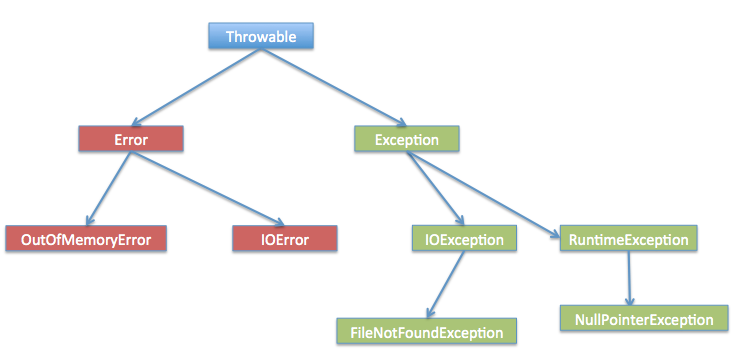
As stated earlier, when any exception is raised an exception object is getting created. Java Exceptions are hierarchical and inheritance is used to categorize different types of exceptions. Throwable is the parent class of Java Exceptions Hierarchy and it has two child objects – Error and Exception. Exceptions are further divided into checked exceptions and runtime exception.
- Errors Errors are exceptional scenarios that are out of scope of application and it’s not possible to anticipate and recover from them, for example hardware failure, JVM crash or out of memory error. That’s why we have a separate hierarchy of errors and we should not try to handle these situations. Some of the common Errors are OutOfMemoryError and StackOverflowError.
- Checked Exceptions Checked Exceptions are exceptional scenarios that we can anticipate in a program and try to recover from it, for example FileNotFoundException. We should catch this exception and provide useful message to user and log it properly for debugging purpose. Exception is the parent class of all Checked Exceptions and if we are throwing a checked exception, we must catch it in the same method or we have to propagate it to the caller using throws keyword.
- Runtime Exception Runtime Exceptions are cause by bad programming, for example trying to retrieve an element from the Array. We should check the length of array first before trying to retrieve the element otherwise it might throw ArrayIndexOutOfBoundException at runtime. RuntimeException is the parent class of all runtime exceptions. If we are throwing any runtime exception in a method, it’s not required to specify them in the method signature throws clause. Runtime exceptions can be avoided with better programming.
Useful Exception Methods
Exception and all of it’s subclasses doesn’t provide any specific methods and all of the methods are defined in the base class Throwable. The exception classes are created to specify different kind of exception scenarios so that we can easily identify the root cause and handle the exception according to it’s type. Throwable class implements Serializable interface for interoperability.
Some of the useful methods of Throwable class are:
- public synchronized Throwable getCause() Returns the cause of this throwable.
- public String getLocalizedMessage() Creates a localized description of this throwable. Subclasses may override this method in order to produce a locale-specific message. For subclasses that do not override this method, the default implementation returns the same result as getMessage().
- public String getMessage() Returns the detail message string of this throwable and the message can be provided while creating the exception through it’s constructor.
- public void printStackTrace() Prints this throwable and its backtrace to the standard error stream.
- public String toString() This method returns the information about Throwable in String format, the returned String contains the name of Throwable class and localized message.
Creating Custom Exception Classes
Java provides a lot of exception classes for us to use but sometimes we may need to create our own custom exception classes to notify the caller about specific type of exception with appropriate message and any custom fields we want to introduce for tracking, such as error codes. For example, let’s say we write a method to process only text files, so we can provide caller with appropriate error code when some other type of file is sent as input.
MyException.java
package cn.zno.exceptions;

public class MyException extends Exception {

    private static final long serialVersionUID = 1L;

    private ErrorCode errorCode = ErrorCode.UNKNOWN;

    public MyException(String message, ErrorCode errorCode) {

        super(message);

        this.errorCode = errorCode;

    }

    public ErrorCode getErrorCode() {

        return errorCode;

    }

    public enum ErrorCode {

        BAD_FILE_TYPE, FILE_NOT_FOUND_EXCEPTION, FILE_CLOSE_EXCEPTION, UNKNOWN

    }

}
Deal.java
package cn.zno.exceptions;

import cn.zno.exceptions.MyException.ErrorCode;

public class Deal {

    public static void main(String[] args)  {

        try {

            processFile();

        } catch (MyException e) {

            e.printStackTrace();

            System.out.println(e.getErrorCode());

            System.out.println(e.getMessage());

        }

    }

    static void processFile() throws MyException  {

        throw new MyException("Bad File Type, notify user", ErrorCode.BAD_FILE_TYPE);

    }

}
cn.zno.exceptions.MyException: Bad File Type, notify user

    at cn.zno.exceptions.Deal.processFile(Deal.java:)

    at cn.zno.exceptions.Deal.main(Deal.java:)

BAD_FILE_TYPE

Bad File Type, notify user
Notice that we can have a separate method to process different types of error codes that we get from different methods, some of them gets consumed because we might not want to notify user for that or some of them we will throw back to notify user for the problem.
Here I am extending Exception so that whenever this exception is being produced, it has to be handled in the method or returned to the caller program, if we extends RuntimeException, there is no need to specify it in the throws clause. This is a design decision but I always like checked exceptions because I know what exceptions I can get when calling any method and take appropriate action to handle them.
Exception (2) Java Exception Handling的更多相关文章
- Exception (3) Java exception handling best practices
List Never swallow the exception in catch block Declare the specific checked exceptions that your me ...
- Java exception handling best practices--转载
原文地址:http://howtodoinjava.com/2013/04/04/java-exception-handling-best-practices/ This post is anothe ...
- Java AOP nested exception is java.lang.NoClassDefFoundError: org/aopalliance/aop/Advice || Error creating bean with name 'org.springframework.aop.aspectj.AspectJPointcutAdvisor#0' 两个异常解决办法
贴出applicationContext.xml <?xml version="1.0" encoding="UTF-8"?> <beans ...
- nested exception is java.lang.RuntimeException: Error parsing Mapper XML. Cause: java.lang.IllegalArgumentException: Result Maps collection already contains value for
org.springframework.beans.factory.BeanCreationException: Error creating bean with name 'daoSupport': ...
- myeclipse启动tomcat会出现 a java exception has occured错误 的解决方法
在浏览器中可以打开tomcat,结果在myeclipse启动tomcat会出现 a java exception has occured错误 ,之后出现一个Classloader.class的文件,关 ...
- Spring 整合 Flex (BlazeDS)无法从as对象 到 Java对象转换的异常:org.springframework.beans.ConversionNotSupportedException: Failed to convert property value of type 'java.util.Date' to required type 'java.sql.Timestamp' for property 'wfsj'; nested exception is java.lang.Ill
异常信息如下: org.springframework.beans.ConversionNotSupportedException: Failed to convert property value ...
- jedis:exception is java.lang.VerifyError: Bad type on operand stack
项目中需要用到缓存,经过比较后,选择了redis,客户端使用jedis连接,也使用到了spring提供的spring-data-redis.配置正确后启动tomcat,发现如下异常: ======== ...
- Spring系列: 使用aop报错:nested exception is java.lang.NoClassDefFoundError: org/aspectj/weaver/reflect/ReflectionWorld$Refle
写了个最简单的aop例子 配置文件如下 <?xml version="1.0" encoding="UTF-8"?> <beans xmlns ...
- Could not load resource factory class [Root exception is java.lang.ClassNotFoundException: org.apache.tomcat.dbcp.dbcp.BasicDataSourceFactory]
WARNING: Failed to register in JMX: javax.naming.NamingException: Could not load resource factory cl ...
随机推荐
- 【UVa】12118 Inspector's Dilemma(欧拉道路)
题目 题目 分析 很巧秒的一道题目,对着绿书瞎yy一会. 联一下必须要走的几条边,然后会形成几个联通分量,统计里面度数为奇数的点,最后再减去2再除以2.这样不断相加的和加上e再乘以t就是答案, ...
- JavaScript数据类型的检测
主要有一下四种方法: 1.typeof 2.instanceof 3.constructor 4.Object.prototype.toString.call() 1.typeof 不能具体细分是什么 ...
- 【Eclipse】开发专题
Eclipse插件安装 参考以下几个网页内容 不同版本Eclipse对JDK版本要求http://blog.csdn.net/kevin_pso/article/details/54971739 Ec ...
- centos7.3安装python3.6.5
最近在玩django,想部署个网站试试,结果发现线上默认的centos用得居然是python2.7.5,那么先升级下吧,到python3.6.5 yum安装时python2.7.5 那么编译安装吧 那 ...
- Linux下编译、安装php
一.apache环境下php的安装步骤如下:[注意:编译安装php前,应先安装好apache,因为编译php时要用到apache的路径] 1. 在http://www.php.net/download ...
- 利用Condition实现多线程交替执行
一.需求 A.B.C 三个线程,循环10次,打印出自己的名称,ABC,ABC,ABC... A.B.C 三个线程,循环10次,打印出自己的名称,A一次,B三次,C五次,ABBBCCCCC,ABBBCC ...
- spring+mybatis结合实例
1.通过上两篇文章的学习,大致了解了spring和mybatis的架构和使用原理,下面这篇文章就将给出两者结合的一个小实例,通过该实例进一步探索这两个框架的魅力,工程所需要的所有jar包都在链接:ht ...
- 40行代码爬取猫眼电影TOP100榜所有信息
主要内容: 一.基础爬虫框架的三大模块 二.完整代码解析及效果展示 1️⃣ 基础爬虫框架的三大模块 1.HTML下载器:利用requests模块下载HTML网页. 2.HTML解析器:利用re正则表 ...
- Python实现七牛云视频播放
这篇文章是使用Python的Web框架Django Rest Framework来提供视频相关的api接口,主要功能包括视频上传.视频转码.视频访问授权.删除视频文件.视频截图功能. 七牛云上的基本概 ...
- python's unittest
[python's unittest] unittest supports some important concepts: 从上图可以看到,unittest中的test-case.test-suit ...