
vue中axios的深入使用
.jpg)
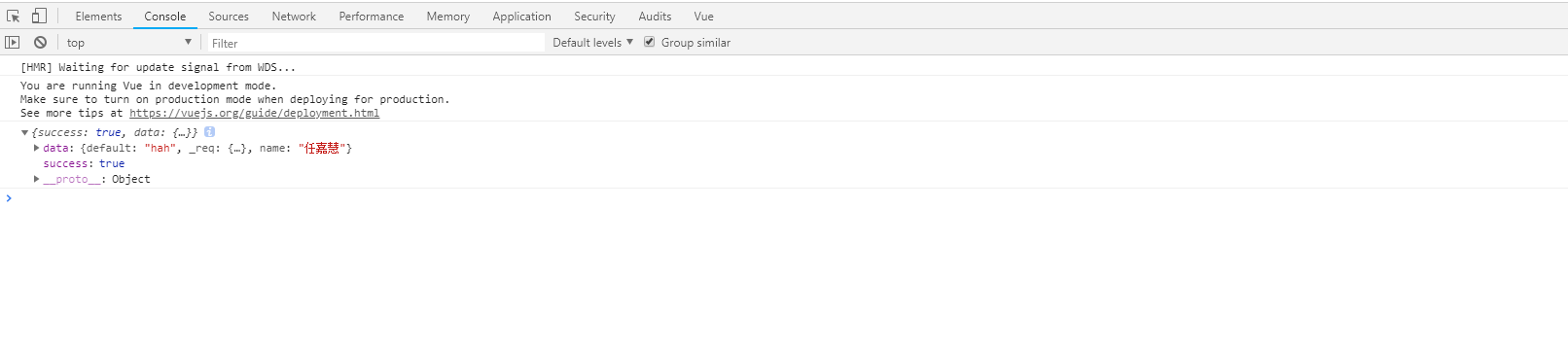
// 引入模块

import axios from "axios"

import qs from 'qs'

// 是否允许跨域

axios.defaults.withCredentials=true;

// axios初始化:延迟时间,主路由地址

let instance = axios.create({

  baseURL: 'https://easy-mock.com/mock/5b7bb6b9d02c1e7f50b4102f/example/',

  timeout: 10000,

});

// 设置拦截器

instance.interceptors.request.use(function(config){

  //在发送请求之前做某事

  return config;

},function(error){

  //请求错误时做些事

  return Promise.reject(error);

});

//响应拦截器

instance.interceptors.response.use(function(response){

  //对响应数据做些事

  return response;

},function(error){

  //请求错误时做些事

  return Promise.reject(error);

});

// 是否销毁拦截器

// 1.给拦截器起个名称 var myInterceptors = instance.interceptors.requesst.use();

// 2.instance.interceptors.request.eject(myInterceptor);

// 请求成功的回调

function checkStatus(res) {

  //请求结束成功

  if (res.status === 200 || res.status === 304) {

    return res.data

  }

  return {

    code: 0,

    msg: res.data.msg || res.statusText,

    data: res.statusText

  }

  return res

}

// 请求失败的回调

function checkCode(res) {

  if (res.code === 0) {

    throw new Error(res.msg)

  }

  return res

}

//模块化导出

export default {

  get(url, params) {

    if (!url) return;

    return instance({

      method: 'get',

      url: url,

      params,

      timeout: 30000

    }).then(checkStatus).then(checkCode)

  },

  post(url, data) {

    if (!url) return;

    return instance({

      method: 'post',

      url: url,

      data: qs.stringify(data),

      timeout: 30000

    }).then(checkStatus).then(checkCode)

  },

  postFile(url, data) {

    if (!url) return;

    return instance({

      method: 'post',

      url: url,

      data

    }).then(checkStatus).then(checkCode)

  }

}
// The Vue build version to load with the `import` command

// (runtime-only or standalone) has been set in webpack.base.conf with an alias.

import Vue from 'vue'

import App from './App'

import router from './router'

import axios from "./utils/axios"

Vue.prototype.$http = axios;

/* eslint-disable no-new */

new Vue({

  el: '#app',

  router,

  components: { App },

  template: '<App/>'

})
<template>

  <div class="home">

    <h3>这里是首页</h3>

  </div>

</template>

<script>

    export default {

      methods: {

        loadData: function () {

          let s = new Promise((resolve,reject) => {

            this.$http.get("query",{name:"任嘉慧"})

              .then(res => {

                console.log(res);//获取数据

//                可通过resolve发送给后端一些参数:resolve(res.data.xxx);

              })

              .catch(error => {

                console.log(error);

              })

          });

        }

      },

      mounted () {

        this.loadData();

      }

    }

</script>

<style scoped>

  .home {

    width: 100%;

    flex: 1;

    overflow-y: auto;

  }

</style>
vue中axios的深入使用的更多相关文章
- vue中Axios请求豆瓣API数据并展示到Swipe中
vue中Axios请求豆瓣API数据并展示到Swipe中 1.首先是安装Axios: 安装方法cnpm install axios --save 等待npm安装完毕: 2.在main.js中引入axi ...
- 聊聊 Vue 中 axios 的封装
聊聊 Vue 中 axios 的封装 axios 是 Vue 官方推荐的一个 HTTP 库,用 axios 官方简介来介绍它,就是: Axios 是一个基于 promise 的 HTTP 库,可以用在 ...
- Vue中axios的封装和api接口的统一管理
更新的是我csdn上的文章,需要的话可以看下,互相学习点击去我的csdn vue中axios的封装 在vue项目和后端交互获取数据时,通常使用axios库,官方文档:https://www.npmjs ...
- vue中axios使用二:axios以post,get,jsonp的方式请求后台数据
本文为博主原创,转载请注明出处 axios在上一篇中讲过:vue中axios使用一:axios做拦截器,axios是请求后台资源的模块,用来请求后台资源. axios本身是支持get,post请求后台 ...
- vue中axios的安装使用
axios是一个基于 promise 的 HTTP 库,在vue中axios是比较常用的网络请求方法. 安装 npm install axios -S 在main.js配置 import axios ...
- vue中axios 配置请求拦截功能 及请求方式如何封装
main.js 中: import axios from '................/axios' axios.js 中: //axios.js import Vue from 'vue' i ...
- vue 中axios 的基本配置和基本概念
axios的基本概念及安装配置方法 ajax:异步请求,是一种无需再重新加载整个网页的情况下,能够更新部分网页的技术 axios:用于浏览器和node.js的基于promise的HTTP客户端 a ...
- vue中Axios的封装和API接口的管理
前端小白的声明: 这篇文章为转载:主要是为了方便自己查阅学习.如果对原博主造成侵犯,我会立即删除. 转载地址:点击查看 如图,面对一团糟代码的你~~~真的想说,What F~U~C~K!!! 回归正题 ...
- 初步使用vue中axios
1.下载axios npm install axios --save 2.两种方式使用axios (1)在模块中引入axios 例如:我在用户登陆界面需要使用axios,就在login页面引入,不是全 ...
随机推荐
- 使用vs的时候,遇到这个:当前不会命中断点 还没有为该文档加载任何符号
一 http://stackoverflow.com/questions/2155930/fixing-the-breakpoint-will-not-currently-be-hit-no-symb ...
- Permission denied: mod_fcgid
[Tue Jun 16 13:29:08 2015] [warn] (13)Permission denied: mod_fcgid: spawn process /var/www/cgi-bin/g ...
- springboot解决开发环境和生产环境不一样的配置问题
代码: application-dev.yml server: port: gril: cupSize: B age: application-prod.yml server: port: gril: ...
- js 图片查看器
将以前用angular 写的 自定义指令 封装成 插件,无需引用jquery.angular. 下载下来即可查看效果. github网址: https://github.com/wzhGitH/img ...
- mongodb禁止外网访问以及添加账号
未曾料到被黑客勒索比特币的戏码竟然降临到我的身上,几个月的技术积累付之一炬.怪只怪自己学艺不精,心存侥幸和无知,不过经此一役,方知网络安全防护的重要性. 一直未给自己的mongodb数据库设置账号密码 ...
- PIL.Image与Base64 String的互相转换
https://www.jianshu.com/p/2ff8e6f98257 PIL.Image与Base64 String的互相转换 mona_alwyn 2018.01.18 19:02* 字数 ...
- iometer测试磁盘IO性能
of Outstanding I/Os per target – 被选中worker的每个磁盘一次所允许的未处理的异步I/O的数量.模拟测试多个应用向 IO 请求读写,默认是 1.通常不用这个参数,除 ...
- C++实现矩阵压缩
C++实现矩阵压缩 转置运算时一种最简单的矩阵运算.对于一个m*n的矩阵M,他的转置矩阵T是一个n*m的矩阵,且T(i,j) = M(j,i). 一个稀疏矩阵的转置矩阵仍然是稀疏矩阵. 矩阵转置 方案 ...
- jmeter-00 JMeter 运行过程
一.GUI mode 图形化界面运行 to run JMeter, run the jmeter.bat (for Windows) or jmeter (for Unix) file. These ...
- zen cart 空白页面的解决方案
在安装zen cart 这套CMS时, 有时候会由于修改了某些页面或者是由于环境的某些组件的版本问题导致前台页面出现空白页, 由于在空白页面处没有任何提示, 并且在日志中也没有这样的出错提示, 导致在 ...