
性能测试工具 nGrinder 项目剖析及二次开发
转:https://testerhome.com/topics/4225
0.背景
组内需要一款轻量级的性能测试工具,之前考虑过LR(太笨重,单实例,当然它的地位是不容置疑的),阿里云的PTS(https://pts.aliyun.com/lite/index.htm, 仅支持阿里云内网和公网机器),Gatling(http://gatling.io/#/)没有TPS数据等等,不太适合我们。
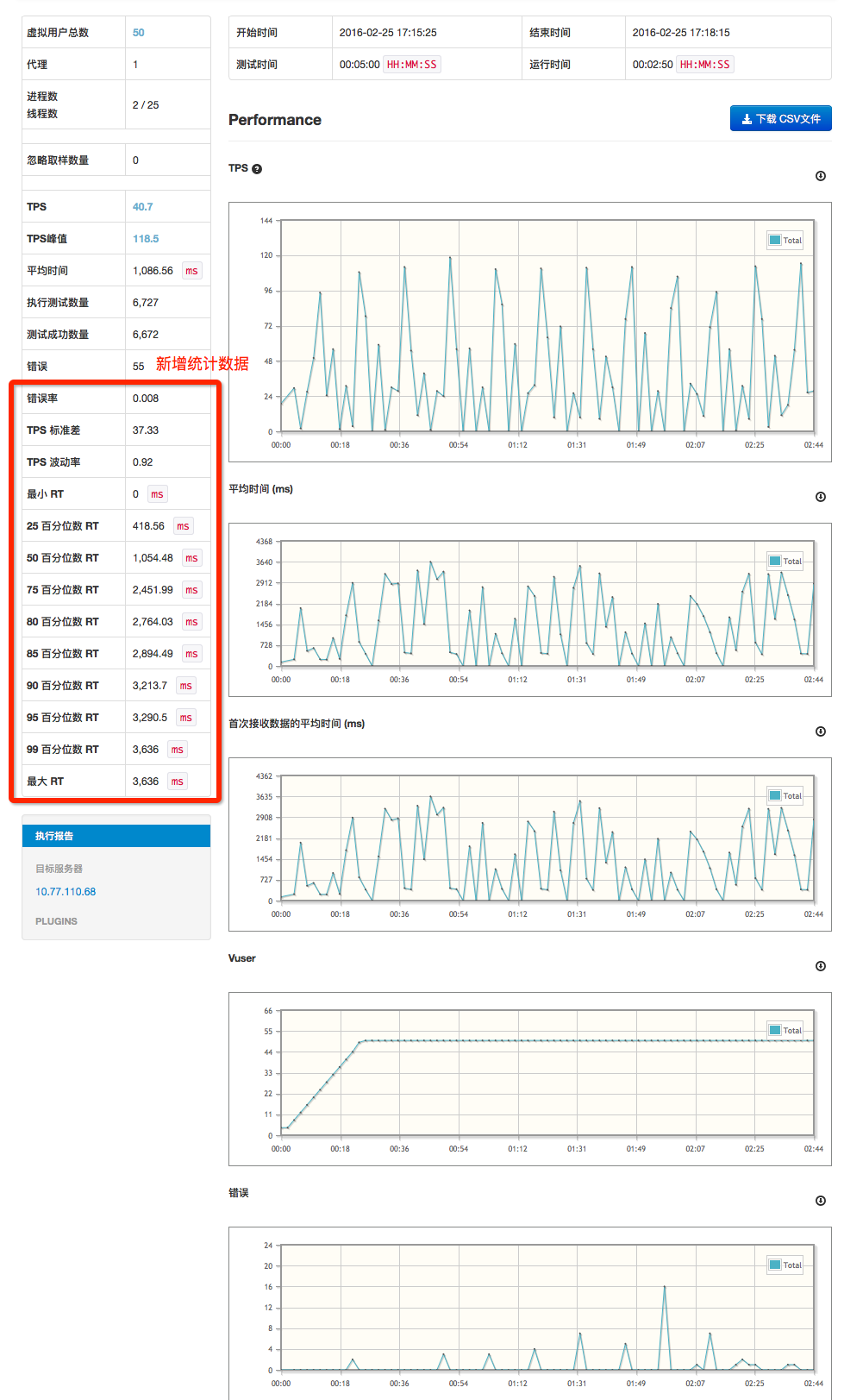
nGrinderr是NAVER(韩国最大互联网公司NHN旗下搜索引擎网站)开源的性能测试工具,直接部署成web服务,支持多用户使用,可扩展性好,可自定义plugin(http://www.cubrid.org/wiki_ngrinder/entry/how-to-develop-plugin),wiki文档较丰富(http://www.cubrid.org/wiki_ngrinder/entry/ngrinder-devzone),数据及图形化展示满足需求;但是展示的统计数据较简单,二次开发整合数据:TPS标准差,TPS波动率,最小/大RT,RT 25/50/75/80/85/90/95/99百分位数字段,并将这些数据展示在详细测试报告页中。
1.项目剖析
1-1. nGrinder架构
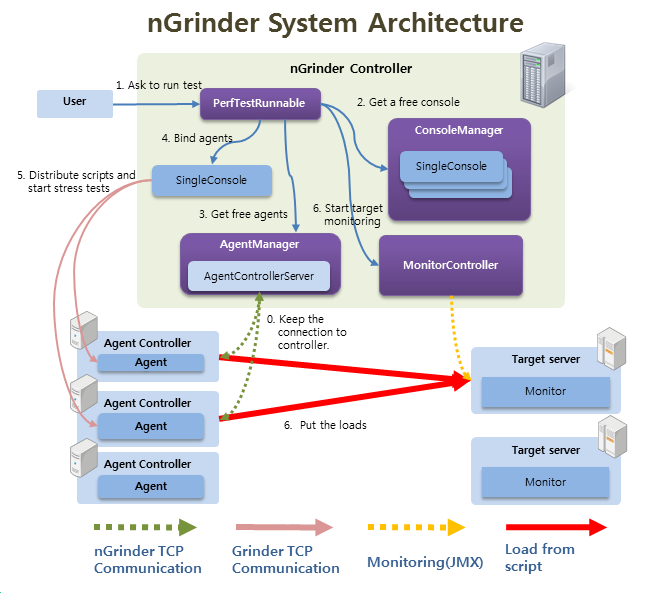
nGrinder是一款在一系列机器上执行Groovy或JPython测试脚本的应用,内部引擎是基于Grinder。
架构图:
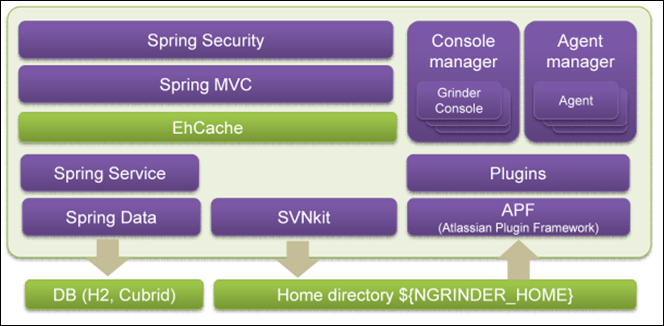
层级图:
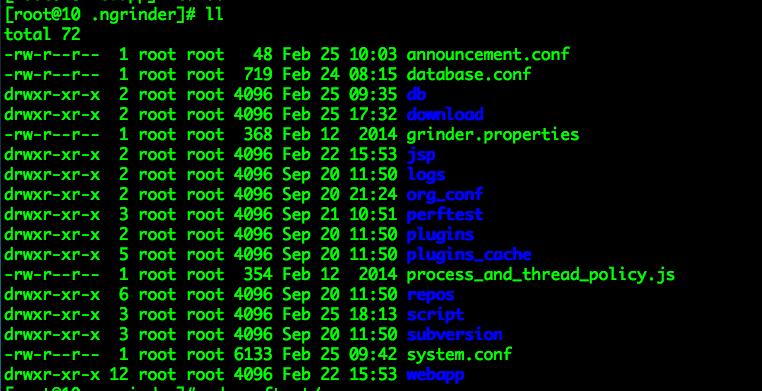
默认的NGRINDER_HOME为/root/.ngrinder, 大多是配置文件和数据文件。
目录/root/.ngrinder/perftest/0_999下,以每个test_id为名的文件夹对应的存储了执行性能测试时的采样数据:
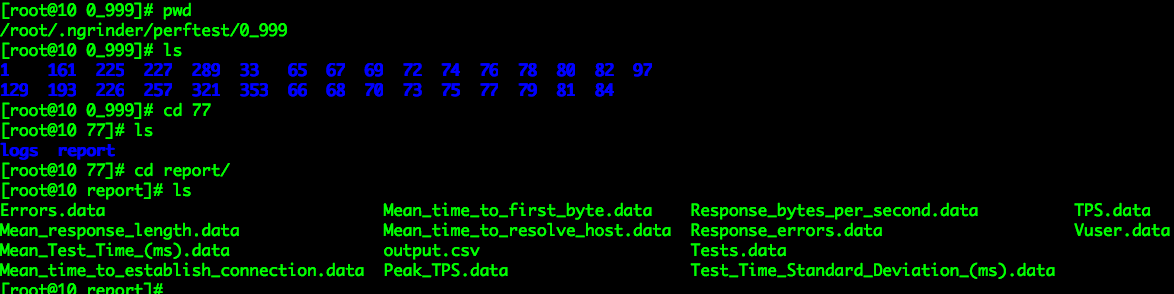
*.data文件就是执行性能测试时对应的各种性能采样数据,性能测试详细报告页就是根据这些data文件,进行图形化展示(ajax)。
nGrinder包含2大组件:
1)Controller
为性能测试提供web interface
协同测试进程
收集和显示测试数据
新建和修改脚本
2)Agent
agent mode: 运行进程和线程,压测目标服务
monitor mode: 监控目标系统性能(cpu/memory), 可以自定义收集的数据(比如 jvm数据)
http://www.cubrid.org/wiki_ngrinder/entry/general-architecture
1-2. 技术栈
1)Controller 层
FreeMarker: 基于Java的模板引擎
Spring Security
Spring Mvc:Spring MVC provides rich functionality for building robust web applications.
GSon
SVNKit Dav
2)Service 层
Grinder
Spring
EhCache: Ehcache has excellent Spring integration.
3)Data层
Spring Data
Hibernate:Hibernate is a powerful technology for persisting data,and it is Spring Data back-end within nGrinder.
H2: (nGrinder默认使用该DB)
Cubrid:(nGrinder同一家公司的DB)
Liquidase: Liquibase is an open source that automates database schema updates.
SVNKit
http://www.cubrid.org/wiki_ngrinder/entry/technology-stack
2.源码实现
需求:在详细测试报告页中展示TPS标准差,TPS波动率,最小/大RT,RT 25/50/75/80/85/90/95/99百分位数这些数据。
修改Controller层,增加数据处理业务逻辑(计算TPS标准差,TPS波动率,最小/大RT,RT 25/50/75/80/85/90/95/99百分位数)
在获取采样数据
ngrinder-core/src/main/java/net/grinder/SingleConsole.java中新增处理业务逻辑,核心修改代码片段:
    // tps list

    List<Double> tps = new CopyOnWriteArrayList<Double>();

    // rt list

    List<Double> meanTestTime = new CopyOnWriteArrayList<Double>();

    /**

     *

     * 每次请求调用一次 Build up statistics for current sampling.

     *

     * @param accumulatedStatistics

     *            intervalStatistics

     * @param intervalStatistics

     *            accumulatedStatistics

     */

    protected void updateStatistics(StatisticsSet intervalStatistics,

            StatisticsSet accumulatedStatistics) {

        Map<String, Object> result = newHashMap();

        result.put("testTime", getCurrentRunningTime() / 1000);

        List<Map<String, Object>> cumulativeStatistics = new ArrayList<Map<String, Object>>();

        List<Map<String, Object>> lastSampleStatistics = new ArrayList<Map<String, Object>>();

        for (Test test : accumulatedStatisticMapPerTest.keySet()) {

            Map<String, Object> accumulatedStatisticMap = newHashMap();

            Map<String, Object> intervalStatisticsMap = newHashMap();

            StatisticsSet accumulatedSet = this.accumulatedStatisticMapPerTest

                    .get(test);

            StatisticsSet intervalSet = this.intervalStatisticMapPerTest

                    .get(test);

            accumulatedStatisticMap.put("testNumber", test.getNumber());

            accumulatedStatisticMap.put("testDescription",

                    test.getDescription());

            intervalStatisticsMap.put("testNumber", test.getNumber());

            intervalStatisticsMap.put("testDescription", test.getDescription());

            // When only 1 test is running, it's better to use the parametrized

            // snapshot.

            for (Entry<String, StatisticExpression> each : getExpressionEntrySet()) {

                if (INTERESTING_STATISTICS.contains(each.getKey())) {

                    accumulatedStatisticMap.put(

                            each.getKey(),

                            getRealDoubleValue(each.getValue().getDoubleValue(

                                    accumulatedSet)));

                    intervalStatisticsMap.put(

                            each.getKey(),

                            getRealDoubleValue(each.getValue().getDoubleValue(

                                    intervalSet)));

                }

            }

            cumulativeStatistics.add(accumulatedStatisticMap);

            lastSampleStatistics.add(intervalStatisticsMap);

        }

        Map<String, Object> totalStatistics = newHashMap();

        for (Entry<String, StatisticExpression> each : getExpressionEntrySet()) {

            if (INTERESTING_STATISTICS.contains(each.getKey())) {

                totalStatistics.put(each.getKey(), getRealDoubleValue(each

                        .getValue().getDoubleValue(accumulatedStatistics)));

            }

        }

        LOGGER.debug("hugang start get plug data");

        // 获取tps, rt集合

        for (Entry<String, StatisticExpression> each : getExpressionEntrySet()) {

            if ("TPS".equals(each.getKey())) {

                tps.add((Double) getRealDoubleValue(each.getValue()

                        .getDoubleValue(intervalStatistics)));

            } else if ("Mean_Test_Time_(ms)".equals(each.getKey())) {

                meanTestTime.add((Double) getRealDoubleValue(each.getValue()

                        .getDoubleValue(intervalStatistics)));

            }

        }

        result.put("totalStatistics", totalStatistics);

        result.put("cumulativeStatistics", cumulativeStatistics);

        result.put("lastSampleStatistics", lastSampleStatistics);

        result.put("tpsChartData", getTpsValues());

        result.put("peakTpsForGraph", this.peakTpsForGraph);

        synchronized (this) {

            result.put(GrinderConstants.P_PROCESS, this.runningProcess);

            result.put(GrinderConstants.P_THREAD, this.runningThread);

            result.put("success", !isAllTestFinished());

        }

        // Finally overwrite.. current one.

        this.statisticData = result;

    }

    /**

     * 从updateStatistics()累加数据, list :rt 和 tps, 为成员变量

     *

     * 再处理集合,放到statisticData中

     *

     * @author hugang

     */

    public void getPlusResult(){

        LOGGER.debug("hugang getPlusResult() tpslist {}  rtlist is {}",

                tps.toString(), meanTestTime.toString());

        int i = 0;

        int j = 0;

        // list转成数组, 标准库使用数组作为参数

        double[] tpsArray = new double[tps.size()];

        for (double tpsNum : tps) {

            tpsArray[i++] = tpsNum;

        }

        // list转成数组

        double[] meanTestTimeArray = new double[meanTestTime.size()];

        for (double meanTime : meanTestTime) {

            meanTestTimeArray[j++] = meanTime;

        }

        // tps 标准差

        double tpsStd = new StandardDeviation().evaluate(tpsArray);

        // tps 平均值

        double tpsMean = new Mean().evaluate(tpsArray, 0, tpsArray.length);

        // tps 波动率= tps 标准差 / tps 平均值

        double tpsVix = 0;

        if(0 != tpsMean){

            tpsVix = tpsStd / tpsMean;

        }

        // meanTestTime 百分位数

        Percentile percentile = new Percentile();

        // 先排序

        Arrays.sort(meanTestTimeArray);

        // meanTestTime最小值

        double minMeanTime = meanTestTimeArray[0];

        double twentyFiveMeanTime = percentile.evaluate(meanTestTimeArray, 25);

        double fiftyMeanTime = percentile.evaluate(meanTestTimeArray, 50);

        double serventyFiveMeanTime = percentile

                .evaluate(meanTestTimeArray, 75);

        double eightyMeanTime = percentile.evaluate(meanTestTimeArray, 80);

        double eightyFiveMeanTime = percentile.evaluate(meanTestTimeArray, 85);

        double ninetyMeanTime = percentile.evaluate(meanTestTimeArray, 90);

        double ninetyFiveMeanTime = percentile.evaluate(meanTestTimeArray, 95);

        double ninetyNineMeanTime = percentile.evaluate(meanTestTimeArray, 99);

        int length = meanTestTimeArray.length;

        // meanTestTime最高值

        double maxMeanTime = meanTestTimeArray[length - 1];

        // meanTestTime平均值

        // double TimeMean = new Mean().evaluate(meanTestTimeArray, 0,

        // meanTestTimeArray.length);

        LOGGER.debug(

                "hugang plug Statistics MinMeanTime {}  MaxMeanTime is {}",

                minMeanTime, maxMeanTime);

        // 附加信息 hugang

        // tps 标准差, tps 波动率, 最小/最大RT, RT百分位数

        Map<String, Object> plusStatistics = newHashMap();

        plusStatistics.put("tpsStd", tpsStd);

//      plusStatistics.put("tpsMean", tpsMean);

        plusStatistics.put("tpsVix", tpsVix);

        plusStatistics.put("minMeanTime", minMeanTime);

        plusStatistics.put("twentyFiveMeanTime", twentyFiveMeanTime);

        plusStatistics.put("fiftyMeanTime", fiftyMeanTime);

        plusStatistics.put("serventyFiveMeanTime", serventyFiveMeanTime);

        plusStatistics.put("eightyMeanTime", eightyMeanTime);

        plusStatistics.put("eightyFiveMeanTime", eightyFiveMeanTime);

        plusStatistics.put("ninetyMeanTime", ninetyMeanTime);

        plusStatistics.put("ninetyFiveMeanTime", ninetyFiveMeanTime);

        plusStatistics.put("ninetyNineMeanTime", ninetyNineMeanTime);

        plusStatistics.put("maxMeanTime", maxMeanTime);

        LOGGER.debug("SingleConsole plug Statistics map plusStatistics {}", plusStatistics);

        this.statisticData.put("plusStatistics", plusStatistics);

    }

    /**

     *

     * 停止采样数据

     * Stop sampling.

     */

    public void unregisterSampling() {

        this.currentNotFinishedProcessCount = 0;

        if (sampleModel != null) {

            this.sampleModel.reset();

            this.sampleModel.stop();

        }

        LOGGER.info("Sampling is stopped");

        informTestSamplingEnd();

        // 结束采样后,处理数据

        // hugang

        getPlusResult();

    }
Map statisticData为不同数据集集合。
Service层从SingleConsole类中获取数据集statisticData:
ngrinder-controller/src/main/java/org/ngrinder/perftest/server/PerfTestService.java 中Map<String, Object> result = consoleManager.getConsoleUsingPort(perfTest.getPort()).getStatisticsData();
/**

     * Update the given {@link PerfTest} properties after test finished.

     *

     * @param perfTest perfTest

     *

     * getConsoleUsingPort()获取数据

     *

     *

     * hugang

     */

    public void updatePerfTestAfterTestFinish(PerfTest perfTest) {

        checkNotNull(perfTest);

        Map<String, Object> result = consoleManager.getConsoleUsingPort(perfTest.getPort()).getStatisticsData();

        @SuppressWarnings("unchecked")

        Map<String, Object> totalStatistics = MapUtils.getMap(result, "totalStatistics", MapUtils.EMPTY_MAP);

        // 获取附加数据

        Map<String, Object> plusStatistics = MapUtils.getMap(result, "plusStatistics", MapUtils.EMPTY_MAP);

        LOGGER.info("Total Statistics for test {}  is {}", perfTest.getId(), totalStatistics);

        LOGGER.info("plug Statistics for test {}  is {}", perfTest.getId(), plusStatistics);

        perfTest.setTps(parseDoubleWithSafety(totalStatistics, "TPS", 0D));

        perfTest.setMeanTestTime(parseDoubleWithSafety(totalStatistics, "Mean_Test_Time_(ms)", 0D));

        perfTest.setPeakTps(parseDoubleWithSafety(totalStatistics, "Peak_TPS", 0D));

        perfTest.setTests(MapUtils.getDouble(totalStatistics, "Tests", 0D).longValue());

        perfTest.setErrors(MapUtils.getDouble(totalStatistics, "Errors", 0D).longValue());

        // 附加信息写到model, 持久化

        perfTest.setTpsStd(parseDoubleWithSafety(plusStatistics, "tpsStd", 0D));

        perfTest.setTpsVix(parseDoubleWithSafety(plusStatistics, "tpsVix", 0D));

        perfTest.setMinRT(parseDoubleWithSafety(plusStatistics, "minMeanTime", 0D));

        perfTest.setTwentyFiveMeanTime(parseDoubleWithSafety(plusStatistics, "twentyFiveMeanTime", 0D));

        perfTest.setFiftyMeanTime(parseDoubleWithSafety(plusStatistics, "fiftyMeanTime", 0D));

        perfTest.setServentyFiveMeanTime(parseDoubleWithSafety(plusStatistics, "serventyFiveMeanTime", 0D));

        perfTest.setEightyMeanTime(parseDoubleWithSafety(plusStatistics, "eightyMeanTime", 0D));

        perfTest.setEightyFiveMeanTime(parseDoubleWithSafety(plusStatistics, "eightyFiveMeanTime", 0D));

        perfTest.setNinetyMeanTime(parseDoubleWithSafety(plusStatistics, "ninetyMeanTime", 0D));

        perfTest.setNinetyFiveMeanTime(parseDoubleWithSafety(plusStatistics, "ninetyFiveMeanTime", 0D));

        perfTest.setNinetyNineMeanTime(parseDoubleWithSafety(plusStatistics, "ninetyNineMeanTime", 0D));

        perfTest.setMaxRT(parseDoubleWithSafety(plusStatistics, "maxMeanTime", 0D));

    }
修改Model层,在javabean中增加TPS标准差,TPS波动率,最小/大RT,RT 25/50/75/80/85/90/95/99百分位数, JPA持久化(H2 DB新增TPS标准差,TPS波动率,最小/大RT,RT 25/50/75/80/85/90/95/99百分位数字段)
model文件为:ngrinder-core/src/main/java/org/ngrinder/model/PerfTest.java
    /**

     * 新增字段,TPS标准差,TPS波动率,最小/大RT,RT 25/50/75/80/85/90/95/99百分位数

     * hugang

     */

    @Expose

    @Column(name = "tpsStd")

    private Double tpsStd;

    @Expose

    @Column(name = "tpsVix")

    private Double tpsVix;

    @Expose

    @Column(name = "minRT")

    private Double minRT;

    @Expose

    @Column(name = "twentyFiveMeanTime")

    private Double twentyFiveMeanTime;

    @Expose

    @Column(name = "fiftyMeanTime")

    private Double fiftyMeanTime;

    @Expose

    @Column(name = "serventyFiveMeanTime")

    private Double serventyFiveMeanTime;

    @Expose

    @Column(name = "eightyMeanTime")

    private Double eightyMeanTime;

    @Expose

    @Column(name = "eightyFiveMeanTime")

    private Double eightyFiveMeanTime;

    @Expose

    @Column(name = "ninetyMeanTime")

    private Double ninetyMeanTime;

    @Expose

    @Column(name = "ninetyFiveMeanTime")

    private Double ninetyFiveMeanTime;

    @Expose

    @Column(name = "ninetyNineMeanTime")

    private Double ninetyNineMeanTime;

    @Expose

    @Column(name = "maxRT")

    private Double maxRT;

    对应的set(), get()
还需修改db change文件(因为系统DB默认使用H2, 只需修改H2对应的xml),ngrinder-controller/src/main/resources/ngrinder_datachange_logfile/db.changelog_schema_H2.xml
create table PERF_TEST (

            id bigint generated by default as identity unique,

            created_date timestamp,

            last_modified_date timestamp,

            agent_count integer,

            description varchar(2048),

            distribution_path varchar(255),

            duration bigint,

            errors integer,

            finish_time timestamp,

            ignore_sample_count integer,

            init_processes integer,

            init_sleep_time integer,

            last_progress_message varchar(2048),

            mean_test_time double,

            peak_tps double,

            errorRate double,

            tpsStd double,

            tpsVix double,

            minRT double,

            twentyFiveMeanTime double,

            fiftyMeanTime double,

            serventyFiveMeanTime double,

            eightyMeanTime double,

            eightyFiveMeanTime double,

            ninetyMeanTime double,

            ninetyFiveMeanTime double,

            ninetyNineMeanTime double,

            maxRT double,
系统重启加载时,Liquidase会自动更新DB。
修改View层,在详细报告对应的freemarker模板新增TPS标准差,TPS波动率,最小/大RT,RT 25/50/75/80/85/90/95/99百分位数字段,前端新增展示这些数据
ngrinder-controller/src/main/webapp/WEB-INF/ftl/perftest/detail_report.ftl
<#-- hugang -->
<#-- 新增 错误率,TPS标准差,TPS波动率,最小RT, 最大RT, RT 25/50/75/80/85/90/95/99百分位数 -->
<tr>
<th><@spring.message "perfTest.report.errorRate"/></th>
<td>${(test.errors /(test.tests + test.errors))!""}</td>
</tr>
<tr>
<th><@spring.message "perfTest.report.tpsStd"/></th>
<td>${test.tpsStd!""}</td>
</tr>
<tr>
<th><@spring.message "perfTest.report.tpsVix"/></th>
<td>${test.tpsVix!""}</td>
</tr>
<tr>
<th><@spring.message "perfTest.report.minRT"/></th>
<td>${test.minRT!""} <code>ms</code></td>
</tr>
<tr>
<th><@spring.message "perfTest.report.TwentyFiveMeanTime"/></th>
<td>${test.twentyFiveMeanTime!""} <code>ms</code></td>
</tr>
<tr>
<th><@spring.message "perfTest.report.FiftyMeanTime"/></th>
<td>${test.fiftyMeanTime!""} <code>ms</code></td>
</tr>
<tr>
<th><@spring.message "perfTest.report.ServentyFiveMeanTime"/></th>
<td>${test.serventyFiveMeanTime!""} <code>ms</code></td>
</tr>
<tr>
<th><@spring.message "perfTest.report.EightyMeanTime"/></th>
<td>${test.eightyMeanTime!""} <code>ms</code></td>
</tr>
</tr>
<tr>
<th><@spring.message "perfTest.report.EightyFiveMeanTime"/></th>
<td>${test.eightyFiveMeanTime!""} <code>ms</code></td>
</tr>
</tr>
<tr>
<th><@spring.message "perfTest.report.NinetyMeanTime"/></th>
<td>${test.ninetyMeanTime!""} <code>ms</code></td>
</tr>
</tr>
<tr>
<th><@spring.message "perfTest.report.NinetyFiveMeanTime"/></th>
<td>${test.ninetyFiveMeanTime!""} <code>ms</code></td>
</tr>
</tr>
<tr>
<th><@spring.message "perfTest.report.NinetyNineMeanTime"/></th>
<td>${test.ninetyNineMeanTime!""} <code>ms</code></td>
</tr>
</tr>
<tr>
<th><@spring.message "perfTest.report.maxRT"/></th>
<td>${test.maxRT!""} <code>ms</code></td>
</tr>还有个坑,就是从github拉下的代码,源码中pom.xml依赖的jar包不完整,直接打不了包,项目有的依赖的jar 公有maven仓库已经没有了,需要自己从网上找jar包,安装到本地仓库,我归整了下:
http://download.csdn.net/detail/neven7/9443895
直接在ngrinder根路径下执行打包命令:
mvn -Dmaven.test.skip=true clean package部署生成的war即可。
3.结果展示
在详细报告页新增如下数据结果:
性能测试工具 nGrinder 项目剖析及二次开发的更多相关文章
- 开源性能测试工具Locust使用篇(二)
那如何理解Locust和TaskSet这两个类呢? class HttpLocust(Locust) 在Locust类中,具有一个client属性,它对应着虚拟用户作为客户端所具备的请求能力,也就是我 ...
- OA项目实战(二) 开发准备
上次的博文OA系统实践(一) 概述中,我们已经了解了OA的相关概念.从本次博文开始,我们做一个简单的OA实例. 在OA开发之前,有几个工作们需要提前做.一个是对需求进行分析,另一个是对开发环境进行选择 ...
- 基于VB语言对SolidWorks参数化设计的二次开发
0 引言 随着数字信息化进程的快速推进,如今三维CAD技术在越来越多的企业当中得到运用.为了降低在设计生产中的成本,缩短设计周期,增强企业竞争力,三维参数化技术随之应声,它凭借更贴近现代概念的设计以及 ...
- 手机游戏渠道SDK接入工具项目分享(二)万事开头难
一般接到任务后程序员们通常都开始着手进行技术调研了,但我这活是项目负责人.还有一大堆事情要先期准备,没人能帮忙. 一.人力配置 考虑的之前已经有一波人搞了大半年,但没有起色,先期也没有太大人力需求,所 ...
- Linux系统性能测试工具(二)——内存压力测试工具memtester
本文介绍关于Linux系统(适用于centos/ubuntu等)的内存压力测试工具-memtester.内存性能测试工具包括: 内存带宽测试工具——mbw: 内存压力测试工具——memtester: ...
- 开源多线程性能测试工具-sysbench
导读 sysbench是一款开源的多线程性能测试工具,可以执行CPU/内存/线程/IO/数据库等方面的性能测试.数据库目前支持MySQL/Oracle/PostgreSQL.本文主要演示Mysql测试 ...
- 【转】开源性能测试工具 - Apache ab 介绍
版权声明:本文可以被转载,但是在未经本人许可前,不得用于任何商业用途或其他以盈利为目的的用途.本人保留对本文的一切权利.如需转载,请在转载是保留此版权声明,并保证本文的完整性.也请转贴者理解创作的辛劳 ...
- 【腾讯开源】Android性能测试工具APT使用指南
[腾讯开源]Android性能测试工具APT使用指南 2014-04-23 09:58 CSDN CODE 作者 CSDN CODE 17 7833 腾讯 apt 安卓 性能测试 开源 我们近日对腾讯 ...
- 性能测试工具Locust的使用
一.写在前面 官网:https://www.locust.io/ 官方使用文档:https://docs.locust.io/en/latest/ 大并发量测试时,建议在linux系统下进行. 二.L ...
随机推荐
- ARM开发板搭建NFS网络文件共享方法
前边 已经提到过吧vmare的IP改成了静态IP,对于上网来说,这个是个麻烦的事.现在重新配置Vmware的IP VMware-Edit-Virtual network editor 选择PC机的无线 ...
- Selenium模拟登陆简书
from selenium import webdriver from selenium.webdriver import ActionChains from selenium.webdriver.c ...
- Hibernate 双向一对多的关联映射
双向的一对多的关联关系是单项的一对多和单项的多对一的情况下产生的. 1.设计表结构 虽然关联关系变为双向的一对多,但是我们表结构不会发生改变,只是指向变了. 2.创建student对象 3.创建Gra ...
- 「NOIP2018」保卫王国
「NOIP2018保卫王国」 题目描述 有一棵 \(n\) 个点, 点有点权 \(a_i\),\(m\) 组询问, 每次求钦点两个节点必须选或者必须不选后的树上最小点覆盖. \(1 \leq n, m ...
- bzoj 4097: [Usaco2013 dec]Vacation Planning
4097: [Usaco2013 dec]Vacation Planning Description Air Bovinia is planning to connect the N farms (1 ...
- CXF和Axis2的区别
1.CXF支持 WS-Addressing,WS-Policy, WS-RM, WS-Security和WS-I Basic Profile.Axis2不支持WS-Policy,但是承诺在下面的版本支 ...
- FIS构建工具学习(一)
一.FIS是什么 在做项目的时候,用到部门内部前端人员开发的fiskit构建工具,经过这次项目基本把它的配置弄清楚了,fiskit构建工具是基于FIS的,所以自己也准备学习FIS,以便更好的理解. 后 ...
- python开发_textwrap文本样式
在看python的API的时候,发现python的textwrap在处理字符串样式的时候功能强大 在这里我做了一个demo: textwrap提供了一些方法: wrap(text, width = 7 ...
- VK Cup 2016 - Round 1 (Div. 2 Edition) C. Bear and Forgotten Tree 3 构造
C. Bear and Forgotten Tree 3 题目连接: http://www.codeforces.com/contest/658/problem/C Description A tre ...
- Shell基础学习(一) Shell简介
Shell是什么? Shell是C语言编写的一种程序,用于用户与linux操作系统交互:Shell既是命令语言,又是程序设计语言. Shell脚本是什么? Shell脚本是用Shell编写的脚本程序. ...