
iOS:分组的表格视图UITableView,可以折叠和展开
虽然表格视图可以分组,但是如果分组后,每一行的内容太多,往后翻看起来比较的麻烦。为了解决这个麻烦,可以将分组的行折叠和展开。折叠时,行内容就会隐藏起来;展开时,行内容就会显示出来。
折叠时: 展开后:
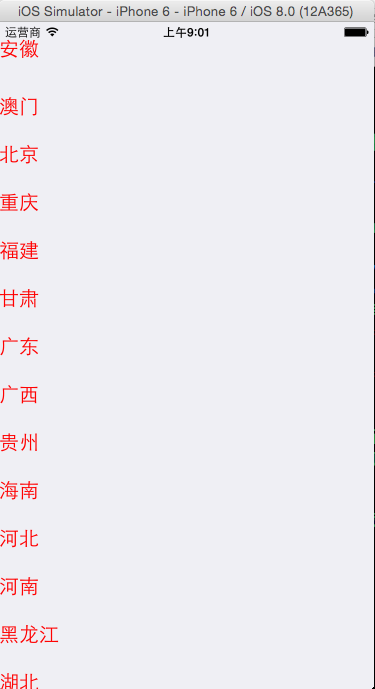
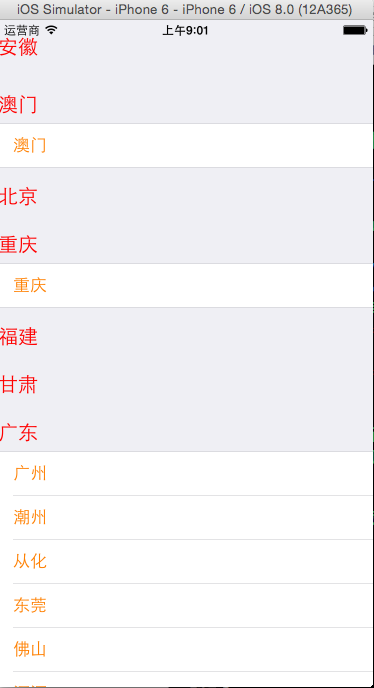
具体的代码如下:
 #import "ViewController.h"

 @interface ViewController ()<UITableViewDataSource,UITableViewDelegate>

 @property (weak, nonatomic) IBOutlet UITableView *tableView;

 @property (strong,nonatomic)NSArray *provinces;

 @property (strong,nonatomic)NSDictionary *cities;

 @property (strong,nonatomic)NSMutableArray *Cellstates;

 @end

 @implementation ViewController

 - (void)viewDidLoad {

     [super viewDidLoad];

     //初始化

     self.provinces = [NSArray array];

     self.cities = [[NSDictionary alloc]init];

     self.Cellstates = [NSMutableArray arrayWithCapacity:self.provinces.count];

     //加载数据

     NSString *path = [[NSBundle mainBundle]pathForResource:@"cities" ofType:@"plist"];

     NSDictionary *dic = [[NSDictionary alloc]initWithContentsOfFile:path];

     if(dic)

     {

         //所有的省份

         self.provinces = [dic objectForKey:@"provinces"];

         //所有的城市

         self.cities = [dic objectForKey:@"cities"];

     }

     //默认每一个section都是折叠的

     for(int i=; i<self.provinces.count; i++)

     {

         NSNumber *state = [NSNumber numberWithBool:NO];

         [self.Cellstates addObject:state];

     }

     //设置数据源和代理

     self.tableView.dataSource = self;

     self.tableView.delegate = self;

 }

 #pragma mark -tableView的数据源方法

 //有多少个分组

 -(NSInteger)numberOfSectionsInTableView:(UITableView *)tableView

 {

     return self.provinces.count;

 }

 //每个分组有多少行

 -(NSInteger)tableView:(UITableView *)tableView numberOfRowsInSection:(NSInteger)section

 {

     if([self.Cellstates[section] boolValue]) //展开的

     {

         //取出所有的城市

         NSArray *cities = [self.cities objectForKey:self.provinces[section]];

         return cities.count;

     }

     else //折叠的

     {

         return ;

     }

 }

 //设置每一个单元格的内容

 -(UITableViewCell *)tableView:(UITableView *)tableView cellForRowAtIndexPath:(NSIndexPath *)indexPath

 {

     //1.根据reuseIdentifier,先到对象池中去找重用的单元格对象

     static NSString *reuseIdentifier = @"citiesCell";

     UITableViewCell *cell = [self.tableView dequeueReusableCellWithIdentifier:reuseIdentifier];

     //2.如果没有找到,自己创建单元格对象

     if(cell == nil)

     {

         cell = [[UITableViewCell alloc]initWithStyle:UITableViewCellStyleDefault reuseIdentifier:reuseIdentifier];

     }

     //3.设置单元格对象的内容

     //取出所有的城市

     NSArray *cities = [self.cities objectForKey:self.provinces[indexPath.section]];

     cell.textLabel.text = cities[indexPath.row];

     //设置字体颜色

     cell.textLabel.textColor = [UIColor orangeColor];

     return cell;

 }

 //设置头部标题

 -(NSString*)tableView:(UITableView *)tableView titleForHeaderInSection:(NSInteger)section

 {

     return self.provinces[section];

 }

 #pragma mark -tableView的代理方法

 -(UIView*)tableView:(UITableView *)tableView viewForHeaderInSection:(NSInteger)section

 {

     UIButton *button = [[UIButton alloc]init];

     //设置标题

     [button setTitle:self.provinces[section] forState:UIControlStateNormal];

     //设置颜色

     [button setTitleColor:[UIColor redColor] forState:UIControlStateNormal];

     //设置对齐方式

     button.contentHorizontalAlignment = UIControlContentHorizontalAlignmentLeft;

     //设置字体大小

     button.titleLabel.font = [UIFont systemFontOfSize:];

     //添加事件

     [button addTarget:self action:@selector(buttonClicked:) forControlEvents:UIControlEventTouchUpInside];

     //记住button的tag

     button.tag = section;

     return button;

 }

 #pragma mark -按钮的事件响应

 -(void)buttonClicked:(UIButton*)sender

 {

     //1.取出旧状态

     NSNumber *oldState = [self.Cellstates objectAtIndex:sender.tag];

     //2.创建新状态

     NSNumber *newState = [NSNumber numberWithDouble:![oldState boolValue]];

     //3.删除旧状态

     [self.Cellstates removeObjectAtIndex:sender.tag];

     //4.添加新状态

     [self.Cellstates insertObject:newState atIndex:sender.tag];

     //刷新表格

     [self.tableView reloadData];

 }

 @end
iOS:分组的表格视图UITableView,可以折叠和展开的更多相关文章
- IOS开发之表视图(UITableView)
IOS开发之表视图(UITableView)的基本介绍(一) (一):UITableView的基本概念 1.在IOS开发中,表视图的应用十分广泛和普及.因此掌握表视图的用法显得非常重要.一般情况下对于 ...
- iOS:带主标题、副标题、图像类型的表格视图UITableView
制作一个通讯录,包括姓名.电话.头像,将表格视图类型设置为UITableViewCellStyleSubtitle 效果图: //创建一个联系人的类,初始化数据 在视图控制器中实现表格内容的显示 #i ...
- iOS:UITableView表格视图控件
UITableView:表格视图控件,继承滚动视图控件UIScrollView,(类似于UIPickerView选择器,它主要通过设置数据源代理和行为代理实现协议来设置单元格) 对表格的操作主要 ...
- IOS第七天(5:UiTableView 汽车品牌,复杂模型分组展示,A-Z索要列表) (2015-08-05 14:03)
复杂模型分组展示 #import "HMViewController.h" #import "HMCarGroup.h" #import "HMCar ...
- UITableView表格视图、UITableView代理方法及应用
一.基本知识点 UITableView表格视图,是一个可以滚动的界面(理解为垂直滚动的UIScrollView),可展示多行数据,没有行数的限制,只能有一列. 使用UITableView: 1.展示信 ...
- IOS中表视图(UITableView)使用详解
IOS中UITableView使用总结 一.初始化方法 - (instancetype)initWithFrame:(CGRect)frame style:(UITableViewStyle)styl ...
- IOS 表视图UITableView 束NSBundle
今天搞了一下表视图UITableView 表视图是在以后应用程序开发中经常用到的一个视图,所以必须要熟练掌握 所获不多,对视图有了一个大概的了解 其中有用到NSBundle , 束 这个类 先说一 ...
- 【转】 iOS如何实现表格的折叠效果?
原文 : http://blog.csdn.net/youcanping2008/article/details/9202167 一.实现原理:就是在点击表格组头视图的时候,如果该表格视图的组展开了 ...
- iOS开发高级分享 - iOS的可折叠表视图
导言 我曾经开发过一个iphone应用程序,它显示了大量的输入,这些输入分为不同的类别,在`UITableView`...若要更改其中一个输入的值,用户按下表视图中的对应行,并在出现的单独屏幕中更改该 ...
随机推荐
- sin()函数的实现
计算如下公式,并输出结果: 其中r.s的值由键盘输入.sin x的近似值按如下公式计算,计算精度为10-10: 程序说明: #include <math.h>和#include<cm ...
- LoadRunner中常用的字符串操作函数
LoadRunner中常用的字符串操作函数有: strcpy(destination_string, source_string); strc ...
- 十三oracle --控制结构(分支,循环,控制)
.使用各种if语句2.使用循环语句3.使用控制语句——goto和null(goto语句不推荐使用): 二.条件分支语句pl/sql中提供了三种条件分支语句if—then,if–then–else,if ...
- cordova编译crosswalk-webview插件报错的处理办法
一直用得好好的.今天编译cordova失败了.报错如下: :processArmv7DebugManifest :processArmv7DebugResourcesERROR: In FontFam ...
- Servlet技术——常用的类和接口
Servlet是运行在服务器端的Java应用程序,由Servlet容器对其进行管理. 当用户对容器发送HTTP请求时,容器将通知相应的Servlet对象进行处理,完成用户和程序之间的交互. 在Serv ...
- Python实现简单的API接口
get方法 代码实现 # coding:utf-8 import json from urlparse import parse_qs from wsgiref.simple_ ...
- Python中__new__()方法的使用和实例化
new()是在新式类中新出现的方法,它作用在构造方法init()建造实例之前,可以这么理解,在Python 中存在于类里面的构造方法init()负责将类的实例化,而在init()调用之前,new()决 ...
- 【BZOJ 2957】 2957: 楼房重建 (线段树)
2957: 楼房重建 Time Limit: 10 Sec Memory Limit: 256 MBSubmit: 1753 Solved: 841 Description 小A的楼房外有一大片施 ...
- BZOJ 4276: [ONTAK2015]Bajtman i Okrągły Robin
最大权值匹配,贪心匈牙利即可. 检查一些人是否能被全部抓住可以采用左端点排序,右端点优先队列处理. By:大奕哥 #include<bits/stdc++.h> using namespa ...
- Codeforces 798D
这两天后缀数组整多了整点有意思的,随机算法. 题意给你两个数组,让你求一个排列使得这个排列对应的两个数组前n/2+1个数之和的二倍大于每个序列总和. 下面先贴下这题正解 二维贪心,按a从大到小排,把第 ...