
solr7.7.0搜索引擎使用(三)(添加文件索引)
众所周知,solr与es的最大区别是,solr可以对pdf,txt,doc等文件生成索引
那我们如何添加文件索引呢?
步骤1.添加core,取名暂且为 coreFile 在bin下执行命令 ./solr create -c coreFile
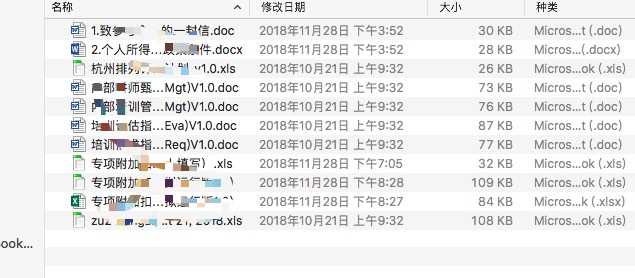
步骤2.准备要搜索的文件
步骤3.添加搜索的数据源 注意,此时使用的class是solr.DataimportHandler
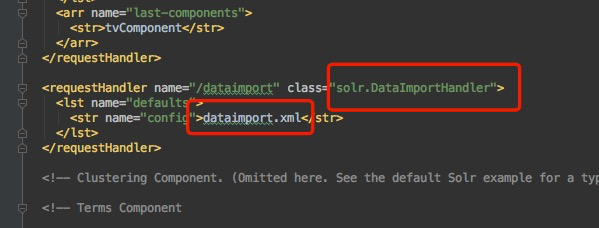
步骤4.添加数据源文件,注意更换 baseDir为你自己的文件路径
<?xml version="1.0" encoding="UTF-8" ?>

<dataConfig>

    <dataSource type="BinFileDataSource"/>

    <document>

        <entity name="file" processor="FileListEntityProcessor" dataSource="null"

                baseDir="/Users/sunpeizhen/Desktop/file" fileName=".(doc)|(pdf)|(docx)|(txt)|(csv)|(json)|(xml)|(pptx)|(pptx)|(ppt)|(xls)|(xlsx)"

                rootEntity="false">

            <field column="file" name="id"/>

            <field column="fileSize" name="fileSize"/>

            <field column="fileLastModified" name="fileLastModified"/>

            <field column="fileLastModified" name="fileLastModified"/>

            <field column="fileAbsolutePath" name="fileAbsolutePath"/>

            <entity name="pdf" processor="TikaEntityProcessor"

                    url="${file.fileAbsolutePath}" format="text">

                <field column="Author" name="author" meta="true"/>

                <!-- in the original PDF, the Author meta-field name is upper-cased,

                  but in Solr schema it is lower-cased

                 -->

                <field column="title" name="title" meta="true"/>

                <field column="text" name="text"/>

            </entity>

        </entity>

    </document>

</dataConfig>
步骤5.添加字段索引
在managed-schema 文件下添加字段索引:
 <field name="title" type="text_cn" indexed="true" stored="true"/>

  <field name="text" type="text_cn" indexed="true" stored="true" omitNorms ="true"/>

  <field name="author" type="string" indexed="true" stored="true"/>

  <field name="fileSize" type="plong" indexed="true" stored="true"/>

  <field name="fileLastModified" type="pdate" indexed="true" stored="true"/>

  <field name="fileAbsolutePath" type="string" indexed="true" stored="true"/>
步骤6.添加中文分词
solr默认没有开启中文分词,许压迫我们添加中文分词的配置
在managed-schema 文件下添加:
    <fieldType name="text_cn" class="solr.TextField" positionIncrementGap="100">

            <analyzer type="index">

                        <tokenizer class="org.apache.lucene.analysis.cn.smart.HMMChineseTokenizerFactory"/>

            </analyzer>

             <analyzer type="query">

                        <tokenizer class="org.apache.lucene.analysis.cn.smart.HMMChineseTokenizerFactory"/>

            </analyzer>

   </fieldType>
此时中文分词开启。
文件搜索已经添加完毕
测试中文分词:
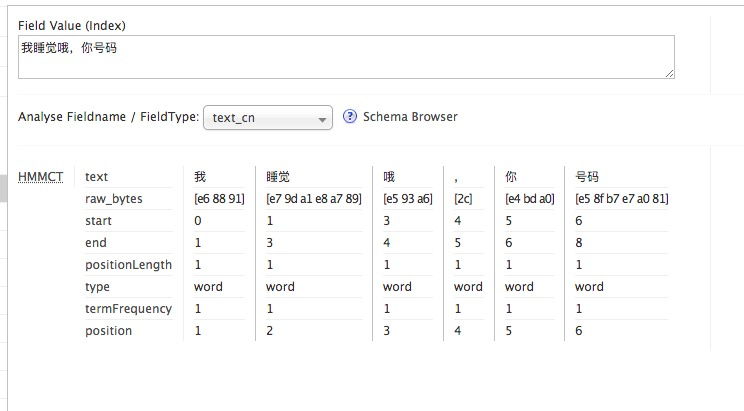
我们添加的分词名称为 text_cn
进入solrUI操作界面,选择coreFIle,点击 Analys

输入中文语句,进行分词,测试如下:
文件搜索:
点击query,进入查询页面。 可以看到文件内容也已经可以搜索到

solr7.7.0搜索引擎使用(三)(添加文件索引)的更多相关文章
- solr7.7.0搜索引擎使用(二)(添加搜索)
一.安装完毕之后,需要为solr添加core,每一个搜索server就是一个core,solr可以有很多core,我们需要创建一个core用于我们的搜索 添加core的方式有两种: 第一种进入solr ...
- solr7.7.0搜索引擎使用(四)(搜索语法)
solr搜索语法 参数defType 指定用于处理查询语句(参数q的内容)的查询解析器,eg:defType=lucenesort 指定响应的排序方式:升序asc或降序desc.同时需要指定 ...
- solr7.7.0搜索引擎使用(一)(下载安装)
一.下载安装 可以直接在官网下载地址:https://lucene.apache.org/solr/ 解压之后,目录结构如下图,bin里边提供部署的文件,contrib提供额外的jar包,docs提供 ...
- (二)部署solr7.1.0到tomcat
solr7.1.0部署到tomcat8 官方表示solr5之后的版本不再提供对第三方容器的支持(不提供war包了). "旧式"solr.xml格式不再支持,核心必须使用core.p ...
- CentOS7.5 Linux搭建全文检索--Solr7.4.0单机服务
一.Solr安装环境 1.官方参考文档 Solr教程参考指南:http://lucene.apache.org/solr/guide/7_4/solr-tutorial.html 2.Solr运行环境 ...
- CentOS7.5搭建Solr7.4.0单机服务
一.Solr安装环境 1.官方参考文档 Solr教程参考指南:http://lucene.apache.org/solr/guide/7_4/solr-tutorial.html 2.Solr运行环境 ...
- VC++6.0一些常见问题解决方法(打开多个窗口、行号、添加文件无响应、更改.exe图标及名称等等)
背景: 最近使用VC++6.0做一个界面,供测试CAN通信使用.由于客户希望我们提供简单方便的函数接口让其最快速使用CAN,DLL(动态链接库)是不二之选.做DLL需要两个VC窗口进行测试才方便.可是 ...
- 解决VC++6.0打开文件或添加文件到工程出错的问题
相信很多朋友在安装VC++6.0之后,发现无法使用打开文件命令.同时,打开了工程,却无法实现文件添加到工程的问题.一旦进行如此操作,便会出现应用程序错误,需要关闭应用程序.为此,不胜其烦.更有甚者,以 ...
- Servlet3.0学习总结(三)——基于Servlet3.0的文件上传
在Servlet2.5中,我们要实现文件上传功能时,一般都需要借助第三方开源组件,例如Apache的commons-fileupload组件,在Servlet3.0中提供了对文件上传的原生支持,我们不 ...
随机推荐
- 刘志梅 201771010115 《面向对象程序设计(java)》 第七周学习总结
实验七 继承附加实验 实验时间 2018-10-11 1.实验目的与要求 (1)进一步理解4个成员访问权限修饰符的用途: 即将类中的域标记为private,而方法标记为public.任何声明为priv ...
- 谷歌浏览器内核Cef js代码整理(一)
尊重作者原创,未经作者允许不得转载!作者:xtfnpgy,原文地址: https://www.cnblogs.com/xtfnpgy/p/9285359.html 一.js基础知识 <!-- ...
- firefox修改语言
下面咱们就可以开始更改设置来让咱们安装好的语言成为默认的语言. 首先在空窗口里输入以下地址:about:config,进入设置页面. 2 请大家定位到general.useragent.locale这 ...
- 华硕R系列的解剖图
1.键盘底部 2.右侧光驱,右下硬盘 3.电源 4.主板 5. 6.4G内存
- 格式化hdfs后,hadoop集群启动hdfs,namenode启动成功,datanode未启动
集群格式化hdfs后,在主节点运行启动hdfs后,发现namenode启动了,而datanode没有启动,在其他节点上jps后没有datanode进程!原因: 当我们使用hdfs namenode - ...
- kettle实现同构单表增量同步
job如下: 如下转换:获取区服列表,将id列表保存到结果(内存) job: 同构数据库单表抽取(每个输入执行一次) 同构数据库单表抽取(job) 的具体实现如下: 转换:获取数据库连接ID 从结果获 ...
- python练习题_02
#1.有两个列表 l1=[11,22,33] l2=[22,33,44] #a.获取内容相同的元素列表 l3=[] for i in l1: if i in l2: l3.append(i) prin ...
- Elasticsearch **代码片段
```JAVA BoolQueryBuilder queryBuilder = QueryBuilders.boolQuery(); RangeQueryBuilder createTimeQuery ...
- python+appium-desktop:安卓(android)7.0以上使用appium无法定位元素(无法refresh)且 无法运行脚本
--解决方法: 启动appium时配置中添加: "automationName":"uiautomator2" --扩展: 想支持安卓7.0及以上版本需要满足一 ...
- sourcetree合并分支
参考: https://blog.csdn.net/qq_34975710/article/details/74469068