
ubuntu16.04 安装最新版nodejs
- ubuntu软件仓库中自带的nodejs版本过低
$ apt-cache policy nodejs

nodejs:

  Installed: (none)

  Candidate: 4.2.6~dfsg-1ubuntu4.2

  Version table:

     4.2.6~dfsg-1ubuntu4.2 500

        500 http://mirrors.aliyun.com/ubuntu xenial-updates/universe amd64 Packages

        500 http://security.ubuntu.com/ubuntu xenial-security/universe amd64 Packages

     4.2.6~dfsg-1ubuntu4 500

        500 http://mirrors.aliyun.com/ubuntu xenial/universe amd64 Packages
- 要安装高版本需要使用新的镜像源
但国内访问deb.nodesource.com会出现连接超时,需要设置代理
测试结果如下:
$ curl -sL -v https://deb.nodesource.com/setup_8.x

*   Trying 13.35.8.34...

* Connected to deb.nodesource.com (13.35.8.34) port 443 (#0)

* found 148 certificates in /etc/ssl/certs/ca-certificates.crt

* found 592 certificates in /etc/ssl/certs

* ALPN, offering http/1.1

* gnutls_handshake() failed: The TLS connection was non-properly terminated.

* Closing connection 0
Step1> 设置代理
以socks5代理为例:
$ export http_proxy=socks5://127.0.0.1:1080

$ export HTTPS_PROXY=socks5://127.0.0.1:1080
Step2> 使用脚本进行安装:
$ curl -sL https://deb.nodesource.com/setup_8.x | sudo -E bash -

$ sudo apt-get install nodejs
安装记录
## Confirming "xenial" is supported...

+ curl -sLf -o /dev/null 'https://deb.nodesource.com/node_8.x/dists/xenial/Release'

## Adding the NodeSource signing key to your keyring...

+ curl -s https://deb.nodesource.com/gpgkey/nodesource.gpg.key | apt-key add -

OK

## Creating apt sources list file for the NodeSource Node.js 8.x LTS Carbon repo...

+ echo 'deb https://deb.nodesource.com/node_8.x xenial main' > /etc/apt/sources.list.d/nodesource.list

+ echo 'deb-src https://deb.nodesource.com/node_8.x xenial main' >> /etc/apt/sources.list.d/nodesource.list

## Running `apt-get update` for you...

+ apt-get update

Hit:1 http://mirrors.aliyun.com/ubuntu xenial InRelease

Hit:2 http://mirrors.aliyun.com/ubuntu xenial-updates InRelease

Hit:3 http://mirrors.aliyun.com/ubuntu xenial-backports InRelease

Hit:4 http://mirrors.aliyun.com/ubuntu xenial-security InRelease

Hit:5 http://mirrors.aliyun.com/docker-ce/linux/ubuntu xenial InRelease

Get:6 https://deb.nodesource.com/node_8.x xenial InRelease [4,646 B]

Get:7 https://deb.nodesource.com/node_8.x xenial/main Sources [761 B]

Get:8 https://deb.nodesource.com/node_8.x xenial/main amd64 Packages [1,006 B]

Get:9 https://deb.nodesource.com/node_8.x xenial/main i386 Packages [1,004 B]

Fetched 7,417 B in 1s (5,551 B/s)

Reading package lists... Done

## Run `sudo apt-get install -y nodejs` to install Node.js 8.x LTS Carbon and npm

## You may also need development tools to build native addons:

     sudo apt-get install gcc g++ make

## To install the Yarn package manager, run:

     curl -sL https://dl.yarnpkg.com/debian/pubkey.gpg | sudo apt-key add -

     echo "deb https://dl.yarnpkg.com/debian/ stable main" | sudo tee /etc/apt/sources.list.d/yarn.list

     sudo apt-get update && sudo apt-get install yarn
如果不想使用脚本,也可以选择手动安装,过程如下:
$ sudo apt-get install apt-transport-https

# 使用代理下载nodesource.gpg.key

$ curl -s https://deb.nodesource.com/gpgkey/nodesource.gpg.key | sudo apt-key add -

OK

# 使用清华镜像源

$ sudo bash -c "echo \"deb https://mirrors.tuna.tsinghua.edu.cn/nodesource/deb_8.x xenial main\" > /etc/apt/sources.list.d/nodesource.list"

$ sudo bash -c "echo \"deb-src https://mirrors.tuna.tsinghua.edu.cn/nodesource/deb_8.x/ xenial main\" >> /etc/apt/sources.list.d/nodesource.list"

$ cat /etc/apt/sources.list.d/nodesource.list

deb https://mirrors.tuna.tsinghua.edu.cn/nodesource/deb_8.x xenial main

deb-src https://mirrors.tuna.tsinghua.edu.cn/nodesource/deb_8.x/ xenial main

$ sudo apt-get update

$ sudo apt-get install nodejs
nodejs安装核心步骤
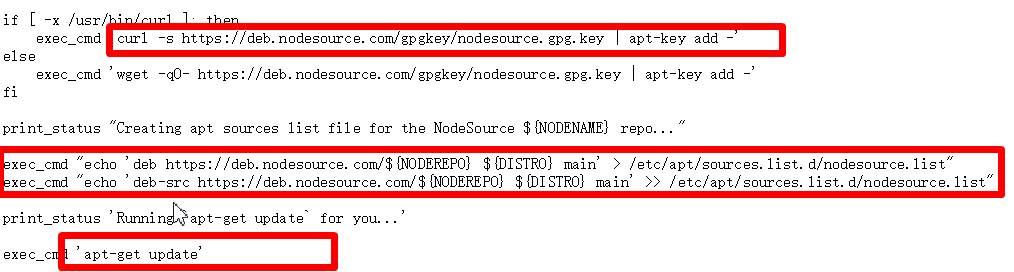
key相关操作
$ apt-key list

...

pub   4096R/68576280 2014-06-13

uid                  NodeSource <gpg@nodesource.com>

sub   4096R/AA01DA2C 2014-06-13

...

$sudo apt-key del 68576280

$apt-key list | grep node
参考:
- https://nodejs.org/zh-cn/download/package-manager/
- https://mirror.tuna.tsinghua.edu.cn/help/nodesource/
ubuntu16.04 安装最新版nodejs的更多相关文章
- 【转载】Ubuntu16.04安装最新版nodejs
安装最新版nodejs 更新ubuntu软件源 sudo apt-get update sudo apt-get install -y python-software-properties softw ...
- Ubuntu16.04安装最新版nodejs
原文链接:https://www.jianshu.com/p/2b24cd430a7d
- ubuntu16.04安装最新版docker、docker-compose、docker-machine
安装前说明: 本文将介绍在ubuntu16.04系统下安装和升级docker.docker-compose.docker-machine. docker:有两个版本:docker-ce(社区版)和do ...
- Ubuntu16.04安装后开发环境配置和常用软件安装
Ubuntu16.04安装后1.安装常用软件搜狗输入法+编辑器Atom+浏览器Chome+视频播放器vlc+图像编辑器GIMP Image Editor安装+视频录制软件RcordMyDesktop安 ...
- Ubuntu16.04安装Ambari 2.7.3
概念了解 Ambair介绍 Apache Ambari是一个用于支持大数据软件供应 管理与监控软件.它也是一个分布式软件,分为Ambair-Server与Ambari-Client两个部分.在生产环境 ...
- Ubuntu16.04安装之后的几个设置
Ubuntu16.04安装之后的几个设置 Ubuntu16.04界面很漂亮,但是安装之后,需要做如下几个简单的设置,这样用的时候会更加顺畅. 1.中文支持 在右上角有一个齿轮,点击->Syste ...
- ubuntu16.04安装node.js、npm
ubuntu16.04安装node.js.npm1.请尽量避免在 Ubuntu 上使用 apt-get 来安装 node.js, 如果你已经这么做了,请手动移除: sudo apt-get purge ...
- ubuntu16.04安装jdk,tomcat
ubuntu16.04安装jdk,tomcat 最近装了一下tomcat,网上的教程很多,我也试了很多次,但是有一些教程关于tomcat配置是错误的,让我走上了歧途.差点重装系统,还好王总及时出手帮助 ...
- Ubuntu16.04 安装openjdk-7-jdk
Ubuntu16.04 安装openjdk-7-jdk sudo apt-get install openjdk-7-jre 或者sudo apt-get install openjdk-7-jdk ...
随机推荐
- spring cloud(二)服务(注册)中心Eureka
Eureka是Netflix开源的一款提供服务注册和发现的产品,它提供了完整的Service Registry和Service Discovery实现.也是springcloud体系中最重要最核心的组 ...
- REACT Missing “key” prop for element
https://stackoverflow.com/questions/48266018/missing-key-prop-for-element-reactjs-and-typescript Whe ...
- Netflix:我们为什么要将 GraphQL 引入前端架构? (转)
在刚开始时,Monet 的 React UI 层需要访问由 Tomcat 服务器提供的传统 REST API.随着时间的推移,随着应用程序的发展,我们的用例变得越来越复杂,即使是一个简单页面也需要从各 ...
- erlang大法好
可惜haxe不能生成erlang.不过没关系,s6k输入法的实际执行方案,现在由typescript改用haxe.cdt3的ts地位不变. 以后这个博客大部分内容都是跟haxe/typescript相 ...
- C语言冒泡(起泡)排序与选择排序的循环条件区别
冒泡排序(写法1): i = 0; i < n-1; ++i{ flag = true; j = 0; j < n-1-i; ++j{//从前面开始冒泡 if( arr[j] < a ...
- 8.5 C++输入相关的成员函数
参考:http://www.weixueyuan.net/view/6411.html 总结: 输入相关的常用的类成员函数. 1) get函数有三种重载形式:不带参数.带一个参数和带有三个参数. 不带 ...
- 2.7 清除FTP服务器文件
清除服务器文件 from ftptools import FtpTools class CleanAll(FtpTools): '''delete an entire remote tree of s ...
- [SCOI2005]繁忙的都市
emm...就是个最小生成树板子...我还能说啥... 为啥我早出生个十多年.../(ㄒoㄒ)/~~ 五六年也好啊.../(ㄒoㄒ)/~~ 呆码: #include<iostream> # ...
- 容器的注入和container设计的思想——Injection Container 理解
为什么会出现容器的注入? 容器:顾名思义,装东西的器物. 至于spring中bean,aop,ioc等一些都只是实现的方式:具体容器哪些值得我们借鉴,我个人觉得是封装的思想.将你一个独立的系统功能放到 ...
- oracle密码过期的修改
ALTER USER 用户名 IDENTIFIED BY 密码 ;