
Lab 7-2
Analyze the malware found in the file Lab07-02.exe.
Questions and Short Answers
How does this program achieve persistence?
A: This program does not achieve persistence. It runs once and then exits.
What is the purpose of this program?
A: The program displays an advertisement web page to the user.
When will this program finish executing?
A: The program finishes executing after displaying the advertisement.
Detailed Analysis
We begin with some basic static analysis. While we don’t see any interesting ASCII strings, we do see one interesting Unicode string: http://www.malwareanalysisbook.com/ad.html. We check the imports and exports of the program, and see only a few imports in addition to the standard imports, as follows:
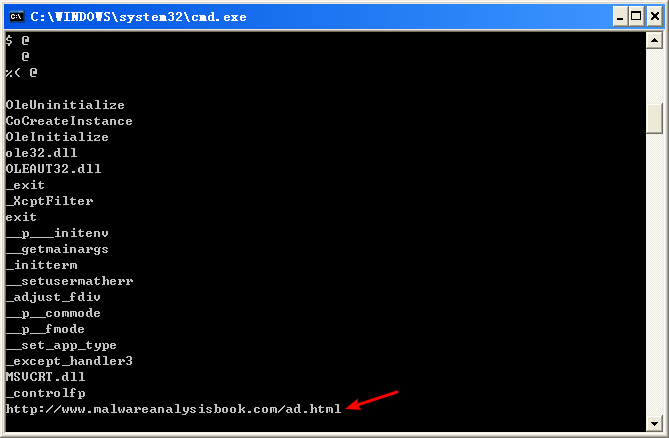

All of these functions are COM-related. The CoCreateInstance and OleInitialize functions in particular are required in order to use COM functionality.
Next, we try dynamic analysis. When we run this program, it opens Internet Explorer and displays an advertisement. There’s no evidence of the program modifying the system or installing itself to execute when the computer is restarted.
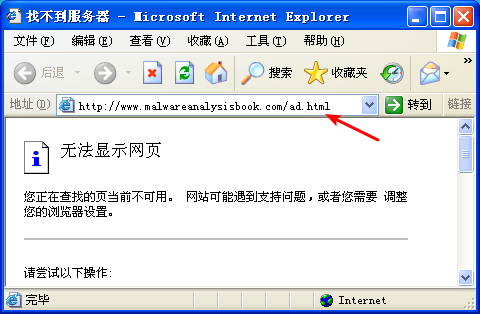
注:这是我掐断网络,运行 Lab07-02 的结果。
Now we can analyze the code in IDA Pro. We navigate to the *_main* method and see the code shown in the following listing.

The first thing the malware does is initialize COM and obtain a pointer to a COM object with OleInitialize at \({\color{red} 1 }\) and CoCreateInstance at \({\color{red} 2 }\). The COM object returned will be stored on the stack in a variable that IDA Pro has labeled ppv, as shown at \({\color{red} 3}\). In order to determine what COM functionality is being used, we need to examine the interface identifier (IID) and class identifier (CLSID).
Clicking rclsid and riid shows that they are 0002DF01-0000-0000-C000-000000000046 and D30C1661-CDAF-11D0-8A3E-00C04FC9E26E, respectively. To determine which program will be called, check the registry for the CLSID, or search for the IID on the Internet for any documentation. In this case, these values are the same identifiers we used in “The Component Object Model” on page 154. The IID is for IWebBrowser2, and the CLSID is for Internet Explorer.


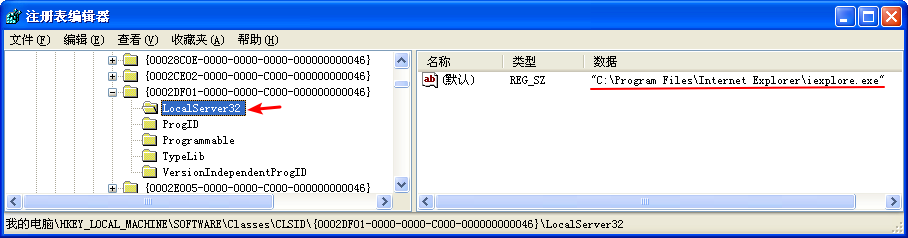
As shown in the following listing, the COM object returned by CoCreateInstance is accessed a few instructions later at \({\color{red} 1 }\).

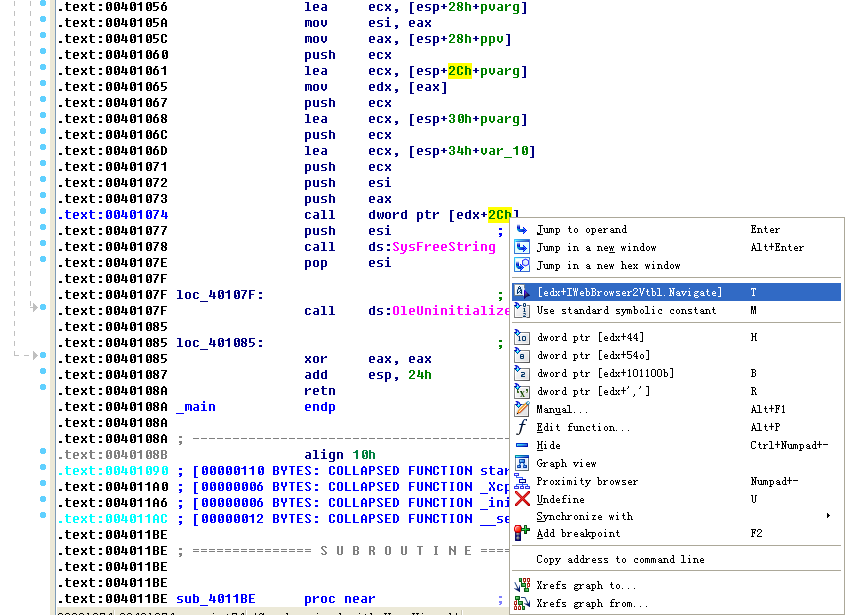
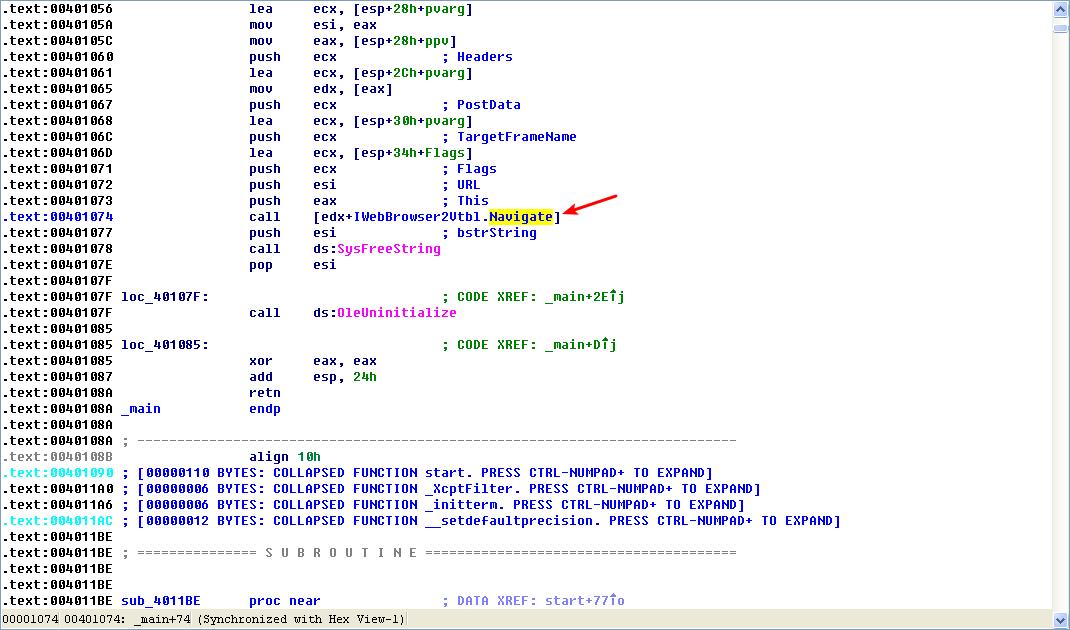
Following this instruction, EAX points to the location of the COM object. At \({\color{red}2}\), EAX is dereferenced and EDX points to the beginning of the COM object itself. At \({\color{red} 3}\), the function at an offset of +0x2C from the object is called. As discussed in the chapter, the offset 0x2C for the IWebBrowser2 interface is the Navigate function, and we can use the Structures window in IDA Pro to create a structure and label the offset. When Navigate is called, Internet Explorer navigates to the web address http://www.malwareanalysisbook.com/ad.html.
注:标识 edx + 2Ch(重命名偏移 2Ch):
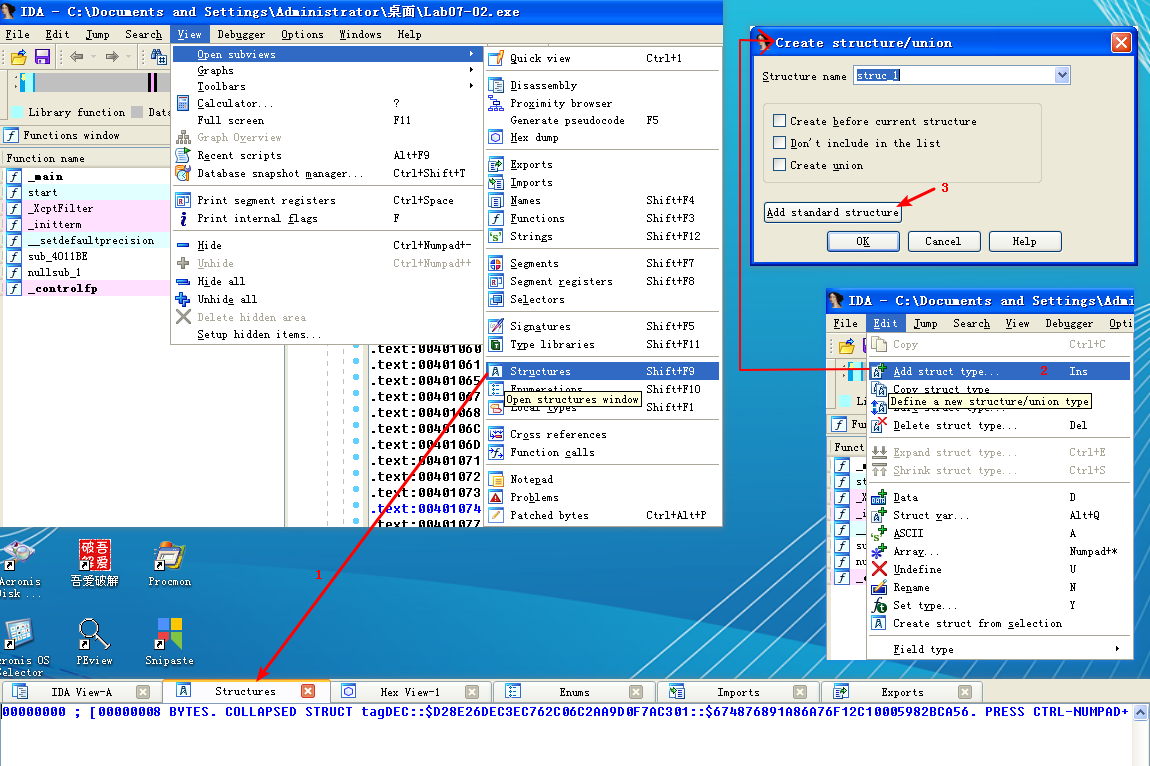


注结束。
After the call to Navigate, there are a few cleanup functions and then the program ends. The program doesn’t install itself persistently, and it doesn’t modify the system. It simply displays a one-time advertisement.
When you encounter a simple program like this one, you should consider it suspect. It may come packaged with additional malware, of which this is just one component.
Preference
Lab 7-2的更多相关文章
- MIT 6.828 JOS学习笔记18. Lab 3.2 Part B: Page Faults, Breakpoints Exceptions, and System Calls
现在你的操作系统内核已经具备一定的异常处理能力了,在这部分实验中,我们将会进一步完善它,使它能够处理不同类型的中断/异常. Handling Page Fault 缺页中断是一个非常重要的中断,因为我 ...
- MIT 6.828 JOS学习笔记17. Lab 3.1 Part A User Environments
Introduction 在这个实验中,我们将实现操作系统的一些基本功能,来实现用户环境下的进程的正常运行.你将会加强JOS内核的功能,为它增添一些重要的数据结构,用来记录用户进程环境的一些信息:创建 ...
- MIT 6.828 JOS学习笔记16. Lab 2.2
Part 3 Kernel Address Space JOS把32位线性地址虚拟空间划分成两个部分.其中用户环境(进程运行环境)通常占据低地址的那部分,叫用户地址空间.而操作系统内核总是占据高地址的 ...
- MIT 6.828 JOS学习笔记15. Lab 2.1
Lab 2: Memory Management lab2中多出来的几个文件: inc/memlayout.h kern/pmap.c kern/pmap.h kern/kclock.h kern/k ...
- MIT 6.828 JOS学习笔记10. Lab 1 Part 3: The kernel
Lab 1 Part 3: The kernel 现在我们将开始具体讨论一下JOS内核了.就像boot loader一样,内核开始的时候也是一些汇编语句,用于设置一些东西,来保证C语言的程序能够正确的 ...
- MIT 6.828 JOS学习笔记7. Lab 1 Part 2.2: The Boot Loader
Lab 1 Part 2 The Boot Loader Loading the Kernel 我们现在可以进一步的讨论一下boot loader中的C语言的部分,即boot/main.c.但是在我们 ...
- python opencv 利用Lab空间把春天的场景改为秋天
前一段时间实现了Reinhard颜色迁移算法,感觉挺有意思的,然后在代码上随意做了一些更改,有了一些发现,把Lab通道的a通道值改为127左右,可以将绿色改为黄色,而对其他颜色的改动非常小,因此可以将 ...
- Acadia Lab 228 + Lab 222
又是一对串烧实验,布好线后非常方便就可以一起完成. 连线方案一模一样: Lab 228 数码管骰子 核心代码如下: def loop() : global cnt global btn_read,se ...
- Acadia Lab 203 + Lab 231
在做完 Lab 6 之后,惊觉选做实验缺口很大,于是遍历了一遍夏任务,找到了一条最省力的路线. 做完 Lab 6 的连线不用拆,可以接下来做以下两个实验: Lab 203 网络时钟 核心代码如下: v ...
- GJM : 【技术干货】给The Lab Renderer for Unity中地形添加阴影
感谢您的阅读.喜欢的.有用的就请大哥大嫂们高抬贵手"推荐一下"吧!你的精神支持是博主强大的写作动力以及转载收藏动力.欢迎转载! 版权声明:本文原创发表于 [请点击连接前往] ,未经 ...
随机推荐
- java的几种对象(PO,VO,DAO,BO,POJO,DTO)解释
一.PO:persistant object 持久对象,可以看成是与数据库中的表相映射的java对象.最简单的PO就是对应数据库中某个表中的一条记录,多个记录可以用PO的集合.PO中应该不包含任何对数 ...
- P5280 [ZJOI2019]线段树
题目链接:洛谷 题目描述:[比较复杂,建议看原题] 这道题太神仙了,线段树上做树形dp. 根据树形dp的套路,都是按照转移的不同情况给节点分类.这里每次modify的时候对于节点的影响也不同,所以我们 ...
- 安装Linux系统
一.环境准备 1.一个VM虚拟机镜像,一个CentOS-7镜像(注:CentOS-7和CentOS-6在命令上有很大的差别,这里选择CentOS-7版本) 二.开始安装 1.新建一个虚拟机,选择自定义 ...
- 在Windows上搭建Git Server
Git在版本控制方面,相比与SVN有更多的灵活性,对于开源的项目,我们可以托管到Github上面,非常方便,但是闭源的项目就会收取昂贵的费用. 那么私有项目,如何用Git进行代码版本控制呢?我们可以自 ...
- 12.C# 接口和抽象类的区别
1.抽象类 声明方法的存在而不去实现它的类叫做抽象类,抽象类用abstract关键字声明.抽象类主要用来规定某些类的基本特征,继承它的子类必须实现抽象类的抽象成员,否则这个子类也为抽象类. publi ...
- 细说@Html.ActionLink()的用法
一.@Html.ActionLink()概述 在MVC的Rasor视图引擎中,微软采用一种全新的方式来表示从前的超链接方式,它代替了从前的繁杂的超链接标签,让代码看起来更加简洁.通过浏览器依然会解析成 ...
- C#设计模式(7)——适配器模式(Adapter Pattern)(转)
一.引言 在实际的开发过程中,由于应用环境的变化(例如使用语言的变化),我们需要的实现在新的环境中没有现存对象可以满足,但是其他环境却存在这样现存的对象.那么如果将“将现存的对象”在新的环境中进行调用 ...
- Filte过滤器
过滤器 , 其实就是对客户端发出来的请求进行过滤. 浏览器发出, 然后服务器派servlet处理. 在中间就可以过滤, 其实过滤器起到的是拦截的作用.生活中的过滤器例如:门禁,你有门卡才能过去,没有 ...
- select2 api参数中文文档
select2 api参数的文档 具体参数可以参考一下: 参数 类型 描述 Width 字符串 控制 宽度 样式属性的Select2容器div minimumInputLength int 最小数 ...
- 隐藏非选中的checkBox
//隐藏非选中的checkBox function onlyCheckBox(){ $("#dtlTable tr:gt(0)").each(function(i) { var c ...