
Lab 7-2
Analyze the malware found in the file Lab07-02.exe.
Questions and Short Answers
How does this program achieve persistence?
A: This program does not achieve persistence. It runs once and then exits.
What is the purpose of this program?
A: The program displays an advertisement web page to the user.
When will this program finish executing?
A: The program finishes executing after displaying the advertisement.
Detailed Analysis
We begin with some basic static analysis. While we don’t see any interesting ASCII strings, we do see one interesting Unicode string: http://www.malwareanalysisbook.com/ad.html. We check the imports and exports of the program, and see only a few imports in addition to the standard imports, as follows:
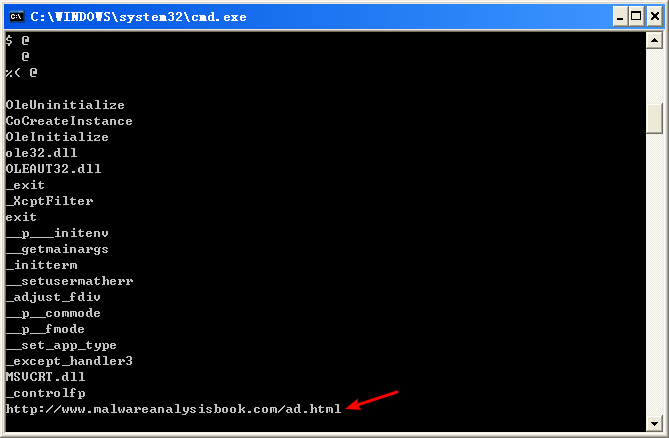

All of these functions are COM-related. The CoCreateInstance and OleInitialize functions in particular are required in order to use COM functionality.
Next, we try dynamic analysis. When we run this program, it opens Internet Explorer and displays an advertisement. There’s no evidence of the program modifying the system or installing itself to execute when the computer is restarted.
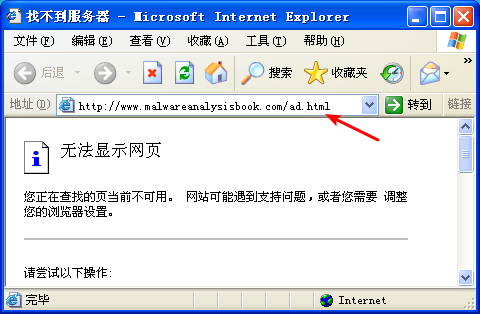
注:这是我掐断网络,运行 Lab07-02 的结果。
Now we can analyze the code in IDA Pro. We navigate to the *_main* method and see the code shown in the following listing.

The first thing the malware does is initialize COM and obtain a pointer to a COM object with OleInitialize at \({\color{red} 1 }\) and CoCreateInstance at \({\color{red} 2 }\). The COM object returned will be stored on the stack in a variable that IDA Pro has labeled ppv, as shown at \({\color{red} 3}\). In order to determine what COM functionality is being used, we need to examine the interface identifier (IID) and class identifier (CLSID).
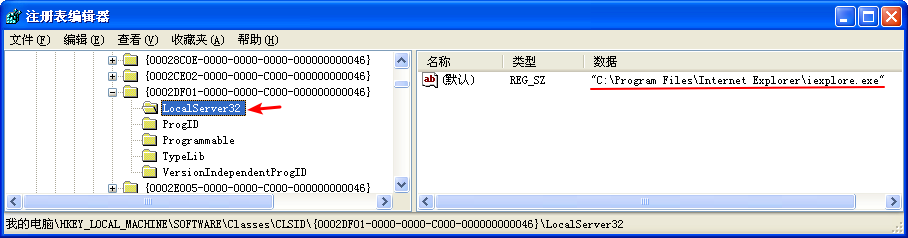
Clicking rclsid and riid shows that they are 0002DF01-0000-0000-C000-000000000046 and D30C1661-CDAF-11D0-8A3E-00C04FC9E26E, respectively. To determine which program will be called, check the registry for the CLSID, or search for the IID on the Internet for any documentation. In this case, these values are the same identifiers we used in “The Component Object Model” on page 154. The IID is for IWebBrowser2, and the CLSID is for Internet Explorer.


As shown in the following listing, the COM object returned by CoCreateInstance is accessed a few instructions later at \({\color{red} 1 }\).

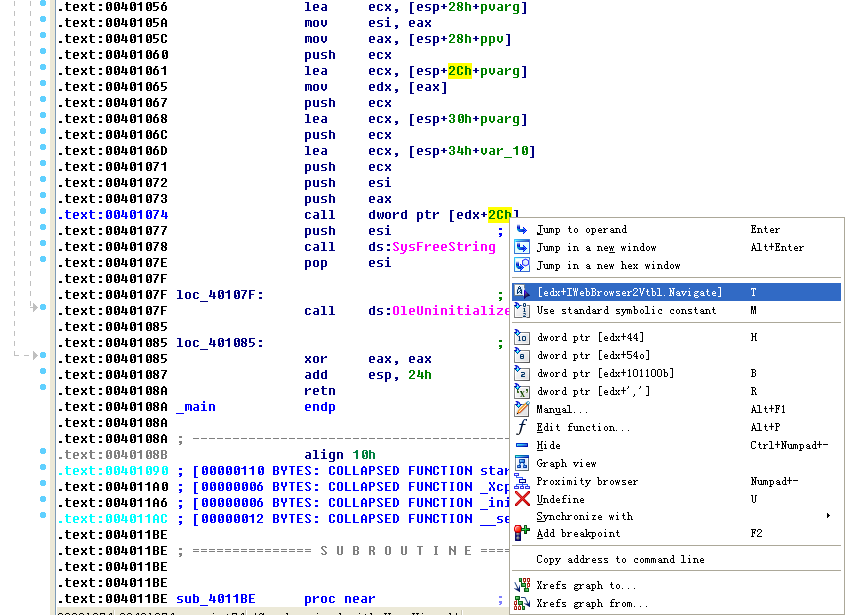
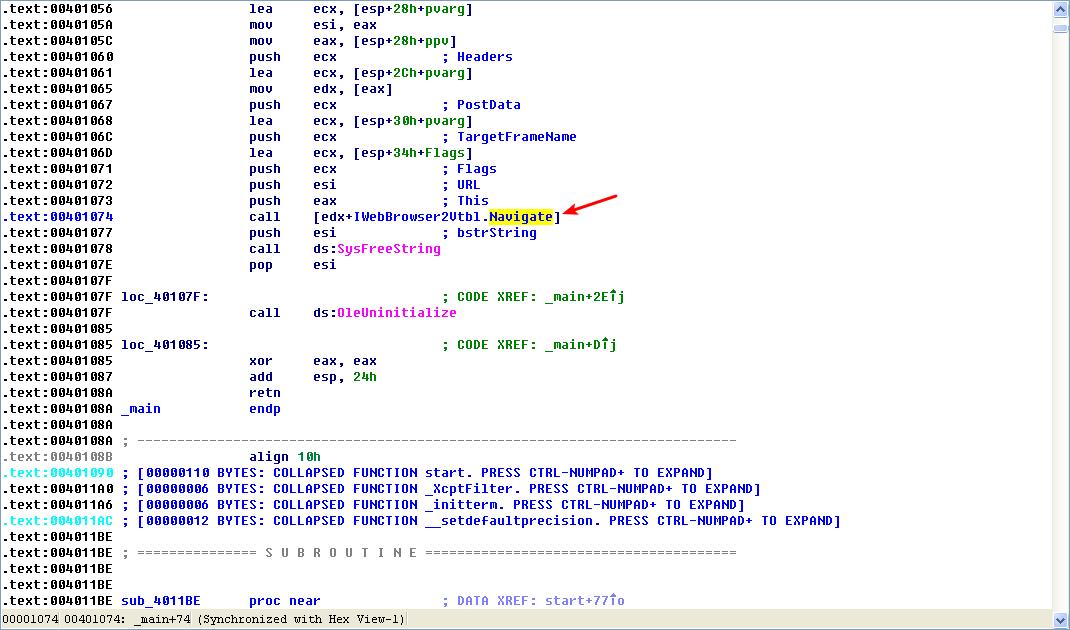
Following this instruction, EAX points to the location of the COM object. At \({\color{red}2}\), EAX is dereferenced and EDX points to the beginning of the COM object itself. At \({\color{red} 3}\), the function at an offset of +0x2C from the object is called. As discussed in the chapter, the offset 0x2C for the IWebBrowser2 interface is the Navigate function, and we can use the Structures window in IDA Pro to create a structure and label the offset. When Navigate is called, Internet Explorer navigates to the web address http://www.malwareanalysisbook.com/ad.html.
注:标识 edx + 2Ch(重命名偏移 2Ch):
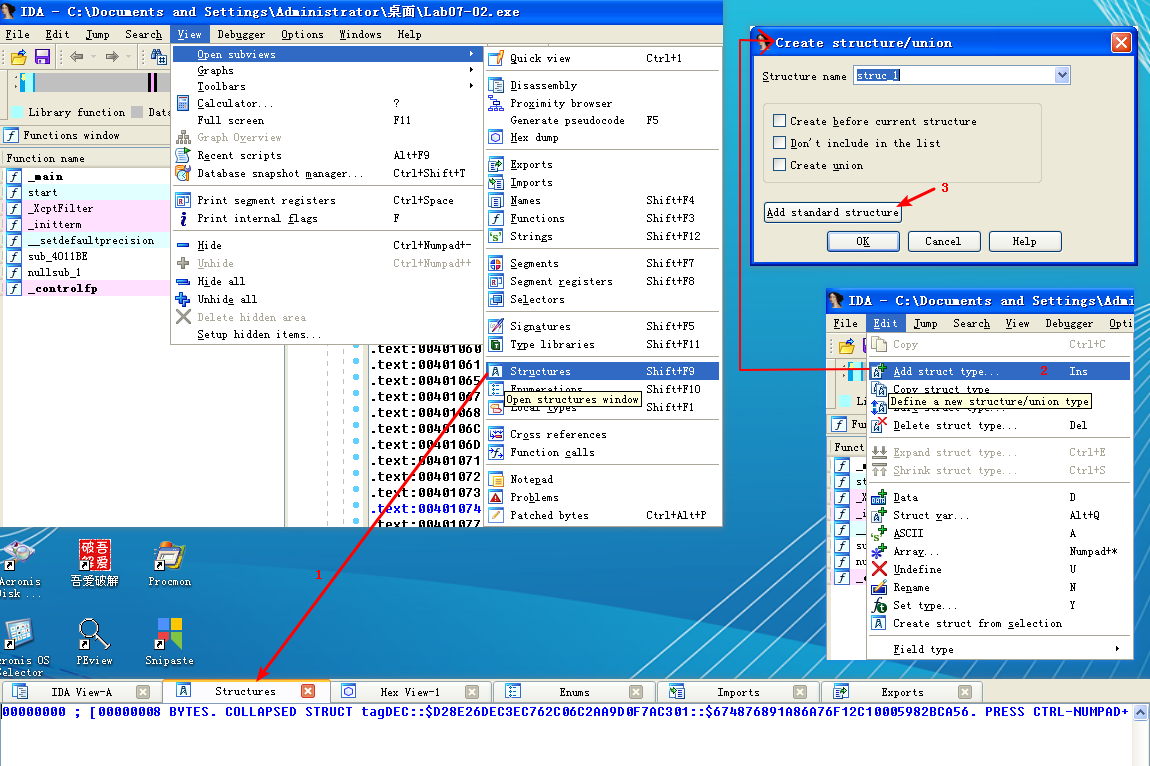


注结束。
After the call to Navigate, there are a few cleanup functions and then the program ends. The program doesn’t install itself persistently, and it doesn’t modify the system. It simply displays a one-time advertisement.
When you encounter a simple program like this one, you should consider it suspect. It may come packaged with additional malware, of which this is just one component.
Preference
Lab 7-2的更多相关文章
- MIT 6.828 JOS学习笔记18. Lab 3.2 Part B: Page Faults, Breakpoints Exceptions, and System Calls
现在你的操作系统内核已经具备一定的异常处理能力了,在这部分实验中,我们将会进一步完善它,使它能够处理不同类型的中断/异常. Handling Page Fault 缺页中断是一个非常重要的中断,因为我 ...
- MIT 6.828 JOS学习笔记17. Lab 3.1 Part A User Environments
Introduction 在这个实验中,我们将实现操作系统的一些基本功能,来实现用户环境下的进程的正常运行.你将会加强JOS内核的功能,为它增添一些重要的数据结构,用来记录用户进程环境的一些信息:创建 ...
- MIT 6.828 JOS学习笔记16. Lab 2.2
Part 3 Kernel Address Space JOS把32位线性地址虚拟空间划分成两个部分.其中用户环境(进程运行环境)通常占据低地址的那部分,叫用户地址空间.而操作系统内核总是占据高地址的 ...
- MIT 6.828 JOS学习笔记15. Lab 2.1
Lab 2: Memory Management lab2中多出来的几个文件: inc/memlayout.h kern/pmap.c kern/pmap.h kern/kclock.h kern/k ...
- MIT 6.828 JOS学习笔记10. Lab 1 Part 3: The kernel
Lab 1 Part 3: The kernel 现在我们将开始具体讨论一下JOS内核了.就像boot loader一样,内核开始的时候也是一些汇编语句,用于设置一些东西,来保证C语言的程序能够正确的 ...
- MIT 6.828 JOS学习笔记7. Lab 1 Part 2.2: The Boot Loader
Lab 1 Part 2 The Boot Loader Loading the Kernel 我们现在可以进一步的讨论一下boot loader中的C语言的部分,即boot/main.c.但是在我们 ...
- python opencv 利用Lab空间把春天的场景改为秋天
前一段时间实现了Reinhard颜色迁移算法,感觉挺有意思的,然后在代码上随意做了一些更改,有了一些发现,把Lab通道的a通道值改为127左右,可以将绿色改为黄色,而对其他颜色的改动非常小,因此可以将 ...
- Acadia Lab 228 + Lab 222
又是一对串烧实验,布好线后非常方便就可以一起完成. 连线方案一模一样: Lab 228 数码管骰子 核心代码如下: def loop() : global cnt global btn_read,se ...
- Acadia Lab 203 + Lab 231
在做完 Lab 6 之后,惊觉选做实验缺口很大,于是遍历了一遍夏任务,找到了一条最省力的路线. 做完 Lab 6 的连线不用拆,可以接下来做以下两个实验: Lab 203 网络时钟 核心代码如下: v ...
- GJM : 【技术干货】给The Lab Renderer for Unity中地形添加阴影
感谢您的阅读.喜欢的.有用的就请大哥大嫂们高抬贵手"推荐一下"吧!你的精神支持是博主强大的写作动力以及转载收藏动力.欢迎转载! 版权声明:本文原创发表于 [请点击连接前往] ,未经 ...
随机推荐
- [bash] 几个以前没注意过的小知识
1. BASH_SOURCE[0] 是啥意思,以及获取当前脚本所在目录 BASH_SOURCE[] 等价于 BASH_SOURCE, 取得当前执行的shell文件所在的路径及文件名. 如/home/ ...
- delphi操作sqlite3
Delphi SQLite 简明无废话上手指南SQLite下载http://www.sqlite.org/download.html SQLite FAQhttp://www.sqlitecn.org ...
- Python字符串拼接的6种方法(转)
add by zhj: 对于多行字符串连接,第6种连接方法很方便,连接时不会添加额外的空格. 原文:http://www.cnblogs.com/bigtreei/p/7892113.html 1. ...
- Vsftp搭建 for centos7
[root@hys ~]# uname -a Linux hys 3.10.0-693.el7.x86_64 #1 SMP Tue Aug 22 21:09:27 UTC 2017 x86_64 x8 ...
- 唯美MACD-完全版
前言: 自己很喜欢MACD这个指标,因为很欠缺所以就搜集的多一点,有人问,学习缠为什么还这么搜集些Macd的资料呢?因为在分析走势(或盘整背驰.或趋势背驰)的时候我的习惯使用Macd做辅助判断,所以M ...
- selenium操作浏览器
import org.openqa.selenium.WebDriver; import common.StartFireFox; public class TestBrowser { public ...
- javaweb(4)之Listener&Filter
监听器 (Listener) 介绍 监听器用于监听 web 应用中某些对象.信息的创建.销毁.增加,修改,删除等动作的发生,然后作出相应的响应处理.当范围对象的状态发生变化的时候,服务器自动调用监听器 ...
- mysql数据据备份与还原
http://www.cnblogs.com/kissdodog/p/4174421.html备份:mysqldump -u username -p dbname > BackupName.sq ...
- excel 八位二进制转换为十六进制公式
=BIN2HEX(C16&D16&E16&F16&G16&H16&I16&J16,2)
- php年会抽奖
<?php/** * 抽奖 * @param int $total */function getReward($total=1000){ $win1 = floor((0.12*$total)/ ...