
shell函数与数组
SHELL脚本编程循环篇-for循环
作者:尹正杰
版权声明:原创作品,谢绝转载!否则将追究法律责任。
[root@node101.yinzhengjie.org.cn ~]# help for

for: for NAME [in WORDS ... ] ; do COMMANDS; done

    Execute commands for each member in a list.

    The `for' loop executes a sequence of commands for each member in a

    list of items.  If `in WORDS ...;' is not present, then `in "$@"' is

    assumed.  For each element in WORDS, NAME is set to that element, and

    the COMMANDS are executed.

    Exit Status:

    Returns the status of the last command executed.

for ((: for (( exp1; exp2; exp3 )); do COMMANDS; done

    Arithmetic for loop.

    Equivalent to

        (( EXP1 ))

        while (( EXP2 )); do

            COMMANDS

            (( EXP3 ))

        done

    EXP1, EXP2, and EXP3 are arithmetic expressions.  If any expression is

    omitted, it behaves as if it evaluates to .

    Exit Status:

    Returns the status of the last command executed.

[root@node101.yinzhengjie.org.cn ~]#

[root@node101.yinzhengjie.org.cn ~]#
[root@node101.yinzhengjie.org.cn ~]# help for
for 变量 in 值1 值2 值3 ...

    do

        源代码

done


也可以写成一行,案例如下:

  [root@node101.yinzhengjie.org.cn ~]# for i in {..};do let sum1+=i;done;echo sum=$sum1;

  sum=

  [root@node101.yinzhengjie.org.cn ~]#
for (( 初始值;循环控制条件;变量变化 ))

    do

        源代码

done

也可以写成一行,案例如下:

  [root@node101.yinzhengjie.org.cn ~]# for((sum=,i=;i<=;i++));do let sum2+=i;done;echo sum=$sum2

  sum=

  [root@node101.yinzhengjie.org.cn ~]#
3>.for循环执行机制
依次将列表中的元素赋值给“变量名”; 每次赋值后即执行一次循环体; 直到列表中的元素耗尽,循环结束
[root@node101.yinzhengjie.org.cn ~]# cat shell/list1.sh

#!/bin/bash

#

#********************************************************************

#Author:        yinzhengjie

#QQ:

#Date:             --

#FileName:        shell/list.sh

#URL:             http://www.cnblogs.com/yinzhengjie

#Description:        The test script

#Copyright notice:     original works, no reprint! Otherwise, legal liability will be investigated.

#********************************************************************

declare -i count=

for i in  a  b  c

    do

        echo "arg $count is $i"

    count=count+

done

[root@node101.yinzhengjie.org.cn ~]#
[root@node101.yinzhengjie.org.cn ~]# bash shell/list1.sh

arg  is

arg  is a

arg  is

arg  is b

arg  is

arg  is c

arg  is

[root@node101.yinzhengjie.org.cn ~]#
[root@node101.yinzhengjie.org.cn ~]# bash shell/list1.sh
[root@node101.yinzhengjie.org.cn ~]# cat shell/list2.sh

#!/bin/bash

#

#********************************************************************

#Author:        yinzhengjie

#QQ:

#Date:             --

#FileName:        shell/list2.sh

#URL:             http://www.cnblogs.com/yinzhengjie

#Description:        The test script

#Copyright notice:     original works, no reprint! Otherwise, legal liability will be investigated.

#********************************************************************

declare -i count=

for i in {A..z}

    do

        echo "arg $count is $i"

    count=count+

done

[root@node101.yinzhengjie.org.cn ~]#
[root@node101.yinzhengjie.org.cn ~]# bash shell/list2.sh

arg  is A

arg  is B

arg  is C

arg  is D

arg  is E

arg  is F

arg  is G

arg  is H

arg  is I

arg  is J

arg  is K

arg  is L

arg  is M

arg  is N

arg  is O

arg  is P

arg  is Q

arg  is R

arg  is S

arg  is T

arg  is U

arg  is V

arg  is W

arg  is X

arg  is Y

arg  is Z

arg  is [

arg  is

arg  is ]

arg  is ^

arg  is _

arg  is `

arg  is a

arg  is b

arg  is c

arg  is d

arg  is e

arg  is f

arg  is g

arg  is h

arg  is i

arg  is j

arg  is k

arg  is l

arg  is m

arg  is n

arg  is o

arg  is p

arg  is q

arg  is r

arg  is s

arg  is t

arg  is u

arg  is v

arg  is w

arg  is x

arg  is y

arg  is z

[root@node101.yinzhengjie.org.cn ~]#
[root@node101.yinzhengjie.org.cn ~]# bash shell/list2.sh
[root@node101.yinzhengjie.org.cn ~]# cat shell/list3.sh

#!/bin/bash

#

#********************************************************************

#Author:        yinzhengjie

#QQ:

#Date:             --

#FileName:        shell/list3.sh

#URL:             http://www.cnblogs.com/yinzhengjie

#Description:        The test script

#Copyright notice:     original works, no reprint! Otherwise, legal liability will be investigated.

#********************************************************************

declare -i count=

for i in `seq   `

    do

        echo "arg $count is $i"

    count=count+

done

[root@node101.yinzhengjie.org.cn ~]#
[root@node101.yinzhengjie.org.cn ~]# bash shell/list3.sh

arg  is

arg  is

arg  is

arg  is

arg  is

arg  is

arg  is

arg  is

arg  is

arg  is

arg  is

arg  is

arg  is

arg  is

arg  is

arg  is

arg  is

arg  is

arg  is

arg  is

arg  is

arg  is

arg  is

arg  is

arg  is

arg  is

arg  is

arg  is

arg  is

arg  is

arg  is

arg  is

arg  is

arg  is

[root@node101.yinzhengjie.org.cn ~]#
[root@node101.yinzhengjie.org.cn ~]# bash shell/list3.sh
[root@node101.yinzhengjie.org.cn ~]# cat shell/list4.sh

#!/bin/bash

#

#********************************************************************

#Author:        yinzhengjie

#QQ:

#Date:             --

#FileName:        shell/list4.sh

#URL:             http://www.cnblogs.com/yinzhengjie

#Description:        The test script

#Copyright notice:     original works, no reprint! Otherwise, legal liability will be investigated.

#********************************************************************

declare -i count=

for i in /etc/profile.d/*.sh

    do

        echo "arg $count is $i"

        count=count+1

done

[root@node101.yinzhengjie.org.cn ~]#
[root@node101.yinzhengjie.org.cn ~]# bash shell/list4.sh

arg  is /etc/profile.d/256term.sh

arg  is /etc/profile.d/bash_completion.sh

arg  is /etc/profile.d/colorgrep.sh

arg  is /etc/profile.d/colorls.sh

arg  is /etc/profile.d/crond.sh

arg  is /etc/profile.d/lang.sh

arg  is /etc/profile.d/less.sh

arg  is /etc/profile.d/qt-graphicssystem.sh

arg  is /etc/profile.d/qt.sh

arg  is /etc/profile.d/vim.sh

arg  is /etc/profile.d/which2.sh

[root@node101.yinzhengjie.org.cn ~]#
[root@node101.yinzhengjie.org.cn ~]# bash shell/list4.sh
[root@node101.yinzhengjie.org.cn ~]# cat shell/list5.sh

#!/bin/bash

#

#********************************************************************

#Author:        yinzhengjie

#QQ:

#Date:             --

#FileName:        shell/list4.sh

#URL:             http://www.cnblogs.com/yinzhengjie

#Description:        The test script

#Copyright notice:     original works, no reprint! Otherwise, legal liability will be investigated.

#********************************************************************

declare -i count=

for i in $@

    do

        echo "arg $count is $i"

        count=count+

done

[root@node101.yinzhengjie.org.cn ~]#
[root@node101.yinzhengjie.org.cn ~]# bash shell/list5.sh python java golang shell c++ php

arg  is python

arg  is java

arg  is golang

arg  is shell

arg  is c++

arg  is php

[root@node101.yinzhengjie.org.cn ~]#
[root@node101.yinzhengjie.org.cn ~]# bash shell/list5.sh python java golang shell c++ php
[root@node101.yinzhengjie.org.cn ~]# vim shell/sum.sh

[root@node101.yinzhengjie.org.cn ~]# cat shell/sum.sh

#!/bin/bash

#

#********************************************************************

#Author:        yinzhengjie

#QQ:

#Date:             --

#FileName:        shell/sum.sh

#URL:             http://www.cnblogs.com/yinzhengjie

#Description:        The test script

#Copyright notice:     original works, no reprint! Otherwise, legal liability will be investigated.

#********************************************************************

sum=

for i in {..};do

    let sum=sum+i

done

echo "1到100的和为: $sum"

[root@node101.yinzhengjie.org.cn ~]# bash shell/sum.sh

1到100的和为:

[root@node101.yinzhengjie.org.cn ~]#
参考案例1
[root@node101.yinzhengjie.org.cn ~]# vim shell/sum.sh

[root@node101.yinzhengjie.org.cn ~]#

[root@node101.yinzhengjie.org.cn ~]# cat shell/sum.sh

#!/bin/bash

#

#********************************************************************

#Author:        yinzhengjie

#QQ:

#Date:             --

#FileName:        shell/sum.sh

#URL:             http://www.cnblogs.com/yinzhengjie

#Description:        The test script

#Copyright notice:     original works, no reprint! Otherwise, legal liability will be investigated.

#********************************************************************

sum=

for i in {..};do

    let sum=$[sum+i]

done

echo "1到100的和为: $sum"

[root@node101.yinzhengjie.org.cn ~]#

[root@node101.yinzhengjie.org.cn ~]# bash shell/sum.sh

1到100的和为:

[root@node101.yinzhengjie.org.cn ~]#
参考案例2
[root@node101.yinzhengjie.org.cn ~]# vim shell/sum.sh

[root@node101.yinzhengjie.org.cn ~]# cat shell/sum.sh

#!/bin/bash

#

#********************************************************************

#Author:        yinzhengjie

#QQ:

#Date:             --

#FileName:        shell/sum.sh

#URL:             http://www.cnblogs.com/yinzhengjie

#Description:        The test script

#Copyright notice:     original works, no reprint! Otherwise, legal liability will be investigated.

#********************************************************************

sum=

for i in {..};do

    let sum=$((sum+i))

done

echo "1到100的和为: $sum"

[root@node101.yinzhengjie.org.cn ~]#

[root@node101.yinzhengjie.org.cn ~]# bash shell/sum.sh

1到100的和为:

[root@node101.yinzhengjie.org.cn ~]#
参考案例3
[root@node101.yinzhengjie.org.cn ~]# vim shell/sum.sh

[root@node101.yinzhengjie.org.cn ~]#

[root@node101.yinzhengjie.org.cn ~]# cat shell/sum.sh

#!/bin/bash

#

#********************************************************************

#Author:        yinzhengjie

#QQ:

#Date:             --

#FileName:        shell/sum.sh

#URL:             http://www.cnblogs.com/yinzhengjie

#Description:        The test script

#Copyright notice:     original works, no reprint! Otherwise, legal liability will be investigated.

#********************************************************************

declare -i sum=

for i in {..};do

    sum=sum+i

done

echo "1到100的和为: $sum"

[root@node101.yinzhengjie.org.cn ~]#

[root@node101.yinzhengjie.org.cn ~]# bash shell/sum.sh

1到100的和为:

[root@node101.yinzhengjie.org.cn ~]#
参考案例4
[root@node101.yinzhengjie.org.cn ~]# cat shell/sum.sh

#!/bin/bash

#

#********************************************************************

#Author:        yinzhengjie

#QQ:

#Date:             --

#FileName:        shell/sum.sh

#URL:             http://www.cnblogs.com/yinzhengjie

#Description:        The test script

#Copyright notice:     original works, no reprint! Otherwise, legal liability will be investigated.

#********************************************************************

sum=

read -t  -p "Please enter the start number>>> " StartNumber

read -t  -p "Please enter an end number>>> " EndNumber

for ((i=$StartNumber;i<=$EndNumber;i=i+))

    do

       sum=$(($sum+$i))

done

echo "从$StartNumber加到$EndNumber的总和是:$sum"

[root@node101.yinzhengjie.org.cn ~]#

[root@node101.yinzhengjie.org.cn ~]# bash shell/sum.sh

Please enter the start number>>>

Please enter an end number>>>

从1加到100的总和是:

[root@node101.yinzhengjie.org.cn ~]#

[root@node101.yinzhengjie.org.cn ~]#
参考案例5
[root@node101.yinzhengjie.org.cn ~]# cat shell/monkey.sh

#!/bin/bash

#

#********************************************************************

#Author:        yinzhengjie

#QQ:

#Date:             --

#FileName:        shell/monkey.sh

#URL:             http://www.cnblogs.com/yinzhengjie

#Description:        The test script

#Copyright notice:     original works, no reprint! Otherwise, legal liability will be investigated.

#********************************************************************

sum=

for i in {..}

    do

        let sum=(sum+)*

done

echo "桃子的个数是: $sum"

unset sum

[root@node101.yinzhengjie.org.cn ~]#

[root@node101.yinzhengjie.org.cn ~]# bash shell/monkey.sh

桃子的个数是:

[root@node101.yinzhengjie.org.cn ~]#
参考案例1
[root@node101.yinzhengjie.org.cn ~]# cat shell/monkey.sh

#!/bin/bash

#

#********************************************************************

#Author:        yinzhengjie

#QQ:

#Date:             --

#FileName:        shell/monkey.sh

#URL:             http://www.cnblogs.com/yinzhengjie

#Description:        The test script

#Copyright notice:     original works, no reprint! Otherwise, legal liability will be investigated.

#********************************************************************

read -p "请输入天数: " day

read -p "请输入最后一天剩余个数: " sum

let day=day-

for i in `seq  $day`

    do

        let sum=(sum+)*

done

echo "桃子的个数是: $sum"

unset sum

[root@node101.yinzhengjie.org.cn ~]#

[root@node101.yinzhengjie.org.cn ~]# bash shell/monkey.sh

请输入天数:

请输入最后一天剩余个数:

桃子的个数是:

[root@node101.yinzhengjie.org.cn ~]# bash shell/monkey.sh

请输入天数:

请输入最后一天剩余个数:

桃子的个数是:

[root@node101.yinzhengjie.org.cn ~]#
参考案例2
[root@node101.yinzhengjie.org.cn ~]# ll ~/backup/

total

-rw-r--r--  root root  Nov  : .pdf

-rw-r--r--  root root  Nov  : aa.png

-rw-r--r--  root root  Nov  : a.b.c.txt

-rw-r--r--  root root  Nov  : a.txt

-rw-r--r--  root root  Nov  : b1.rmvb

-rw-r--r--  root root  Nov  : b.jpg

[root@node101.yinzhengjie.org.cn ~]#

[root@node101.yinzhengjie.org.cn ~]# cat shell/rename.sh

#!/bin/bash

#

#********************************************************************

#Author:        yinzhengjie

#QQ:

#Date:             --

#FileName:        shell/rename.sh

#URL:             http://www.cnblogs.com/yinzhengjie

#Description:        The test script

#Copyright notice:     original works, no reprint! Otherwise, legal liability will be investigated.

#********************************************************************

for i in /root/backup/*

    do

        basename=`echo $i | sed -nr 's#(.*)\..*#\1#p'`

    mv $i ${basename}.log

done

[root@node101.yinzhengjie.org.cn ~]#

[root@node101.yinzhengjie.org.cn ~]# bash shell/rename.sh

[root@node101.yinzhengjie.org.cn ~]#

[root@node101.yinzhengjie.org.cn ~]# ll ~/backup/

total 0

-rw-r--r-- 1 root root 0 Nov 25 09:47 1.log

-rw-r--r-- 1 root root 0 Nov 25 09:47 aa.log

-rw-r--r-- 1 root root 0 Nov 25 09:50 a.b.c.log

-rw-r--r-- 1 root root 0 Nov 25 09:47 a.log

-rw-r--r-- 1 root root 0 Nov 25 09:47 b1.log

-rw-r--r-- 1 root root 0 Nov 25 09:47 b.log

[root@node101.yinzhengjie.org.cn ~]#

[root@node101.yinzhengjie.org.cn ~]#
参考案例1
[root@node101.yinzhengjie.org.cn ~]# cat shell/rename.sh

#!/bin/bash

#

#********************************************************************

#Author:        yinzhengjie

#QQ:

#Date:             --

#FileName:        shell/rename.sh

#URL:             http://www.cnblogs.com/yinzhengjie

#Description:        The test script

#Copyright notice:     original works, no reprint! Otherwise, legal liability will be investigated.

#********************************************************************

file_path=/root/backup/

cd $file_path

for suffix in `ls | sed -nr 's/.*\.(.*)/\1/p' | sort -u`

    do

    rename "$suffix" "log" *

done

[root@node101.yinzhengjie.org.cn ~]#

[root@node101.yinzhengjie.org.cn ~]# ll ~/backup

total

-rw-r--r--  root root  Nov  : .pdf

-rw-r--r--  root root  Nov  : aa.png

-rw-r--r--  root root  Nov  : a.b.c.txt

-rw-r--r--  root root  Nov  : a.txt

-rw-r--r--  root root  Nov  : b1.rmvb

-rw-r--r--  root root  Nov  : b.jpg

[root@node101.yinzhengjie.org.cn ~]#

[root@node101.yinzhengjie.org.cn ~]# bash shell/rename.sh

[root@node101.yinzhengjie.org.cn ~]#

[root@node101.yinzhengjie.org.cn ~]# ll ~/backup

total

-rw-r--r--  root root  Nov  : .log

-rw-r--r--  root root  Nov  : aa.log

-rw-r--r--  root root  Nov  : a.b.c.log

-rw-r--r--  root root  Nov  : a.log

-rw-r--r--  root root  Nov  : b1.log

-rw-r--r--  root root  Nov  : b.log

[root@node101.yinzhengjie.org.cn ~]#

[root@node101.yinzhengjie.org.cn ~]#
参考案例2
[root@node101.yinzhengjie.org.cn ~]# cat shell/scanip.sh

#!/bin/bash

#

#********************************************************************

#Author:        yinzhengjie

#QQ:

#Date:             --

#FileName:        shell/scanip.sh

#URL:             http://www.cnblogs.com/yinzhengjie

#Description:        The test script

#Copyright notice:     original works, no reprint! Otherwise, legal liability will be investigated.

#********************************************************************

netid=172.30.

for id in {..}

    do

        #并行执行下面的ping操作

        {

            if ping -c  -w  $netid.$id &>/dev/null ;then

            echo "$netid.$id is up!"

            else

            echo "$netid.$id is down!"

            fi

    }&

done

#等待后台执行的命令执行完毕后自动退出

wait

[root@node101.yinzhengjie.org.cn ~]#

[root@node101.yinzhengjie.org.cn ~]# bash shell/scanip.sh

172.30.1.101 is up!

172.30.1.102 is up!

172.30.1.253 is up!

172.30.1.1 is down!

172.30.1.3 is down!

172.30.1.2 is down!

172.30.1.9 is down!

172.30.1.6 is down!

172.30.1.5 is down!

172.30.1.12 is down!

172.30.1.15 is down!

172.30.1.10 is down!

172.30.1.7 is down!

172.30.1.19 is down!

172.30.1.14 is down!

172.30.1.18 is down!

172.30.1.23 is down!

172.30.1.13 is down!

172.30.1.25 is down!

172.30.1.20 is down!

172.30.1.29 is down!

172.30.1.27 is down!

172.30.1.24 is down!

172.30.1.22 is down!

172.30.1.31 is down!

172.30.1.33 is down!

172.30.1.35 is down!

172.30.1.36 is down!

172.30.1.28 is down!

172.30.1.37 is down!

172.30.1.38 is down!

172.30.1.8 is down!

172.30.1.66 is down!

172.30.1.58 is down!

172.30.1.43 is down!

172.30.1.62 is down!

172.30.1.48 is down!

172.30.1.46 is down!

172.30.1.55 is down!

172.30.1.32 is down!

172.30.1.51 is down!

172.30.1.41 is down!

172.30.1.53 is down!

172.30.1.42 is down!

172.30.1.63 is down!

172.30.1.47 is down!

172.30.1.50 is down!

172.30.1.59 is down!

172.30.1.11 is down!

172.30.1.71 is down!

172.30.1.54 is down!

172.30.1.52 is down!

172.30.1.72 is down!

172.30.1.70 is down!

172.30.1.81 is down!

172.30.1.61 is down!

172.30.1.44 is down!

172.30.1.74 is down!

172.30.1.65 is down!

172.30.1.69 is down!

172.30.1.78 is down!

172.30.1.88 is down!

172.30.1.57 is down!

172.30.1.17 is down!

172.30.1.83 is down!

172.30.1.77 is down!

172.30.1.68 is down!

172.30.1.73 is down!

172.30.1.84 is down!

172.30.1.82 is down!

172.30.1.89 is down!

172.30.1.86 is down!

172.30.1.16 is down!

172.30.1.21 is down!

172.30.1.93 is down!

172.30.1.26 is down!

172.30.1.92 is down!

172.30.1.30 is down!

172.30.1.97 is down!

172.30.1.96 is down!

172.30.1.40 is down!

172.30.1.108 is down!

172.30.1.87 is down!

172.30.1.103 is down!

172.30.1.109 is down!

172.30.1.104 is down!

172.30.1.34 is down!

172.30.1.91 is down!

172.30.1.110 is down!

172.30.1.45 is down!

172.30.1.100 is down!

172.30.1.95 is down!

172.30.1.129 is down!

172.30.1.4 is down!

172.30.1.49 is down!

172.30.1.67 is down!

172.30.1.106 is down!

172.30.1.107 is down!

172.30.1.56 is down!

172.30.1.116 is down!

172.30.1.113 is down!

172.30.1.39 is down!

172.30.1.60 is down!

172.30.1.121 is down!

172.30.1.111 is down!

172.30.1.64 is down!

172.30.1.125 is down!

172.30.1.75 is down!

172.30.1.119 is down!

172.30.1.130 is down!

172.30.1.123 is down!

172.30.1.138 is down!

172.30.1.115 is down!

172.30.1.79 is down!

172.30.1.147 is down!

172.30.1.118 is down!

172.30.1.80 is down!

172.30.1.127 is down!

172.30.1.148 is down!

172.30.1.114 is down!

172.30.1.94 is down!

172.30.1.134 is down!

172.30.1.85 is down!

172.30.1.124 is down!

172.30.1.90 is down!

172.30.1.128 is down!

172.30.1.142 is down!

172.30.1.137 is down!

172.30.1.98 is down!

172.30.1.132 is down!

172.30.1.144 is down!

172.30.1.152 is down!

172.30.1.131 is down!

172.30.1.140 is down!

172.30.1.157 is down!

172.30.1.136 is down!

172.30.1.76 is down!

172.30.1.219 is down!

172.30.1.99 is down!

172.30.1.133 is down!

172.30.1.155 is down!

172.30.1.189 is down!

172.30.1.151 is down!

172.30.1.162 is down!

172.30.1.175 is down!

172.30.1.105 is down!

172.30.1.176 is down!

172.30.1.180 is down!

172.30.1.166 is down!

172.30.1.158 is down!

172.30.1.170 is down!

172.30.1.179 is down!

172.30.1.161 is down!

172.30.1.215 is down!

172.30.1.167 is down!

172.30.1.184 is down!

172.30.1.211 is down!

172.30.1.185 is down!

172.30.1.218 is down!

172.30.1.143 is down!

172.30.1.173 is down!

172.30.1.165 is down!

172.30.1.146 is down!

172.30.1.188 is down!

172.30.1.181 is down!

172.30.1.193 is down!

172.30.1.120 is down!

172.30.1.172 is down!

172.30.1.169 is down!

172.30.1.122 is down!

172.30.1.214 is down!

172.30.1.187 is down!

172.30.1.126 is down!

172.30.1.174 is down!

172.30.1.159 is down!

172.30.1.192 is down!

172.30.1.203 is down!

172.30.1.168 is down!

172.30.1.160 is down!

172.30.1.177 is down!

172.30.1.205 is down!

172.30.1.139 is down!

172.30.1.150 is down!

172.30.1.202 is down!

172.30.1.163 is down!

172.30.1.199 is down!

172.30.1.145 is down!

172.30.1.198 is down!

172.30.1.222 is down!

172.30.1.206 is down!

172.30.1.207 is down!

172.30.1.135 is down!

172.30.1.171 is down!

172.30.1.141 is down!

172.30.1.210 is down!

172.30.1.213 is down!

172.30.1.164 is down!

172.30.1.225 is down!

172.30.1.149 is down!

172.30.1.156 is down!

172.30.1.183 is down!

172.30.1.178 is down!

172.30.1.200 is down!

172.30.1.228 is down!

172.30.1.216 is down!

172.30.1.217 is down!

172.30.1.196 is down!

172.30.1.195 is down!

172.30.1.209 is down!

172.30.1.182 is down!

172.30.1.186 is down!

172.30.1.191 is down!

172.30.1.234 is down!

172.30.1.232 is down!

172.30.1.190 is down!

172.30.1.244 is down!

172.30.1.230 is down!

172.30.1.237 is down!

172.30.1.212 is down!

172.30.1.235 is down!

172.30.1.223 is down!

172.30.1.220 is down!

172.30.1.254 is down!

172.30.1.240 is down!

172.30.1.238 is down!

172.30.1.252 is down!

172.30.1.197 is down!

172.30.1.226 is down!

172.30.1.247 is down!

172.30.1.246 is down!

172.30.1.208 is down!

172.30.1.112 is down!

172.30.1.231 is down!

172.30.1.233 is down!

172.30.1.204 is down!

172.30.1.236 is down!

172.30.1.229 is down!

172.30.1.242 is down!

172.30.1.245 is down!

172.30.1.153 is down!

172.30.1.248 is down!

172.30.1.224 is down!

172.30.1.154 is down!

172.30.1.251 is down!

172.30.1.221 is down!

172.30.1.249 is down!

172.30.1.241 is down!

172.30.1.194 is down!

172.30.1.239 is down!

172.30.1.243 is down!

172.30.1.201 is down!

172.30.1.117 is down!

172.30.1.227 is down!

172.30.1.250 is down!

[root@node101.yinzhengjie.org.cn ~]#
参考案例1
[root@node101.yinzhengjie.org.cn ~]# cat shell/scanip.sh

#!/bin/bash

#

#********************************************************************

#Author:        yinzhengjie

#QQ:

#Date:             --

#FileName:        shell/scanip.sh

#URL:             http://www.cnblogs.com/yinzhengjie

#Description:        The test script

#Copyright notice:     original works, no reprint! Otherwise, legal liability will be investigated.

#********************************************************************

read -p "Please input a netid(eg:192.168.1.0) " netid

host_list="/tmp/iplist.log"

#每次扫描文件时先清空上次的记录

>$host_list

netid=`echo $netid | sed -nr 's#(.*)\..*#\1#p'`

echo netid=$netid

for id in {..}

    do

        #并行执行下面的ping操作

        {

            if ping -c  -w  $netid.$id &>/dev/null ;then

            #将能ping通的主机地址保存下来

        echo "$netid.$id" >> $host_list

            echo "$netid.$id is up!"

            else

            echo "$netid.$id is down!"

            fi

    }&

done

#等待后台执行的命令执行完毕后自动退出

wait

[root@node101.yinzhengjie.org.cn ~]#

[root@node101.yinzhengjie.org.cn ~]# bash shell/scanip.sh

Please input a netid(eg:192.168.1.0) 172.30.1.0

netid=172.30.

172.30.1.101 is up!

172.30.1.102 is up!

172.30.1.253 is up!

172.30.1.1 is down!

172.30.1.5 is down!

172.30.1.2 is down!

172.30.1.6 is down!

172.30.1.3 is down!

172.30.1.16 is down!

172.30.1.8 is down!

172.30.1.4 is down!

172.30.1.20 is down!

172.30.1.12 is down!

172.30.1.10 is down!

172.30.1.9 is down!

172.30.1.19 is down!

172.30.1.14 is down!

172.30.1.21 is down!

172.30.1.24 is down!

172.30.1.18 is down!

172.30.1.13 is down!

172.30.1.25 is down!

172.30.1.17 is down!

172.30.1.27 is down!

172.30.1.28 is down!

172.30.1.30 is down!

172.30.1.31 is down!

172.30.1.22 is down!

172.30.1.33 is down!

172.30.1.32 is down!

172.30.1.35 is down!

172.30.1.26 is down!

172.30.1.76 is down!

172.30.1.41 is down!

172.30.1.38 is down!

172.30.1.48 is down!

172.30.1.45 is down!

172.30.1.42 is down!

172.30.1.36 is down!

172.30.1.49 is down!

172.30.1.47 is down!

172.30.1.40 is down!

172.30.1.53 is down!

172.30.1.51 is down!

172.30.1.43 is down!

172.30.1.54 is down!

172.30.1.58 is down!

172.30.1.46 is down!

172.30.1.56 is down!

172.30.1.59 is down!

172.30.1.62 is down!

172.30.1.7 is down!

172.30.1.73 is down!

172.30.1.29 is down!

172.30.1.61 is down!

172.30.1.50 is down!

172.30.1.34 is down!

172.30.1.68 is down!

172.30.1.65 is down!

172.30.1.63 is down!

172.30.1.67 is down!

172.30.1.11 is down!

172.30.1.69 is down!

172.30.1.15 is down!

172.30.1.55 is down!

172.30.1.71 is down!

172.30.1.37 is down!

172.30.1.66 is down!

172.30.1.60 is down!

172.30.1.77 is down!

172.30.1.39 is down!

172.30.1.79 is down!

172.30.1.75 is down!

172.30.1.44 is down!

172.30.1.64 is down!

172.30.1.57 is down!

172.30.1.70 is down!

172.30.1.74 is down!

172.30.1.78 is down!

172.30.1.82 is down!

172.30.1.52 is down!

172.30.1.83 is down!

172.30.1.72 is down!

172.30.1.23 is down!

172.30.1.87 is down!

172.30.1.84 is down!

172.30.1.85 is down!

172.30.1.89 is down!

172.30.1.88 is down!

172.30.1.93 is down!

172.30.1.90 is down!

172.30.1.98 is down!

172.30.1.94 is down!

172.30.1.96 is down!

172.30.1.99 is down!

172.30.1.100 is down!

172.30.1.95 is down!

172.30.1.103 is down!

172.30.1.104 is down!

172.30.1.112 is down!

172.30.1.110 is down!

172.30.1.108 is down!

172.30.1.109 is down!

172.30.1.113 is down!

172.30.1.122 is down!

172.30.1.105 is down!

172.30.1.106 is down!

172.30.1.126 is down!

172.30.1.115 is down!

172.30.1.117 is down!

172.30.1.118 is down!

172.30.1.120 is down!

172.30.1.116 is down!

172.30.1.129 is down!

172.30.1.124 is down!

172.30.1.119 is down!

172.30.1.131 is down!

172.30.1.128 is down!

172.30.1.142 is down!

172.30.1.143 is down!

172.30.1.138 is down!

172.30.1.123 is down!

172.30.1.133 is down!

172.30.1.145 is down!

172.30.1.147 is down!

172.30.1.127 is down!

172.30.1.80 is down!

172.30.1.155 is down!

172.30.1.151 is down!

172.30.1.81 is down!

172.30.1.132 is down!

172.30.1.140 is down!

172.30.1.144 is down!

172.30.1.86 is down!

172.30.1.160 is down!

172.30.1.134 is down!

172.30.1.157 is down!

172.30.1.164 is down!

172.30.1.148 is down!

172.30.1.139 is down!

172.30.1.149 is down!

172.30.1.159 is down!

172.30.1.153 is down!

172.30.1.168 is down!

172.30.1.161 is down!

172.30.1.154 is down!

172.30.1.169 is down!

172.30.1.171 is down!

172.30.1.174 is down!

172.30.1.135 is down!

172.30.1.166 is down!

172.30.1.179 is down!

172.30.1.172 is down!

172.30.1.158 is down!

172.30.1.182 is down!

172.30.1.111 is down!

172.30.1.180 is down!

172.30.1.163 is down!

172.30.1.152 is down!

172.30.1.121 is down!

172.30.1.185 is down!

172.30.1.125 is down!

172.30.1.177 is down!

172.30.1.170 is down!

172.30.1.190 is down!

172.30.1.183 is down!

172.30.1.130 is down!

172.30.1.165 is down!

172.30.1.194 is down!

172.30.1.136 is down!

172.30.1.192 is down!

172.30.1.175 is down!

172.30.1.188 is down!

172.30.1.137 is down!

172.30.1.146 is down!

172.30.1.195 is down!

172.30.1.176 is down!

172.30.1.150 is down!

172.30.1.181 is down!

172.30.1.156 is down!

172.30.1.186 is down!

172.30.1.187 is down!

172.30.1.162 is down!

172.30.1.107 is down!

172.30.1.191 is down!

172.30.1.184 is down!

172.30.1.141 is down!

172.30.1.92 is down!

172.30.1.193 is down!

172.30.1.197 is down!

172.30.1.114 is down!

172.30.1.189 is down!

172.30.1.167 is down!

172.30.1.178 is down!

172.30.1.223 is down!

172.30.1.91 is down!

172.30.1.203 is down!

172.30.1.230 is down!

172.30.1.196 is down!

172.30.1.204 is down!

172.30.1.241 is down!

172.30.1.198 is down!

172.30.1.205 is down!

172.30.1.208 is down!

172.30.1.249 is down!

172.30.1.97 is down!

172.30.1.220 is down!

172.30.1.210 is down!

172.30.1.200 is down!

172.30.1.201 is down!

172.30.1.209 is down!

172.30.1.207 is down!

172.30.1.219 is down!

172.30.1.217 is down!

172.30.1.202 is down!

172.30.1.212 is down!

172.30.1.224 is down!

172.30.1.252 is down!

172.30.1.218 is down!

172.30.1.206 is down!

172.30.1.246 is down!

172.30.1.245 is down!

172.30.1.232 is down!

172.30.1.222 is down!

172.30.1.231 is down!

172.30.1.213 is down!

172.30.1.227 is down!

172.30.1.211 is down!

172.30.1.226 is down!

172.30.1.215 is down!

172.30.1.236 is down!

172.30.1.173 is down!

172.30.1.234 is down!

172.30.1.225 is down!

172.30.1.243 is down!

172.30.1.248 is down!

172.30.1.239 is down!

172.30.1.254 is down!

172.30.1.233 is down!

172.30.1.235 is down!

172.30.1.221 is down!

172.30.1.244 is down!

172.30.1.251 is down!

172.30.1.229 is down!

172.30.1.247 is down!

172.30.1.250 is down!

172.30.1.237 is down!

172.30.1.216 is down!

172.30.1.240 is down!

172.30.1.228 is down!

172.30.1.242 is down!

172.30.1.238 is down!

172.30.1.199 is down!

172.30.1.214 is down!

[root@node101.yinzhengjie.org.cn ~]#

[root@node101.yinzhengjie.org.cn ~]# cat /tmp/iplist.log

172.30.1.101

172.30.1.102

172.30.1.253

[root@node101.yinzhengjie.org.cn ~]#

[root@node101.yinzhengjie.org.cn ~]#
参考案例2
[root@node101.yinzhengjie.org.cn ~]# cat shell/rectangle.sh

#!/bin/bash

#

#********************************************************************

#Author:        yinzhengjie

#QQ:

#Date:             --

#FileName:        shell/rectangle.sh

#URL:             http://www.cnblogs.com/yinzhengjie

#Description:        The test script

#Copyright notice:     original works, no reprint! Otherwise, legal liability will be investigated.

#********************************************************************

read -p "Please input colume: " col

read -p "Please input line: " line

for i in `seq $line`;do

    for j in `seq $col`;do

        echo -n "*"

    done

    #内循环结束后添加一个换行符

    echo

done

[root@node101.yinzhengjie.org.cn ~]#

[root@node101.yinzhengjie.org.cn ~]# bash shell/rectangle.sh

Please input colume:

Please input line:

**********

**********

**********

**********

**********

[root@node101.yinzhengjie.org.cn ~]#

[root@node101.yinzhengjie.org.cn ~]#
参考案例1
[root@node101.yinzhengjie.org.cn ~]# cat shell/rectangle.sh

#!/bin/bash

#

#********************************************************************

#Author:        yinzhengjie

#QQ:

#Date:             --

#FileName:        shell/rectangle.sh

#URL:             http://www.cnblogs.com/yinzhengjie

#Description:        The test script

#Copyright notice:     original works, no reprint! Otherwise, legal liability will be investigated.

#********************************************************************

read -p "Please input colume: " col

read -p "Please input line: " line

for i in `seq $line`;do

    for j in `seq $col`;do

        #定义随机颜色

        COLOR=$[RANDOM%+]

    #输出时使用上面获取的随机颜色并高亮

        #echo -e "\033[1;${COLOR}m*\033[0m\c"

    #输出时使用上面获取的随机颜色并高亮且附带闪烁功能

        echo -e "\033[1;5;${COLOR}m*\033[0m\c"

    done

    #内循环结束后添加一个换行符

    echo

done

[root@node101.yinzhengjie.org.cn ~]#

[root@node101.yinzhengjie.org.cn ~]# bash shell/rectangle.sh

Please input colume:

Please input line:

**********

**********

**********

**********

**********

[root@node101.yinzhengjie.org.cn ~]#
参考案例2
[root@node101.yinzhengjie.org.cn ~]# cat shell/rectangle.sh

#!/bin/bash

#

#********************************************************************

#Author:        yinzhengjie

#QQ:

#Date:             --

#FileName:        shell/rectangle.sh

#URL:             http://www.cnblogs.com/yinzhengjie

#Description:        The test script

#Copyright notice:     original works, no reprint! Otherwise, legal liability will be investigated.

#********************************************************************

read -p "Please input colume: " col

read -p "Please input line: " line

for i in `seq $line`;do

    for j in `seq $col`;do

        if [ $i -eq  -o $i -eq $line -o $j -eq  -o $j -eq $col ];then

            #定义随机颜色

            COLOR=$[RANDOM%+]

        #输出时使用上面获取的随机颜色并高亮且附带闪烁功能

            echo -e "\033[1;5;${COLOR}m*\033[0m\c"

    else

        echo -n "*"

    fi

    done

    #内循环结束后添加一个换行符

    echo

done

[root@node101.yinzhengjie.org.cn ~]#

[root@node101.yinzhengjie.org.cn ~]# bash shell/rectangle.sh

Please input colume:

Please input line:

********************

********************

********************

********************

********************

********************

********************

********************

********************

********************

********************

********************

********************

********************

********************

[root@node101.yinzhengjie.org.cn ~]#
参考案例3
[root@node101.yinzhengjie.org.cn ~]# cat shell/rectangle.sh

#!/bin/bash

#

#********************************************************************

#Author:        yinzhengjie

#QQ:

#Date:             --

#FileName:        shell/rectangle.sh

#URL:             http://www.cnblogs.com/yinzhengjie

#Description:        The test script

#Copyright notice:     original works, no reprint! Otherwise, legal liability will be investigated.

#********************************************************************

read -p "Please input colume: " col

read -p "Please input line: " line

for i in `seq $line`;do

    for j in `seq $col`;do

        case $i in

    |$line)

            #定义随机颜色

            COLOR=$[RANDOM%+]

        #输出时使用上面获取的随机颜色并高亮且附带闪烁功能

            echo -e "\033[1;5;${COLOR}m*\033[0m\c"

        ;;

    *)

            case $j in

        |$col)

                COLOR=$[RANDOM%+]

                echo -e "\033[1;5;${COLOR}m*\033[0m\c"

            ;;

        *)

            echo -e "*\c"

            ;;

        esac

        esac

    done

    #内循环结束后添加一个换行符

    echo

done

[root@node101.yinzhengjie.org.cn ~]#

[root@node101.yinzhengjie.org.cn ~]# bash shell/rectangle.sh

Please input colume:

Please input line:

**********

**********

**********

**********

**********

[root@node101.yinzhengjie.org.cn ~]#

[root@node101.yinzhengjie.org.cn ~]#
参考案例4
[root@node101.yinzhengjie.org.cn ~]# cat shell/triangle.sh

#!/bin/bash

#

#********************************************************************

#Author:        yinzhengjie

#QQ:

#Date:             --

#FileName:        shell/triangle.sh

#URL:             http://www.cnblogs.com/yinzhengjie

#Description:        The test script

#Copyright notice:     original works, no reprint! Otherwise, legal liability will be investigated.

#********************************************************************

read -p "Please input line : " line

for i in `seq $line`;do

    let star=$i*-

    let space=$line-$i

    for j in `seq $space`;do

        echo -n " "

    done

    for k in `seq $star`;do

        echo -e "*\c"

    done

    echo

done

[root@node101.yinzhengjie.org.cn ~]#

[root@node101.yinzhengjie.org.cn ~]# bash shell/triangle.sh

Please input line :

         *

        ***

       *****

      *******

     *********

    ***********

   *************

  ***************

 *****************

*******************

[root@node101.yinzhengjie.org.cn ~]#

[root@node101.yinzhengjie.org.cn ~]# bash shell/triangle.sh

Please input line :

    *

   ***

  *****

 *******

*********

[root@node101.yinzhengjie.org.cn ~]#
参考案例1
[root@node101.yinzhengjie.org.cn ~]# cat shell/.sh

#!/bin/bash

#

#********************************************************************

#Author:        yinzhengjie

#QQ:

#Date:             --

#FileName:        shell/.sh

#URL:             http://www.cnblogs.com/yinzhengjie

#Description:        The test script

#Copyright notice:     original works, no reprint! Otherwise, legal liability will be investigated.

#********************************************************************

for i in {..};do

    for j in `seq $i`;do

        let sum=i*j

    echo -e "${j} x ${i} = $sum\t\c"

    done

    echo

done

[root@node101.yinzhengjie.org.cn ~]#

[root@node101.yinzhengjie.org.cn ~]# bash shell/.sh

 x  =

 x  =      x  =

 x  =      x  =      x  =

 x  =      x  =      x  =      x  =

 x  =      x  =      x  =      x  =      x  =

 x  =      x  =      x  =      x  =      x  =      x  =

 x  =      x  =      x  =      x  =      x  =      x  =      x  =

 x  =      x  =      x  =      x  =      x  =      x  =      x  =      x  =

 x  =      x  =      x  =      x  =      x  =      x  =      x  =      x  =      x  =

[root@node101.yinzhengjie.org.cn ~]#

[root@node101.yinzhengjie.org.cn ~]#
参考案例1
[root@node101.yinzhengjie.org.cn ~]# cat shell/.sh

#!/bin/bash

#

#********************************************************************

#Author:        yinzhengjie

#QQ:

#Date:             --

#FileName:        shell/.sh

#URL:             http://www.cnblogs.com/yinzhengjie

#Description:        The test script

#Copyright notice:     original works, no reprint! Otherwise, legal liability will be investigated.

#********************************************************************

read -p "请输入您想要打印的乘法表行数: " line

if [ -z $line ];then

   line=

fi

for i in `seq $line`;do

    for j in `seq $i`;do

    echo -e "${j} x ${i} = $((i*j))\t\c"

    done

    echo

done

[root@node101.yinzhengjie.org.cn ~]#

[root@node101.yinzhengjie.org.cn ~]# bash shell/.sh

请输入您想要打印的乘法表行数:

 x  =

 x  =      x  =

 x  =      x  =      x  =

 x  =      x  =      x  =      x  =

 x  =      x  =      x  =      x  =      x  =

 x  =      x  =      x  =      x  =      x  =      x  =

 x  =      x  =      x  =      x  =      x  =      x  =      x  =

 x  =      x  =      x  =      x  =      x  =      x  =      x  =      x  =

[root@node101.yinzhengjie.org.cn ~]#
参考案例2
[root@node101.yinzhengjie.org.cn ~]# cat shell/.sh

#!/bin/bash

#

#********************************************************************

#Author:        yinzhengjie

#QQ:

#Date:             --

#FileName:        shell/.sh

#URL:             http://www.cnblogs.com/yinzhengjie

#Description:        The test script

#Copyright notice:     original works, no reprint! Otherwise, legal liability will be investigated.

#********************************************************************

for i in {..};do

    for j in `seq $i`;do

    echo -e "${j} x ${i} = $[i*j]\t\c"

    done

    echo

done

[root@node101.yinzhengjie.org.cn ~]#

[root@node101.yinzhengjie.org.cn ~]# bash shell/.sh

 x  =      x  =      x  =      x  =      x  =      x  =      x  =      x  =      x  =

 x  =      x  =      x  =      x  =      x  =      x  =      x  =      x  =

 x  =      x  =      x  =      x  =      x  =      x  =      x  =

 x  =      x  =      x  =      x  =      x  =      x  =

 x  =      x  =      x  =      x  =      x  =

 x  =      x  =      x  =      x  =

 x  =      x  =      x  =

 x  =      x  =

 x  =

[root@node101.yinzhengjie.org.cn ~]#

[root@node101.yinzhengjie.org.cn ~]#
参考案例3
[root@node101.yinzhengjie.org.cn ~]# cat shell/.sh

#!/bin/bash

#

#********************************************************************

#Author:        yinzhengjie

#QQ:

#Date:             --

#FileName:        shell/.sh

#URL:             http://www.cnblogs.com/yinzhengjie

#Description:        The test script

#Copyright notice:     original works, no reprint! Otherwise, legal liability will be investigated.

#********************************************************************

for((i=;i<=;i++));do

    for((j=;j<=$i;j++));do

        echo -en "${i}x${j}=$[i*j]\t"

    done

    echo

done

[root@node101.yinzhengjie.org.cn ~]#

[root@node101.yinzhengjie.org.cn ~]# bash shell/.sh

1x1=

2x1=    2x2=

3x1=    3x2=    3x3=

4x1=    4x2=    4x3=    4x4=

5x1=    5x2=    5x3=    5x4=    5x5=

6x1=    6x2=    6x3=    6x4=    6x5=    6x6=

7x1=    7x2=    7x3=    7x4=    7x5=    7x6=    7x7=

8x1=    8x2=    8x3=    8x4=    8x5=    8x6=    8x7=    8x8=

9x1=    9x2=    9x3=    9x4=    9x5=    9x6=    9x7=    9x8=    9x9=

[root@node101.yinzhengjie.org.cn ~]#

[root@node101.yinzhengjie.org.cn ~]#
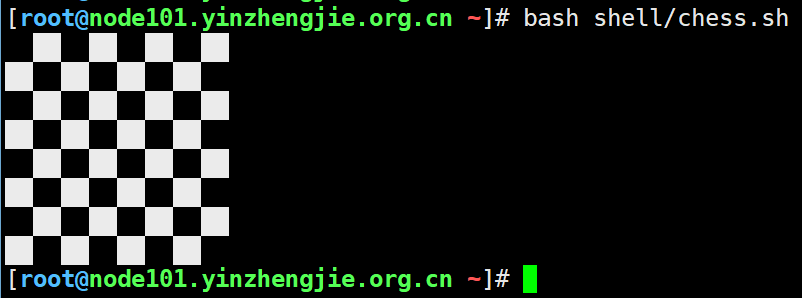
参考案例4
[root@node101.yinzhengjie.org.cn ~]# cat shell/chess.sh

#!/bin/bash

#

#********************************************************************

#Author:        yinzhengjie

#QQ:

#Date:             --

#FileName:        shell/chess.sh

#URL:             http://www.cnblogs.com/yinzhengjie

#Description:        The test script

#Copyright notice:     original works, no reprint! Otherwise, legal liability will be investigated.

#********************************************************************

for i in {..};do

    for j in {..};do

        flag=$[(j+i)%]

        if [ $flag -eq  ];then

        echo -e "\033[47m  \033[0m\c"

    else

            echo -e "  \c"

    fi

    done

    echo

done

[root@node101.yinzhengjie.org.cn ~]#
参考案例1
[root@node101.yinzhengjie.org.cn ~]# cat shell/chess.sh

#!/bin/bash

#

#********************************************************************

#Author:        yinzhengjie

#QQ:

#Date:             --

#FileName:        shell/chess.sh

#URL:             http://www.cnblogs.com/yinzhengjie

#Description:        The test script

#Copyright notice:     original works, no reprint! Otherwise, legal liability will be investigated.

#********************************************************************

for i in {..};do

    for j in {..};do

        if [ $[i%] -eq  ];then

        echo -e "\033[47m  \033[0m  \c"

    else

            echo -e "  \033[47m  \033[0m\c"

    fi

    done

    echo

done

[root@node101.yinzhengjie.org.cn ~]#
参考案例2
[root@node101.yinzhengjie.org.cn ~]# cat shell/chess.sh

#!/bin/bash

#

#********************************************************************

#Author:        yinzhengjie

#QQ:

#Date:             --

#FileName:        shell/chess.sh

#URL:             http://www.cnblogs.com/yinzhengjie

#Description:        The test script

#Copyright notice:     original works, no reprint! Otherwise, legal liability will be investigated.

#********************************************************************

for i in {..};do

    for j in {..};do

        echo -e "\033[47m  \033[0m  \c"

    done

    echo

    for k in {..};do

        echo -e "  \033[047m  \033[0m\c"

    done

    echo

done

[root@node101.yinzhengjie.org.cn ~]#
参考案例3
[root@node101.yinzhengjie.org.cn ~]# cat shell/user.sh

#!/bin/bash

#

#********************************************************************

#Author:        yinzhengjie

#QQ:

#Date:             --

#FileName:        shell/user.sh

#URL:             http://www.cnblogs.com/yinzhengjie

#Description:        The test script

#Copyright notice:     original works, no reprint! Otherwise, legal liability will be investigated.

#********************************************************************

read -p "Please input username(default "yinzhengjie"):" -t  username

read -p "Please input the number of users:" -t  UsersNumber

read -p "Please input the password of users:" -t  password

if [ -z $username ]

    then

        username=yinzhengjie

fi

if [ ! -z "$username" -a ! -z "$UsersNumber" -a ! -z "$password" ]

    then

        y=$(echo $UsersNumber|sed 's/[0-9]//g')

        if [ -z "$y" ]

            then

                for (( i=;i<=$UsersNumber;i=i+ ))

                    do

                        useradd "$username$i" &>/dev/null

                        echo $password | passwd --stdin "$username$i" &> /dev/null

        done

        fi

fi

[root@node101.yinzhengjie.org.cn ~]#

[root@node101.yinzhengjie.org.cn ~]# bash shell/user.sh

Please input username(default yinzhengjie):jason

Please input the number of users:

Please input the password of users:

[root@node101.yinzhengjie.org.cn ~]#

[root@node101.yinzhengjie.org.cn ~]# cat /etc/passwd | grep jason

jason:x::::/home/jason:/bin/bash

jason1:x::::/home/jason1:/bin/bash

jason2:x::::/home/jason2:/bin/bash

jason3:x::::/home/jason3:/bin/bash

jason4:x::::/home/jason4:/bin/bash

jason5:x::::/home/jason5:/bin/bash

jason6:x::::/home/jason6:/bin/bash

jason7:x::::/home/jason7:/bin/bash

jason8:x::::/home/jason8:/bin/bash

jason9:x::::/home/jason9:/bin/bash

jason10:x::::/home/jason10:/bin/bash

jason11:x::::/home/jason11:/bin/bash

jason12:x::::/home/jason12:/bin/bash

jason13:x::::/home/jason13:/bin/bash

jason14:x::::/home/jason14:/bin/bash

jason15:x::::/home/jason15:/bin/bash

jason16:x::::/home/jason16:/bin/bash

jason17:x::::/home/jason17:/bin/bash

jason18:x::::/home/jason18:/bin/bash

jason19:x::::/home/jason19:/bin/bash

jason20:x::::/home/jason20:/bin/bash

jason21:x::::/home/jason21:/bin/bash

jason22:x::::/home/jason22:/bin/bash

jason23:x::::/home/jason23:/bin/bash

jason24:x::::/home/jason24:/bin/bash

jason25:x::::/home/jason25:/bin/bash

jason26:x::::/home/jason26:/bin/bash

jason27:x::::/home/jason27:/bin/bash

jason28:x::::/home/jason28:/bin/bash

jason29:x::::/home/jason29:/bin/bash

jason30:x::::/home/jason30:/bin/bash

[root@node101.yinzhengjie.org.cn ~]#
参考案例1
[root@node101.yinzhengjie.org.cn ~]# cat /dev/urandom | tr -dc '[:alnum:]' | head -c8     #获取8个随机字符方法

oVAsKdef

[root@node101.yinzhengjie.org.cn ~]#
小提示:获取8个随机字符方法
一.为什么要使用shell函数
 a>.把相同的代码定义成函数,可以减少程序代码量;

 b>.增加程序的可读,易读性;

 c>.实现程序的功能模块化;
 function 函数名() {

     源代码

     return

 }
 调用函数

 >.直接执行函数名即可

     函数名

     注意:

         a>.执行函数时,不要带小括号了;

         b>.函数定义及函数体必须在要执行的函数名的前面定义,shell的执行从上到下按行执行的;

 >.带参数的函数执行方法

     函数名 参数1 参数2 .....

     注意:

         a>.在函数体中位置参数($,$,$,...,$#,$*,$?以及$@)都可以是函数的参数;

         b>.父脚本的参数则临时的被函数参数所掩盖或隐藏;

         c>.$0比较特殊,他仍然是父脚本的名称;

         d>.当函数完成时,原来的命令行参数会恢复;

         e>.在shell函数里面。return命令的功能与工作方式与exit相同,用于跳出函数;

         f>.在shell函数体里面使用exit会终止整个shell脚本;

         g>.return语句会返回一个退出值给调用的程序;
 [root@yinzhengjie shell]# more function1.sh

 #!/bin/bash

 #@author :yinzhengjie

 #blog:http://www.cnblogs.com/yinzhengjie

 #EMAIL:y1053419035@qq.com

 function yinzhengjie(){

         echo "尹正杰到此一游!"

 }

 yinzhengjie

 [root@yinzhengjie shell]#

 [root@yinzhengjie shell]# sh function1.sh

 尹正杰到此一游!

 [root@yinzhengjie shell]#
 [root@yinzhengjie shell]# pwd

 /root/yinzhengjie/shell

 [root@yinzhengjie shell]#

 [root@yinzhengjie shell]# more function1.sh

 #!/bin/bash

 #@author :yinzhengjie

 #blog:http://www.cnblogs.com/yinzhengjie

 #EMAIL:y1053419035@qq.com

 function yinzhengjie(){

         echo "尹正杰到此一游!"

 }

 yinzhengjie

 [root@yinzhengjie shell]#

 [root@yinzhengjie shell]# more function2.sh

 #!/bin/bash

 #@author :yinzhengjie

 #blog:http://www.cnblogs.com/yinzhengjie

 #EMAIL:y1053419035@qq.com

 #如果存在“function1.sh”这个文件,就导入它,注意导入可以用"."

 [ -f /root/yinzhengjie/shell/function1.sh ]&& . /root/yinzhengjie/shell/function1.sh || exit

 yinzhengjie

 [root@yinzhengjie shell]#

 [root@yinzhengjie shell]# sh function2.sh

 尹正杰到此一游!

 尹正杰到此一游!

 [root@yinzhengjie shell]#
 [root@yinzhengjie shell]# more function3.sh

 #!/bin/bash

 #@author :yinzhengjie

 #blog:http://www.cnblogs.com/yinzhengjie

 #EMAIL:y1053419035@qq.com

 function yinzhengjie(){

     echo "Welcome to beijing,[$1]."

 }

 [root@yinzhengjie shell]#

 [root@yinzhengjie shell]#

 [root@yinzhengjie shell]#

 [root@yinzhengjie shell]# more function4.sh

 #!/bin/bash

 #@author :yinzhengjie

 #blog:http://www.cnblogs.com/yinzhengjie

 #EMAIL:y1053419035@qq.com

 #导入函数

 . /root/yinzhengjie/shell/function3.sh

 yinzhengjie 尹正杰

 [root@yinzhengjie shell]#

 [root@yinzhengjie shell]#

 [root@yinzhengjie shell]# sh function4.sh

 Welcome to beijing,[尹正杰].

 [root@yinzhengjie shell]#

 [root@yinzhengjie shell]#
 [root@yinzhengjie shell]# more CheckWeb.sh

 #!/bin/bash

 #@author :yinzhengjie

 #blog:http://www.cnblogs.com/yinzhengjie

 #EMAIL:y1053419035@qq.com

 function CheckUrl(){

     curl -I -s $  | head - && return  || return

 }

 CheckUrl $

 [root@yinzhengjie shell]#

 [root@yinzhengjie shell]# sh CheckWeb.sh www.baidu.com

 HTTP/1.1  OK

 [root@yinzhengjie shell]#

 [root@yinzhengjie shell]#
五.数组介绍
 [root@yinzhengjie ~]# yinzhengjie=(  )           #定义数组

 [root@yinzhengjie ~]# echo ${#yinzhengjie[@]}            #查看数组长度方式一

 [root@yinzhengjie ~]# echo ${#yinzhengjie[*]}                #查看数组长度方式二

 [root@yinzhengjie ~]#

 [root@yinzhengjie ~]# echo ${yinzhengjie[]}                #查看某个数组

 [root@yinzhengjie ~]# echo ${yinzhengjie[*]}                #查看整个数组的元素

 [root@yinzhengjie ~]#
 [root@yinzhengjie ~]# echo ${#yinzhengjie[*]}

 [root@yinzhengjie ~]#

 [root@yinzhengjie ~]# echo ${yinzhengjie[*]}

 [root@yinzhengjie ~]#

 [root@yinzhengjie ~]# yinzhengjie[]=jie

 [root@yinzhengjie ~]#

 [root@yinzhengjie ~]# echo ${yinzhengjie[*]}

    jie

 [root@yinzhengjie ~]#
 [root@yinzhengjie ~]# echo ${#yinzhengjie[*]}

 [root@yinzhengjie ~]# echo ${yinzhengjie[*]}

    jie

 [root@yinzhengjie ~]# yinzhengjie[]=yin

 [root@yinzhengjie ~]# yinzhengjie[]=zheng

 [root@yinzhengjie ~]#

 [root@yinzhengjie ~]# echo ${yinzhengjie[*]}

 yin zheng  jie

 [root@yinzhengjie ~]#
 [root@yinzhengjie ~]# yinzhengjie=(     )

 [root@yinzhengjie ~]# echo ${#yinzhengjie[@]}

 [root@yinzhengjie ~]# echo ${yinzhengjie[@]}

 [root@yinzhengjie ~]#

 [root@yinzhengjie ~]# a=(${yinzhengjie[@]//})

 [root@yinzhengjie ~]# echo ${a[@]}

 [root@yinzhengjie ~]# echo ${yinzhengjie[@]}

 [root@yinzhengjie ~]#
 [root@yinzhengjie ~]# echo ${#yinzhengjie[*]}

 [root@yinzhengjie ~]#

 [root@yinzhengjie ~]# echo ${yinzhengjie[*]}

 yin zheng  jie

 [root@yinzhengjie ~]# unset yinzhengjie[]

 [root@yinzhengjie ~]#

 [root@yinzhengjie ~]# echo ${#yinzhengjie[*]}

 [root@yinzhengjie ~]# echo ${yinzhengjie[*]}

 yin zheng jie

 [root@yinzhengjie ~]#

 [root@yinzhengjie ~]# unset yinzhengjie

 [root@yinzhengjie ~]# echo ${yinzhengjie[*]}

 [root@yinzhengjie ~]#
 [root@yinzhengjie ~]# yinzhengjie=(     )

 [root@yinzhengjie ~]# echo ${#yinzhengjie[@]}

 [root@yinzhengjie ~]# echo ${yinzhengjie[@]}

 [root@yinzhengjie ~]# echo ${yinzhengjie[@]::}

 [root@yinzhengjie ~]# echo ${yinzhengjie[@]::}

 [root@yinzhengjie ~]#
 [root@yinzhengjie shell]# yinzhengjie=($(ls))

 [root@yinzhengjie shell]# ls | wc -l

 [root@yinzhengjie shell]# for((i=;i<${#yinzhengjie[@]};i++));do echo ${yinzhengjie[$i]};done

 argv1.sh

 argv2.sh

 argv3.sh

 CheckWeb.sh

 file_backup.sh

 function1.sh

 function2.sh

 function3.sh

 function4.sh

 ls.log

 partitions.sh

 read.sh

 res.txt

 Tetris.sh

 until.sh

 while.sh

 yinzhengjie.sh

 [root@yinzhengjie shell]#

 [root@yinzhengjie shell]# for file in ${yinzhengjie[@]};do echo $file;done

 argv1.sh

 argv2.sh

 argv3.sh

 CheckWeb.sh

 file_backup.sh

 function1.sh

 function2.sh

 function3.sh

 function4.sh

 ls.log

 partitions.sh

 read.sh

 res.txt

 Tetris.sh

 until.sh

 while.sh

 yinzhengjie.sh

 [root@yinzhengjie shell]#
 [root@yinzhengjie shell]# more array.sh

 #!/bin/bash

 #@author :yinzhengjie

 #blog:http://www.cnblogs.com/yinzhengjie

 #EMAIL:y1053419035@qq.com

 array=(

         yinzhengjie

         bingan

         alex

         mage

         oldboy

         brother

 )

 for ((i=;i<${#array[*]};i++))

 do

     echo "This is num [$i],then content is ${array[$i]}"

 done

 echo -----------------line------------------------

 for name in ${array[@]}

 do

      echo "The boy is [$name]"

 done

 [root@yinzhengjie shell]#
shell函数与数组的更多相关文章
- Shell函数和数组
函数的返回值用return,脚本的返回值用exit shell函数只允许返回数字,若不是则报line 6: return: num: numeric argument required:若是写了ret ...
- shell脚本函数与数组
前言 之前写过一篇关于shell脚本流程控制总结,这次继续写关于shell脚本的问题.本篇文章主要包含shell脚本中的函数以及数组的用法介绍.同时也涵盖了一些字符串处理以及shell脚本比较使用的小 ...
- shell中的函数、shell中的数组、告警系统需求分析
7月16日任务 20.16/20.17 shell中的函数20.18 shell中的数组20.19 告警系统需求分析 20.16/20.17 shell中的函数 函数就是一个子shell就是一个代码段 ...
- shell变量、函数和数组以及字符串的截取
一.变量 1.shell变量名 (1)可以由字母.数字.下划线等字符组成.但是第一个字符必须是字母或者下划线. (2)若果变量中包含下划线(_)则要特别注意,$project_svn_$date.ta ...
- Linux centosVMware shell中的函数、shell中的数组、
一.shell中的函数 函数就是把一段代码整理到了一个小单元中,并给这个小单元起一个名字,当用到这段代码时直接调用这个小单元的名字即可. 格式: function _name() { command ...
- Shell 函数 & 数组
Shell 函数 函数介绍 # 什么是函数? 具备某一功能的工具 => 函数 事先准备工具的过程 => 函数的定义 遇到应用场景拿来就用 => 函数的调用 # 为何要用函数? 没有引 ...
- shell脚本函数及数组
函数介绍: 函数function是由若干条shell命令组成的语句块,实现代码重用和模块话编程. 它与shell程序形式上是相似的,不同的是它不是一个单独的进程,不能独立运行,而是shell程序的一部 ...
- Shell函数的简单应用
Shell函数的简单应用 在脚本内给函数传参: #!/bin/bash . /etc/init.d/functions CheckUrl (){ curl -I -s $ | head - } Che ...
- shell 函数
1 shell函数的定义及其调用 shell函数有两种格式: function name { commands } name() { commands } 其中,name为函数名,commands为函 ...
随机推荐
- eclipse中git的author和commiter的修改
项目目录,隐藏的文件.git的文件夹,config文件 eclipse-->右击项目--showin--system explorer.git 打开config文件加上 [user] name ...
- 关于对springboot程序配置文件使用jasypt开源工具自定义加密
一.前言 在工作中遇到需要把配置文件加密的要求,很容易就在网上找到了开源插件 jasypt (https://github.com/ulisesbocchio/jasypt-spring-boot# ...
- json.dumps()和json.loads()
json.dumps()用于将字典形式的数据转化为字符串,json.loads()用于将字符串形式的数据转化为字典,代码: import json data = { 'name' : 'Connor' ...
- 基础-Math.floor与parseInt区别
Math.floor只能对一个数向下取整,不能解析字符串 如: Math.floor(1.5) // 1 Math.floor(-2.1) // -3 Math.floor("3" ...
- [2017BUAA软工]第零次作业
第一部分:结缘计算机 你为什么选择计算机专业?你认为你的条件如何?和这些博主比呢?(必答) 我当初选择计算机,是因为:1.北航的前辈对北航计算机专业评价非常高:2.我也喜欢通过编程来代替我完成 ...
- Activiti reassign task to another user
//早先胡乱尝试的其他方法,可能对于以后深入学习Activiti有些用处. //taskService.delegateTask(taskId, receiveUserId); //taskServi ...
- Linux初学笔记---关于进程管理等
菜鸟初学: 1. 查看进程用的命令: ps 具体用法 ps -A ro ps -e 显示所有进程 ps -u root 显示root 用户的进程 ps -u root -N 显示非root用户的进程 ...
- PHP + JS 实现大文件分割上传
服务器上传文件会有一定的限制.避免内存消耗过大影响性能,在 php.ini 配置文件中,有几个影响参数: upload_max_filesize = 2M //PHP最大能接受的文件大小 post_m ...
- Angular $interval
<!DOCTYPE html><html ng-app="myApp"><head lang="en"> <meta ...
- CAS登陆过程UML中文版
如果大家图片显示看不请,可以点击图片右键:在新窗口中打开图片,进行查看 名词解释 CASTGC:向cookie中添加该值的目的是当下次访问 认证中心 时,浏览器将Cookie中的TGC携带到服务器,服 ...