
01Hadoop二次排序
我的目的:
示例:
2012,01,01,35
2011,12,23,-4
2012,01,01,43
2012,01,01,23
2011,12,23,5
2011,4,1,2
2011,4,1,56
结果:
201112 -4,5
20114 2,56
201201 23,35,43
正式实现:
代码结构:
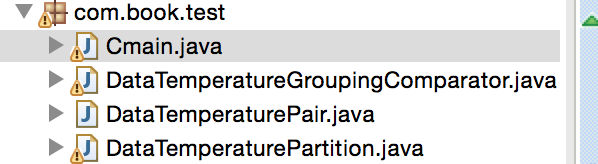
分为以下的步骤:
(1)编写封装类,把上述的字段分装进去。
package com.book.test;

import java.io.DataInput;

import java.io.DataOutput;

import java.io.IOException;

import org.apache.hadoop.io.IntWritable;

import org.apache.hadoop.io.Text;

import org.apache.hadoop.io.Writable;

import org.apache.hadoop.io.WritableComparable;

public class DataTemperaturePair implements Writable,WritableComparable<DataTemperaturePair> {

 //年-月

private Text yearMoth=new Text();

//温度

private IntWritable temperature=new IntWritable();

//日期

private Text day=new Text();

public DataTemperaturePair()

{

}

public Text getYearMoth() {

    return yearMoth;

}

public Text getDay() {

    return day;

}

public void setDay(Text day) {

    this.day = day;

}

public void setYearMoth(Text yearMoth) {

    this.yearMoth = yearMoth;

}

public IntWritable getTemperature() {

    return temperature;

}

public void setTemperature(IntWritable temperature) {

    this.temperature = temperature;

}
//这俩个函数是必须要写的,不然在reduce端,这个分装类拿不到

public void readFields(DataInput input) throws IOException {

    String readuf=input.readUTF();

    int readuf3=input.readInt();

    String readuf2=input.readUTF();

    this.yearMoth=new Text(readuf);

    this.temperature=new IntWritable(readuf3);

    this.day=new Text(readuf2);

}
//这俩个函数是必须要写的,不然在reduce端,这个分装类拿不到
public void write(DataOutput output) throws IOException
{ output.writeUTF(yearMoth.toString()); output.writeInt(temperature.get()); output.writeUTF(day.toString()); }

 public int compareTo(DataTemperaturePair that) {
int compareValue=this.yearMoth.compareTo(that.yearMoth);

if(compareValue==0) {
compareValue=temperature.compareTo(that.temperature);
}

//升序
return compareValue;
}
(2)编写分区器
为什么要自定义这个分区器呢?
因为我们的key是自己写的一个对象,我们想按照这个对象里面的Yearmoth来分到一个区。
package com.book.test;

import org.apache.hadoop.io.NullWritable;

import org.apache.hadoop.io.Text;

import org.apache.hadoop.mapreduce.Partitioner;

/**

 * 自定义的分区器

 * @author Sxq

 *

 */

public class DataTemperaturePartition extends Partitioner<DataTemperaturePair, NullWritable> {

    @Override

    public int getPartition(DataTemperaturePair pair, NullWritable text, int numberOfPartotions) {

        return Math.abs(pair.getYearMoth().hashCode()%numberOfPartotions);

    }

}
(3)编写比较器
决定数据分入到哪个分组
package com.book.test;

import org.apache.hadoop.io.WritableComparable;

import org.apache.hadoop.io.WritableComparator;

public class DataTemperatureGroupingComparator extends WritableComparator {

     public DataTemperatureGroupingComparator() {

     super(DataTemperaturePair.class,true);

     }

    @Override

    public int compare(WritableComparable a, WritableComparable b) {

        DataTemperaturePair v1=(DataTemperaturePair)a;

        DataTemperaturePair v2=(DataTemperaturePair)b;

        return v1.getYearMoth().compareTo(v2.getYearMoth());

    }

}
(4)写驱动类
package com.book.test;

import java.io.IOException;

import java.util.Iterator;

import org.apache.hadoop.conf.Configuration;

import org.apache.hadoop.fs.Path;

import org.apache.hadoop.io.IntWritable;

import org.apache.hadoop.io.LongWritable;

import org.apache.hadoop.io.NullWritable;

import org.apache.hadoop.io.Text;

import org.apache.hadoop.mapreduce.Job;

import org.apache.hadoop.mapreduce.Mapper;

import org.apache.hadoop.mapreduce.Reducer;

import org.apache.hadoop.mapreduce.lib.input.FileInputFormat;

import org.apache.hadoop.mapreduce.lib.output.FileOutputFormat;

import com.guigu.shen.flowsun.FlowCountSort;

public class Cmain {

    static  class mapper1 extends Mapper<LongWritable,Text, DataTemperaturePair, IntWritable>

    {

        DataTemperaturePair dataTemperaturePair=new DataTemperaturePair();

        @Override

        protected void map(LongWritable key, Text value,

                Mapper<LongWritable, Text, DataTemperaturePair, IntWritable>.Context context)

                throws IOException, InterruptedException {

            String valuestring=value.toString();

            String[] lines=valuestring.split(",");

            String yymm=lines[0]+lines[1];

            dataTemperaturePair.setYearMoth(new Text(yymm));

            IntWritable temparature=new IntWritable(Integer.valueOf(lines[3]));

            dataTemperaturePair.setTemperature(temparature);

            dataTemperaturePair.setDay(new Text(lines[2]));

            context.write(dataTemperaturePair, temparature);

        }

    }

    static  class reduce1 extends Reducer<DataTemperaturePair, IntWritable, Text, Text>

    {

        @Override

        protected void reduce(DataTemperaturePair KEY, Iterable<IntWritable> VALUE,

                Context context)

                throws IOException, InterruptedException {

              StringBuffer sortedTemperaturelist=new StringBuffer();

            Iterator<IntWritable> iterator=VALUE.iterator();

            while(iterator.hasNext())

            {

                sortedTemperaturelist.append(iterator.next());

                sortedTemperaturelist.append(",");

            }

            context.write(KEY.getYearMoth(), new Text(sortedTemperaturelist.toString()));

        }

    }

    public static void main(String[] args) throws Exception {

        Configuration conf=new Configuration();

        Job job=Job.getInstance(conf);

        job.setJarByClass(Cmain.class);

        job.setMapperClass(mapper1.class);

        job.setReducerClass(reduce1.class);

        job.setMapOutputKeyClass(DataTemperaturePair.class);

        job.setMapOutputValueClass(IntWritable.class);

        job.setOutputKeyClass(Text.class);

        job.setOutputValueClass(Text.class);

        job.setGroupingComparatorClass(DataTemperatureGroupingComparator.class);

        job.setPartitionerClass(DataTemperaturePartition.class);

        //指定输入的数据的目录

        FileInputFormat.setInputPaths(job, new Path("/Users/mac/Desktop/temperature.txt"));

        FileOutputFormat.setOutputPath(job, new Path("/Users/mac/Desktop/flowresort"));

        boolean result=job.waitForCompletion(true);

        System.exit(result?0:1);

    }

}
结果:
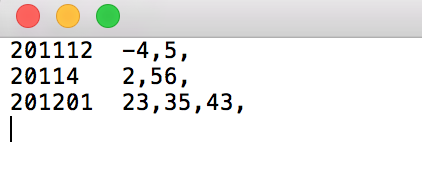
成功了
01Hadoop二次排序的更多相关文章
- MapReduce二次排序
默认情况下,Map 输出的结果会对 Key 进行默认的排序,但是有时候需要对 Key 排序的同时再对 Value 进行排序,这时候就要用到二次排序了.下面让我们来介绍一下什么是二次排序. 二次排序原理 ...
- Hadoop Mapreduce分区、分组、二次排序过程详解[转]
原文地址:Hadoop Mapreduce分区.分组.二次排序过程详解[转]作者: 徐海蛟 教学用途 1.MapReduce中数据流动 (1)最简单的过程: map - reduce (2) ...
- Hadoop.2.x_高级应用_二次排序及MapReduce端join
一.对于二次排序案例部分理解 1. 分析需求(首先对第一个字段排序,然后在对第二个字段排序) 杂乱的原始数据 排序完成的数据 a,1 a,1 b,1 a,2 a,2 [排序] a,100 b,6 == ...
- Hadoop学习笔记: MapReduce二次排序
本文给出一个实现MapReduce二次排序的例子 package SortTest; import java.io.DataInput; import java.io.DataOutput; impo ...
- Spark基础排序+二次排序(java+scala)
1.基础排序算法 sc.textFile()).reduceByKey(_+_,).map(pair=>(pair._2,pair._1)).sortByKey(false).map(pair= ...
- (转)MapReduce二次排序
一.概述 MapReduce框架对处理结果的输出会根据key值进行默认的排序,这个默认排序可以满足一部分需求,但是也是十分有限的.在我们实际的需求当中,往往有要对reduce输出结果进行二次排序的需求 ...
- MapReduce自定义二次排序流程
每一条记录开始是进入到map函数进行处理,处理完了之后立马就入自定义分区函数中对其进行分区,当所有输入数据经过map函数和分区函数处理完之后,就调用自定义二次排序函数对其进行排序. MapReduce ...
- Hadoop MapReduce 二次排序原理及其应用
关于二次排序主要涉及到这么几个东西: 在0.20.0 以前使用的是 setPartitionerClass setOutputkeyComparatorClass setOutputValueGrou ...
- hadoop2.2编程:mapreduce编程之二次排序
mr自带的例子中的源码SecondarySort,我重新写了一下,基本没变. 这个例子中定义的map和reduce如下,关键是它对输入输出类型的定义:(java泛型编程) public static ...
随机推荐
- 以加密方式访问tomcat服务器
以加密方式(https)访问tomcat服务器,就要求对相应的端口配置加密连接器connector. 配置加密连接器的方法如下: 1.生成数字证书 利用jdk里的keytool生成证书,keytool ...
- Spring-context 实现Hello World
Spring-context 实现Hello World 本文作为Spring入门笔记,用Spring-context实现控制台的hello world Spring简介 Spring是一个开放源代码 ...
- helm-chart-2-chart结构和简单模板
1, chart 结构介绍 我们创建一个chart 并查看其结构 右侧注释为其文件的的解释 $ helm create mychart $ cd mychart/ $ tree ├── charts ...
- Python基础-列表、元祖、字典、字符串
列表和分组 序列概览: 数据结构是通过某种方式组织在一起的数据元素的集合.这些元素可以是数字.字符,甚至可以是其他数据结构. 在python中,最基本的数据结构是序列(sequence). 序列中的每 ...
- 经典SQL面试题(转)
以下题目都在MySQL上测试可行,有疏漏或有更优化的解决方法的话欢迎大家提出,我会持续更新的:) 有三个表,如果学生缺考,那么在成绩表中就不存在这个学生的这门课程成绩的记录,写一段SQL语句,检索出每 ...
- 学习Selenium的历程
Selenium资源包下载 我这段时间在学习Web自动化测试方面的知识,在搭建相应的环境上出现了问题.去Selenium官网下载相对应得包,老是下载不了.而如果直接到CSDN等上下载,需要积分,或者下 ...
- Python核心编程(第二版)正则表达式练习题解
15-1. 识别下列字符串:“bat,” “bit,” “but,” “hat,” “hit,” 或 “hut” from re import match word = raw_input('inpu ...
- java static learning
/*static learning */ class one { public int a = 5; static { // 类加载时就运行代码码 System.out.println("s ...
- 面试必备:HashMap、Hashtable、ConcurrentHashMap的原理与区别
同步首发:http://www.yuanrengu.com/index.php/2017-01-17.html 如果你去面试,面试官不问你这个问题,你来找我^_^ 下面直接来干货,先说这三个Map的区 ...
- Elasticsearch集群优化
版本配置: ES版本:6.2.4 OS内存64G. 一.参数配置: ES jvm内存31G. vi /etc/sysctl.conf vm.swappiness = 1 elasticsearch.y ...