
Autofac与AOP功能例子
using Autofac.Extras.DynamicProxy;

using System;

using System.Collections.Generic;

using System.Linq;

using System.Text;

using System.Threading.Tasks;

namespace aopTest

{

    [Intercept(typeof(CallLogger))]

    public interface IProduct

    {

        string Title { get; set; }

        decimal Price { get; set; }

        string Show();

    }

    [Intercept(typeof(CallLogger))]

    public class Apple : IProduct

    {

        public Apple()

        {

            Title = "苹果";

            Price = 5.0m;

        }

        public string Title { get ; set ; }

        public decimal Price { get ; set; }

        public virtual string Show()

        {

            return $"{Title} - {Price}";

        }

    }

    [Intercept(typeof(CallLogger))]

    public class Book : IProduct

    {

        public Book()

        {

            Title = "Asp.net开发";

            Price = 35.0m;

        }

        public string Title { get; set; }

        public decimal Price { get; set; }

        [Auth("product.show")]

        public virtual string Show()

        {

            Test();

            return $"{Title} - {Price}";

        }

        protected virtual void Test()

        {

            Console.WriteLine("is a test code....");

        }

    }

}
using System;

using System.Collections.Generic;

using System.Linq;

using System.Text;

using System.Threading.Tasks;

namespace aopTest

{

    [AttributeUsage(AttributeTargets.Method)]

    public class AuthAttribute : Attribute

    {

        public AuthAttribute(string code)

        {

            Code = code;

        }

        public string Code { get; set; }

    }

}

using System;

using System.Collections.Generic;

using System.Linq;

using System.Text;

using System.Threading;

using System.Threading.Tasks;

namespace aopTest

{

    public class UserInfo

    {

        static LocalDataStoreSlot storeSlot = Thread.AllocateNamedDataSlot("user-info");

        public static void SetUser(string name)

        {

            Thread.SetData(storeSlot, name);

        }

        public static string GetUser()

        {

            return Thread.GetData(storeSlot).ToString();

        }

    }

}
using System;

using System.Collections.Generic;

using System.Diagnostics;

using System.IO;

using System.Linq;

using System.Text;

using System.Threading.Tasks;

using Castle.DynamicProxy;

namespace aopTest

{

    public class CallLogger : IInterceptor

    {

        TextWriter _output;

        public CallLogger(TextWriter output)

        {

            _output = output;

        }

        public void Intercept(IInvocation invocation)

        {

            Stopwatch stopWatch = new Stopwatch();

            stopWatch.Start();

            string m = invocation.TargetType.ToString() + "." + invocation.Method.Name;

            _output.WriteLine($"方法:{m}调用开始");

            _output.Write("Calling method {0} with parameters {1}... ",

            invocation.Method.Name,

            string.Join(", ", invocation.Arguments.Select(a => (a ?? "").ToString()).ToArray()));

            var authAttribute = invocation.Method.GetCustomAttributes(typeof(AuthAttribute), false).FirstOrDefault();

            if (authAttribute != null)

            {

                var authInfo = (AuthAttribute)authAttribute;

                if (UserInfo.GetUser() != "zhangsan" && authInfo.Code == "product.show")

                {

                    _output.WriteLine($"当前用户{UserInfo.GetUser()}没有方法{m}的访问权限,需要权限{authInfo.Code}");

                }

            }

            invocation.Proceed();

            _output.WriteLine("Done: result was {0}.", invocation.ReturnValue);

            stopWatch.Stop();

            _output.WriteLine($"方法:{m}调用结束,总耗时{stopWatch.ElapsedMilliseconds}毫秒");

        }

    }

}
using Autofac;

using Autofac.Extras.DynamicProxy;

using System;

using System.Collections.Generic;

using System.Linq;

using System.Text;

using System.Threading.Tasks;

namespace aopTest

{

    class Program

    {

        static void Main(string[] args)

        {

            var builder = new ContainerBuilder();

            /*builder.RegisterType<Apple>()

                   .As<IProduct>()

                   .EnableInterfaceInterceptors();

            builder.RegisterType<Book>()

                   .As<IProduct>()

                   .EnableInterfaceInterceptors();*/

            builder.RegisterType<Apple>()

                  .As<IProduct>()

                  .EnableClassInterceptors();

            builder.RegisterType<Book>()

                   .As<IProduct>()

                   .EnableClassInterceptors();

            builder.Register(c => new CallLogger(Console.Out));

            var container = builder.Build();

            UserInfo.SetUser("zhaoliu");

            var products = container.Resolve<IEnumerable<IProduct>>();

            products.ToList().ForEach(product => {

                product.Show();

            });

            Console.ReadKey();

        }

    }

}
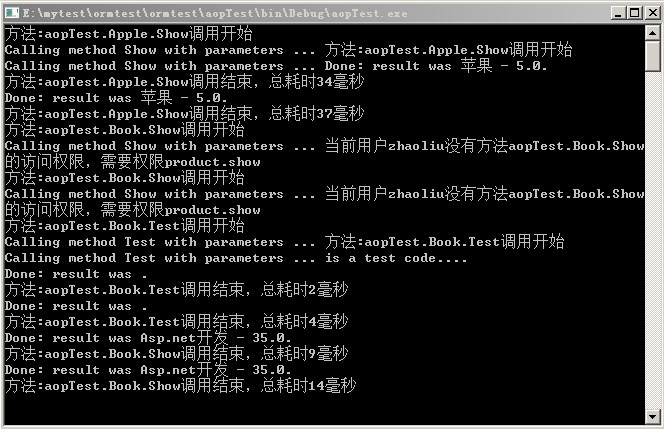
Autofac与AOP功能例子的更多相关文章
- SpringBoot中使用LoadTimeWeaving技术实现AOP功能
目录 1. 关于LoadTimeWeaving 1.1 LTW与不同的切面织入时机 1.2 JDK实现LTW的原理 1.3 如何在Spring中实现LTW 2. Springboot中使用LTW实现A ...
- (转)使用JDK中的Proxy技术实现AOP功能
http://blog.csdn.net/yerenyuan_pku/article/details/52863780 AOP技术在企业开发中或多或少都会用到,但用的最多的大概就是做权限系统时,在做权 ...
- C# Unity依赖注入利用Attribute实现AOP功能
使用场景? 很多时候, 我们定义一个功能, 当我们要对这个功能进行扩展的时候, 按照常规的思路, 我们一般都是利用OOP的思想, 在原有的功能上进行扩展. 那么有没有一种东西, 可以实现当我们需要扩展 ...
- 实现AOP功能的封装与配置的小框架
内容 java基础巩固笔记 - 实现AOP功能的封装与配置的小框架 设计(目录): XXX = java.util.ArrayList中 代码 Advice接口 MyAdvice类 BeanFacto ...
- Spring AOP功能和目标
1.AOP的作用 在OOP中,正是这种分散在各处且与对象核心功能无关的代码(横切代码)的存在,使得模块复用难度增加.AOP则将封装好的对象剖开,找出其中对多个对象产生影响的公共行为,并将其封装为一个可 ...
- aop学习总结二------使用cglib动态代理简单实现aop功能
aop学习总结二------使用cglib动态代理简单实现aop功能 模拟业务需求: 1.拦截所有业务方法 2.判断用户是否有权限,有权限就允许用户执行业务方法,无权限不允许用户执行业务方法 (判断是 ...
- aop学习总结一------使用jdk动态代理简单实现aop功能
aop学习总结一------使用jdk动态代理实现aop功能 动态代理:不需要为目标对象编写静态代理类,通过第三方或jdk框架动态生成代理对象的字节码 Jdk动态代理(proxy):目标对象必须实现接 ...
- (转)使用CGLIB实现AOP功能与AOP概念解释
http://blog.csdn.net/yerenyuan_pku/article/details/52864395 使用CGLIB实现AOP功能 在Java里面,我们要产生某个对象的代理对象,这个 ...
- Ioc 之 Unity的AOP功能
前面我们介绍了Unity的依赖注入功能,现在来介绍下Unity的AOP功能.AOP是面向切面编程,它能够使我们在不改变现有代码结构的情况下额外的为其添加一些功能. 我们还是使用配置文件来对类型进行注入 ...
随机推荐
- [原]vue中各模块的实际引用
检查发现: 1.vue实际引用文件配置位置 alias: { 'vue$': 'vue/dist/vue.esm.js', 此位置替换了vue包内的package.json中定义的位置 } 2.vue ...
- TCC细读 - 1 例子流程
http://www.iocoder.cn/categories/TCC-Transaction/ https://github.com/changmingxie/tcc-transaction 细读 ...
- GDI+_SavePic
Option Explicit Private Const EncoderQuality As String = "{1D5BE4B5-FA4A-452D-9CDD-5DB35105E7EB ...
- 通过scp拷贝文件时无需交互输入密码
工作中经常需要把一些文件从一个服务器传输到另一台服务器,linux环境下最习惯的方式当然是scp,但是scp需要交互输入密码有时候觉得麻烦,记录几种无需手动输入密码的方法. 方法一:建立SSH互信 此 ...
- 如何关闭wps热点,如何关闭wpscenter,如何关闭我的wps
用wps已经快十年了,最开始的时候速度快,非常好用,甩office几条街,但最近这几年随着wps胃口越来越大,各种在线功能不断推出,植入广告越来越多,逐渐让人失去欢喜. 通过各种网帖的经验,我把网上流 ...
- 查看oracle的执行计划
基于ORACLE的应用系统很多性能问题,是由应用系统SQL性能低劣引起的,所以,SQL的性能优化很重要,分析与优化SQL的性能我们一般通过查看该SQL的执行计划,本文就如何看懂执行计划,以及如何通过分 ...
- Python设计模式 - 创建型 - 单例模式(Singleton) - 十种
对于很多开发人员来说,单例模式算是比较简单常用.也是最早接触的设计模式了,仔细研究起来单例模式似乎又不像看起来那么简单.我们知道单例模式适用于提供全局唯一访问点,频繁需要创建及销毁对象等场合,的确方便 ...
- PHP安装linux
PHP 7.1.26 安装 1. 下载安装包 例php-7.1.26.tar.gz 下载地址:http://cn2.php.net/downloads.php 2. 放入/root 3. 切换目录 # ...
- python3 urllib.parse 常用函数
1.获取url参数 urlparse from urllib import parse url = "https://docs.python.org/3.5/library/urllib.p ...
- 如何配置Java环境变量[转]
https://jingyan.baidu.com/article/fd8044fa2c22f15031137a2a.html