
Spring Boot中使用Swagger2构建强大的RESTful(最新全,无坑)
1:说明
网上这类文章 太多, 一搜一大把 ,但是要不是知识太过于老旧,就是配置没有说名清楚,你的项目按照他的配置却不能正常运行:
所以本文的目的: 配置swagger 2 那swagger 1 不说一下吗,我觉得没有必要了,确实需要以jar包方式构建 或者 维护老项目,那么参考下面的连接
https://github.com/swagger-api/swagger-ui/tree/2.x/dist 下载这个路径内容,导入相关依赖即可,不建议使用
2: swagger2 部署方式1
2.1: 导入lib
<!-- swagger -->

<dependency>

    <groupId>io.springfox</groupId>

    <artifactId>springfox-swagger2</artifactId>

    <version>2.9.</version>

</dependency>

<dependency>

    <groupId>io.springfox</groupId>

    <artifactId>springfox-swagger-ui</artifactId>

    <version>2.9.</version>

</dependency>
2.2 2: 创建配置类
@Configuration

@EnableSwagger2

public class Swagger2 {

    @Bean

    public Docket createRestApi() {

        return new Docket(DocumentationType.SWAGGER_2)

                .apiInfo(apiInfo())

                .select()

                // 扫描包路径

                .apis(RequestHandlerSelectors.basePackage("com.dgw.controller"))

                // 扫描@APi 标记的Class

                //.apis(RequestHandlerSelectors.withClassAnnotation(ApiOperation.class))

                .paths(PathSelectors.any())

                .build();

    }

    private ApiInfo apiInfo() {

        return new ApiInfoBuilder()

                .title("Swagger2构建RESTful APIs")

                .description(" 项目 ")

                .contact(new Contact("dgw", "https://www.cnblogs.com/dgwblog/", "xxx@qq.com"))

                .version("1.0")

                .build();

    }

}
2.3 基本上到这里 网上那些教程让你启动 http://localhost:8080/swagger-ui.html# 访问查看,然后介绍API就完事了 ? 他难道没有用到 拦截器 Spring Boot 访问映射 ? 你开发项目 就是一个hello world? 哈哈
下面你必须配置资源映射 sping boot 2 在webmvcconfigurationsupport中配置
/**

 * 支持webjars

 */

registry.addResourceHandler("/webjars/**")

        .addResourceLocations("classpath:/META-INF/resources/webjars/");

/**

 * 支持swagger

 */

// 解决 SWAGGER 404报错

registry.addResourceHandler("/swagger-ui.html").addResourceLocations("classpath:/META-INF/resources/");
2.4 如果你的项目展示没有使用到拦截器 那么是可以成功访问的 ,但是最好知道需要配置拦截器
registry.addInterceptor(new LoginIntercepter()).addPathPatterns("/**")

        .excludePathPatterns("/user/login","/","/index")

           // swagger 排除规则

           .excludePathPatterns("/swagger-ui.html")

           .excludePathPatterns("/swagger-resources/**")

           .excludePathPatterns("/error")

           .excludePathPatterns("/webjars/**");
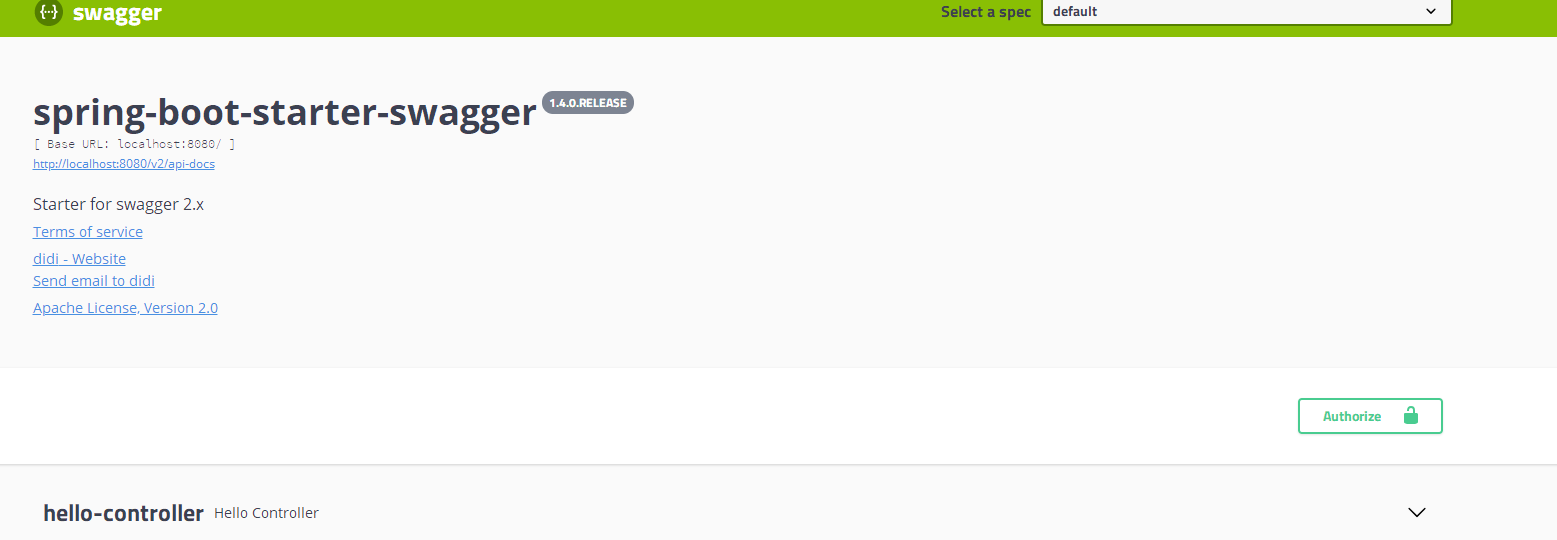
这个时候 访问一下: 没有问题:
对了 如果你的项目用到 spring security 还需要排除以下配置
@Configuration

public class WebSecurityConfiguration extends WebSecurityConfigurerAdapter {

    @Override

    public void configure(WebSecurity web) throws Exception {

        web.ignoring().antMatchers("/v2/api-docs", "/configuration/ui", "/swagger-resources", "/configuration/security", "/swagger-ui.html", "/webjars/**");

    }

}
3: swagger2 部署方式2 推荐
导入lib'
<!-- https://mvnrepository.com/artifact/com.spring4all/swagger-spring-boot-starter -->

<dependency>

    <groupId>com.spring4all</groupId>

    <artifactId>swagger-spring-boot-starter</artifactId>

    <version>1.9.0.RELEASE</version>

</dependency>

<dependency>

    <groupId>org.springframework.boot</groupId>

    <artifactId>spring-boot-starter-thymeleaf</artifactId>

</dependency>
application.xml配置
swagger.title=spring-boot-starter-swagger

swagger.description=Starter for swagger 2.x

swagger.version=1.4.0.RELEASE

swagger.license=Apache License, Version 2.0

swagger.licenseUrl=https://www.apache.org/licenses/LICENSE-2.0.html

swagger.termsOfServiceUrl=https://github.com/dyc87112/spring-boot-starter-swagger

swagger.contact.name=didi

swagger.contact.url=https://www.cnblogs.com/dgwblog/

swagger.contact.email=xxx@qq.com

# 扫描包路径

swagger.base-package=com.dgw.controller

swagger.base-path=/**
启动配置swagger 扫描
@SpringBootApplication 这个注解

@EnableSwagger2Doc

public class DemoApplication {

    public static void main(String[] args) {

        SpringApplication.run(DemoApplication.class, args);

    }

}
这里如果出现了 建议看前面的 文章 ,自己考虑一下 为什么不能访问.
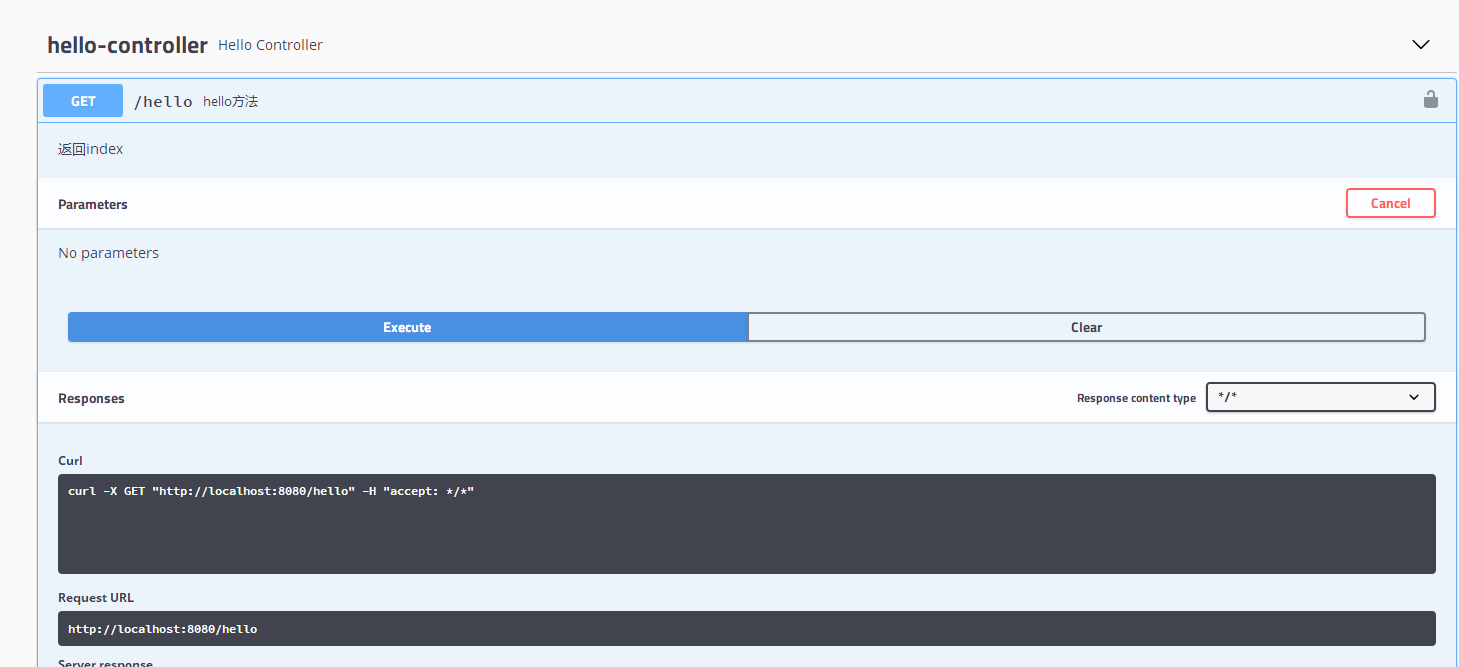
这里写个测试
@Controller

@Api("接口说明")

public class HelloController {

    @ApiOperation(value = "hello方法 ",notes = "返回index")

    @GetMapping("/hello")

    public String hello(){

        return  "index";

    }

}
能够正常访问:

Spring Boot中使用Swagger2构建强大的RESTful(最新全,无坑)的更多相关文章
- Spring Boot中使用Swagger2构建强大的RESTful API文档
由于Spring Boot能够快速开发.便捷部署等特性,相信有很大一部分Spring Boot的用户会用来构建RESTful API.而我们构建RESTful API的目的通常都是由于多终端的原因,这 ...
- Spring Boot 中使用 Swagger2 构建强大的 RESTful API 文档
项目现状:由于前后端分离,没有很好的前后端合作工具. 由于接口众多,并且细节复杂(需要考虑不同的HTTP请求类型.HTTP头部信息.HTTP请求内容等),高质量地创建这份文档本身就是件非常吃力的事,下 ...
- Spring Boot中使用Swagger2构建API文档
程序员都很希望别人能写技术文档,自己却很不愿意写文档.因为接口数量繁多,并且充满业务细节,写文档需要花大量的时间去处理格式排版,代码修改后还需要同步修改文档,经常因为项目时间紧等原因导致文档滞后于代码 ...
- Spring Boot中使用Swagger2构建RESTful APIs
关于 Swagger Swagger能成为最受欢迎的REST APIs文档生成工具之一,有以下几个原因: Swagger 可以生成一个具有互动性的API控制台,开发者可以用来快速学习和尝试API. S ...
- Spring Boot中使用Swagger2构建RESTful API文档
在开发rest api的时候,为了减少与其他团队平时开发期间的频繁沟通成本,传统做法我们会创建一份RESTful API文档来记录所有接口细节,然而这样的做法有以下几个问题: 1.由于接口众多,并且细 ...
- Spring Boot中使用Swagger2构建RESTful APIs介绍
1.添加相关依赖 <!-- https://mvnrepository.com/artifact/io.springfox/springfox-swagger2 --> <depen ...
- SpringBoot_06_使用Swagger2构建强大的RESTful API文档
二.参考资料 1.Spring Boot中使用Swagger2构建强大的RESTful API文档 2.
- Spring Boot中使用Swagger2自动构建API文档
由于Spring Boot能够快速开发.便捷部署等特性,相信有很大一部分Spring Boot的用户会用来构建RESTful API.而我们构建RESTful API的目的通常都是由于多终端的原因,这 ...
- Spring Boot教程(二十二)使用Swagger2构建强大的RESTful API文档(1)
由于Spring Boot能够快速开发.便捷部署等特性,相信有很大一部分Spring Boot的用户会用来构建RESTful API.而我们构建RESTful API的目的通常都是由于多终端的原因,这 ...
随机推荐
- iOS 一些struct类型的NSLog输出格式
https://my.oschina.net/sayonala/blog/215910 我们经常会输出一些坐标尺寸信息之类的,比如view的frame,是CGRect类型的,用frame.oringi ...
- Hello! 第一篇博客!
我在博客园开通博客啦 :) 欢迎大家来关注和玩耍,和我互动, Follow 我! 我关心算法和Python!
- Kafka分区分配策略分析——重点:StickyAssignor
“ 为什么Kafka在RangeAssigor.RoundRobinAssignor的基础上,又新增了PartitionAssignor,它解决了什么问题?” 背景 用过Kafka的同学应该都知道Ka ...
- 机器学习笔记(十)---- KNN(K Nearst Neighbor)
KNN是一种常见的监督学习算法,工作机制很好理解:给定测试样本,基于某种距离度量找出训练集中与其最靠近的k个训练样本,然后基于这k个"邻居"的信息来进行预测.总结一句话就是&quo ...
- 一条数据的HBase之旅,简明HBase入门教程1:开篇
[摘要] 这是HBase入门系列的第1篇文章,主要介绍HBase当前的项目活跃度以及搜索引擎热度信息,以及一些概况信息,内容基于HBase 2.0 beta2版本.本系列文章既适用于HBase新手,也 ...
- 第6节:Java基础 - 三大集合(上)
第6节:Java基础 - 三大集合(上) 本小节是Java基础篇章的第四小节,主要介绍Java中的常用集合知识点,涉及到的内容包括Java中的三大集合的引出,以及HashMap,Hashtable和C ...
- UVA-11995
There is a bag-like data structure, supporting two operations:1 x Throw an element x into the bag.2 ...
- 小程序 - 解决IOS端使用css滤镜渲染出现异常
在页面渲染时,GPU默认不会开启.当css样式中出现某些规则时,就会开启GPU加速,让动画运行的更加流畅,最显著的象征就是元素的3D变换. 这些就是我们通常所说的css硬件加速,但我们有时候并不需要用 ...
- Java并发编程系列-(5) Java并发容器
5 并发容器 5.1 Hashtable.HashMap.TreeMap.HashSet.LinkedHashMap 在介绍并发容器之前,先分析下普通的容器,以及相应的实现,方便后续的对比. Hash ...
- ARTS-S shell脚本实现循环
#!/bin/bash i=0 while [ "$i" != "100" ] && [ "$RESP" != " ...